Minimum Viable Product development is a challenging task for any development team. An MVP is something that we want to ship quickly, ensuring that the included features are fully functional. These features should often be compelling and “selling points” for the product. Such MVPs need to be engaging for users and enable smooth onboarding. Since users may not give a second chance, it is crucial for developers to ensure that even with a fast release, the MVP still maintains a high level of quality.
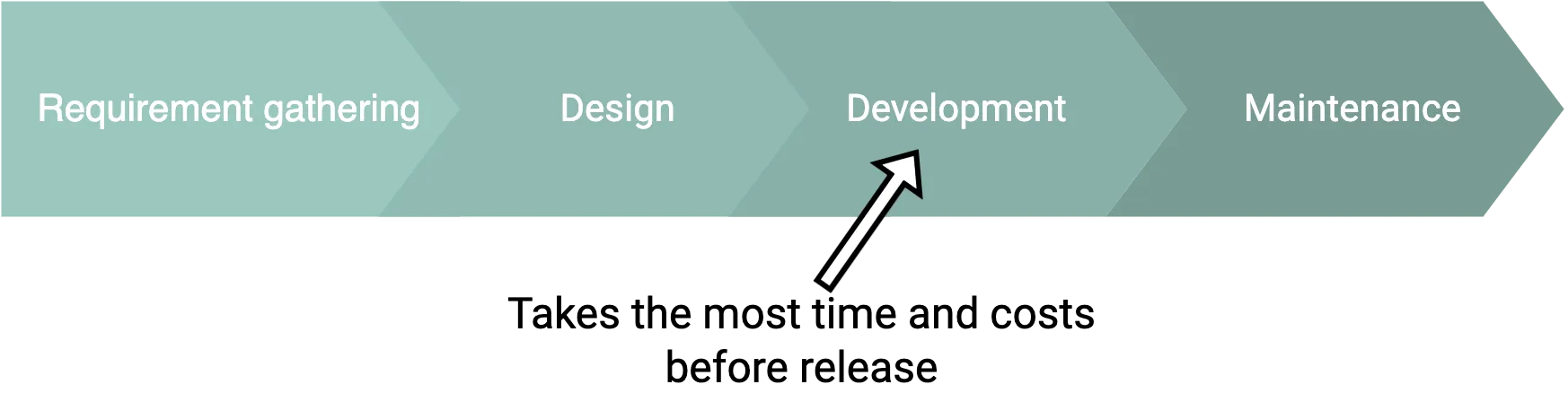
At this point, we can define such requirements for MVP:
- includes only a minimum set of features to get to market faster;
- built quickly and inexpensively as you just explore your market and product-market fit;
- implementation should be simple to allow extensibility or even a complete rewrite;
- stable, well-tested components/integrations.
In this article, we want to cover an overview of our toolset to achieve the pointed capabilities and precisely how a development team could build MVP faster. As most of MVPs built by our development team are video conferencing and streaming solutions, we will share our expertise and examples of product features we have already made.
Step #1. Buy instead of build
When we start to break down the product features into app components, we can identify that some of them are generic and already exist in other products. Here is a potential list of components:
- user sign-in
- user management
- event scheduling
- event attendance system
- event recording management
User sign-in is a component that almost every product requires, and despite its seemingly simple definition, building it from scratch can take some time. An alternative approach is to utilize cloud services that offer sign-in features on a per-usage billing model.
Let’s delve into the sign-in feature and examine its constituent parts. Here is a sample list of UI screens:
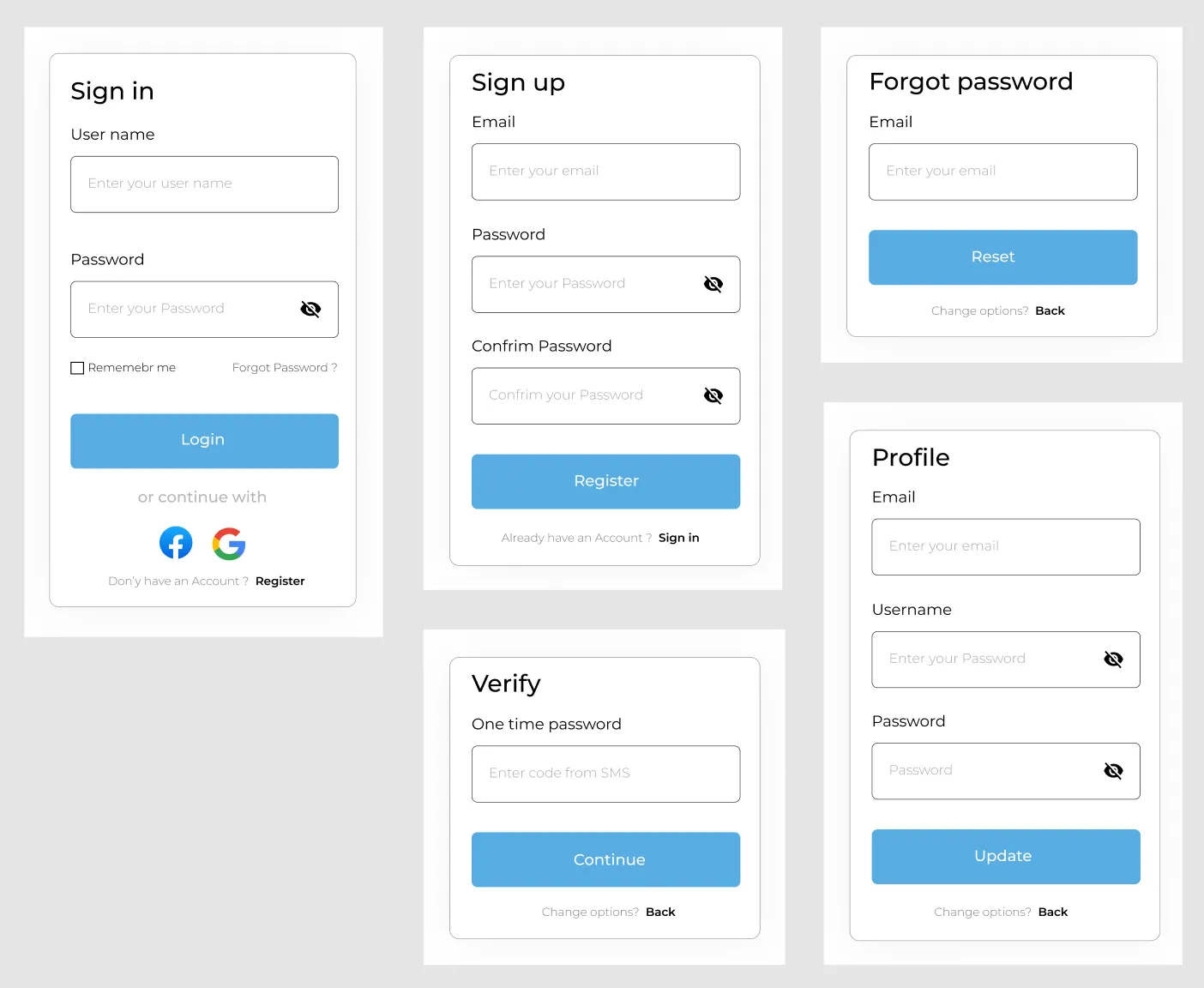
Possible sign-in screens the average product has to use
That is a visible part of the iceberg. With the number of auth providers we could integrate on the backend side, there could be additional functionalities, like secure login, refreshing login sessions, proper password storage, and personal data security according to government rules.
And that’s the point. Knowing where to find ready-to-go solutions for some product features can save tons of time and resources during your MVP stage.
Step #2. Compare cloud prices
Let’s check what SaaS companies can provide user authentication that we can use in our project.
- AWS with Amazon Cognito.
- Octa with Auth0.
- Microsoft with Azure B2C.
- Google with Firebase Authentication.
- Smaller providers: Supabase, AppWrite.
All of them provide a free tier that is possible to use for growing products. As sign-in is not a typical cloud product, the billing happens not per megabyte or CPU user but per user usage – monthly active users (MAU), typically unique users who logged in the last 30 days. Below we shared a simple comparison table.
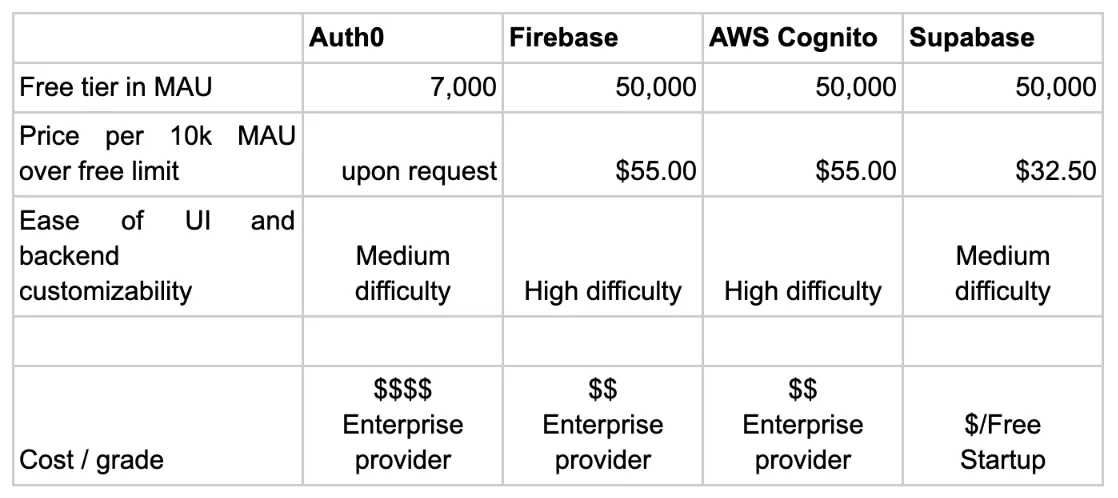
Here we can select an appropriate provider by sign-in pricing and number of sessions our product requires and for sure explore other capabilities that the provider might have.
Step #3. Take into account technical capabilities
The selected user authentication management solution will store our users’ data in its own database. As a result, we, as app developers, can delegate some responsibilities and compliance requirements to the SaaS provider. In fact, they may offer services such as Data Processing Agreements, SOC 1 compliance, and other obligations.
What else can SaaS provide us in terms of user authentication? Here are some additional benefits:
- Self-hosted GUI pages for sign-in, sign-up, and email templates. It allows us to either implement login web pages ourselves or utilize templates provided by the SaaS.
- Integration with over 20 authentication providers to verify user identities, including Google, Facebook, Apple, Discord, LinkedIn, Twitter, GitHub, and more.
- Robust security functionality (Attack Protection) that requires specialized roles, which can be challenging to maintain within a startup team. These roles include a Security Officer and DevSecOps.
- Additional technical features such as Single Sign-On (SSO) for a set of products, support for organizations with tenant isolation, enterprise logins with SAML, granular user permissions roles, and passwordless authentication.
By leveraging these SaaS services for user sign-in, we not only gain core functionality but also unlock the potential for extending our MVP with additional capabilities. Adding new features can often be accomplished through configuration rather than extensive development efforts.
Step #4. No code approach for back office
In 2022 the world moved to the era of low-code solutions, where web applications can be designed and configured in web builder instead of managing full development process in a specific programming language.
No-code tools can enhance the efficiency of web-based back-office operations in startups. They are helpful in managing data, accounting, and customer support. For instance, you could use a no-code tool to devise a web-based system for customer interaction management or an accounting tool.
Here are some notable no-code tools suitable for web-based solutions:
- Bubble: Bubble allows users to build intricate web apps suitable for various back-office tasks.
- DronaHQ: This tool is known for its ability to help you create internal apps quickly without writing a single line of code.
- Retool: Retool is an easy-to-use platform that allows you to create custom apps quickly. It connects to your data sources and uses components like tables, buttons, and forms.
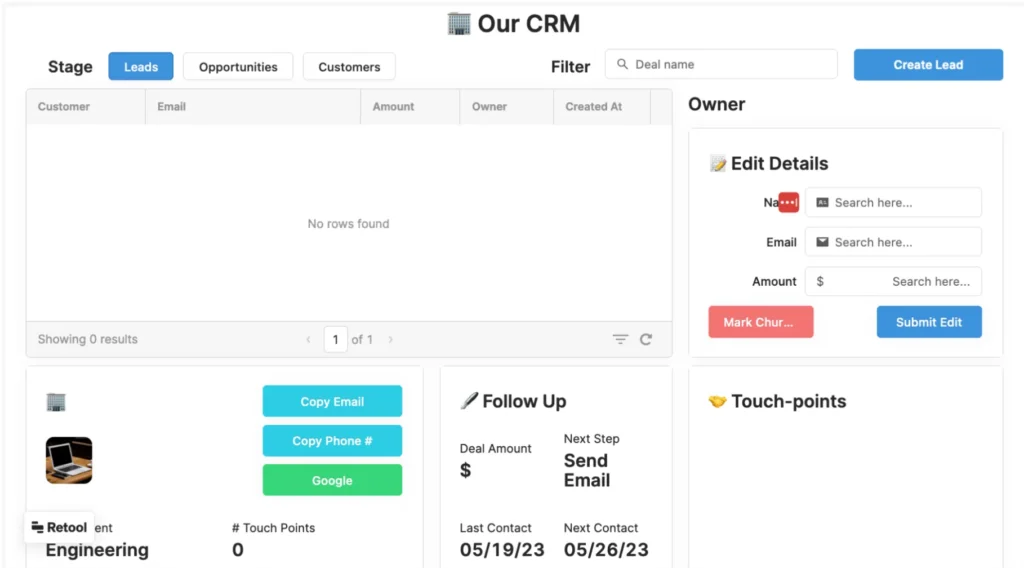
(retool.com demo)
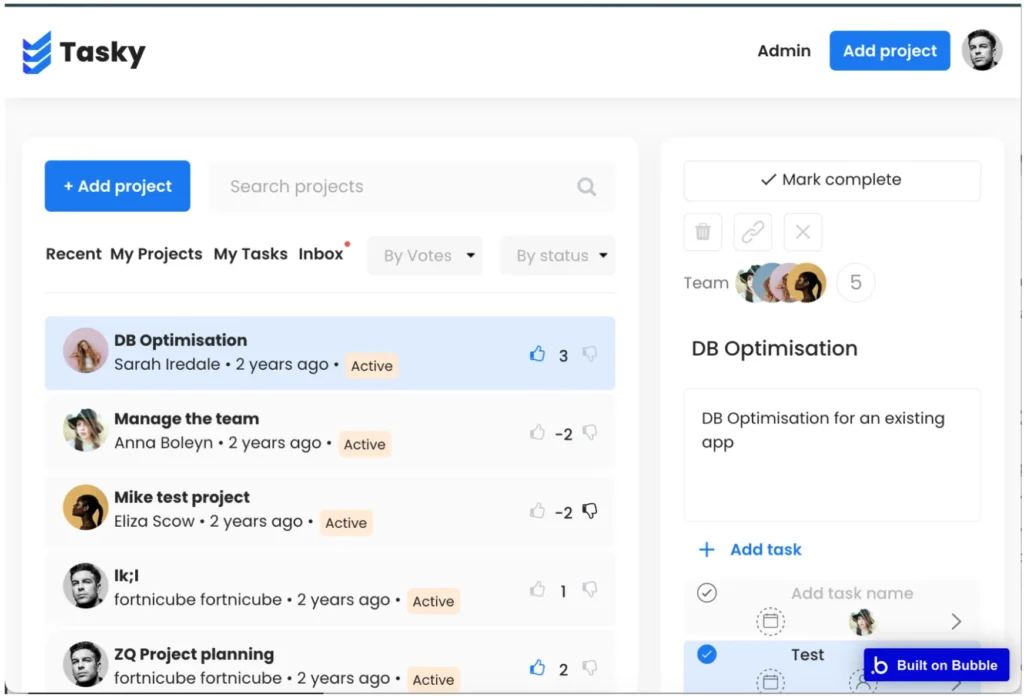
bubble.io demo
No-code platforms enable non-technical founders in startups to bring their ideas to life fast without relying on a team of developers. They provide founders with greater control and allow them to quickly make changes based on users feedback or shifts in market trends.
Step #5. Take into account maintenance operations
Shipping fast might cause postponed work later due to ignored known/unknown bugs or technical debt in general. But as we select to delegate sign-in to cloud providers, we are not impacted much here.
The next phase of MVP after product development is product maintenance. We must take care of infrastructure bills and catch product errors in time. Again, for a start, we prefer not to build and own all infrastructure from the beginning but rent infra in the cloud to both ensure a decent level of quality metrics and delegate responsibility.
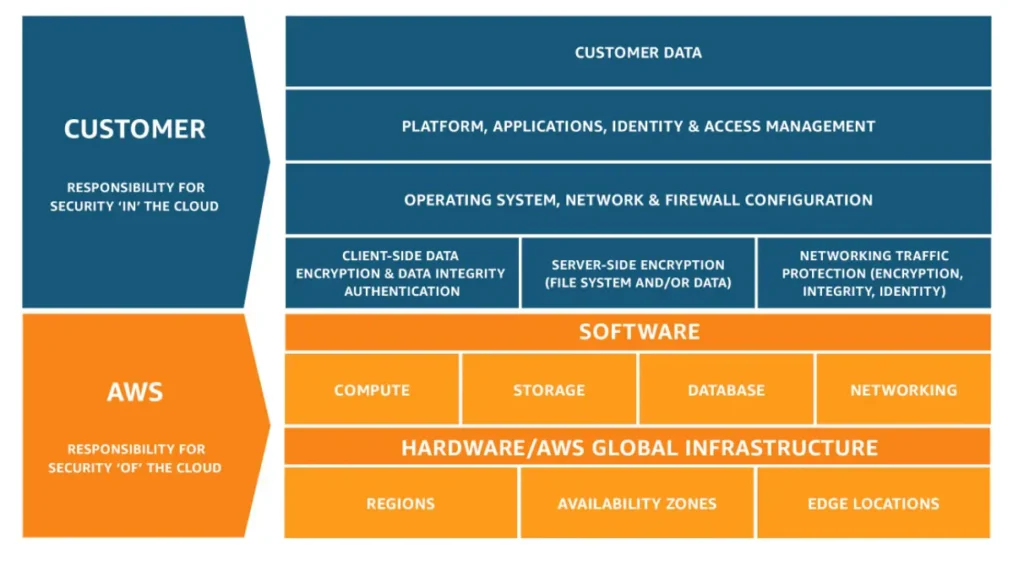
AWS shared responsibility model
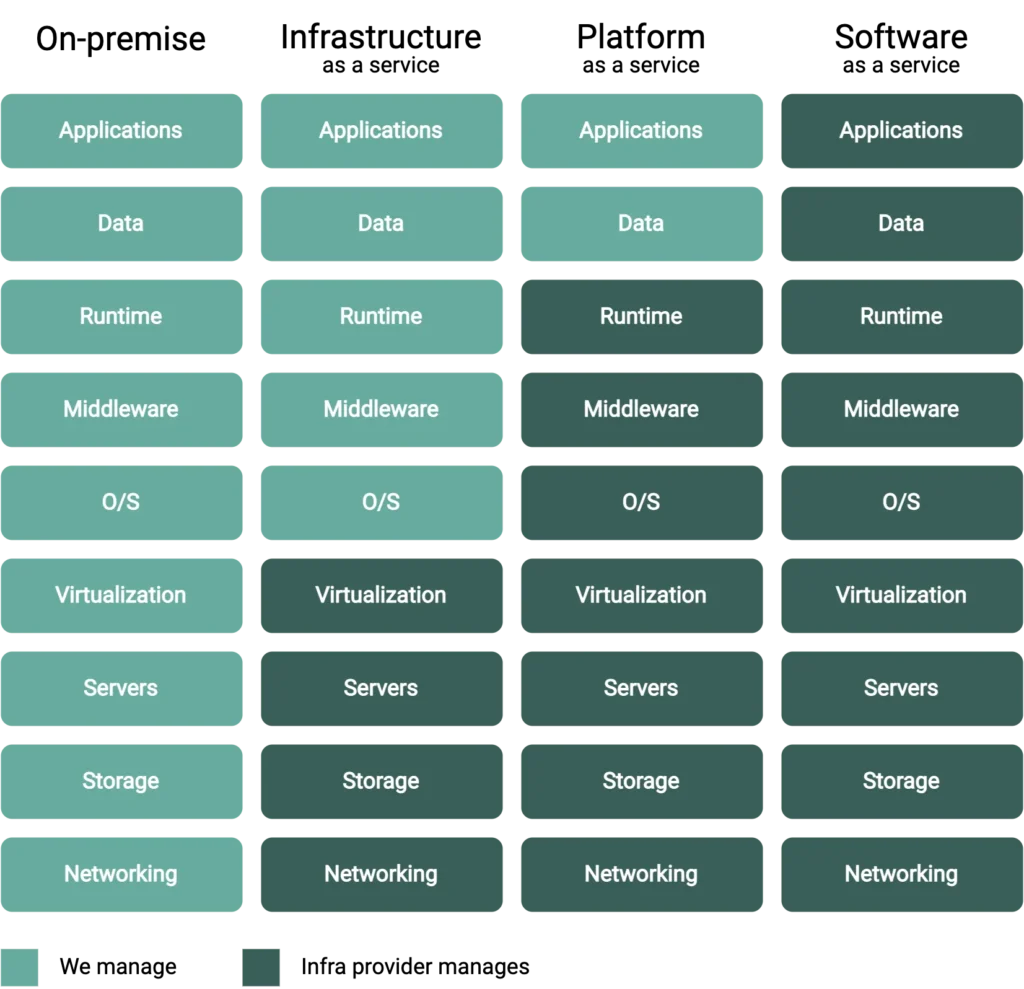
SaaS vs PaaS vs IaaS – Key Differences
When at some point in the future, a selected cloud infrastructure would not satisfy our needs, then we are free to migrate to either a different cloud or personal on-premise servers. Of course, the initial architecture should be vendor-lock-free. For example, if we select Supabase Cloud for sign-in and initial database, then we are not blocked from using its on-premise version. Or even migrate from it completely by writing your backend logic. The data can be easily migrated from Supabase using a generic Postgres database.
Conclusion
In this article we covered typical goals for MVP development today. Hope it will be a little bit easier for readers to understand how products can be develop faster with a modern toolset. So, make the most out of integrations mentioned and get your dream product out to the market! And if you want to get assistance with your MVP development, feel free to reach out to Trembit as a video streaming MVPs provider without any hesitation.