How to design real-time video consultation systems that work reliably under constrained network conditions
Reliable internet connectivity is a luxury that many rural and remote communities often lack. Yet, these are often the populations with the greatest need for healthcare access — individuals who may have to travel hours to reach the nearest clinic. Telemedicine powered by WebRTC offers a compelling solution, but only if the underlying architecture is purpose-built for low-bandwidth, high-latency, and intermittent network environments.
This article explores practical, production-ready architecture patterns for deploying WebRTC telemedicine platforms that perform well even when bandwidth drops below 500 Kbps — without sacrificing the clinical utility that providers and patients depend on.
Why Standard WebRTC Implementations Fail in Rural Settings
Out-of-the-box WebRTC works well on broadband connections, but rural deployments expose several critical weaknesses:
- Default video codecs (VP8, H.264) are not optimized for severe bandwidth constraints and degrade unpredictably.
- ICE (Interactive Connectivity Establishment) candidate gathering can fail silently when the NAT traversal infrastructure is unavailable.
- Standard SFU (Selective Forwarding Unit) architectures assume a stable uplink, causing cascading quality failures on spotty connections.
- No built-in fallback mechanisms exist for reconnecting gracefully after signal drops.
- Medical-grade audio — essential for auscultation and patient communication — is often sacrificed first during congestion.
Understanding these failure modes is the first step toward designing systems that overcome them.
Core Architecture Patterns for Low-Bandwidth WebRTC
1. Adaptive Bitrate with Aggressive Downscaling
Adaptive bitrate (ABR) control is standard in streaming, but telemedicine requires a medically aware ABR strategy. The key principle: protect audio quality above all else, since clear communication is clinically non-negotiable.
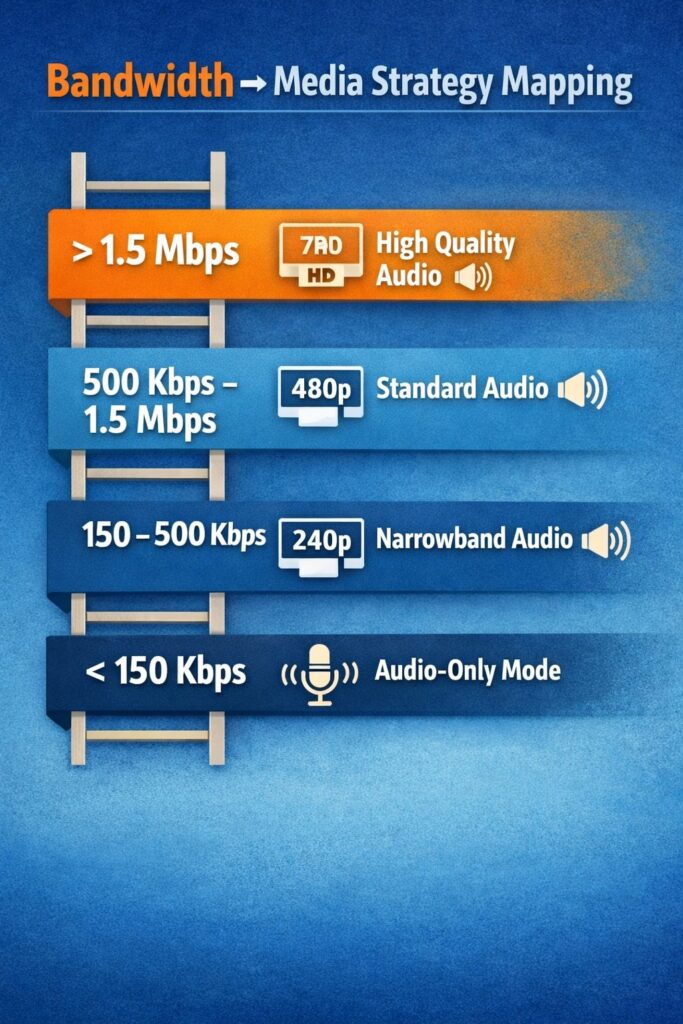
Recommended bitrate targets for different bandwidth tiers:
| Available Bandwidth | Video Resolution | Video Bitrate | Audio Bitrate |
| > 1.5 Mbps | 720p @ 30fps | 1,200 Kbps | 64 Kbps (Opus) |
| 500 Kbps – 1.5 Mbps | 480p @ 15fps | 400 Kbps | 48 Kbps (Opus) |
| 150 – 500 Kbps | 240p @ 10fps | 150 Kbps | 32 Kbps (Opus NB) |
| < 150 Kbps | Audio-only fallback | 0 Kbps | 16 Kbps (Opus NB) |
Use the RTCPeerConnection getStats() API to monitor available bandwidth every 2–3 seconds and renegotiate codec parameters dynamically. Implement hysteresis (a 10–15% buffer above the downgrade threshold) to prevent oscillation.
2. TURN Server Placement and Relay Optimization
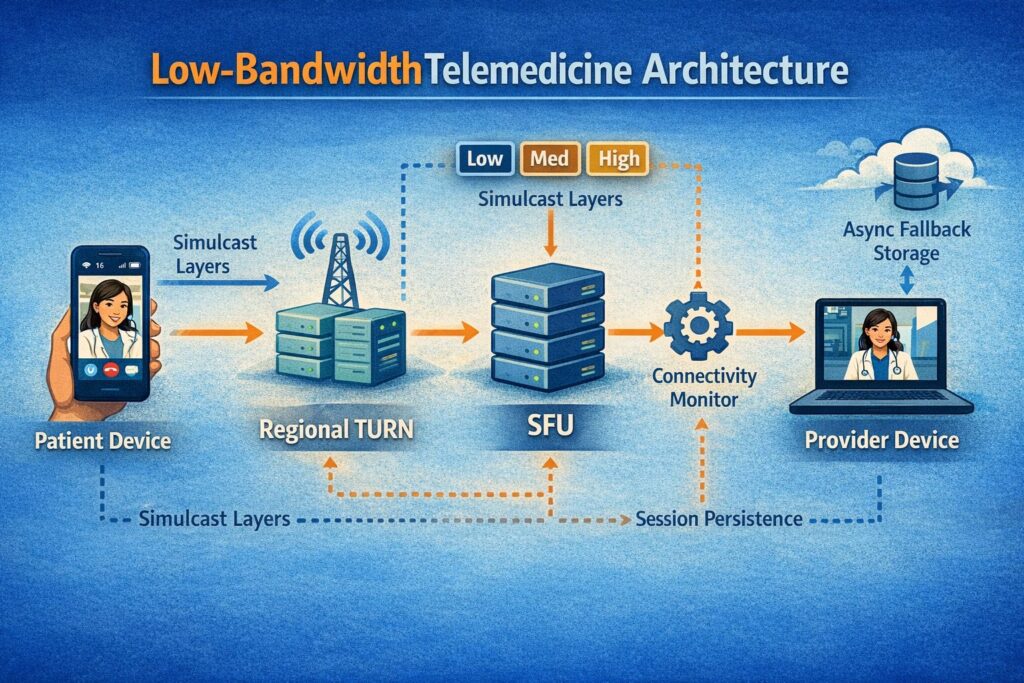
In rural environments, direct peer-to-peer connections often fail due to restrictive NAT configurations and firewall rules common on satellite and LTE networks. TURN (Traversal Using Relays around NAT) servers become essential — but placement matters enormously.
Best practices for TURN infrastructure in rural telemedicine:
- Deploy TURN servers regionally, as close to rural population centers as possible, rather than relying on a single centralized relay.
- Use UDP-based TURN by default, with TCP and TLS fallbacks — UDP is significantly more efficient under high latency.
- Implement TURN server load balancing with health checks to avoid routing through overloaded nodes.
- Monitor TURN relay bandwidth per session; budget approximately 2x the media bitrate for relay overhead.
- Consider edge-deployed TURN servers co-located with regional ISP points of presence for minimum hop counts.
3. SFU Configuration for Unstable Uplinks
A Selective Forwarding Unit (SFU) architecture, where a central server receives streams and selectively forwards them to participants, is preferable to mesh P2P in low-bandwidth telemedicine scenarios involving more than two participants. However, standard SFU configurations assume stable uplinks.
Key SFU tuning parameters for rural deployments:
- Enable Simulcast with at least three spatial layers (low, medium, high). When the patient connection degrades, the SFU can instantly downswitch the forwarded layer without requiring encoder renegotiation.
- Configure aggressive NACK (Negative Acknowledgment) and RTX (retransmission) policies to recover from packet loss without full keyframe requests.
- Set a maximum packet loss tolerance of 5% before triggering an automatic quality downgrade — rural LTE and satellite links commonly exhibit burst losses in the 3–8% range.
- Implement connection resumption logic at the SFU level, holding session state for up to 30 seconds to allow transparent reconnection after a brief signal drop.
4. Codec Selection: AV1 and Opus as the Rural Stack
Codec selection has an outsized impact on quality under constrained bandwidth. The recommended codec stack for rural telemedicine is:
- AV1 for video — up to 30% more efficient than VP9 and 50% more efficient than H.264 at equivalent quality. AV1 degrades more gracefully at low bitrates, maintaining recognizable facial expressions — critical for non-verbal clinical communication.
- Opus for audio — the Opus codec supports dynamic bitrate adjustment from 6 Kbps to 510 Kbps within a single session, and its narrowband mode (Opus NB) maintains intelligible speech at 16 Kbps on severely congested links.
Where AV1 hardware encoding is unavailable on patient-side devices (common on older Android phones), fall back to VP9 before H.264, as VP9 offers better low-bandwidth efficiency than H.264.
Resilience Patterns: Handling Disconnections Gracefully
Connection drops are not edge cases in rural telemedicine — they are expected events. Architecture must treat them as first-class scenarios:
- Session persistence layer: Store call state (participant IDs, consent records, active media tracks) in a server-side session store with a TTL of 60 seconds. When a patient reconnects within this window, the session resumes seamlessly without requiring a new join flow.
- Progressive degradation UX: Rather than showing a frozen frame or error screen, display a clear connectivity indicator and continue audio-only when video bandwidth is insufficient. Patients and providers should always know the connection status.
- Async clinical data capture: If the connection is too poor for live video, enable asynchronous store-and-forward for medical images or short video clips. This store-and-forward fallback can be implemented alongside WebRTC as a graceful degradation path, not a replacement.
- Reconnection backoff: Implement exponential backoff with jitter for reconnection attempts (starting at 1s, capping at 30s), to avoid synchronized reconnection storms after a regional outage.
Security and Compliance Considerations
Low-bandwidth optimizations must never compromise the security and regulatory standards that healthcare applications require. Every WebRTC session must enforce:
- DTLS-SRTP for all media encryption — this is mandatory in WebRTC but worth verifying explicitly in TURN relay configurations.
- Signaling over WSS (WebSocket Secure) with valid TLS certificates.
- End-to-end session authentication using short-lived tokens (JWT with 15-minute expiry) to prevent session hijacking on shared rural network infrastructure.
- HIPAA-compliant logging that captures session metadata without recording PHI in transit logs.
Monitoring and Observability for Remote Deployments
Rural deployments are difficult to debug remotely. Building observability into the architecture from day one saves significant operational overhead. Collect the following WebRTC stats per session via getStats():
- Round-trip time (RTT) — values above 300ms indicate satellite or congested LTE paths and should trigger SFU quality adaptation.
- Packet loss percentage — track independently for audio and video streams.
- Available outgoing bitrate vs. target bitrate — the gap between these values indicates network headroom.
- Codec negotiated at session start and any mid-session changes.
Push these metrics to a centralized observability platform. Aggregate by geographic region to identify infrastructure gaps that justify additional TURN server deployment or ISP-level interventions.
How Trembit Helps You Build for Rural Realities
Designing WebRTC infrastructure that performs reliably in low-bandwidth environments requires deep expertise across network engineering, real-time media processing, and healthcare compliance. It is not a configuration exercise — it is an architecture discipline.
Trembit has extensive experience building custom telemedicine platforms for clients operating in connectivity-constrained environments. Our engineering team brings hands-on expertise in WebRTC SFU design, codec optimization, TURN infrastructure, and HIPAA-compliant system architecture — delivering solutions that are robust in the field, not just in the lab.
Whether you are building a new telemedicine platform from scratch or improving the resilience of an existing one, Trembit can serve as your technical partner from architecture design through production deployment and ongoing support.
Reach out to the Trembit team to discuss your specific connectivity challenges and explore how a purpose-built low-bandwidth architecture can expand your platform’s reach to the patients who need it most.
Conclusion
Rural telemedicine is not simply urban telemedicine with lower bandwidth — it requires a fundamentally different engineering approach. By combining adaptive bitrate strategies, regionally deployed TURN infrastructure, simulcast-capable SFUs, efficient codecs like AV1 and Opus, and resilient session management, you can build WebRTC applications that deliver genuine clinical value even on constrained 150 Kbps connections.
The technical investment in low-bandwidth architecture pays dividends not only in patient outcomes but in platform reliability, provider trust, and competitive differentiation in an increasingly crowded telemedicine market.