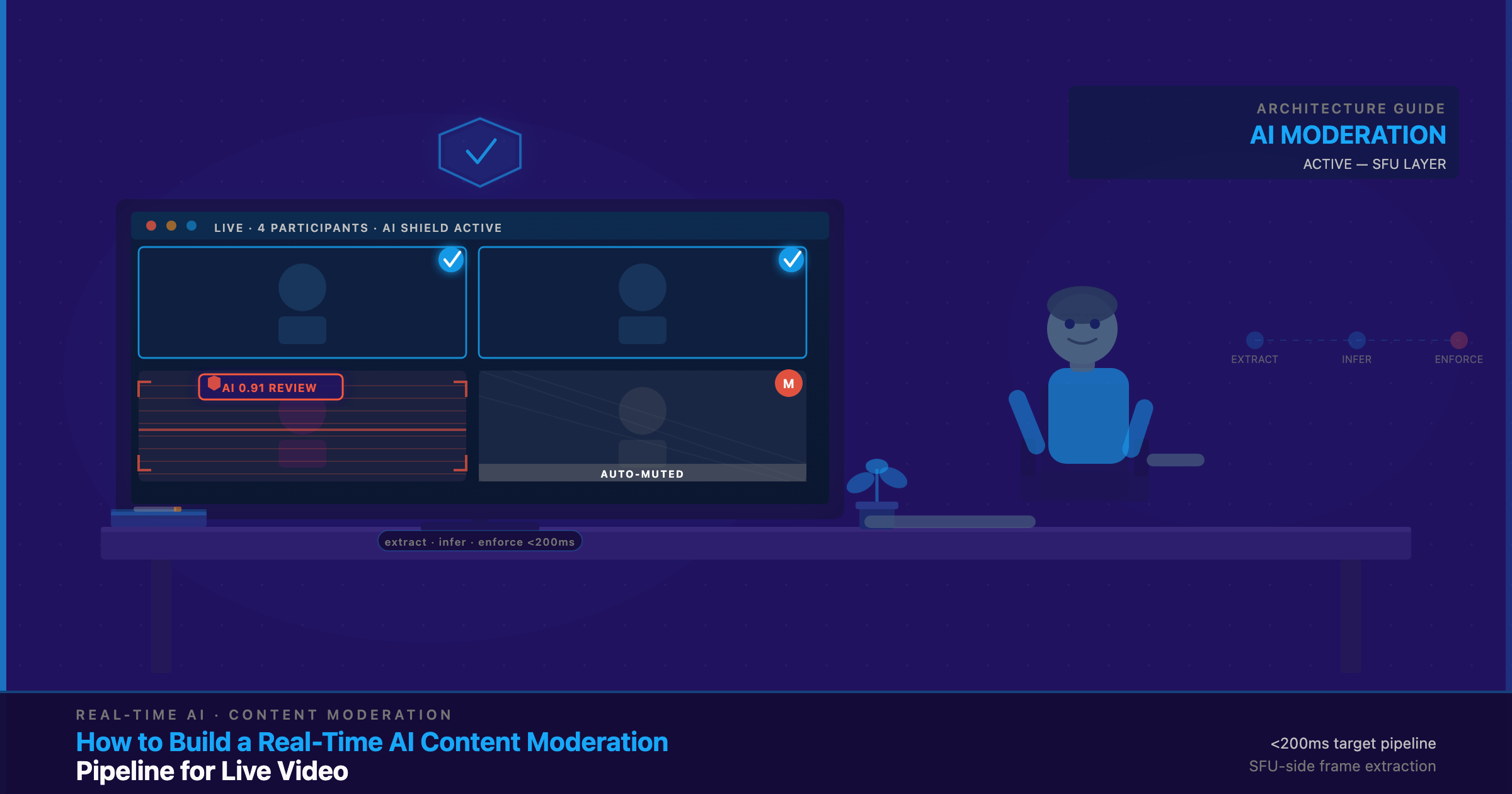
A real-time AI content moderation pipeline is the combination of three things: extracting frames and audio from a live media stream, running AI inference on them, and returning an enforcement action — mute, kick, flag, or blur — back to the session fast enough that harmful content never reaches viewers. The central engineering decision is where in the media path that inference runs: at the SFU, at a CDN edge node, or in the client browser. That single choice sets your latency, cost, and coverage.
What Problem Does Real-Time AI Content Moderation Solve?
There are two distinct jobs hiding under the word “moderation,” and they demand different architectures.
Post-call moderation runs after a session ends. You have a recording — a file — and you can throw a heavy, accurate model at it, take your time, and archive the verdict. It is the right tool for compliance archiving, dispute resolution, and training-data review. What it cannot do is stop harm while it is happening. By the time a post-call model flags a stream, everyone who was watching has already seen it.
Real-time moderation runs on live frames while the stream is in flight, and it enforces in-session. This is the requirement for live commerce, social and UGC platforms, dating apps, creator tools, and marketplaces — anywhere strangers broadcast to an audience. The exposure differs by vertical but the stakes rhyme: on a live-commerce streaming platform, a single unmoderated stream reaching thousands of shoppers is a brand-safety and advertiser problem; on a dating or creator platform, it is explicit content and minor-safety failures that can get your app pulled from the App Store or Google Play.
And the regulatory floor is rising. The EU Digital Services Act carries fines of up to 6% of global annual turnover; COPPA violations in the US can trigger FTC penalties and app-store removal; and the EU AI Act adds transparency duties on top. The through-line: regulators and platforms alike now reward demonstrable, timely action on harmful content over a next-day cleanup — which is an architecture problem before it is a policy one.
The architectural consequence is that real-time moderation is a streaming problem, not a file problem. You are not uploading an artifact and waiting for a score. You are tapping a live media path, sampling it, scoring the sample, and acting — all before the next few frames forward to viewers. That constraint is what makes the coverage window the number every architect should design around.
What is a “Coverage Window” and Why Does it Determine Your Architecture?
The coverage window is the worst-case span of time a violation can be live on the stream before your system can act on it. It is the sum of three delays:
coverage window = frame extraction interval + inference latency + action delivery time
A concrete example. At 1 frame per second extraction with 80ms inference, the worst case is that a violation appears just after a sampled frame — so you wait almost a full second for the next sample, then 80ms to score it, then the action-delivery time. Your coverage window is roughly 1,080ms, just over a second. Double the sampling to 2 fps and the same 80ms inference gives a ~580ms window.
This is the single most important number in the design, because it forces every other trade-off. Want a tighter window? Sample more frames (more CPU/GPU cost), use a faster model (usually less accurate), or collocate inference with the SFU to cut the network hop. There is no free tightening — coverage buys against cost and accuracy. Fix your acceptable window first, then work backward into topology.
What can AI moderation detect in a live video stream?
Four categories, each with its own model requirements and latency profile:
- NSFW / explicit visual content on video frames — the most mature category, served by dedicated image classifiers.
- Hate speech and threatening language in the audio track — requires speech-to-text plus classification, and is frequently missed by video-only pipelines.
- Deepfake / synthetic-media detection — specialized classifiers; still an evolving area with no single dominant open model as of 2026.
- Age-verification signals — relevant under COPPA and the EU AI Act, and usually a lighter-weight first-pass signal rather than a hard gate.
Most production systems start with NSFW visual detection and add audio and age signals as the trust-and-safety program matures. The rest of this guide focuses on the plumbing that all four share.
Where in the Media Path Does Moderation Inference Run — SFU, CDN Edge, or Client Browser?
This is the decision that defines the whole pipeline. There are three places inference can physically run, and they are not interchangeable — the right one depends on your transport.
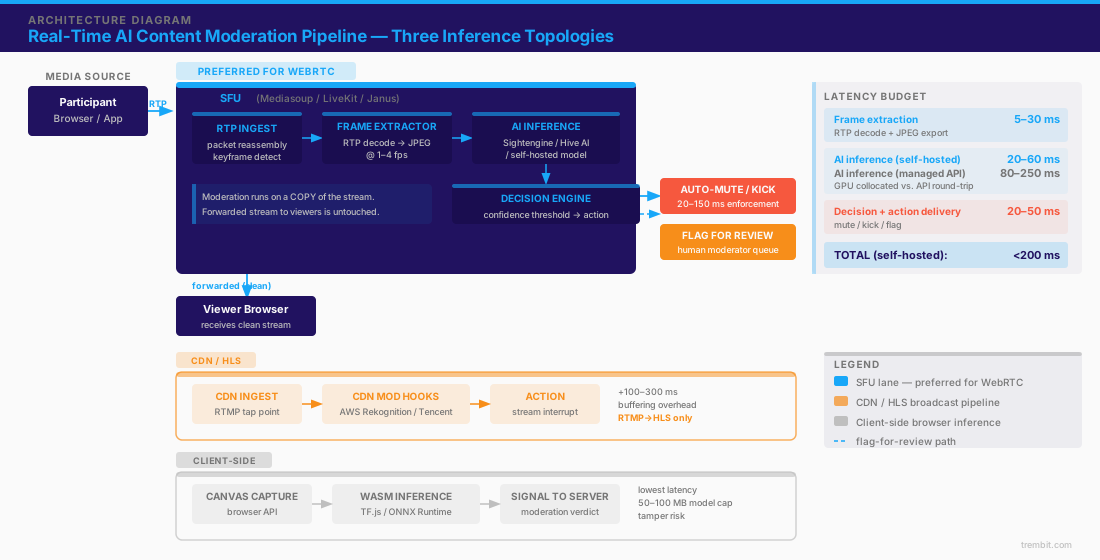
SFU-side inference — why the Selective Forwarding Unit is the natural moderation insertion point
On a WebRTC platform, the SFU already does most of the work for you. It receives each participant’s RTP streams and demuxes them per participant — video and audio as separate tracks — so it can selectively forward them to other participants. Note what the SFU does and does not do: it routes and forwards the encoded RTP payloads (they stay H.264/VP8/VP9 all the way through) — it does not decode or transcode them the way an MCU would. What it gives you is each source cleanly isolated as its own track. Decoding those frames is the step your moderation tap adds on top; the SFU just makes each source individually accessible in the first place.
From there, the extraction path is: tap the incoming RTP stream for a participant, reassemble packets, detect keyframes, decode frames at a controlled rate (typically 1–4 fps), export them as JPEG or PNG, and hand them to an inference service. Critically, you do this on a copy — the forwarded stream to other participants is untouched unless the decision engine says otherwise. This is the preferred architecture for any platform running its own media server (Mediasoup, LiveKit, Janus, LiveSwitch), because the integration is native to the media path rather than bolted onto the application layer.
The costs to budget: frame decode and export run roughly 5–30ms per sampled frame; the inference call adds 30–150ms depending on model and whether it is collocated or a remote API; and you pay CPU or GPU per concurrent stream, since every active source you sample consumes decode-and-inference capacity. That per-stream cost is what eventually pushes high-scale platforms from a managed API toward self-hosted models. If you are still choosing a media server, our comparison of Janus vs. Mediasoup vs. LiveKit walks through how each handles per-participant track access — which directly shapes how clean your extraction tap will be.
CDN edge inference — when your platform uses a CDN relay instead of a self-hosted SFU
Not every live-video product is WebRTC end-to-end. Plenty use an RTMP → CDN → HLS/DASH path for one-to-many broadcast. Here the extraction point is different: you tap the CDN ingest, or you use the CDN’s own moderation hooks. Amazon’s Rekognition integrations with AWS media services and Tencent Cloud’s content-moderation hooks are named examples of this pattern.
The trade-off is straightforward. CDN-side moderation is simpler to integrate — you do not need SFU-level access — but the CDN relay introduces buffering, which adds meaningful pipeline latency, on the order of 100–300ms — and to be precise, that figure is at the CDN ingest/origin point, before HLS/DASH segmentation. (Don’t confuse it with delivery-side HLS latency, which is a separate and far larger 1–30 seconds; that is not what this pipeline taps.) The hard limitation: this topology does not apply to WebRTC-native two-way video. In a peer-to-peer or SFU-routed WebRTC session, the CDN is simply not in the media path, so there is nothing to tap there. CDN-edge moderation is a broadcast-pipeline pattern, not a real-time-conversation one.
Client-side inference — browser-based WASM/WebGL moderation for privacy-first architectures
In a client-side approach, the browser captures frames off the video element via the canvas API, runs inference locally with a WASM-compiled model (TensorFlow.js, ONNX Runtime Web), and sends only the resulting moderation signal to the server. The advantages are real: no frame-upload cost, the lowest possible latency because there is no network round-trip for frame delivery, and privacy preservation because frames never leave the device.
The limits are equally real. The practical model-size ceiling is roughly 50–100MB — not a hard WebAssembly limit but a function of download time and mobile-device memory pressure, inference speed is bound to the client’s CPU/GPU (and mobile devices throttle under load), and a client-side model can be tampered with by a determined bad actor — so it cannot be your only line of defense. The right use for client-side inference is a privacy-first architecture, a regulatory environment that restricts frame upload, or a cheap first-pass filter that runs before a heavier cloud confirmation on anything suspicious.
How do you extract frames from an RTP stream for AI inference?
This is the most specific question in the pipeline and the one competitor guides skip. The flow at the SFU looks like this:
| Stage | What happens | Notes |
|---|---|---|
| 1. RTP ingest | Receive per-participant RTP packets | Already demuxed at the SFU |
| 2. Packet reassembly | Reorder and reassemble packets into coded frames | Handle jitter/loss here |
| 3. Keyframe detection | Identify I-frames (and optionally decode P-frames) | You do not need every frame |
| 4. Decode + downscale | Decode selected frames, downscale to model input size | Downscaling cuts inference cost |
| 5. Export | Encode as JPEG/PNG at N fps (typically 1–4 fps) | fps is your primary cost/coverage lever |
| 6. Inference call | Send to model (collocated or API), receive score | 20–250ms depending on topology |
The frame-rate decision drives everything downstream. Cost scales roughly linearly with fps — every extra sampled frame is another decode plus another inference call — so most production pipelines land at 2 fps as the balance point between a sub-second coverage window and manageable cost. There is no universal right answer; a high-risk UGC platform may push to 4 fps, while a lower-risk B2B webinar tool may sample at 1 fps or less.
Note what you are not doing: you are not running a full 30fps decode-and-score. Moderation samples the stream; it does not watch every frame. That distinction is what makes real-time moderation economically viable at all.
How do keyframe intervals affect moderation coverage and cost?
For moderation you generally want to decode I-frames (keyframes) plus, optionally, a subset of P-frames — you do not need the full frame sequence. The catch is that keyframe cadence is set by the encoder, not by you, and it may be too slow for your target window.
Concretely: at 1080p/30fps with a 2-second keyframe interval, extracting only at keyframes gives you 0.5 fps — a 2-second coverage window before inference even runs. That is often too coarse. You have two options. Force more frequent keyframes — pushing to a 500ms interval gives 2 fps and a ~500ms + inference window — but that raises bitrate, because keyframes are large; we estimate that at roughly 15–40% bandwidth overhead, and higher on motion-heavy content, where keyframes cost the most.
The alternative is to leave the keyframe interval alone and decode a rolling window of P-frames off the last keyframe, which gets you more sample points without changing the encode — at the cost of more decode CPU. Which one wins depends on whether your bottleneck is bandwidth or server compute, and that is a per-platform judgment, not a default.
What is the latency contract between detection and enforcement action?
Detecting a violation is only two-thirds of the job. The pipeline is not complete until an action lands back in the session, and that action delivery has its own budget. The full contract has three stages: (1) frame extraction + inference, (2) decision logic that maps a confidence score to an action, and (3) delivery of that action back to the live session.
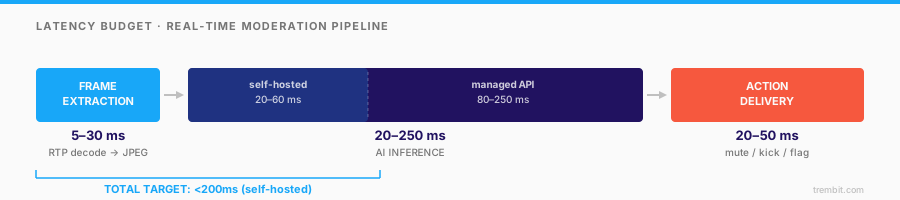
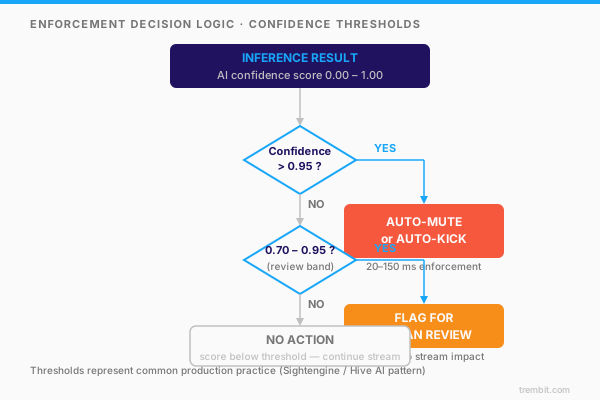
The decision layer sits between inference and action, and it is where confidence thresholds do their work. A raw model score is not an action — you need a policy that turns “0.91 explicit” into “mute” or “flag.” Most production pipelines use a two-tier boundary: a high threshold for automatic enforcement and a middle band that routes to a human. Sightengine’s and Hive AI’s documentation both describe threshold-based decisioning of this kind.
What enforcement actions are available, and how quickly can each be executed?
Four action types, ordered from fastest to most resource-intensive:
- Mute / freeze — stop forwarding the offending participant’s RTP packets at the SFU’s routing layer, so their media simply stops reaching other participants (optionally paired with a signaling message so their own client reflects the muted state). This is a routing decision at the SFU, not an RTCP trick — executable within roughly 20–50ms of the decision. The fastest option.
- Remove from stream (kick) — close the participant’s server-side PeerConnection and send a termination message over the signaling channel. Roughly 50–150ms depending on the signaling channel.
- Flag for human review — enqueue the offending frame, segment, and session metadata to a moderator dashboard. Near-zero latency impact on the live stream; the right choice for borderline calls where auto-action risks a false positive.
- Blur / mask in real time — apply a blur transform to the video frame at the SFU before forwarding. The most visually graceful outcome, but it needs GPU-accelerated frame processing at the SFU and is the most resource-intensive action per stream.
On thresholds: a common two-tier setup is a high band (roughly >0.95 confidence) that triggers automatic muting or removal, and a middle band (roughly 0.70–0.95) that routes to human review, with everything below taking no action. The right cutoffs are a policy choice, not a technical constant: a platform that would rather over-block sets the auto-action bar lower; one that fears false positives raises it and leans on the human queue.
Which AI inference services work best for live-stream moderation?
The useful way to frame this is not “which vendor wins” but “which integration pattern fits your scale and constraints.” There are three, and each has a clear best-fit.
Managed moderation APIs — best for speed to production, worst for latency and lock-in
Sightengine and Hive AI offer managed moderation APIs that accept image URLs or base64 frames and return moderation scores across categories. (Note that chat- and activity-feed platforms like GetStream focus on text and feed moderation rather than video-frame inference — a related but different job from the frame pipeline described here; don’t assume a chat-moderation vendor covers your live video.) The appeal is obvious: no model to train or host, pre-trained coverage of diverse content, and a working integration in days. The costs are latency and lock-in. A round-trip from your SFU to the API and back typically runs on the order of 80–250ms depending on region proximity, and that time lands directly in your coverage window. Per-frame pricing also scales with your fps, so a high-throughput platform pays for every sampled frame across every concurrent stream. This is the right pattern for early-stage products, moderate concurrency, or teams that want to validate the trust-and-safety product before investing in ML operations.
Self-hosted inference — best for latency and cost at scale, requires model management
Running a containerized model on the same host or rack as the SFU removes the API round-trip entirely. Open options like NudeNet (NSFW-specific) or YOLOv11 with a custom classification head, or a purpose-trained classifier, can run on GPU hardware at roughly 20–60ms per frame. Collocation is the point: no network hop means a tighter coverage window and no per-call fee.
The trade-off is operational. You own model maintenance — retraining as content shifts, defending against adversarial evasion, and keeping the deployment healthy. There is also a cost crossover: below some concurrency, the managed API is cheaper because you avoid GPU hosting overhead; above it, per-call fees exceed the cost of running your own GPUs. We put that crossover in the range of 500–1,000 concurrent streams, depending heavily on your fps rate and hardware.
Cloud vision APIs — Google Vision API SafeSearch, Amazon Rekognition Content Moderation, and Azure Content Moderator — sit between these two: managed like an API, but general-purpose vision rather than moderation-specialized, which makes them a reasonable option when you want breadth over a purpose-built NSFW model.
How Does Audio Moderation Fit into the Same Pipeline?
Most live-stream moderation obsesses over video frames and quietly ignores that a large share of harm — hate speech, threats, harassment — happens in the audio track. The video-only pipeline misses all of it.
The audio path mirrors the video path. Extract each participant’s audio track from the SFU (again, already demuxed), run it through speech-to-text (Deepgram, Whisper, or similar), then classify the transcript — a fine-tuned small transformer (DistilBERT, or a service like Google’s Perspective API) or an LLM for nuanced context, or keyword and tone analysis for the lightest-weight pass — and feed the result into the same enforcement layer. That shared enforcement layer is the important design principle: one system that can mute, kick, or flag based on either modality, rather than two disconnected moderation stacks.
The latency profile differs, though. Speech-to-text adds a round-trip of its own, on the order of 100–300ms, so audio enforcement typically lags video by roughly one cycle. In practice that is acceptable: a threatening sentence takes seconds to speak, so a few hundred milliseconds of extra detection latency still lands the enforcement action well within the harmful segment.
How Does Trembit Build Real-time Moderation Pipelines?
Trembit builds moderation into the WebRTC media path, not on top of it. Because we work at the SFU level across Mediasoup, LiveKit, and Janus — the depth behind our SFU comparison for real-time platforms — the frame-extraction tap sits where the per-participant tracks already live, rather than being bolted onto the application layer after the fact. That is the difference between sampling a clean, demuxed source and trying to reconstruct one downstream.
Across 50+ video and voice projects, that protocol-layer work has spanned healthcare platforms with HIPAA-aligned handling of sensitive media, e-learning systems with live recording and AI, and UGC and streaming products where trust-and-safety is a launch requirement rather than an afterthought. Concretely, the pattern this guide describes is the one we deploy: a Mediasoup or LiveKit extraction tap on the incoming per-participant RTP track, feeding a collocated classifier, tuned to a sub-second coverage window at ~2 fps — on a copy, so the forwarded stream is never degraded while the decision engine returns its action and viewers keep seeing clean media.
If you are not sure whether your current setup would catch a violation before your viewers do — or you are scoping one from scratch — a short architecture review gives you three concrete outputs: a map of where moderation should insert in your media path, a coverage-window pressure-test against your expected concurrency, and an API-versus-self-hosted cost crossover for your target fps. That is a one-conversation exercise, not a sales pitch.