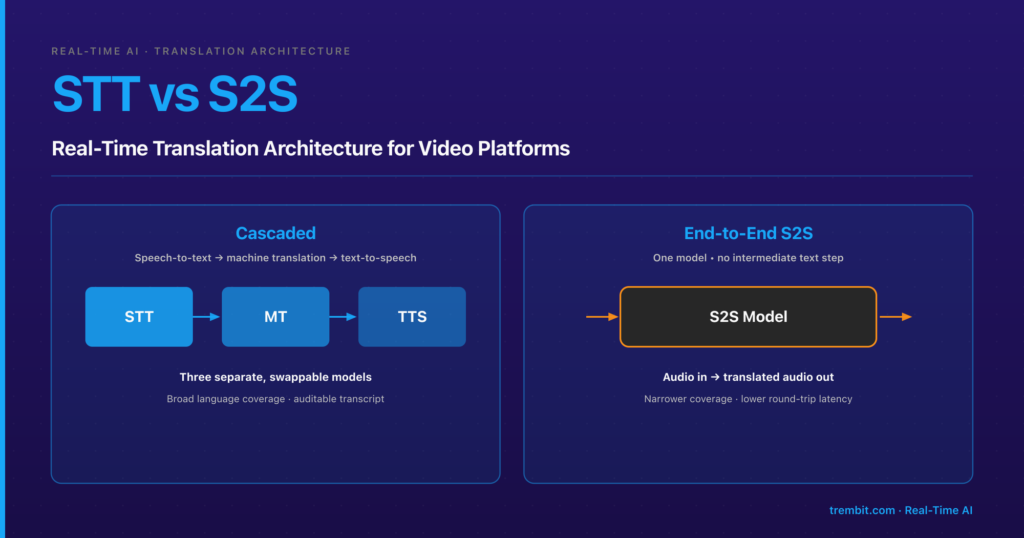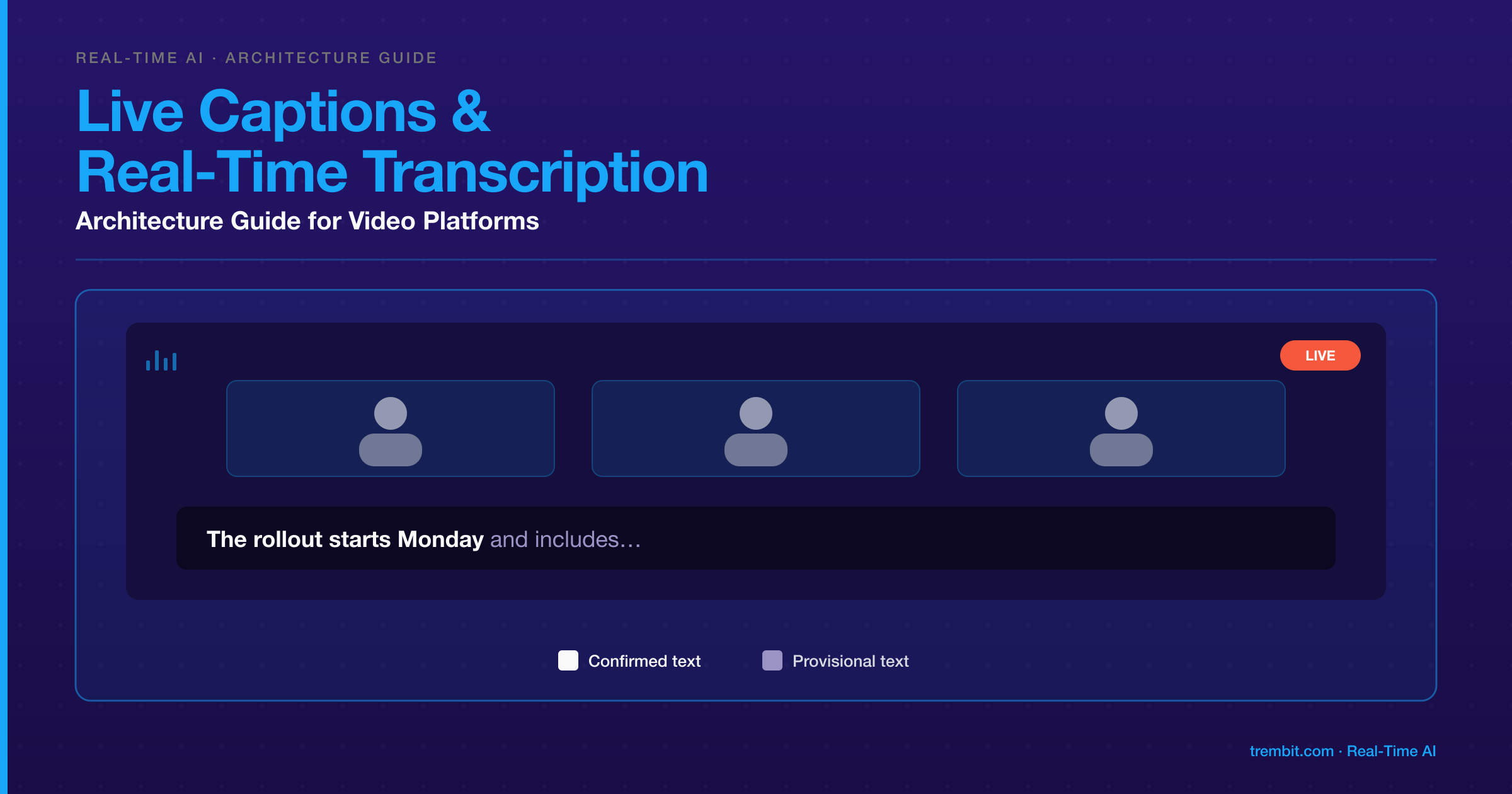
Real-time transcription is the text stream a speech-to-text (STT) system produces from call audio while people are still talking — word by word, revised as more audio arrives. Live captions are one way to consume that stream: the text rendered on screen, in step with the video, during the call. The terms get used interchangeably, but a product can need either one without the other. Adding them to a video platform comes down to three decisions: where the audio leaves your media path, what kind of STT deployment it goes to, and how your interface handles text that is still changing. Most teams pick a vendor from its API docs first, then find their video architecture had already narrowed the options.
Key takeaways
- Transcription is the stream; captions are one rendering of it. Decide whether you need on-screen captions, a stored transcript, or both before choosing tools — one live stream can feed both.
- Start with one question: can the audio leave your infrastructure? If a contract, embargo or regulation says no, you’re self-hosting — and self-hosting a commercial model can mean an enterprise contract, not just engineering work (Deepgram’s does). Beyond that, there are three deployment patterns: a managed streaming API, a model provider’s dedicated real-time transcription session, or a model you run yourself. The deciding axis is who runs the model and where the audio goes, not open source versus commercial.
- OpenAI’s Realtime API covers two different jobs. The
gpt-realtimemodels are speech-to-speech models for voice agents;gpt-live-transcriberuns dedicated transcription sessions. Live captions belong to the second.- Vendor latency figures measure one segment of the path. Deepgram’s published sub-300ms figure is its transcription processing time — one term in its own total-latency formula — and it is vendor-reported, not an independent benchmark.
- Provisional text is a design decision, not a bug. Show still-changing words differently from confirmed ones. In our media-production build, errors concentrated in names and domain terms, not in common words.
Choosing a vendor or signing off on compliance rather than writing the code? Jump to Which transcription pattern should you build on? and Does an accessibility standard like WCAG apply? — both stand alone.
What’s the difference between real-time transcription and live captions — and does your product need both?
Real-time transcription is a data problem: turn audio into accurate, timestamped text with as little delay as the use case allows. Live captions are a presentation problem layered on top: get that text onto a viewer’s screen, legible, in sync with the speaker, and stable enough to read.
A request for “real-time transcription in our video calls” usually hides one of three product needs:
- Live on-screen captions — for accessibility, noisy rooms, or listeners working in a second language. Display latency matters most; nothing has to be stored.
- A transcript generated during the call — for search, notes, records, or downstream AI. Completeness and accuracy matter most; display latency barely matters.
- Both from one stream — the common case, and the cheaper one to build if you design for it from the start.
Our accessible webinar platform, built on Jitsi Meet, took the third route: the same live speech-to-text data drove on-screen subtitles during sessions and produced full searchable transcripts afterwards (webinar platform case study). It also produced a finding worth planning for. Subtitles were built for hearing-impaired learners, yet most attendees turned them on regardless, and they became the platform’s most-used feature. Captions scoped as a compliance line item often end up as a core feature. (Translated subtitles add a translation stage — a separate decision, linked in the next section.)
How is this different from post-call (batch) transcription?
Batch transcription starts once the recording exists: you send a file or URL, and the API returns the transcript in a single response (Deepgram, pre-recorded audio). Streaming transcription keeps a connection open while audio is still arriving. Deepgram’s live endpoint is a WebSocket that sends “continuous updates, meaning transcription results may evolve over time” (Deepgram, live audio reference).
That evolving output is the central trade-off. A streaming model commits to words before it hears what comes next; a batch job sees the whole sentence and the whole conversation. OpenAI’s real-time transcription guide makes the dial explicit: its delay setting runs from “minimal for the most latency-sensitive interactions” through “low for low-latency live captions” to “xhigh when your workflow can tolerate the most delay for more context” (OpenAI, Realtime transcription). Our own media-production build hit the same wall: the techniques that make offline recognition most accurate — large context windows, beam search, language-model rescoring — take time a live caption doesn’t have.
Plenty of products need both: a streaming pass for what’s on screen now, and a slower pass for the record you keep.
Where does transcription actually happen in a WebRTC video architecture?
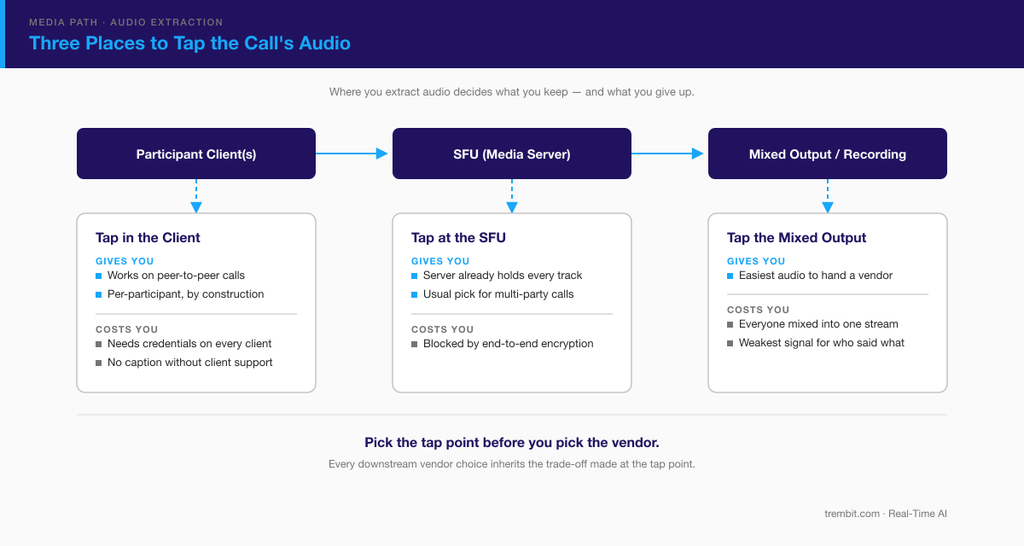
Before any STT service sees a word, audio has to leave the call. There are three places to tap it, and the choice affects cost, privacy, and whether you still know who was speaking:
- In the client. The browser or app sends its own microphone audio to the STT service alongside the WebRTC call. It works on peer-to-peer calls with no media server and is per-participant by construction. The costs: every client needs short-lived STT credentials, each device carries a second upstream audio connection, and you can’t caption a participant whose client doesn’t cooperate. OpenAI’s transcription sessions document both routes — “WebSocket for server-side audio pipelines or WebRTC for browser audio” — so this is a supported path, not a workaround.
- At the media server. In an SFU-routed call, the server already receives every participant’s audio. A server-side subscriber or egress process terminates the media and hands raw audio to your pipeline. This is the usual production choice for multi-party calls, and we walked through that extraction from a mediasoup SFU in our guide to real-time translation architectures for live calls — the same extraction problem with a different stage downstream. If media is end-to-end encrypted, the server can’t read it, and this option is off the table.
- From a mixed output. A recording or broadcast mix combines everyone into one stream. It’s the easiest input to hand a vendor and the worst starting point for knowing who said what.
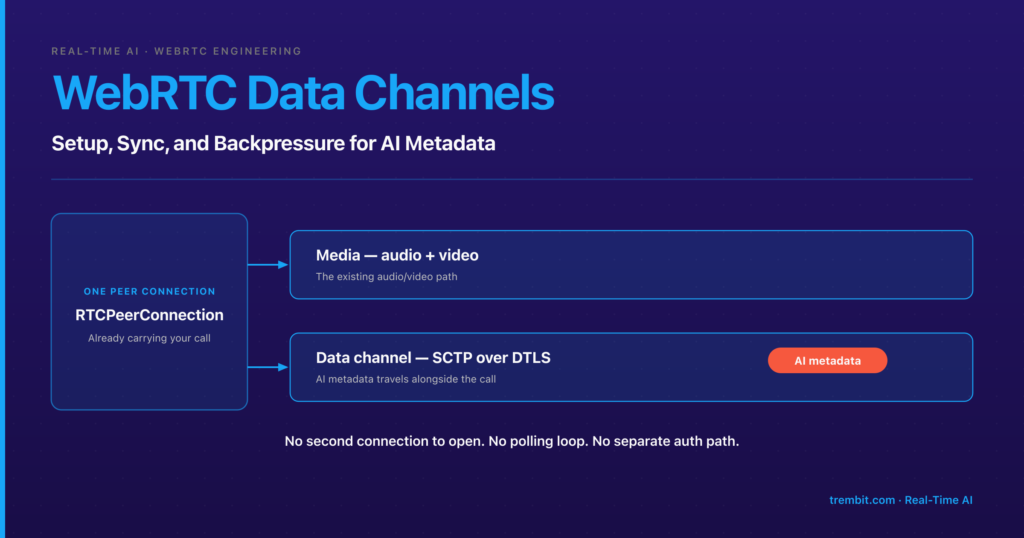
Caption text then travels back to viewers; sending it over the WebRTC data channel, timestamp-aligned to the video, is a delivery pattern the translation guide above also covers.
Which transcription pattern should you build on — managed streaming API, a dedicated real-time session, or self-hosted?
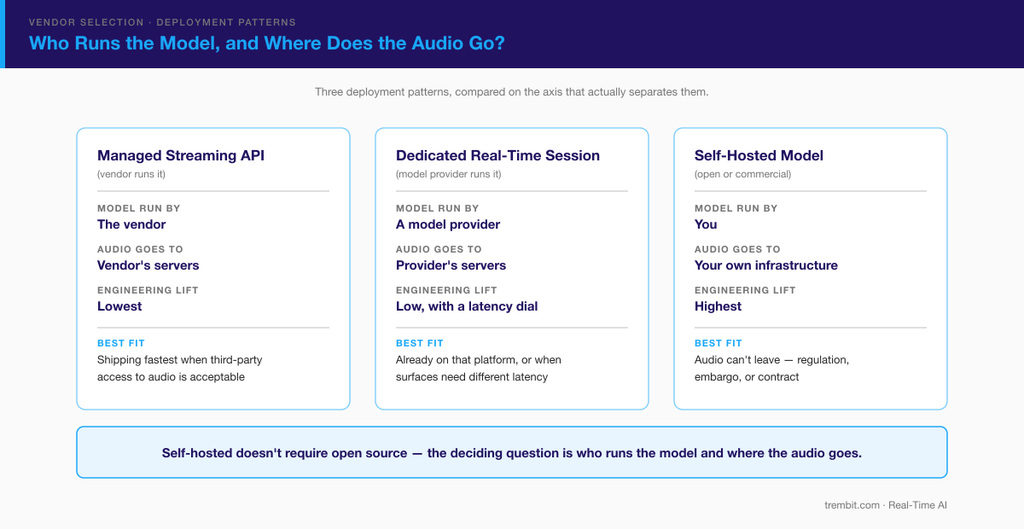
Once audio is out of the call, it goes to one of three kinds of STT deployment. Brand and headline price are the wrong way to tell them apart. The question that separates them is who runs the model, and where the audio goes.
Managed streaming APIs (e.g., Deepgram)
You open a WebSocket to the vendor, stream audio, and receive interim and final results. The vendor runs the models, scaling, and upgrades; you pay for usage. It’s the lowest engineering lift and the quickest route to working captions.
Read the latency claim precisely. Deepgram’s documentation says its models “are optimized to deliver transcription latency in 300 milliseconds or less for streaming workloads,” and gives its own formula: total transcript latency equals network transit (20–200 ms) plus transcription latency (150–300 ms) plus client processing, for 200–500 ms in total (Deepgram, Measuring STT latency). These are vendor-published figures, not an independent benchmark. They measure the gap between audio submitted and interim transcript returned — Deepgram says to use interim results only, because finals are “delayed by endpoint detection.” None of it covers getting audio from a speaker’s microphone through your media server to the STT connection, or delivering the caption back to viewers.
Best fit: teams that may send call audio to a third party and want to ship quickly. Check data-processing terms — and, for US healthcare, Business Associate Agreement (BAA) coverage — before real calls flow through it.
A dedicated real-time transcription session (e.g., OpenAI’s gpt-live-transcribe)
This is where vendor docs cause the most confusion. OpenAI’s Realtime API does two different jobs. Its gpt-realtime models are conversational speech-to-speech models for voice agents — the voice-agent guide’s current example is gpt-realtime-2.1 (OpenAI, Realtime API) — which is the territory of our guide to building voice AI agents on WebRTC. Transcription is a separate session type using a dedicated model. OpenAI’s speech-to-text guide calls gpt-live-transcribe “the recommended realtime path” for “live audio from a microphone, call, or media stream” (OpenAI, Speech to text). That guide lists several other transcription models alongside it as of 30 September 2026; check the current list before you build.
What sets this pattern apart is the tuning surface: the delay dial quoted above, a prompt to describe the recording’s setting, and keywords “for product names, acronyms, and other literal terms that may appear in the audio”. The guide publishes no latency numbers for the delay settings and tells you to test against your real audio.
Best fit: teams already on OpenAI’s platform, or products where different surfaces need different latency — a live caption and a meeting record, for example. The third-party data questions are the same as for a managed API.
Self-hosted models (e.g., WhisperLive)
Here the model runs on infrastructure you control. The usual open-source starting point is Whisper, whose “code and model weights are released under the MIT License” (openai/whisper). Whisper isn’t a streaming server, so projects wrap it. WhisperLive is maintained by Collabora, not OpenAI; its README calls it “A nearly-live implementation of OpenAI’s Whisper,” with faster_whisper, TensorRT, and OpenVINO backends, WebSocket clients, and optional server-side voice activity detection (collabora/WhisperLive). The README publishes no latency figure. Numbers quoted for it elsewhere come from third parties’ own hardware, so benchmark on yours.
You own everything a vendor would otherwise handle: GPU capacity for peak concurrent streams, model updates, monitoring, and accuracy on your audio. In return, audio stays in your environment, and cost follows hardware rather than minutes.
One correction to a common framing: self-hosted doesn’t have to mean open source. Deepgram documents a self-hosted deployment in which “no audio, transcripts, or other identifying markers of the request content are sent to Deepgram,” with components contacting its license server only to validate models and report usage (Deepgram, Self-hosted introduction). That deployment is gated, though: running it on Docker, Podman or Kubernetes requires a Deepgram Enterprise plan, while Amazon SageMaker is the more accessible route, billed through AWS Marketplace (Deepgram, Self-hosted introduction). You can meet a data-residency requirement with a commercial model. What you can’t avoid is operating it.
Best fit: embargoed, regulated, or residency-bound audio, and high, steady volume. If the transcript then feeds clinical AI in a US telemedicine product, every downstream vendor still needs its own BAA — covered in our AI clinical scribe build guide.
How do you choose between them?
Ask three questions, in this order:
- Can the audio leave your infrastructure? If a contract, an embargo, or a regulation says no, you’re self-hosting — open or commercial — and the rest is detail.
- What latency does each surface need? Our media-production build set its live-caption budget at one to two seconds from speech; a transcript for the record can wait far longer. If your surfaces differ, a tunable service or two separate passes may beat one compromise.
- What does it cost at your real volume? Per-minute pricing suits low or unpredictable volume; owned GPUs tend to pay off only when utilisation is high and steady. Model it against your actual concurrency curve, not a vendor calculator.
How accurate is real-time transcription, and what should you expect on-screen?
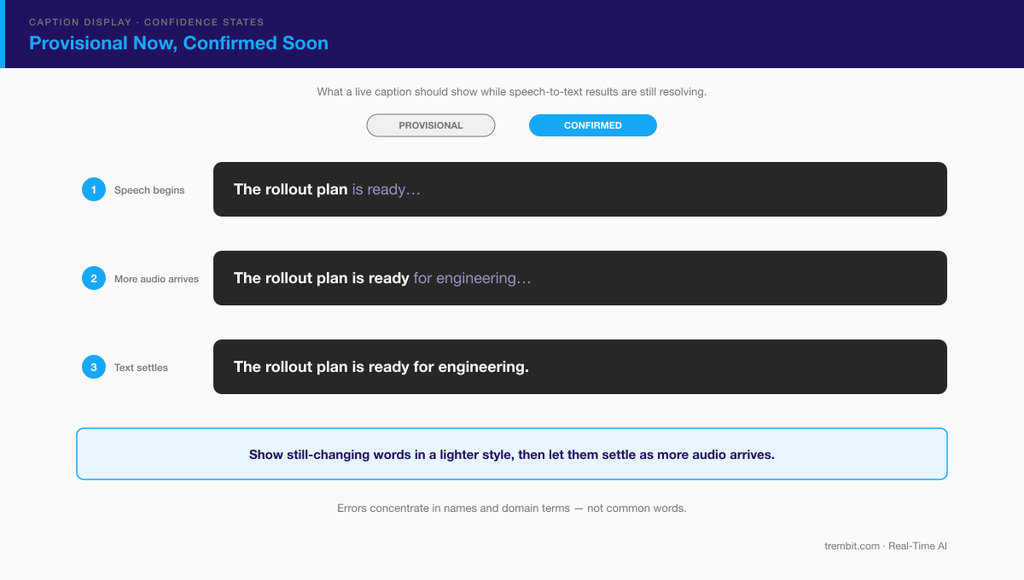
Expect two kinds of text, and design for both. Streaming STT sends interim results first. Deepgram describes them as guesses that it “corrects and improves” as more audio arrives, flagged is_final: false until it sends a final transcript (Deepgram, Interim results). OpenAI’s transcription sessions split the same way into delta and completed events. Render every interim update in place and captions flicker; show only finals and they lag.
The pattern that holds up is a visible provisional state. In our media-production transcription system, recent text appears in a lighter style before it’s confirmed, so viewers expect it may change and can trust that confirmed text won’t. Silently rewriting text viewers had already read made them distrust the system; watching it visibly correct itself made them trust it more.
On accuracy, the headline error rate matters less than where the errors land. In that build, common words weren’t the problem. Errors concentrated in proper nouns, domain terms, and context-dependent word choices — the words that matter most. The commercial APIs the client had evaluated processed each audio chunk independently, so a guest’s name could come out differently on every mention. Two fixes did most of the work: an entity-consistency layer, which on its own removed more than half of the errors that had previously needed human correction, and letting producers preload guest names and topic terms before a session. Vendor keyword features — Deepgram’s Keyterm Prompting for “up to 100 important terminology, product and company names, industry jargon” (Deepgram, Keyterm prompting) and OpenAI’s keywords — are the managed-service version of that second fix.
Treat any word-error rate a vendor publishes about itself as vendor-reported, measured on audio it chose rather than your microphones, accents, and vocabulary. Test on recordings of your own calls before committing.
Adding transcription to a video platform that’s already in production is day-to-day work for our WebRTC AI development team.
What changes when more than one person is on the call?
Once a call has two speakers, every caption needs a name, and a wrong name is worse than none. Most STT documentation assumes one mixed stream and asks diarization — statistical speaker separation — to infer who is talking. In an SFU-routed call that is often work you don’t need: the server already receives each participant as a separate audio track, so transcribing per track can give you attribution by construction. Several common setups break that assumption, though. The attribution decision and its fallbacks are covered in our companion piece, Per-Speaker Live Captions in Multi-Party WebRTC Calls.
What does a real production build of this look like?
Our most complete reference is a real-time transcription system we built for a media production company handling live broadcasts, recorded interviews, and editorial video (real-time speech-to-text case study). Its inputs were studio microphones, phone lines, field recorders, and video feeds rather than a WebRTC call, so it shows the transcription pipeline on its own terms.
The starting point will sound familiar after a first vendor integration: fast automated output that editors spent thirty to sixty minutes cleaning up for every hour of audio. What we built, in pipeline order:
- Streaming recognition on custom speech-to-text models, with partial results within 1–2 seconds of speech; high-confidence words show immediately while uncertain segments are held until more audio resolves them.
- A context engine that tracks names, organisations, topic, and vocabulary across the session, enforces consistent spelling of recurring entities, and adapts word probabilities as the topic shifts.
- Retroactive correction that revises earlier text when later context proves it wrong, emitting revision events that caption displays and transcript editors each handle in their own way.
- Standard outputs — SRT, VTT, plain text, and timestamped JSON — consumed by broadcast captioning, editing, and CMS systems without custom adapters.
- On-premises deployment with GPU inference on the company’s own infrastructure and no audio sent to external services, because pre-broadcast content was embargoed.
That last point is the self-hosted pattern chosen for the reason it usually is: the audio could not leave. The lesson we’d carry into any video platform is that acoustic accuracy has diminishing returns. The gains that make a transcript publishable come from context — what has already been said, and what the operator knew before the session started.
Inside a WebRTC product, the webinar platform described earlier ran live captions on Jitsi Meet for hundreds of concurrent viewers.
Does an accessibility standard like WCAG apply to your video platform?
The relevant standard is WCAG 2.1 Success Criterion 1.2.4, Captions (Live), Level AA: “Captions are provided for all live audio content in synchronized media” (W3C, Understanding SC 1.2.4). Whether it reaches two-way calls, and which regulations reference it, is covered in Per-Speaker Live Captions in Multi-Party WebRTC Calls — and whether it applies to your product is a question for your counsel, not this guide.
Where should you start?
Start with the decision that’s hardest to reverse. Switching transcription vendors later is a contract change and an integration; changing where audio leaves the call — or learning that a compliance rule means it can’t leave at all — can mean re-architecting the pipeline. Settle that first, and the vendor shortlist mostly writes itself.
For a second opinion on that decision, book a free 30-minute call with our engineers. Bring the concrete question: the tap point in your SFU, caption lag you can’t get under control, whether a data-residency rule pushes you into an enterprise self-hosting contract, or whether you need stored transcripts at all. We’ll work through it with you — no deck, no pitch.
FAQ
What’s the difference between live captions and real-time transcription?
Real-time transcription is the text stream an STT system produces from audio as people speak. Live captions are one use of that stream: the text displayed on screen, in sync with the video, during the call. A product can need a transcript without visible captions, captions without a stored transcript, or both — and one live stream can serve both if you design for it.
Should I use a managed API or self-host my transcription model?
Decide by where the audio may go first, then by latency, then by cost. If audio can’t leave your infrastructure, self-host — either an open model such as Whisper behind a streaming wrapper, or a commercial model licensed for self-hosting (Deepgram’s self-hosted deployment, for instance, requires an enterprise plan). If it can, a managed streaming API or a dedicated real-time transcription session is far less work to run.
How accurate is real-time transcription compared to a post-call transcript?
A post-call pass can be more accurate because it sees the whole conversation before committing to words; streaming trades some of that context for immediacy, which is why real-time services revise interim text. In practice, errors in live transcription concentrate in names and domain terms. Keyword or vocabulary features, and context-aware correction, close more of that gap than switching acoustic models.
Does WCAG require live captions on my video platform?
WCAG 2.1 SC 1.2.4 (Level AA) requires captions for all live audio content in synchronized media. Whether that applies to your product depends on what you build and which rules you operate under — ask your counsel. Our per-speaker captions piece covers the standard’s scope in detail.