By Dmytro Yekymov, Senior Software Engineer at Trembit · Wear OS and offline-first field systems · Last updated 29 October 2026
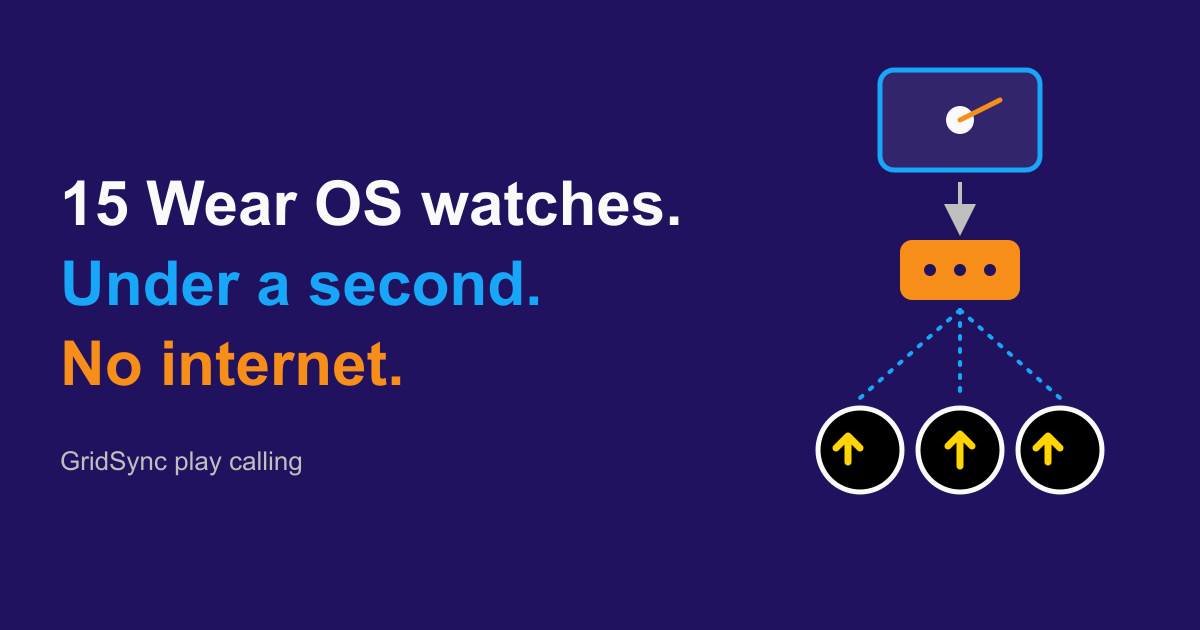
GridSync is a Wear OS play-calling system Trembit built for an American football club in Texas. The coach taps a play on an Android tablet, and in under a second up to fifteen players’ watches buzz with each player’s own assignment (the quarterback sees every assignment in the play). It runs on a local network that a router in the coach’s bag creates, so it never needs the internet during a game. This article covers what drove the design: gloves, sunlight, different roles on the field and a field with no connectivity. It also covers the parts we would build differently on a bigger system.
Key takeaways
- Under a second, tap to last buzz. Measured on the field: from the coach’s tap to the last of up to 15 Wear OS watches vibrating.
- No internet at game time. A GL.iNet GL-MT6000 running OpenWrt, off a 12V battery, creates its own Wi-Fi network and runs a Python asyncio WebSocket server. Every packet stays on the field.
- Two watch apps, three screens. The quarterback’s app shows every assignment in the play; the player app shows one player’s own — a route for a receiver, a screen of his own for a lineman — with the position bound per watch from the tablet. The server filters each play by role before sending it.
- No touches once the play arrives. Gloves and sunlight make the watch a road sign, not an app: high contrast, large type and three vibration patterns a player learns in one practice.
- We chose WebSocket over MQTT because the server has to filter by role. MQTT’s retained messages, persistent sessions and last-will are what we gave up. On a bigger fleet or with worse coverage, they are the reason to switch.
- We name the limits. A watch that drops off misses that play. The WPA2 password is the only gate: any client on the field network can connect and claim a role. Our own update loop has no staged rollout and no rollback.
Not an engineer? The first two sections and “What carries over beyond football?” tell the story without the stack.
About the project
| Client | An American football club in Texas, USA |
| Team and timeline | One Trembit engineer with our CTO, about six months |
| What Trembit built | Coach’s playbook and broadcast app (Android tablet, React Native) · two Wear OS apps — quarterback and player, the player app carrying a receiver’s screen and a lineman’s, bound per watch from the tablet (Kotlin, Jetpack Compose) · field server on a GL.iNet GL-MT6000 router running OpenWrt (Python, asyncio, WebSocket) · cloud backup and sync (Firebase) · our own update loop that does not use the app stores |
| Constraint | Built so that even the 25-second play clock leaves margin, on a field with no reliable internet, read by players in gloves and helmets in full sun |
| Result | Coach’s tap to last watch buzzing: under a second, measured on the field |
How much time does a football team have to get a play in?
American football gives you forty seconds between two whistles. When the clock restarts after a score, a timeout or the start of a period, it’s twenty-five.
In those seconds the coach passes the next play to the quarterback. The quarterback gets it to the ten players around him. All eleven line up in the right formation, and only then does the play begin.
The classic approach of cardboard boards and sideline hand signals has worked for half a century. But every “we didn’t read the signal” timeout costs the offense yards and points.
Texas, where the club is based, opened the door to it. For the 2025 season, the state’s high-school league (UIL) approved one-way wearable technology such as watches and wristbands for in-game play calls, with no limit on how many players wear one. Voice is not allowed, so the call arrives as something to read.
Read the restrictions as carefully as the permission. The same document requires that calls be transmitted from the press box only, not initiated on the sideline, and it keeps every device other than the players’ wearables out of the sideline and team area. So under that rule the tablet is a press-box device, and a team copying this has to put it there. Check your own state association’s current wording before a game — the document we read, still the one UIL links as of October 2026, is written for the 2025 season.
GridSync is the wearable system we built so that even the twenty-five-second version leaves time to spare:
- the coach taps a play on an Android tablet;
- under a second later, up to fifteen Wear OS watches vibrate, all of them the same watch;
- each player sees their own assignment (the QB sees every assignment in the play), and the eleven on the field line up.
No signals, no boards, no “didn’t hear that.”
How do you design a watch screen for gloves, helmets and full sun?
The first thing you learn when you take a prototype onto a real field is that you can’t read the screen. It looked great in the office. On a player’s wrist at one in the afternoon it was a dull grey blur. The sun washes out the contrast, the helmet shades half the screen, the player’s pupils are narrowed, and the watch is about forty centimetres away on an outstretched, gloved arm.
So the field player’s screen is a road sign, not an app interface. One shape, one colour, one meaning:
- maximum contrast — the screen is read, not admired;
- no thin fonts, no delicate icons, nothing a player has to lean in for;
- screen brightness forced to maximum during game time. It costs battery, but the watch still lasts the match.
Touch is the second thing that stops working. A receiver’s leather glove with silicone grip pads is not made for pressing a 45-millimetre screen. In our own testing on the field, half the taps didn’t register and a quarter landed somewhere else.
That gives us the rule the whole field-player watch is built around: once the play arrives, no required touches. It vibrates, the player lifts their wrist, sees the assignment and plays. Anything a player does have to tap — connecting before the game, reviewing after — happens in the locker room, without gloves.
The quarterback needs slightly more: paging back to the previous play and opening a hurry-up card. The principle still holds. Anything that can be a single large tap or swipe, is. Anything that can be removed, is. Receivers, running backs and linemen touch the watch zero times during a play. The QB touches it only as often as the job requires.
Why do the quarterback and the receiver get different apps?
Shipping one app for everyone is tempting: one codebase, one screen, a couple of role flags. But a quarterback and the ten players around him are reading at different altitudes. A universal screen is a bad screen for both.
- Quarterback: the play, not his part of it. Knowing his own route isn’t enough. He needs to see where the other players line up and where they are going. His screen is a top-down diagram of the field with the figures and route arrows of the play: dense, but readable in one look.
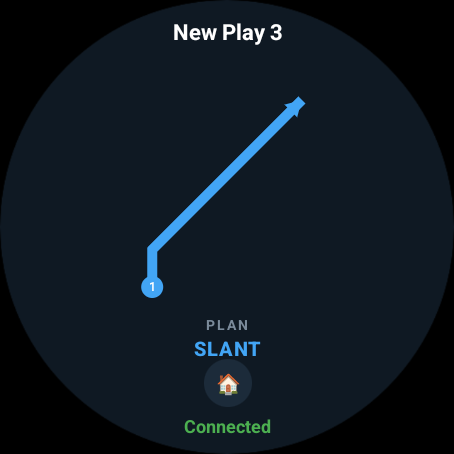
- Receiver: one arrow. The full picture just gets in the way. He needs one thing: where he runs. On his round dial there’s a large route arrow and the play’s label at the top. It takes half a second to take in, not five.
- Lineman: his own screen. His job is to block, not to run, so a route arrow is the wrong shape for him, and he gets a screen of his own rather than a receiver’s with different content.
So the count is two apps and three screens: a quarterback app, and a player app carrying a receiver’s screen and a lineman’s, with the position bound to each watch from the tablet.
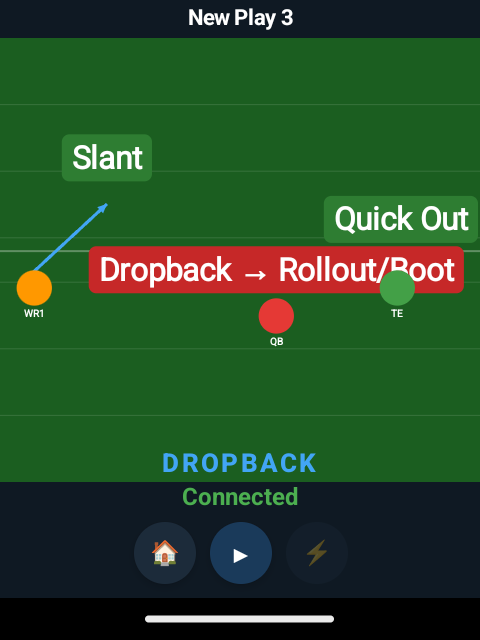
The split is a product decision, not a technical one.
The tablet app is built in React Native. If you’re weighing that choice for a regulated product, we wrote about where cross-platform mobile breaks in healthcare. The watches use Kotlin with Jetpack Compose.
What does the role filter protect, and what doesn’t it?
Each player only gets their part of the play, not the whole playbook. This happens on the server: each play packet is filtered by the recipient’s role before it is sent, so a lineman’s watch never receives the receivers’ routes. We built it for speed and bandwidth. It also means a lost receiver’s or lineman’s watch exposes one role’s part of one play, not the playbook.
The limits matter just as much:
- The QB’s watch and the tablet are the devices worth protecting. The QB’s watch holds the whole play and can page back through it. The tablet holds everything and syncs it to the cloud.
- WPA2 keeps strangers out; it doesn’t identify devices. Every device on the field knows the same shared password. The tablet also sends a token when it connects.
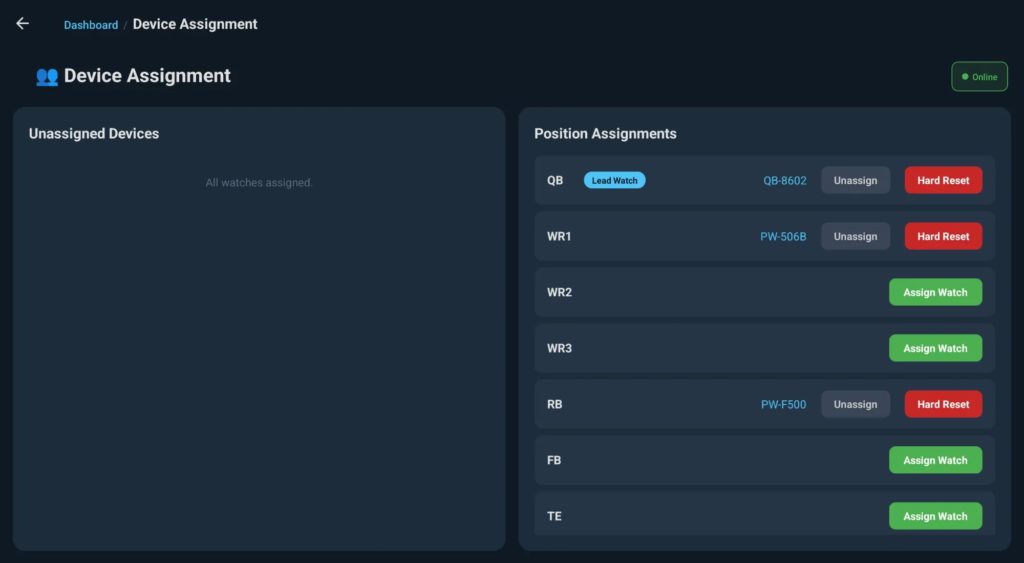
- A watch declares its role when it connects, and the coach can override it live from the tablet, where a watch that has just joined shows up unassigned and gets bound to a position. The filter behind it is real: a lineman’s watch never receives the receivers’ routes. But the role is a claim the client makes, and the only gate is the WPA2 password — any WebSocket client on the field network can connect and ask for a role. We would rather state that plainly than dress it up: it is not authentication, and it would not stop someone who set out to impersonate a watch.
- Traffic runs over
wss://with a self-signed certificate built into the server and all three apps — the tablet plus the two watch apps. Trust comes from the set of apps we ship, not from a public certificate authority.
On a closed field network with one coach, that is enough. We chose to say so rather than add complexity we don’t need.
How can vibration tell a player what’s happening?
You have to look at a screen, and once the ball is live there’s no time to look at your wrist. So some of the information has to reach the player without their eyes. In GridSync, vibration is a separate channel, not just “look at me.”
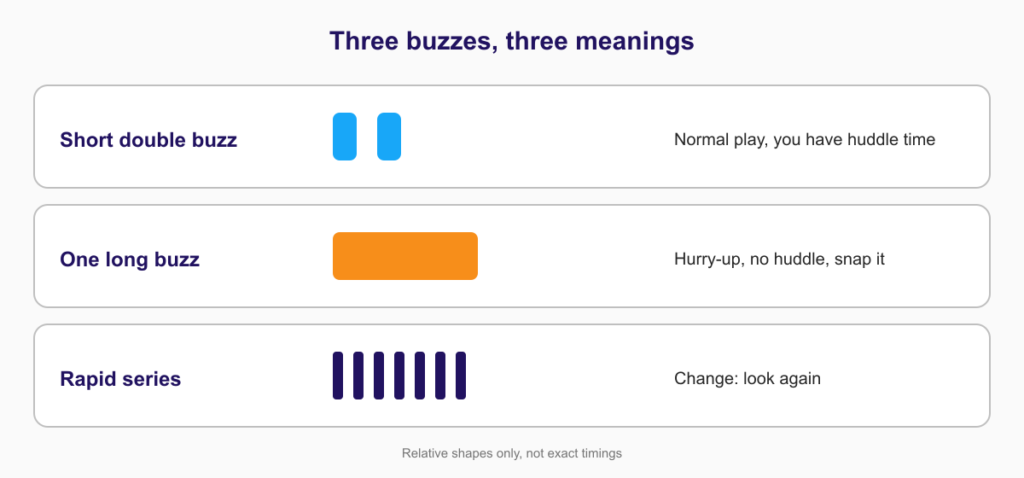
GridSync uses three vibration patterns, and players learn to tell them apart in one practice:
| Pattern | Meaning |
|---|---|
| Short double buzz | Normal play, you have huddle time |
| One long buzz | Hurry-up, no huddle, snap it |
| Rapid series | Change: look again |
It runs on the standard Wear OS Vibrator API, but we tuned the timings on real wrists rather than taking them from the docs. What reads as a “short double” on paper feels like one long buzz to a player running in a noisy stadium. The final timings took about a dozen rounds of testing on the field. Players know what’s happening before they lift their wrist.
Touch is an old signalling channel, and nothing here invented it. Consumer wearables buzz to get your attention; using a small set of patterns as a vocabulary, where the buzz itself carries the meaning, is rarer. When sight and hearing are already busy, it is the only channel left.
How do you run a real-time system on a field with no internet?
High-school and college fields aren’t NFL stadiums. There may or may not be Wi-Fi, and it won’t accept an unknown device. Mobile signal drops under the stands. If you rely on the cloud, you can lose a game because of someone else’s data centre two thousand kilometres away.
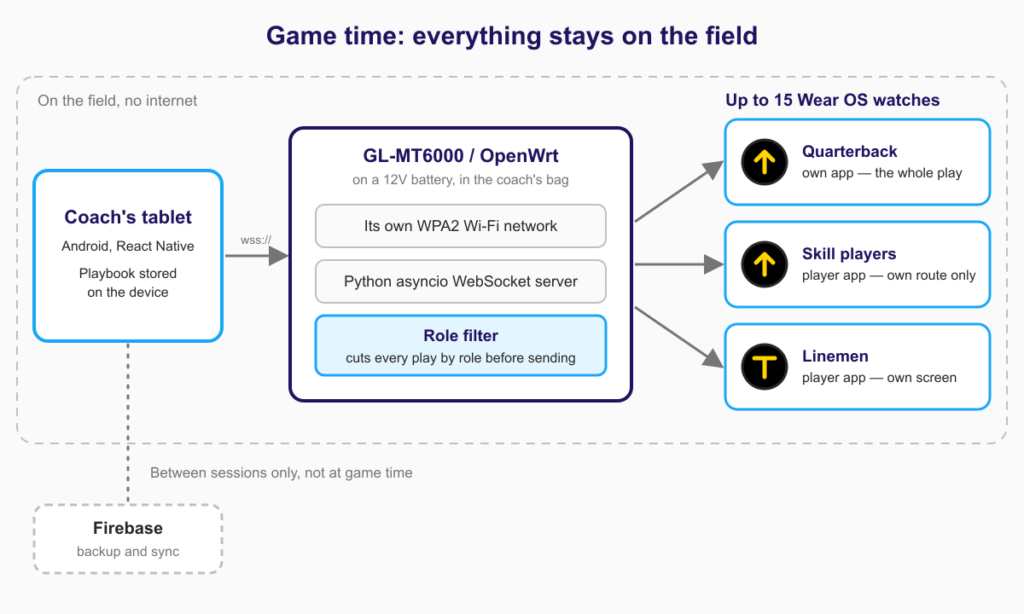
An “offline mode” bolted onto a cloud app is a bad idea; something always breaks where the two modes meet. GridSync doesn’t rely on any outside service during a game. On the field there are three things:
- A compact router in the coach’s bag: a GL.iNet GL-MT6000 (Flint 2) running OpenWrt, powered from a 12V battery — its input is 12V on a barrel jack, not USB, so a typical USB power bank cannot power it directly. It is an ordinary consumer Wi-Fi 6 router, not ruggedised hardware: quad-core ARM, 1 GB of RAM and 8 GB of eMMC, which is why a Python asyncio server can live on it at all, and a draw GL.iNet publishes as under 20W, which is what makes a modest battery practical for a match. In our setup it covers the 60-120 m of field we need, runs its own WPA2 network separate from any stadium network, and you manage it over SSH with a key. One caveat we’d state to anyone copying this: GL.iNet rates it 0-40 degC and lists no IP rating, so it travels in the bag, out of the sun, not clipped to a fence.
- A WebSocket server written in Python with asyncio, running on that router.
- The coach’s tablet and the players’ watches, which connect to the server. No packet leaves the field.
We use WebSocket rather than HTTP polling because the coach needs to push a play to every watch at once, without waiting for a polling cycle. The play packet is compact JSON, the role filter runs on the server before sending, and each watch gets only its part.
If a player walks out of range and comes back, the watch reconnects within a couple of seconds and gets the next play as normal. The last play stays on screen the whole time.
What happens when a watch misses a play?
That last sentence hides the one real hazard in the design. A watch that’s off the network when a play goes out doesn’t get that play. It keeps showing the previous one, which looks just as valid as a current one. On a normal down that costs little, because the player looks to the huddle. With the “change, look again” pattern it costs more, because the whole point of that buzz is that the previous play is wrong.
We accept that loss:
- the broadcast carries a
play_id, but not a sequence number, so a watch can’t tell it’s behind; - the server doesn’t resend the current play when a watch reconnects; the watch waits for the next broadcast;
- the coach’s tablet shows a list of watches, and a watch switches to Offline after 30 seconds without a heartbeat. Short dropouts don’t show up there. That’s fragile under hurry-up and acceptable on a normal down.
MQTT’s retained messages, persistent sessions and last-will would close this gap. They are the honest reason to switch on a bigger fleet.
WebSocket vs MQTT: which do you use to send to many small devices on a local network?
The short version: use MQTT if your fleet is large, your devices constantly send data back, or your radio is genuinely unreliable. That’s what MQTT is built for, and it can run over WebSocket too. We went the other way on GridSync. One reason decided it; three others were honest trade-offs rather than knockouts.
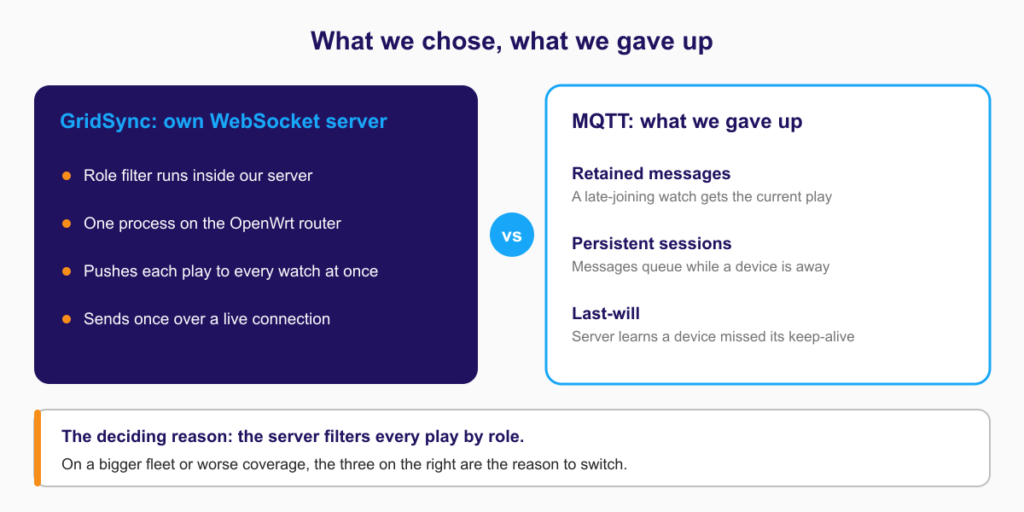
The reason that decided it: our server is more than a relay. Every play packet is filtered by role before it goes out, so our own logic sits in the middle of the message path. With a broker, you either publish one topic per role, which only moves the filtering into whatever publishes to those topics, or you filter before publishing anyway. Then the broker is just carrying messages our own process has already prepared. Running our own server kept the filter where the decision is made.
The three smaller reasons:
- Operations. We preferred one process to a broker plus our own code on the same OpenWrt box. But Mosquitto is a small C daemon already packaged for OpenWrt, so this was a preference, not a technical win.
- Delivery. Resending a play just overwrites the same play on the watch, so sending once over a live TCP connection without confirmation is enough for us. But MQTT’s QoS 0 also sends once without confirmation, so this describes what we need rather than separating the two.
- Client libraries. React Native has a WebSocket client built in. Android doesn’t, so the watches use OkHttp. That’s one dependency, and MQTT would have needed one too.
What we gave up, and would want back on a bigger system. MQTT has three features we don’t:
- retained messages, so a watch that joins late gets the current play straight away;
- persistent sessions, so messages queue up while a device is away;
- last-will, which tells the server when a device has missed its keep-alive.
All three map directly onto the dropped-watch problem above. That’s the honest argument against our choice. On a bigger fleet, or on a field with worse coverage, they would be the reason to switch.
If you’re making a similar call between WebSocket and WebRTC’s data channel, here’s how we decide when the data channel is the wrong carrier.
Facing a similar transport decision on your own fleet? Bring it to a 30-minute call. The details are at the end of this article.
Where does the playbook live: on the field or in the cloud?
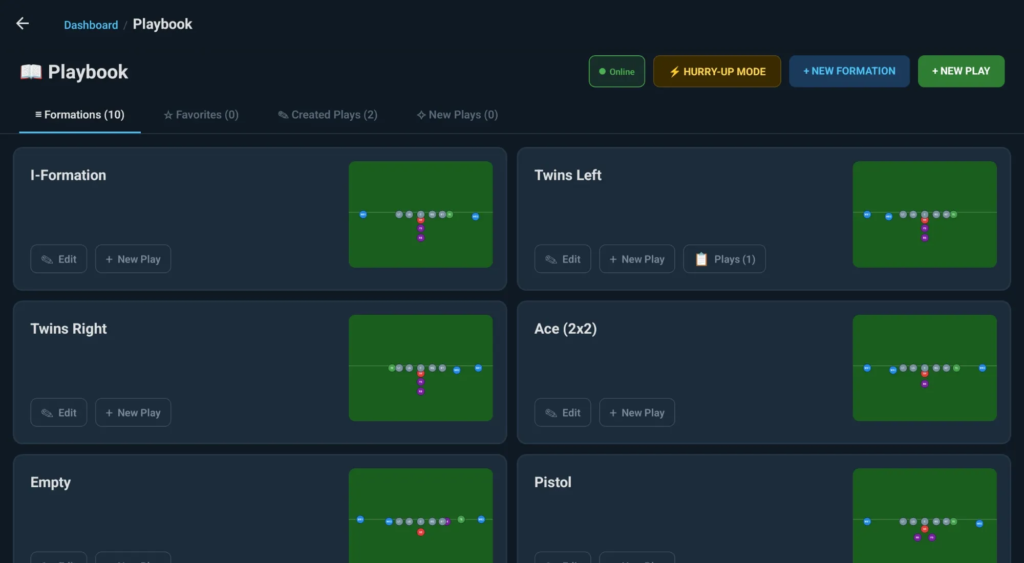
The playbook and settings live on the tablet. Backup and sync between the coach’s devices go through Firebase automatically whenever the tablet is online (at home, or at the club after the match). Change the playbook on the tablet and the change goes to the cloud the next time it connects. Sign in on a new tablet and everything is there. None of this is needed on the field, because the full playbook is already on the tablet and works without a network.
How do you ship updates to watches without the app stores?
Google Play and the App Store are awkward here. The watches aren’t always managed devices, store release cycles are slow, and the coach shouldn’t have to be a device administrator. So GridSync has its own update loop:
- new watch and tablet builds are published to GitHub Releases as APKs;
- the apps check for a new version on their own, download it and offer a one-tap update;
- test builds go out through Firebase App Distribution, and production builds through the in-app updater.
Checking for and downloading updates both need internet. During a game the field router has no internet connection, so the updater does nothing. It only runs when the devices are back on a connected network between sessions.
This only works because every GridSync device runs Android: Wear OS on the wrists and Android on the tablet. An iPad would rule it out completely. An app can’t install another iOS app itself, so you’d be back to TestFlight or a device-management system.
Skipping the stores has costs, and we name them:
- Protecting the signing key becomes our job instead of the store’s. On a bigger fleet it’s the first thing we would tighten.
- There’s no signature check inside the app. The updater saves the APK to cache and opens the system installer. Android’s rule that an update must be signed with the same certificate is the only safety net.
- No staged rollout, no rollback. When it has internet, every watch checks the same release record every 30 seconds. A broken release has to be fixed with a higher
versionCode.
For a fleet one club uses during a season, we judged that acceptable. At larger scale we’d add signature checks inside the app and a way to release to a few devices first.
What carries over beyond football?
GridSync is built for one sport and one client, but most of its decisions aren’t about football: screens built for sun and gloves, a screen that follows the job rather than one screen for everyone, vibration as its own channel, a local network on a self-contained router, everything local during play and cloud sync only between sessions. That’s a type of problem, not a sport. The same constraints show up in:
- warehouse logistics: workers wearing devices, unpredictable coverage;
- field medicine: ambulance crews and mobile teams;
- industrial inspection rounds;
- team sports and fitness beyond football.
Example: a warehouse picker. Swap the coach’s tablet for a supervisor’s console and the play for a pick list, and almost every decision stays the same:
- the picker’s hands are full, so the screen must be readable at a glance and confirming must be a single large tap;
- Wi-Fi drops in aisles the site survey said were fine, so the task has to be on the watch before the worker walks into the dead zone. That’s why we push the play rather than waiting for the watch to ask;
- each worker gets their own tasks and nobody else’s, which is the same role filter;
- vibration tells a worker a new task has arrived while they’re looking at a pallet, not their wrist.
What changes is how sure you need to be that every message arrives. Missing a football play now and then is acceptable, because the next whistle resets everyone. A missed warehouse pick means a short shipment and a return. There the MQTT trade-off flips: retained messages, persistent sessions and last-will stop being what we gave up and become the reason to choose MQTT.
Frequently asked questions
Are smartwatches allowed for play calling in high-school football games? It depends on the state. In Texas, the UIL approved one-way wearables such as watches and wristbands for in-game play calls for the 2025 season, with no voice transmission, and calls must be sent from the press box, not the sideline. Check your own state association’s rules before using any device in a game.
Can Wear OS watches get real-time updates without an internet connection? Yes. In GridSync the watches connect to a local Wi-Fi network created by an OpenWrt router in the coach’s bag and receive plays over WebSocket from a server running on that router. Nothing during a game depends on the internet. The cloud is used only between sessions: to back up and sync the playbook and to deliver app updates.
How fast can a play reach a team’s watches over WebSocket? On the field, from the coach’s tap on the tablet to the last of up to fifteen Wear OS watches vibrating takes under a second, consistently.
Should I use WebSocket or MQTT to send messages to many devices on a local network? Use MQTT for large fleets, devices that send a lot of data back, or unreliable radio: its retained messages, persistent sessions and last-will handle devices that drop off. Use your own WebSocket server when your logic has to run in the middle of the message path, as GridSync’s role filter does.
What happens if a watch is out of range when a play is sent? It misses that play and keeps showing the previous one. When it reconnects, it waits for the next broadcast. The coach sees watches that have been silent for 30 seconds as Offline. Shorter dropouts aren’t flagged, which is the main trade-off of not using MQTT.
Can you update Wear OS apps without Google Play? Yes, if every device runs Android. GridSync publishes APKs to GitHub Releases and between sessions the apps check for new versions and offer a one-tap update. The cost is that we look after the signing key ourselves and have no staged rollout or rollback.
Building something with the same constraints?
If you’re building a wearable that has to work in bad conditions, a system that can’t rely on the internet while it runs, or something that sends to many small devices over a local network, book a free 30-minute call.
Bring the specific problem you’re stuck on: WebSocket vs MQTT, Wear OS battery life with a constant connection, OpenWrt server sizing, or offline-first architecture. We’ll test it against what we did here. No slides, no pitch.
More on how we build this kind of system: mobile development at Trembit.
About the author
Dmytro Yekymov is a senior software engineer at Trembit, with around fifteen years building and running production systems — backends in Node.js and PHP, and, on GridSync, Wear OS and the offline-first field stack described above. He works from Kyiv.