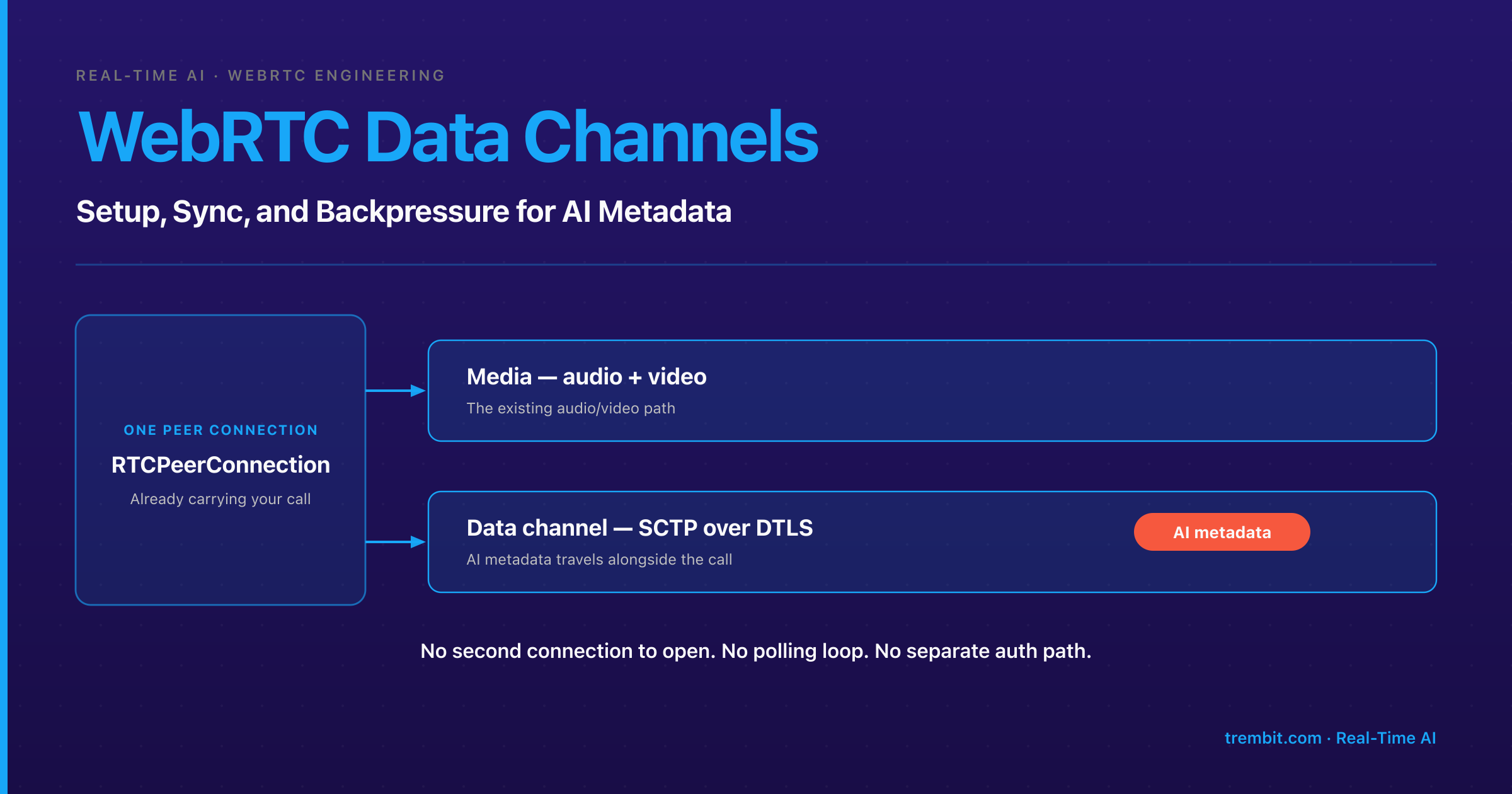
A WebRTC data channel (RTCDataChannel) is a bidirectional, low-latency channel for arbitrary application data that runs on the same peer connection already carrying your audio and video: “Non-media data is handled by using the Stream Control Transmission Protocol (SCTP) encapsulated in DTLS” (RFC 8831). That makes it the natural carrier for AI metadata travelling beside a live stream — inference results, captions, application state — with no second connection to open, no polling loop, and no separate auth path.
This guide is about the carrier itself: how to set a channel up, how to pick a reliability mode, where the real message-size ceiling is, how to keep messages aligned to the right video frame, how to behave when the network tightens, and when the data channel is the wrong tool entirely. AI metadata is the running example, but the mechanics are identical for translated text, bid state, or sensor telemetry.
Our guide to delivering AI analytics metadata back to the client in sync with the video covers the analytics-specific pattern, then stops deliberately: “Beyond that, the general mechanics of data-channel setup, message framing, congestion behavior, and A/V-to-data sync are a topic in their own right — and not analytics-specific — so this guide stops here rather than re-deriving them.” This is that topic.
Key takeaways
- A data channel runs over SCTP encapsulated in DTLS on the same peer connection as your media — not a separate protocol stack, not a separate connection to authenticate (RFC 8831)
ordered,maxPacketLifeTime, andmaxRetransmitsare the three reliability knobs.ordereddefaults totrue, and the last two are mutually exclusive — set both and the browser throws aSyntaxError(MDN —createDataChannel())- The “16 KB cross-browser limit” is folklore. When
max-message-sizeisn’t negotiated in the SDP, “a default value of 64 kilobytes is assumed” (MDN, citing RFC 8841)- Timestamp every payload with the source frame’s media time, not wall-clock send time — that’s what lets a late message re-align to the frame it describes instead of the frame currently on screen
bufferedAmountplus thebufferedamountlowevent is the built-in backpressure signal, but it “only includes data buffered by the user agent itself” — it does not tell you what is in flight on the wire (MDN)- Sometimes the answer is “don’t.” On a live horse-auction build, Trembit ran bidding on WebSockets with server-side sequencing, because bid order needs a server as arbiter of truth; a data channel would have been the wrong carrier — the kind of call our WebRTC AI work opens with
Already decided on the data channel and just want the call? Jump to the reliability-mode and “wrong carrier” sections. Debugging captions on the wrong frame, or messages piling up under load? The sync and congestion sections read on their own. And if you’re here for the architecture decision rather than the API — whether this data should ride the peer connection at all, or a separate WebSocket — “When is the WebRTC data channel the wrong carrier?” answers that on its own, with a real build that made that call.
What is a WebRTC data channel, and how do you set one up?
You create a data channel on an existing peer connection with pc.createDataChannel(label, options). There’s no separate handshake to manage: the channel rides the DTLS/SCTP association the peer connection already established for media. Two negotiation paths, and the choice matters more than it looks.
In-band (the default, negotiated: false). One side calls createDataChannel(), the browser handles the channel-open protocol, and the remote side receives a datachannel event carrying the channel object. Right default for almost everything: the ends stay in sync automatically and you never manage channel IDs.
Pre-negotiated (negotiated: true). Both sides call createDataChannel() with the same explicit id and no in-band open message is exchanged (MDN) — useful when the channel must be usable the moment the transport is up, at the cost of owning ID assignment yourself.
Treat the label as a routing convention: one channel per data type — ai-events, captions, control — giving you per-type reliability settings, per-type rate limits, and a dispatch key that isn’t buried in your payload. In congestion terms it buys you less than engineers assume, for reasons the backpressure section covers.
One gotcha that catches multi-party builds: a data channel is scoped to a peer connection, not to a room. In a P2P call it reaches your one peer. In an SFU-routed call it reaches the SFU and nothing further — SFUs don’t fan data-channel messages out to other participants unless that relay is explicitly built and enabled. If your AI metadata has to reach everyone in the room, someone writes that fan-out. Decide it before the first line of WebRTC development work, not after.
Reliable, partially reliable, or unreliable — which mode should you choose?
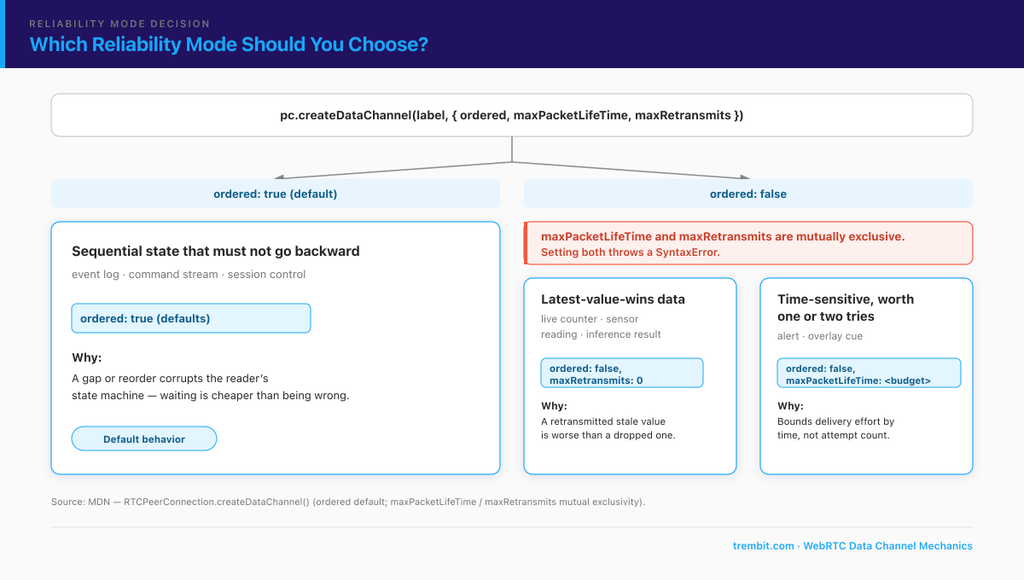
Three options in RTCDataChannelInit control delivery semantics, and the defaults are TCP-like: reliable and ordered.
ordered— whether messages must arrive in the order sent. Default:true(MDN)maxPacketLifeTime— a millisecond budget for retransmission attempts before the message is abandoned.maxRetransmits— a cap on retransmission attempts.
maxPacketLifeTime and maxRetransmits are mutually exclusive. Set both and createDataChannel() throws a SyntaxError — only one may hold a non-null value (MDN). A five-minute bug the first time, and a production incident the second time, when both arrive through an options object built from environment variables.
| You’re sending | Config | Why |
|---|---|---|
| Sequential state that must not go backward — an event log, a command stream, session control | ordered: true (defaults) | A gap or a reorder corrupts the reader’s state machine; waiting is cheaper than being wrong |
| Latest-value-wins data — a live counter, a periodic sensor reading, a per-frame inference result | ordered: false, maxRetransmits: 0 | A retransmitted stale value is worse than a dropped one; the next message supersedes it anyway |
| Time-sensitive data that’s worth one or two tries but useless late — an alert, a transient overlay cue | ordered: false, maxPacketLifeTime: <your budget> | Bounds delivery effort by time, which is what actually matters, rather than by attempt count |
The default is where most teams go wrong with AI metadata. Reliable-ordered means a lost packet stalls everything queued behind it until it’s retransmitted — so a channel emitting inference results many times per second will, on a lossy link, deliver a burst of stale payloads at once instead of the current one on time. If the next message makes the previous one irrelevant, ordered delivery is charging you latency for a guarantee you don’t want.
How big can a message be, and when should you chunk it?
Start by discarding a widely repeated number. “16 KB is the safe cross-browser maximum” is folklore. It comes from a real line in RFC 8831, but not the one people think — the RFC’s guidance is about fairness between channels: “As long as message interleaving is not supported, the sender SHOULD limit the maximum message size to 16 KB to avoid monopolization” (RFC 8831). That’s a don’t-hog-the-association rule, and it’s one of two reasons so many older WebRTC codebases chunk at 16 KB. The other is historical implementation reality: browser SCTP stacks of that era had their own lower ceilings and inconsistent behaviour on large messages, so 16 KB was the figure that worked everywhere. Both reasons were sound at the time. Neither makes 16 KB the current spec-level answer.
The current ceiling is different. Maximum message size is negotiated with the max-message-size SDP attribute from RFC 8841, and “if the max-message-size attribute is not present in the SDP, a default value of 64 kilobytes is assumed” (MDN). A value of 0 declares the endpoint will take any size, bounded only by memory. So design against 64 KB unless you control both endpoints and have confirmed the negotiated value.
The monopolization warning still applies, and it’s the real reason to chunk: “Without message interleaving (as defined in RFC 8260), sending a large message on one data channel can cause head-of-line blocking, which in turn can negatively affect the latency of messages on other data channels” (MDN).
Practical rule: anything routinely larger than a few kilobytes — a full frame’s worth of detections, a batched transcript, a model snapshot — gets chunked client-side with your own sequence header and reassembly, on its own channel. Keep the hot path small and frequent. Don’t park a 40 KB batch in front of the caption your user is waiting for.
How do you keep data-channel messages in sync with the video?
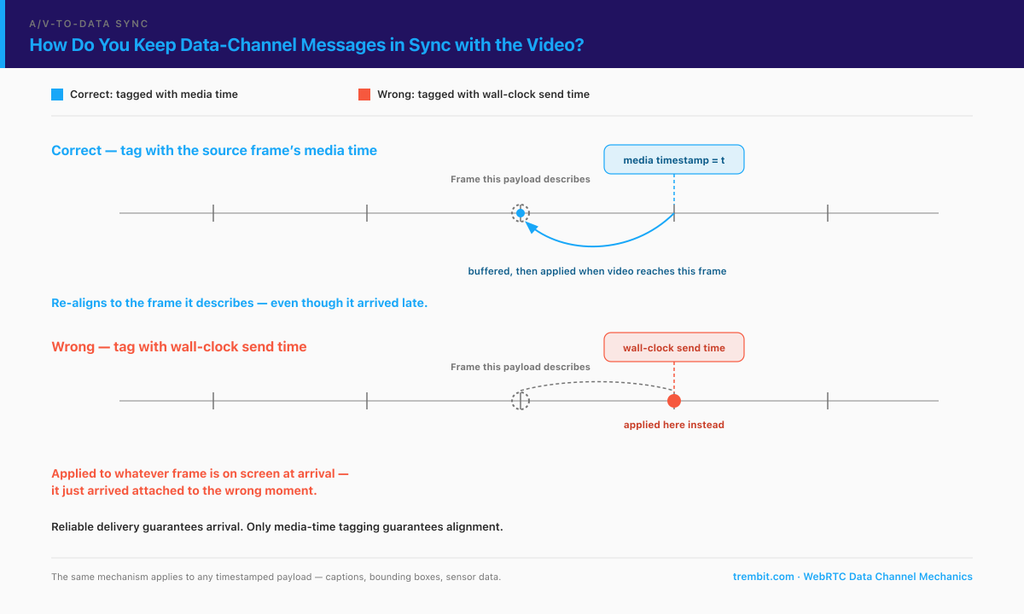
The failure looks like this: your bounding box lands on the frame after the one it describes, or your caption arrives half a beat ahead of the speaker. Nothing errored. The data was correct. It just arrived attached to the wrong moment.
The root cause is using wall-clock send time as the reference. Media and metadata take different paths with different delays. The video frame goes through encode, network, jitter buffer, decode, render. The metadata goes through inference, serialisation, SCTP, and a JavaScript event handler. Those delays are neither equal nor stable — they drift with jitter, CPU load, and inference time. “Sent at 10:42:03.120” tells the receiver nothing about which frame the model was looking at.
The fix is to tag every payload with the media time of the source frame — the same timeline the video track’s frames are presented against — and to make the receiver, not the sender, decide when to apply it. The receiving pattern has three parts:
- Buffer on arrival, keyed by media timestamp. Don’t render on receipt. A message is a statement about a moment, not a command to act now.
- Apply when the video’s presentation time reaches the payload’s timestamp. The video track is the clock; the metadata follows it.
- Have an explicit late-arrival policy. When a payload’s frame has already passed, you either drop it, clamp it to the current frame, or hold it and re-align on the next seek. Pick one deliberately — the implicit default, “render whatever just arrived,” is what produces boxes trailing a moving object by a frame or two.
This is also why turning up reliability doesn’t fix sync. Reliable-ordered delivery guarantees a payload eventually arrives in order; it guarantees nothing about arriving in time to be useful. Ordering and alignment are different properties, and only the second one is visible to your user.
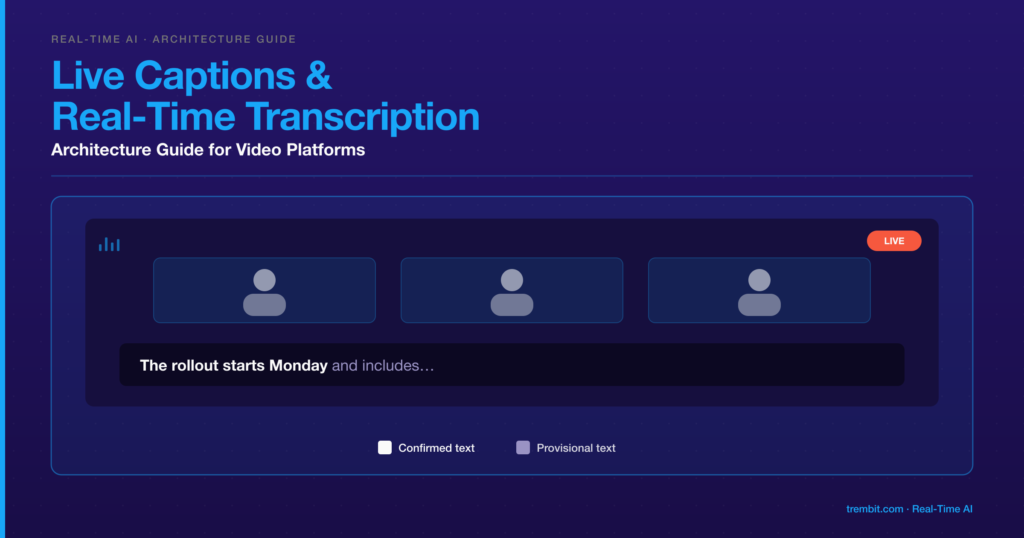
The same mechanism carries any timestamped payload. In real-time translation, translated captions ride the data channel as timestamped text without touching the audio path — same buffer-and-apply pattern, different payload.
How do you handle congestion and backpressure without silently losing data?
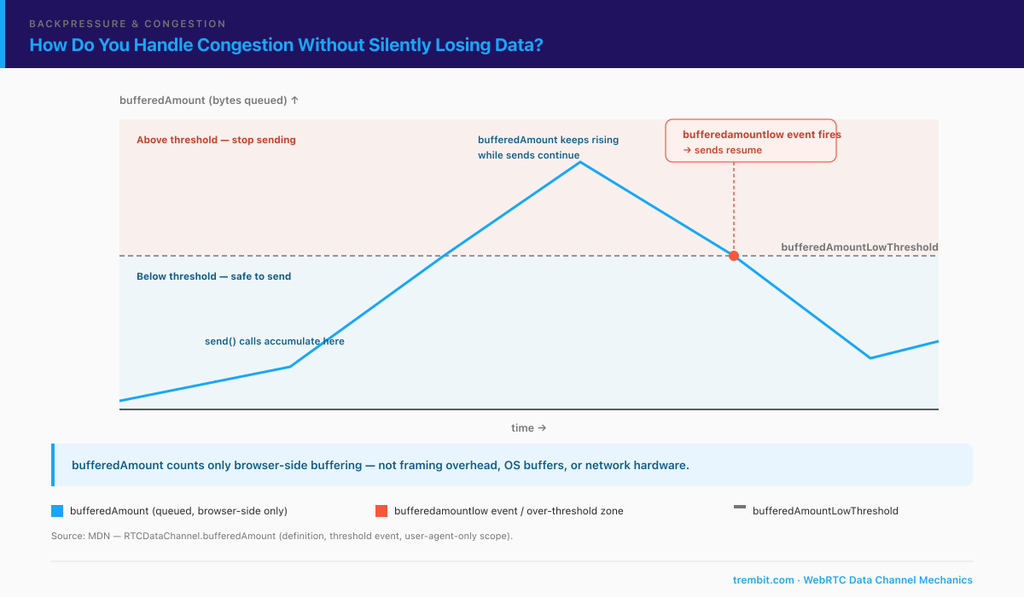
send() does not mean “delivered.” It means “queued.” The browser buffers outbound data automatically, and your only visibility into that queue is bufferedAmount — “the number of bytes of data currently queued to be sent over the data channel” (MDN).
The flow-control signal is threshold-driven: set bufferedAmountLowThreshold, and “whenever this value decreases to fall to or below the value specified in the bufferedAmountLowThreshold property, the user agent fires the bufferedamountlow event” (MDN). The pattern: check bufferedAmount before enqueuing more, stop sending above your threshold, resume on bufferedamountlow rather than on a timer.
Now the nuance almost everyone misses. bufferedAmount “only includes data buffered by the user agent itself; it doesn’t include any framing overhead or buffering done by the operating system or network hardware” (MDN). It measures your backlog, not the wire. A bufferedAmount of zero doesn’t mean the peer received anything — it means the browser handed everything off. Treat it as a signal to stop over-producing, never as a delivery receipt. If you need to know a message landed, the peer has to tell you.
Separate channels give you less isolation than you’d expect. Every data channel on a peer connection shares one SCTP association, and without message interleaving a large message on one channel delays messages on the others (RFC 8260, quoted above). “Put bulk transfers on their own channel” is real advice — it keeps the hot path clean and independently rate-limited — but it is not a bulkhead. The bulkhead is keeping big messages small in the first place.
Finally, reliability mode is a congestion strategy. An unordered channel with maxRetransmits: 0 or a short maxPacketLifeTime lets stale data die instead of queuing behind a retransmit. On a bad network that channel degrades by dropping frames nobody would have used; a reliable channel degrades by delivering a burst of history. Decide which failure mode your product can live with before you meet it.
If you’re weighing that trade-off on a live system right now, the architecture review at the end of this piece is built for exactly this conversation.
How has Trembit built this in production?
Two deliveries are worth naming, because between them they show both halves of the decision — and neither is the tidy “we used the data channel and it was great” story.
Pain Cave Live is an indoor-cycling platform on a Janus WebRTC SFU, where each rider’s power, cadence, and heart-rate readings have to line up with their live video feed across a multi-participant group ride. The conclusion from that build is the one worth carrying into your own: “Video sync isn’t solved by WebRTC alone — the data layer is where immersion lives or dies.” The mechanism was a timestamp-alignment pipeline tagging incoming sensor data with media-timeline references, so a rider’s on-screen power spike, the leaderboard, and the coaching overlay move together. Sub-second alignment was a stated requirement going in, not a result discovered afterwards — the build was scoped against the threshold that even half a second of drift breaks the immersion, because at that point the leaderboard stops feeling trustworthy and the session stops feeling live.
State the next part precisely, because it’s the useful part: that data rode WebSocket channels running alongside the media streams, not RTCDataChannel. The sync discipline is carrier-independent — media-time tagging, receiver-side alignment — and the carrier was chosen for the build’s own reasons. Pairing a WebSocket data path with SFU-routed media is a normal production shape, not a compromise.
THFY Horse Auction is the other half: a live-video auction where the real-time bidding engine runs on WebSockets with server-side sequencing that guarantees bid-order integrity regardless of network jitter. A data channel would have been the wrong carrier there — the next section says why.
When is the WebRTC data channel the wrong carrier?
Most content on this API only tells you when to use it. Three cases where you shouldn’t:
When the source of truth has to live on a server. A data channel is peer state in a peer-to-peer pipe: no server-side arbiter, no ordering authority above the two endpoints, no persistence. If a client drops and rejoins, the channel is gone and so is anything that only existed inside it. That’s why THFY’s bids run over WebSockets — an auction needs one server deciding what order bids happened in, anti-sniping logic that extends the closing window when a bid lands in the final seconds. No reliability-mode tuning gives a peer connection those properties, because they aren’t transport properties.
When you need to reach anything that isn’t in the call. A backend analytics store, a moderator dashboard, a compliance archive, a client that isn’t a WebRTC peer — the data channel reaches peers on the peer connection and nowhere else. If your metadata has a second consumer, it needs a second path anyway.
When delivery must survive the receiver being offline. There is no store-and-forward. A message sent while a peer is reconnecting isn’t queued — it’s gone. If “the user must eventually see this” is a requirement, this is the wrong place for it.
These aren’t competing choices. Plenty of production systems run both — a server channel for state that must persist and fan out, the data channel for the low-latency in-call slice that only matters while the call is happening. The question isn’t which carrier is better; it’s which guarantees each piece of your data actually needs.
Frequently asked questions about WebRTC data channels for AI metadata
Is a WebRTC data channel the same as a WebSocket?
No. A WebSocket is a TCP connection between a client and a server, always reliable and ordered, and it survives independently of any media session. A data channel is SCTP over DTLS between peers on an existing peer connection, with configurable reliability and ordering, and it dies when that peer connection dies. Different transport, different lifecycle, different guarantees — and the “wrong carrier” section above walks through which of those differences actually decides the choice.
What’s the maximum message size for a WebRTC data channel?
Design against 64 KB. That’s the value assumed when the max-message-size SDP attribute isn’t present (MDN, citing RFC 8841). You can negotiate higher when you control both endpoints, but chunk large payloads anyway to avoid blocking your latency-sensitive messages behind them. The widely quoted 16 KB figure is RFC 8831’s anti-monopolization guidance, not a browser cap.
How do I keep data-channel messages synchronized with video?
Tag each payload with the media timestamp of the source frame — never wall-clock send time — then buffer payloads on the receiver and apply each one when the video’s presentation time reaches its timestamp. Define explicitly what happens to a payload whose frame has already passed.
Can I use a data channel in a multi-party (SFU) call?
Yes, but not the way people expect. The channel is scoped to a peer connection, so in an SFU topology it reaches the SFU. Relaying messages on to other participants isn’t automatic — the media server has to support it and you have to enable and design around it. Plan the fan-out before you plan the payload.
The data channel gets you most of the way for free. What’s left is where builds quietly degrade: the reliability mode that was fine in the office and wrong on cellular, the sync that holds at two participants and drifts at twelve, the backpressure nobody wrote because send() never threw.
Book a free 30-minute architecture review — bring what you’re sending, your call shape, and the guarantees you need, and we’ll tell you which carrier and reliability mode fit, including when the answer is “not the data channel.” No deck, no pitch. Start at AI inside live video and voice.