By the Trembit AI Engineering Team · Last updated: 2026-07-08
An AI admin co-worker is an AI agent that reads incoming documents and requests, makes a judgment call on the routine cases, and hands anything consequential to a person. The pattern is read → decide → act, with a human on anything that matters. It sits in the broader agentic AI and AI workflow automation conversation, but it is not a chatbot — a chatbot answers questions, while a co-worker does the work and updates your systems. It is also not classic RPA, which follows rigid rules on clean input and stalls the moment a case needs interpretation.
Key takeaways
- An AI admin co-worker follows a read → decide → act pattern, with a human checkpoint on anything consequential.
- The best candidate tasks are high-volume, pattern-following, and low-to-medium stakes — not one-off or highly ambiguous work.
- Grounding the agent in your own documents and records (RAG) is the biggest lever against hallucination — bigger than which model you pick — but it reduces the problem rather than solving it, so retrieval quality needs its own ongoing evaluation.
- Human-in-the-loop is a design decision set at the confidence-threshold level, not a blanket “review everything” rule — it should scale down as the agent earns trust.
- Guardrails and an audit trail (what the agent saw, decided, did, and who approved it) are what make an agent safe in a regulated workflow — not optional add-ons.
- Start with one narrow, well-bounded pilot workflow and a measurable metric — not a general-purpose “do everything” agent.
Most AI agent projects that fail don’t fail in the demo — they impress everyone in the demo and never reach production. Closing that gap is the engineering discipline this playbook is about, and it’s the work Trembit is most often called in to do: taking an agent that worked once on a slide and making it survive a real, regulated back office. This playbook walks through the build in sequence: pick the right tasks, design the agent, put humans in the loop at the right points, add guardrails and an audit trail, then measure and expand. It is the companion to our decision guide, which covers what AI agents can and can’t automate before you commit to a build — read the full picture of what AI agents can and can’t automate . This piece is the how.
Which repetitive back-office tasks are actually worth turning into an AI admin co-worker?
The most common way an admin-automation project stalls is at the very first step: the team either tries to automate everything at once, or picks a task that looks repetitive but is actually full of judgment and exceptions. Both fail for the same reason — the work doesn’t fit the shape an agent is good at.
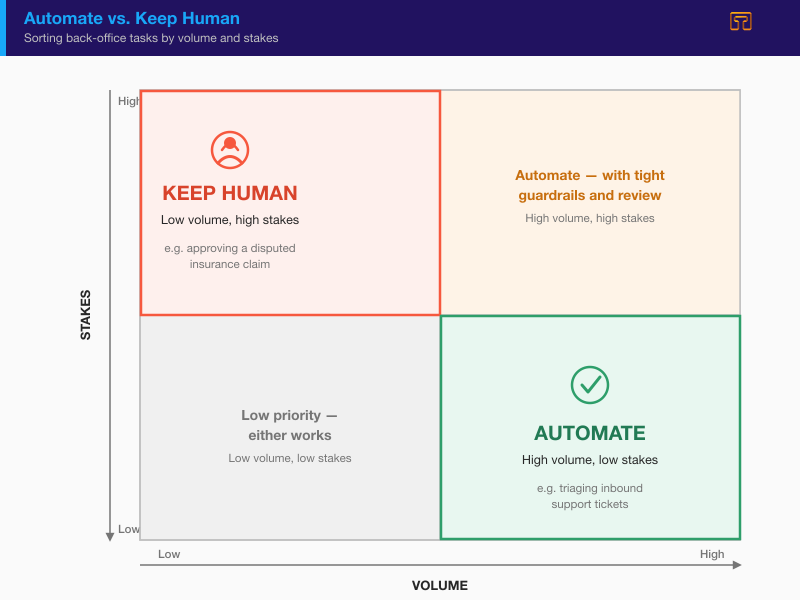
There’s a simple test. Run every candidate task through the read → decide → act pattern: Is there a document or request to read? Is there a decision — a classification, a routing call, a risk score — to make? Is there an action to take, like drafting a reply or updating a record? A task that has all three, repeats often, and doesn’t put a large irreversible decision in the agent’s hands is a strong candidate. A task that’s mostly negotiation, tacit judgment, or one-off reasoning is not — no matter how much time it eats.
This is the same discipline that runs through how Trembit builds AI agents for back-office automation: scope narrow, ground in real data, keep a person on anything that matters.
The four signals that make a task a good automation candidate
Four properties, in combination, separate a good first candidate from a trap:
- Volume. The task should be high-volume and repetitive. Automation earns its keep on the hundredth case, not the first — a task that happens twice a month rarely justifies the engineering.
- Input structure. The input should be structured or semi-structured — forms, standard fields, recurring templates, even messy scanned PDFs — not free-flowing negotiation or emotionally charged correspondence. “Messy but recurring” is fine; “genuinely open-ended” is not.
- Reversibility. The action the agent takes should be low-stakes or easily reversible — a draft, a tag, a routine record update — not a financial commitment or a clinical decision that’s hard to walk back.
- Groundedness. An answer has to actually exist somewhere retrievable — in your policies, records, or past cases — so retrieval-augmented generation (RAG) can find it. If the right answer lives only in a senior colleague’s head, an agent can’t ground itself in it.
Which tasks to automate vs. which to keep human — a reference table
Use this table to sort your back-office work before you write a line of code. Each row is one signal; read across to decide whether an agent should handle a task or a person should keep it.
| Signal | Automate (agent handles it) | Keep human | Worked example |
|---|---|---|---|
| Input structure | Structured or semi-structured — forms, standard fields, recurring templates | Free-form, contradictory, or emotionally charged input | Extracting terms from a standard renewal form → automate; interpreting an angry, ambiguous complaint email → keep human |
| Volume | High-volume, repetitive, follows a consistent pattern | Low-volume, one-off, non-repeating | Triaging hundreds of inbound support tickets by category → automate; a bespoke partnership request → keep human |
| Reversibility | Low-stakes, easily reversible (a draft, a tag, a routine update) | High-stakes, hard-to-reverse (a financial commitment, a clinical or legal decision) | Drafting a routine acknowledgement for review → automate; approving a disputed insurance claim → keep human |
| Confidence | Agent’s confidence score is consistently high on validated cases | Confidence is borderline, or the case is an edge case / exception | A clean, complete intake document scored with high confidence → automate; a form with a missing or contradictory field → keep human |
| Regulatory weight | Routine administrative step with clear precedent | A regulated decision requiring named human accountability | Logging and routing a prior-auth request → automate; the clinical approval itself → keep human |
| Data availability | Grounded in retrievable documents/records (RAG works) | Requires tacit knowledge or judgment not captured anywhere | Answering from a documented policy → automate; a call that depends on unwritten institutional context → keep human |
The pattern across every row is the same: the agent handles the routine, the person handles the judgment. When you’re unsure which side a task falls on, that uncertainty is itself the answer — keep it human until the data tells you otherwise.
How do you design an AI workflow automation architecture for an admin co-worker?
Once you’ve picked a task, the architecture is where a demo becomes something that survives production. The word “agent” is easy to demo and hard to ship — the difference is entirely in the engineering around the model. Three steps carry most of the weight.
Step 1 — scope one workflow, not a general assistant
A narrow agent that reliably handles one workflow beats a broad one that half-handles ten. Resist the pull toward a general-purpose “office assistant”; it’s the fastest route to an agent nobody trusts. Pick a single workflow — say, inbound renewal processing or first-line ticket triage — and define what “done right” looks like and the metric you’ll judge it by (volume handled, hours saved, turnaround time) before anyone writes code. That definition is also your pilot’s go/no-go bar later. Scope is not a formality here; it’s the decision that determines whether the rest of the build has a target to hit.
Step 2 — ground it in your own data (RAG), not the model’s general memory
A language model on its own reasons from what it absorbed during training — which is exactly why it can invent a plausible-sounding but wrong answer. Retrieval-augmented generation (RAG) fixes this: at the moment the agent needs to act, it retrieves your actual documents, policies, and records, and reasons from those instead of from general memory. Ask about a renewal, and it pulls the specific contract and the current policy, not a statistical guess about what a contract usually says.
Grounding is the biggest lever against hallucination — bigger than which model you choose — but it shifts the problem more than it solves it. A retriever can return the wrong document at a high similarity score, and the model will then reason confidently from bad context — a failure mode known as “grounded hallucination.” So retrieval quality (how precisely the system finds the right document in your corpus) is a separate, ongoing evaluation problem, not something you set up once. In practice, grounding means putting your documents into a retrieval layer — a searchable index of your own content — and building the agent so that every answer is traceable back to a source it actually retrieved. If it can’t find a grounded answer, that’s a signal to escalate, not to guess.
What this means for your business: the agent answers from your real policies and records instead of guessing from general training data — which is what makes its output defensible — but keeping those answers accurate is an ongoing job, not a one-time install.
Step 3 — give it tools: reading, classification, routing, and write-back actions
An agent that can only talk is a chatbot. What makes it a co-worker is tools — the ability to read a document, classify and triage it, draft a response or a record update, and route the ambiguous cases to the right person. Tool and function calling, along with the Model Context Protocol (MCP), let the agent read and write in your real systems — your ERP, CRM, ticketing, or EHR — through your APIs, with scoped permissions rather than open access. What this means for your business: the agent doesn’t just answer a question and leave the follow-up to a person — it updates the record, drafts the reply, or moves the ticket itself, but only within a fenced set of actions you approve, not free rein over your systems.
This action layer is where integration engineering earns its keep, and where most projects underestimate the work: the model is a commodity, but making it act reliably inside your systems is not. Each tool should do one bounded thing, validate its inputs, and refuse to act outside a defined set of actions. Each write action also needs to be idempotent, so a retried or timed-out call can’t double-process the same case — duplicate records and double-processed renewals from non-idempotent writes are one of the most common ways an agent fails in production. Agents also run on the orchestration layer that routes and monitors agent actions — retrying failed calls, sequencing multi-step work, and recording what happened. When the challenge is mostly about wiring the agent into legacy platforms, that’s connecting an agent to your existing systems, a discipline in its own right.
Where do human-in-the-loop checkpoints actually go — and how do you decide when to intervene?
Most content treats “human-in-the-loop” as a reassuring slogan. In a real build it’s a design decision, made at a specific point in the flow: the confidence threshold. The question isn’t whether a human reviews the agent’s work — it’s which cases a human reviews, and that should be driven by how confident the agent is and how much is at stake.
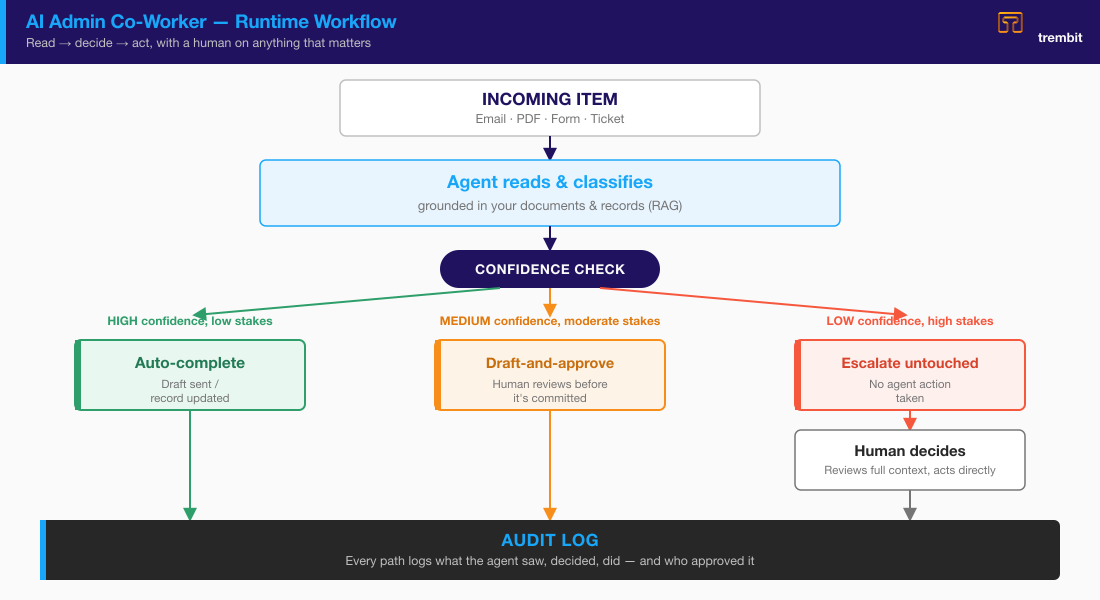
Confidence thresholds — auto-complete, flag for review, or escalate
First, a caveat that decides whether any of this works: the confidence number has to mean something. A model’s raw self-reported confidence is miscalibrated — “I’m 95% sure” is not the same as being right 95% of the time — so a trustworthy score has to be calibrated against real labeled outcomes (a held-out eval set, self-consistency across multiple runs, or a separately scored classifier), not simply asked of the model. Route on an uncalibrated number and the whole three-tier model is standing on sand.
A practical model has two or three tiers:
- High confidence + low stakes → auto-complete with logging. The agent acts on its own and records what it did. Reserve this tier for cases the agent has demonstrably handled well.
- Mid confidence or moderate stakes → draft-and-approve. The agent proposes — a drafted reply, a proposed record change — and a person approves before anything is sent or committed. The agent does the work; the human owns the decision.
- Low confidence or high stakes → full escalation. The agent takes no action at all. It hands the case to a human, untouched, with whatever context it gathered.
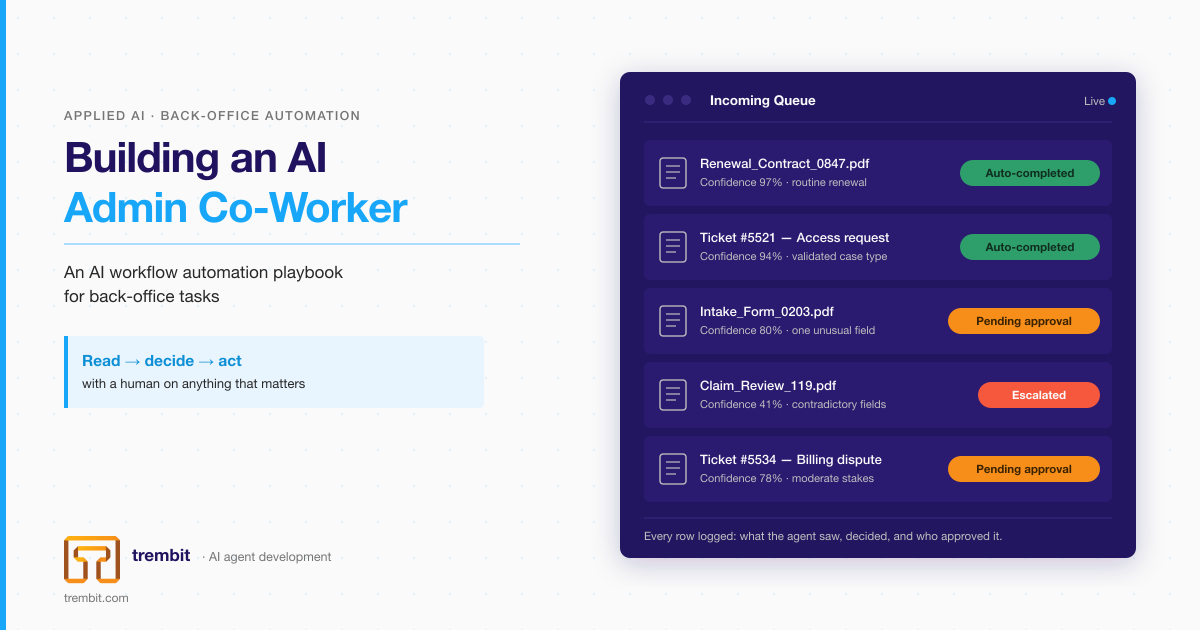
Here’s one item moving through all three, to make it concrete. An inbound document arrives. If the agent classifies it as a routine renewal with very high confidence — for example, a 97% confidence score might trigger auto-completion — it processes it and logs the action. The same document type arriving with, say, 80% confidence and one unusual field gets drafted and queued for a person to approve. A version that’s contradictory or missing a required field is escalated untouched, because acting on incomplete input is exactly the failure mode the loop exists to prevent. (These percentages are illustrative thresholds, not a claim about any specific system’s accuracy — the actual cut-points are tuned per workflow against real cases.)
Draft-and-approve vs. full autonomy — how trust is earned, not assumed
The right starting posture is propose only. The agent drafts and routes while people approve, and you watch how often the humans agree with it. As its track record on that specific workflow proves out, you widen its autonomy deliberately — moving well-validated case types from draft-and-approve into auto-complete. The agent proposes; a person disposes, until you’ve earned enough trust to widen its autonomy deliberately.
This is a phased rollout, not a one-time build decision. Autonomy is something an agent earns on a per-workflow basis, backed by data, and it can be narrowed again just as deliberately if the numbers move the wrong way.
What guardrails and audit trail does a production admin co-worker actually need?
This is the section that separates a demo from something that survives contact with a regulated back office. Grounding and human checkpoints reduce the odds of a bad action; guardrails and an audit trail contain the ones that slip through and prove, after the fact, exactly what happened.
Input validation and output constraints
Guardrails work on both ends of the agent. On the way in, input validation defines what the agent is allowed to read and rejects malformed or out-of-scope inputs before they reach the model — this is also your first line of defence against prompt-injection attacks that try to hijack the agent through the content it processes, a class of risk documented in the OWASP Top 10 for LLM Applications. On the way out, output constraints force the agent’s response into a defined shape — a structured, validated output — and refuse any action outside a fixed, allowed action set. The agent can propose one of the things it’s permitted to do; it cannot invent a new action.
Backing both is a standing eval suite: a set of real, labelled cases the agent is scored against on every change. Evals are what catch a regression before your users do — an agent you can’t measure is an agent you can’t safely ship.
The audit trail — what to log, and why “the AI did it” is never an acceptable answer
Every input the agent saw, every decision it made, every action it took, and who approved it — logged and reviewable. That’s the audit trail, and it maps one-to-one onto the read → decide → act pattern from the top of this piece: you log the read (what it saw and retrieved), the decide (its classification, confidence, and reasoning), and the act (what it did and who signed off).
In a regulated back office this isn’t an optional add-on — it’s the entire point of putting a human in the loop. “The AI did it” is never an acceptable answer to a regulator or an internal risk committee. A proper audit trail lets you replace that with a specific, defensible account: here is what the agent saw, here is why it scored the case the way it did, here is the person who approved the action, and here is when.
What do human-oversight regulations actually require?
Human oversight of AI is increasingly a legal requirement, not just good engineering — and the audit trails and checkpoints above are largely how you satisfy it. Two primary sources are worth knowing at the “what this means for your build” level (this is context, not legal advice):
- The EU AI Act (Regulation (EU) 2024/1689), Article 14, requires that high-risk AI systems be designed so they can be effectively overseen by natural persons while in use — including the ability for a human to interpret the system’s output, decide not to use it, and intervene or stop it. If your admin co-worker touches a high-risk use case as the Act defines it, human-in-the-loop isn’t a design preference; it’s a named obligation. (EUR-Lex, Article 14)
- The NIST AI Risk Management Framework (AI RMF 1.0), a voluntary US framework, treats human oversight, monitoring, and traceability as core to trustworthy AI — its functions call for AI systems whose decisions can be documented, monitored in operation, and traced after the fact. That’s the same audit-trail discipline described above, framed as risk management. (NIST AI RMF 1.0)
The reader’s takeaway is narrow and factual: regulators and standards bodies are increasingly naming human checkpoints and traceability as requirements, so building them in from the start is cheaper than retrofitting them under audit later. What counts as “high-risk,” and whether a given system falls in scope, is a legal question for your own counsel — not something a vendor should assert for you.
How do you measure whether an AI admin co-worker is actually working?
You measure it against the metric you defined in Step 1 — which is why that step comes first. Without a pre-agreed number, “is it working?” collapses into opinion, and a genuinely useful agent can get killed by a vague sense that it “still makes mistakes sometimes.”
The metrics that matter
Four metrics tell you almost everything about an admin co-worker in production:
- Automation rate — the share of volume the agent handles end-to-end versus what it escalates to a human. This is the throughput story.
- Time saved — hours or FTE-time returned to the team, and turnaround time before versus after the agent went live. This is the ROI story.
- Escalation rate — how often the agent hands a case to a human. Not a failure metric; a healthy agent escalates the genuinely hard cases.
- Override rate — how often a human overturns the agent’s proposal when reviewing it. This is the leading indicator: a rising override rate means your confidence thresholds need tuning, or the task has drifted, before it becomes a trust problem.
Watch override rate and escalation rate together. If overrides are low and stable, that’s your signal that specific case types are ready to move from draft-and-approve into auto-complete.
How to run a pilot before you scale
Run one workflow, with a defined success metric, over a fixed pilot window, then make a deliberate go/no-go decision about widening scope. That’s the whole discipline. The pilot’s job is to produce real data on a real workflow — not a slide deck — so the decision to expand is evidence-based rather than hopeful.
This closes the loop back to Step 1: the playbook is a cycle, not a straight line. You scope one workflow, build it, measure it, and only then widen — one proven workflow at a time. Most engagements grow from a single agent into a suite exactly this way.
How does Trembit build AI admin co-workers with human-in-the-loop?
The clearest example of this pattern in production is the leasing-decision platform we built for Eska — one of 50+ real-time and AI systems Trembit has shipped since 2009. The workflow maps almost exactly onto this playbook. The pipeline reads unstructured leasing contracts — different formats and layouts — using Python NLP and OCR, then scores each application for credit risk with an explainable machine-learning model, so a credit analyst can see why a contract scored the way it did rather than facing a black box. From there it follows the same three-tier logic described above: it auto-approves low-risk applications, routes high-risk ones to a human analyst with the risk breakdown attached, and flags borderline cases for review. The whole thing is wired into the client’s Odoo ERP through a Node.js integration layer, with monitoring and retraining built in so accuracy doesn’t quietly drift.
That is read → decide → act in production: the agent handles the routine, the analyst handles the judgment calls, and every decision is traceable. You can read the full account in Eska’s automated leasing-decision pipeline.
The same discipline extends into regulated back offices — healthcare admin, finance operations — where the audit trail matters most. From building compliance-sensitive systems, Trembit brings hands-on HIPAA, GDPR, and KBV experience to that kind of work — the background needed to build an agent to the auditability standard a regulated workflow demands, rather than a guarantee about any particular deployment, which always depends on your own scope and counsel. If you want to see where an agent would fit in your operation, scope an AI agent pilot with our team — one workflow, one metric, a person in the loop from day one.
Frequently asked questions
What is an AI admin co-worker?
An AI admin co-worker is an AI agent that reads incoming documents and requests, makes a judgment call on routine cases, and hands anything consequential to a human — the pattern is read → decide → act, with a person on anything that matters. It differs from a chatbot, which answers questions but doesn’t do the work or touch your systems. It also differs from RPA, which follows rigid, pre-defined rules on clean, structured input and stalls the moment a case needs interpretation.
Which back-office tasks should you automate first?
Start with tasks that score well on four signals: high volume (repetitive, frequent), workable input structure (forms, templates, recurring documents — even messy ones), high reversibility (low-stakes or easily undone actions), and groundedness (the right answer exists in retrievable records, so RAG can find it). In practice, that means picking one narrow, high-volume, low-stakes workflow — like ticket triage or routine document intake — rather than trying to automate a whole department at once.
What does “human-in-the-loop” actually mean in practice?
It means routing each case by the agent’s confidence and the stakes involved, using thresholds. High confidence and low stakes → the agent auto-completes and logs it. Mid confidence or moderate stakes → the agent drafts a proposal and a person approves it before anything is committed. Low confidence or high stakes → the agent takes no action and escalates the case to a human untouched. Human-in-the-loop is that routing decision, not a vague promise that “someone reviews things.”
What’s the difference between an AI admin co-worker and RPA?
RPA (robotic process automation) follows rigid, pre-defined rules on clean, structured input — fast and reliable for deterministic steps, and useless the moment a case needs interpretation or arrives as unstructured text. An AI admin co-worker handles exactly that: it reads messy inputs, makes a judgment call, and decides what to do, including when to escalate. In practice the two work together — the agent handles the ambiguous cases and hands the deterministic steps to RPA or scripts. A good scoping exercise maps which is which.
How do you keep an AI admin co-worker safe and auditable in a regulated back office?
Four layers. Grounding (RAG) so the agent reasons from your real records, not general memory. Human-in-the-loop checkpoints so anything consequential passes a person or a confidence threshold before it’s committed. Guardrails and evals — input validation, output constraints, and a standing test suite that scores the agent on real cases with every change. And an audit trail logging every input, decision, action, and approval. This is also increasingly a legal expectation: the EU AI Act’s Article 14 requires effective human oversight of high-risk AI systems, and the NIST AI Risk Management Framework treats human oversight and traceability as core to trustworthy AI.
How long does it take to build and pilot an AI admin co-worker?
A pilot is deliberately scoped to move fast — one workflow, one clear metric, a fixed window — precisely so it can prove out on real data before you commit to a broader program. The honest caveat on top of that is “scoped, not fixed”: how long it takes depends on how many systems the agent must integrate with and how messy the inputs are. For how we scope and price that kind of engagement, see how Trembit builds AI agents for back-office automation, part of the broader AI development picture.
Start with one workflow
The hard part of an AI admin co-worker was never the model. It’s the engineering discipline around it — grounding it in your real data, giving it scoped tools, putting humans at the right checkpoints, adding guardrails and evals, and logging every decision to an audit trail. Get that discipline right on one narrow workflow, measure it, and expand from proof rather than hope — we don’t ship an agent we can’t measure. If you have a back-office process drowning in repetitive reading and routing, scope a pilot workflow with our team — one workflow, one metric, a person in the loop from day one.