“We’re thinking about upgrading to 4K for our video platform.” That’s what a startup CTO told us last month. His team was planning significant infrastructure investment to support higher resolution streams — more storage, more bandwidth, more server capacity.
Our response surprised him: “What if you don’t need to send 4K at all?”
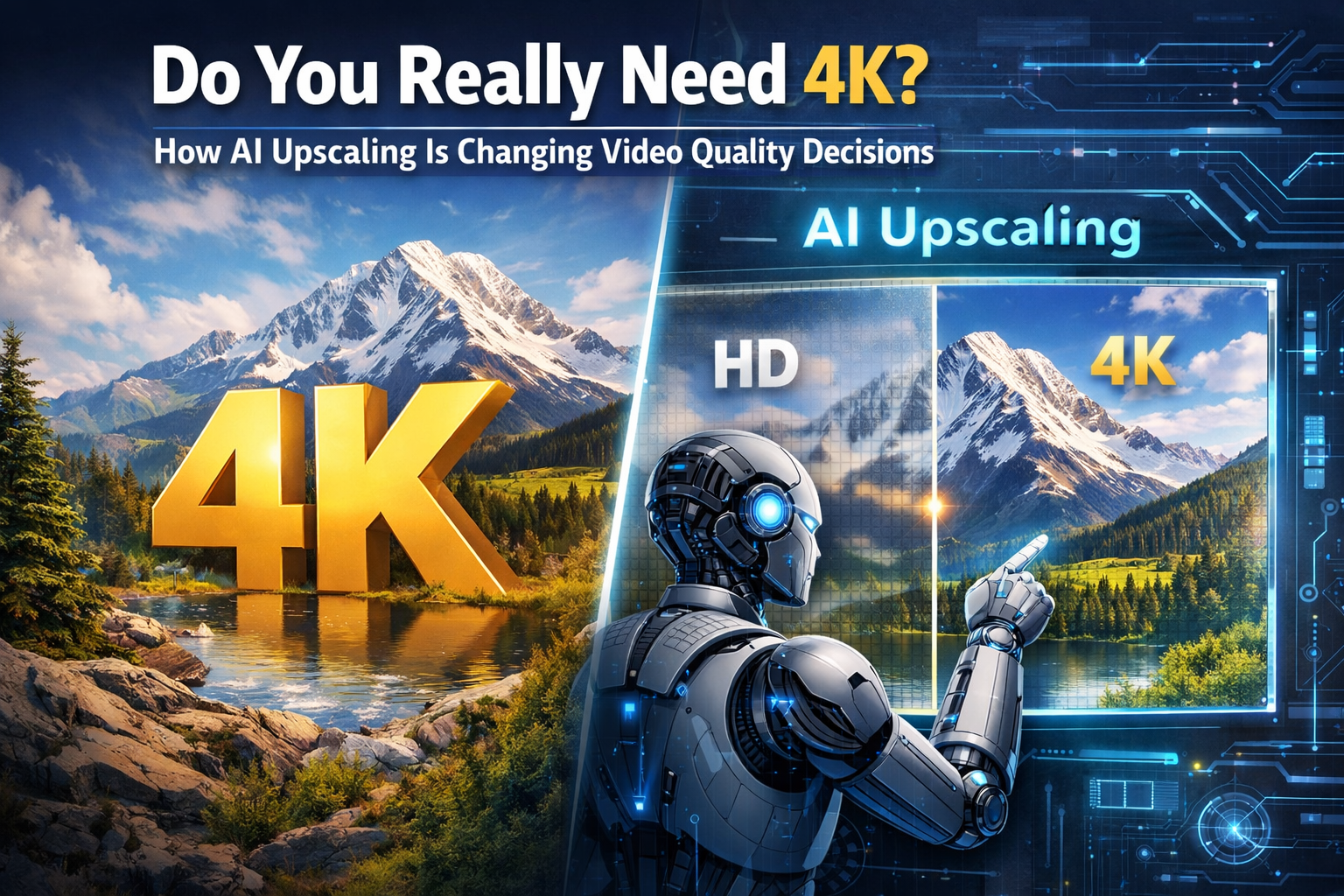
In 2026, one of the most interesting shifts happening in real-time video isn’t about encoding better video — it’s about whether we need to send high-resolution video at all. AI upscaling technology is fundamentally changing the calculus around video quality, bandwidth, and infrastructure costs.
Here’s the question that’s challenging assumptions across the industry: Should we invest in sending perfect 1080p or 4K streams, or send optimized 720p and let AI enhancement on the receiver side deliver comparable quality?
Based on what we’re seeing in production systems and recent platform rollouts, the answer is shifting faster than most teams realize.
The Traditional Video Quality Playbook Is Breaking Down
For years, the video quality formula was straightforward: higher resolution equals better user experience. If you wanted professional-quality video, you captured, encoded, stored, and transmitted it at the highest resolution possible.
That meant:
- Recording in 1080p or 4K
- Encoding with the best codec you could afford to process
- Storing massive files (1 GB for 5 minutes of 4K is common)
- Transmitting high-bitrate streams that strain networks and budgets
- Hoping users had the bandwidth and hardware to handle it
The problem? This approach is expensive, bandwidth-intensive, and often overkill for actual viewing conditions.
The Reality of How People Actually Watch Video
Industry experts have pointed out an uncomfortable truth: most video calls, webinars, and live streams don’t actually display in the resolution they’re encoded at.
Here’s what really happens:
- A “1080p” video conference call often streams at 720p or lower to save bandwidth
- Viewers watch on laptop screens where the video window is 400×300 pixels
- Mobile users see even smaller frames, often in portrait mode
- Network conditions force the adaptive bitrate to drop quality anyway
- Screen sharing, one of the most common WebRTC use cases, rarely needs a high resolution
One platform architect put it this way: “We were obsessed with sending perfect HD video. Then we realized 80% of our users were watching in a 3-inch window on a 13-inch laptop. They couldn’t even tell the difference between 720p and 1080p.”
The question became: why burn the CPU, bandwidth, and storage on resolution that doesn’t improve the actual experience?
Enter AI Upscaling: The Game-Changing Alternative
AI-powered video upscaling uses machine learning models to intelligently enhance lower-resolution video in real-time. Instead of simply stretching pixels, which creates blur and artifacts, AI models analyze patterns, textures, and motion to generate new pixel data that looks natural and sharp.
Think of it as the difference between zooming in on a photo in a basic viewer (which just makes pixels bigger) versus using Photoshop’s content-aware scaling (which intelligently fills in detail).
How AI Super-Resolution Actually Works
Modern AI upscaling relies on deep neural networks trained on millions of video frames. The process works like this:
1. Pattern Recognition: The AI model analyzes the low-resolution input frame, identifying patterns like edges, textures, faces, and motion vectors.
2. Detail Reconstruction: Using patterns learned from training on high-resolution reference footage, the model generates plausible pixel data to fill in missing details.
3. Temporal Consistency: For video (not just static images), the AI ensures that upscaled frames maintain smooth motion and consistent detail across time.
4. Enhancement Beyond Resolution: Advanced models also reduce noise, sharpen edges, fix compression artifacts, and improve color consistency — essentially “cleaning up” the video as they upscale it.
The result? You can upload or stream 720p video, and viewers see something that approaches 1080p or even 4K quality — without the bandwidth or storage cost of transmitting full high-definition streams.
YouTube’s Move: Validation at Massive Scale
In late 2025, YouTube introduced AI-powered automatic upscaling for videos uploaded below 1080p, with plans to support upscaling to 4K. This feature, labeled “super resolution,” uses AI to enhance lower-resolution content for viewers with high-resolution displays.
The implications are huge:
- Creators can upload smaller files while viewers get better quality
- YouTube reduces storage and CDN costs for billions of videos
- Older content gets automatically enhanced without re-uploading
- Viewers on 4K or 8K displays see improved quality from standard uploads
YouTube isn’t alone. Netflix has been using AI enhancement for years, and platforms like Twitch, TikTok, and professional streaming services are exploring similar approaches.
The pattern is clear: the industry is moving toward “send less, enhance more.”
Real-World Applications: Where AI Upscaling Shines Today
AI upscaling isn’t just theoretical — it’s being deployed in production across multiple use cases in 2026.
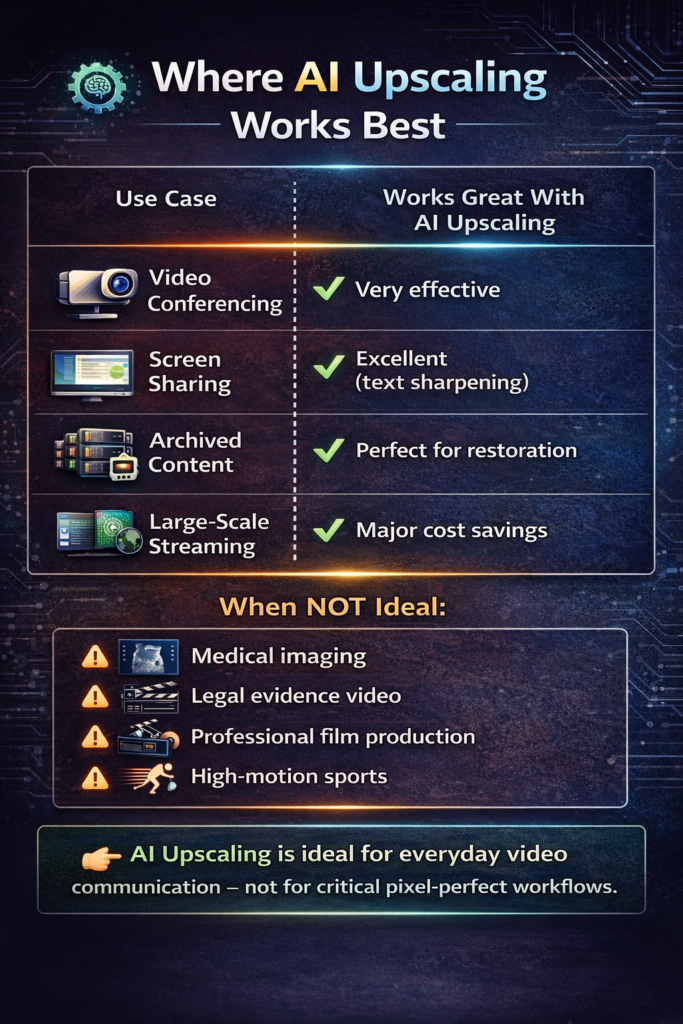
1. WebRTC Video Conferencing
For real-time video calls, AI upscaling enables a new architecture:
- Traditional approach: Client encodes at 1080p → SFU forwards 1080p → Receiver decodes 1080p
- AI-enhanced approach: Client encodes at 720p → SFU forwards 720p → Receiver decodes + AI upscales to 1080p
The benefits?
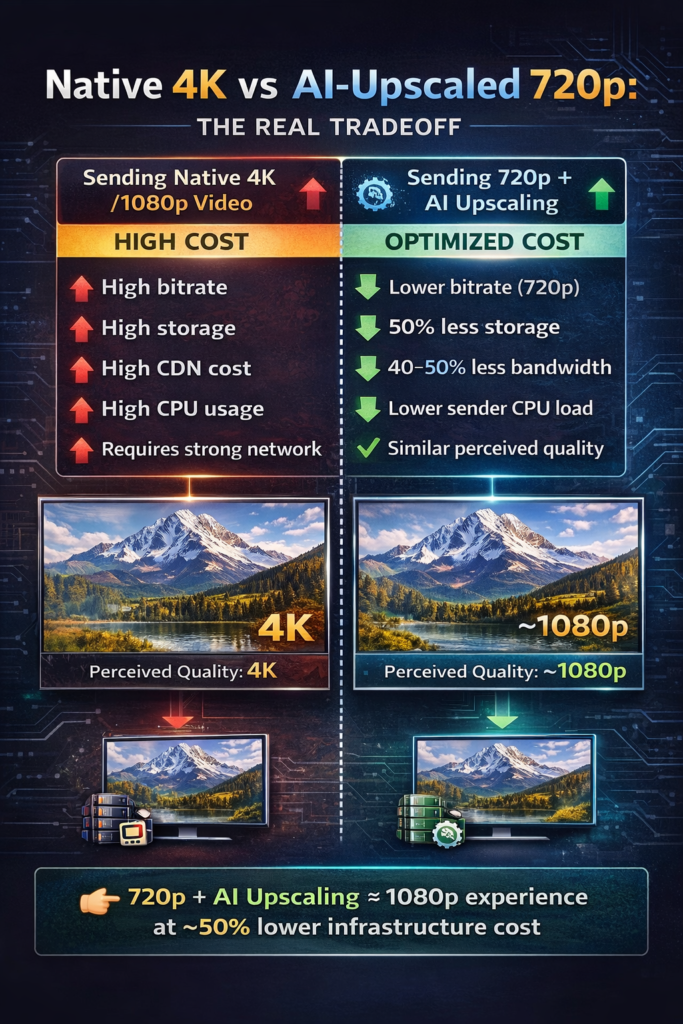
- 40-50% reduction in bandwidth usage
- Lower CPU cost on sender devices (critical for mobile and budget laptops)
- Comparable perceived quality on the receiver side
- Better experience on poor networks, where 1080p would stutter
One telehealth platform we consulted with tested this approach and found that patient satisfaction scores remained identical when switching from native 1080p to “720p + AI upscale,” while infrastructure costs dropped 35%.
2. Archival and Legacy Content Restoration
Organizations sitting on years of standard-definition video — corporate training, recorded webinars, archived events — can now enhance that content without re-recording.
AI upscaling tools can transform:
- Old 480p DVDs into watchable 1080p
- VHS transfers into clean digital archives
- Early smartphone videos into shareable social media content
- Grainy security footage into clearer evidence
We’ve seen companies use AI upscaling to “future-proof” their video libraries, making decade-old content viable for modern displays and expectations.
3. Screen Sharing and Remote Collaboration
WebRTC screen sharing often involves static content — slides, code, documents, dashboards. These benefit enormously from AI enhancement because they contain sharp edges and text that traditional codecs struggle with.
Modern AI models excel at:
- Enhancing text clarity in shared documents
- Sharpening UI elements and code editors
- Reducing compression artifacts in diagrams and charts
- Preserving fine detail in wireframes and design tools
For remote collaboration tools, this means sending lower-bitrate screen shares that look better after AI enhancement than native high-resolution streams that get heavily compressed.
4. Streaming and Broadcasting at Scale
For one-to-many broadcasts, webinars, live events, and gaming streams, AI upscaling offers a powerful cost optimization:
- Stream the source at 720p to reduce origin bandwidth
- Let the CDN cache and distribute smaller files
- Apply AI upscaling on the client side for viewers with capable devices
- Offer both “standard” and “AI-enhanced” quality tiers
This hybrid approach balances infrastructure costs with viewer experience, particularly for platforms with global audiences where bandwidth costs vary dramatically by region.
Client-Side vs. Server-Side Enhancement: The Architecture Question
One of the most important decisions teams face is where to apply AI upscaling: on the client device (viewer’s browser or app) or server-side (in the cloud before distribution).
Here’s how they compare:
Client-Side Enhancement
How it works: The viewer’s device receives lower-resolution video, then runs an AI model locally to upscale and enhance before display.
Pros:
- No additional server infrastructure costs
- Scales automatically with user base (computation is distributed)
- Can adapt to each viewer’s display and preferences
- Preserves privacy (video processing happens locally)
Cons:
- Requires a GPU or a capable CPU on viewer devices
- Not all devices can run AI models efficiently (older phones, budget laptops)
- Battery drain on mobile devices
- Inconsistent experience across different hardware
Best for: Consumer applications where most users have modern devices, or opt-in “enhanced quality” features.
Server-Side Enhancement
How it works: Video is upscaled in the cloud (often on GPU-equipped servers) before being sent to viewers.
Pros:
- Consistent quality for all viewers regardless of device
- No extra work on client devices
- Can use more powerful AI models
- Works for all end-users, including legacy devices
Cons:
- Significant server infrastructure costs (GPUs are expensive)
- Doesn’t scale linearly — processing costs grow with user base
- Adds latency (though often minimal with optimized models)
- Still requires bandwidth to deliver enhanced streams
Best for: Enterprise applications, controlled environments, or platforms where guaranteed quality matters more than infrastructure cost.
The Hybrid Approach (Where the Industry Is Heading)
Smart platforms are implementing adaptive strategies:
- Detect device capability on the client
- For capable devices: send 720p and upscale client-side
- For limited devices: send pre-upscaled 1080p from servers
- Let users choose “standard” or “enhanced” quality modes
This gives teams the best of both worlds: cost efficiency where possible, guaranteed quality where needed.
The Numbers: Why “Send Less Data” Is Winning
Let’s look at the practical economics of AI upscaling for a mid-sized video platform:
Traditional 1080p Approach
- 1000 hours of video storage: ~500 GB at 5 Mbps average bitrate
- CDN bandwidth for 100,000 viewers: 500 TB/month
- Encoding infrastructure: High CPU/GPU costs
- Total monthly cost: ~$5,000-7,000
AI-Enhanced 720p Approach
- 1000 hours of video storage: ~250 GB at 2.5 Mbps average bitrate (50% reduction)
- CDN bandwidth for 100,000 viewers: 250 TB/month (50% reduction)
- AI upscaling: Client-side (free) or server-side ($500-1,000/month with efficient GPU usage)
- Total monthly cost: ~$2,500-4,000
The savings compound as the scale increases. For platforms distributing video globally, bandwidth is often the largest infrastructure cost — cutting it in half has a material impact.
One streaming platform told us, “We tested AI upscaling, expecting marginal improvements. What we found was that we could serve the same user experience at 40% lower cost. That changes our entire unit economics.”
When AI Upscaling Doesn’t Make Sense
AI upscaling isn’t a universal solution. There are scenarios where you still need to send full-resolution native video:
Professional Production and Post-Production
If you’re capturing footage for editing, color grading, or archival where every pixel matters — film production, documentary work, high-end corporate videos — you still need native high resolution. AI can’t replace capturing details that never existed.
Medical Imaging and Critical Applications
Telehealth platforms showing diagnostic imagery, remote surgery applications, or any scenario where a doctor is making medical decisions based on visual detail cannot rely on AI reconstruction. The risk of introducing artifacts or missing critical information is too high.
High-Motion Sports and Gaming
Fast-moving content with complex motion — sports broadcasts, esports, action games — can expose limitations in temporal AI models. These use cases often still benefit more from high native frame rates and resolutions than from AI enhancement.
Regulatory and Compliance Requirements
Some industries require that transmitted video matches captured video exactly, with no AI manipulation. Legal proceedings, regulated surveillance, and certain government applications fall into this category.
The Future: What 2026-2028 Looks Like
Based on current trends and conversations with platform architects, here’s where AI upscaling is heading:
2026 (Now):
- YouTube, Netflix, and major platforms deploy AI upscaling widely
- Consumer AI upscaling tools mature (Topaz Video AI, TensorPix, etc.)
- WebRTC platforms begin testing client-side enhancement
- Hardware manufacturers add AI upscaling to GPUs and mobile chips
- “720p + AI” becomes a common strategy for bandwidth optimization
2027:
- Browser-native AI upscaling APIs emerge (similar to WebCodecs)
- More CPaaS providers offer built-in enhancement options
- Standardized AI models for real-time video enhancement
- Client devices routinely include dedicated AI processing units
- Hybrid architectures become best practice for video platforms
2028:
- Real-time AI enhancement is default for most video applications
- 4K streaming becomes “4K-ready” (send 1080p, display 4K)
- The concept of “native resolution” becomes less relevant
- Codec wars shift focus: compression vs. enhancement trade-offs
The direction is clear: we’re moving from “always send the highest quality” to “send optimal quality and enhance intelligently.”
Practical Recommendations for Teams Building Video Applications
If you’re evaluating whether AI upscaling makes sense for your application, here’s our framework:
For Startups and New Products:
- Start with standard resolutions (720p or 1080p) using proven codecs (VP8, H.264)
- Design your architecture to make video processing modular and swappable
- Test AI upscaling on a subset of users before committing to infrastructure
- Measure bandwidth savings vs. quality perception with real user feedback
Don’t bet your product on bleeding-edge AI upscaling, but build flexibility to adopt it as it matures.
For Existing Platforms Optimizing Costs:
- Audit your current resolution distribution – what are users actually receiving?
- Calculate bandwidth and storage costs at your current scale
- Run A/B tests comparing native 1080p vs. “720p + AI upscale”
- Consider hybrid approaches that adapt based on device capability
- Start with non-critical content (archived videos, screen shares) before touching live streams
The ROI is often compelling, especially for platforms with global distribution or heavy mobile usage.
For Enterprise and Regulated Applications:
- Prioritize quality guarantees over cost savings
- Test AI enhancement in controlled environments first
- Get a legal and compliance review for an AI-manipulated video
- Use server-side processing to ensure a consistent experience
- Maintain native high-res options for critical use cases
For industries where video quality has legal, medical, or safety implications, proceed cautiously and maintain traditional high-resolution options.
The Broader Question: Are We Chasing the Wrong Metrics?
AI upscaling forces us to reconsider what “video quality” even means.
For decades, the industry optimized for technical metrics:
- Resolution (pixels)
- Bitrate (Mbps)
- Codec efficiency (compression ratios)
But what users actually care about is perceived quality — how good the video looks to them in their specific viewing context.
AI upscaling exposes a gap: you can achieve better perceived quality with lower technical specs by applying smart enhancement. A 720p stream enhanced with AI can look better than a poorly encoded or heavily compressed 1080p stream.
This leads to a paradigm shift:
Old thinking: “We need to support 4K to stay competitive.”
New thinking: “We need to optimize for perceived quality in actual viewing contexts — which might mean 720p + AI, adaptive quality tiers, or targeted enhancement for specific content types.”
One senior video engineer told us, “We’ve been fighting codec wars for 20 years. What if the endgame isn’t AV1 or VP10 — it’s just smarter post-processing?”
That question is reshaping long-term roadmaps across the industry.
Bottom Line: The Calculus Has Changed
If you’re building or operating a video platform in 2026, the old assumptions no longer hold:
- 4K isn’t automatically better if most viewers watch on small screens with AI enhancement
- Bandwidth costs matter more as AI makes lower resolutions acceptable
- Codec choice matters less when AI can fix compression artifacts
- Infrastructure planning must account for AI processing as part of the video pipeline
The smartest teams aren’t asking “should we support 4K?” They’re asking:
- “What resolution do our users actually need for their viewing context?”
- “Can AI upscaling deliver comparable quality at lower cost?”
- “Should we process on the client, server, or both?”
- “How do we build flexibility to adapt as AI models improve?”
AI upscaling isn’t replacing high-quality video capture and encoding — it’s changing the equation around what you need to transmit and store. For many applications, sending less data and enhancing intelligently is now the better architecture.
The future isn’t about chasing the highest resolution. It’s about delivering the best experience at the lowest cost — and increasingly, AI upscaling is how teams get there.
At Trembit, we help companies to architect modern video systems that balance quality, cost, and user experience. Whether you’re evaluating AI upscaling for your WebRTC application, optimizing bandwidth costs, or building next-generation streaming infrastructure, we bring deep expertise in both traditional video pipelines and emerging AI-enhanced approaches. Let’s talk about what makes sense for your specific use case — not just what sounds impressive in a blog post.