By Stan Reshetnyk, CTO, Trembit · Last updated 17 October 2026
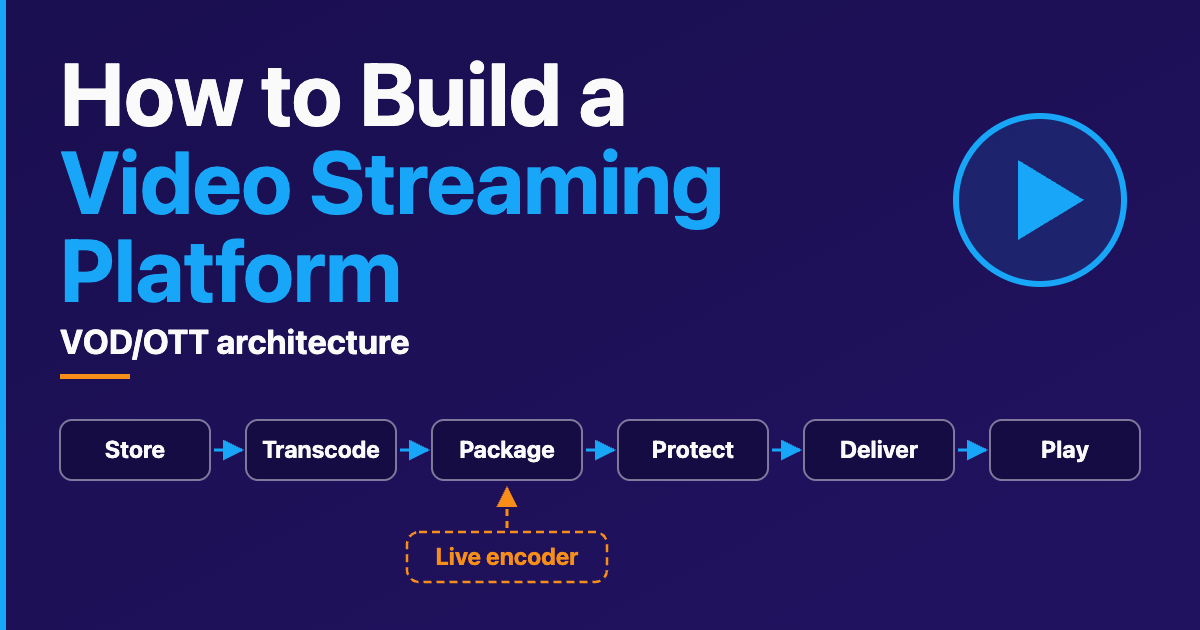
A video streaming platform (VOD or OTT) is a pipeline that turns uploaded source video into protected, adaptive streams and delivers them to every device your viewers own, wrapped in services for catalogue, access and analytics. You build it in layers: store the source masters, transcode them into a bitrate ladder, package the renditions as HLS and DASH, encrypt them with DRM where your content requires it, serve them through an origin and a CDN, and play them back in a DRM-capable player on the web and in each video streaming app. Live streaming adds a real-time encoder and reuses most of the layers after it. OTT, in this guide, means video delivered over the open internet rather than through an operator’s managed TV network.
The build guides we compared list those stages and stop. The expensive mistakes sit between them: a ladder that pays for renditions nobody can tell apart, an encryption mode one device family will not play, a FairPlay credential only your own team can request. This guide takes each layer in turn: what to buy, what to build, and the source behind each fact.
Key takeaways
- A streaming platform is six media layers (store, transcode, package, protect, deliver, play) plus a control plane (catalogue, access, licences, ads, analytics). Decide buy or build per layer.
- A bitrate ladder is a content decision: Apple calls its bit-rate table one possible set to test against your content, and AWS’s automated ABR drops renditions that add bitrate without adding quality.
- Multi-DRM means licensing playback through more than one DRM system, usually Widevine, FairPlay and PlayReady. One
cbcs-encrypted CMAF set can serve all three only if every device you target supportscbcs; Android 4.4 to 6.x and PlayReady clients before 4.0 need a second,cenc-encrypted copy.- DRM has non-engineering gates: Apple approves FairPlay production credentials only for the team providing the streaming service, in wording aimed at consumer services, and your licence agreements set the protection requirements. Start that paperwork early.
- Live adds a real-time encoder that feeds the same packaging, DRM, CDN and player layers, often with different packager and origin settings. Recorded live streams become VOD assets.
Not an engineer? Read the layer table, Which decisions come first?, What are the non-engineering gates?, Should you build, buy or assemble each layer? and What has Trembit built around this stack?; the rest is reference.
What are the layers of a video streaming platform?
A streaming platform has two planes. The media plane moves video: upload, master storage, transcoding into a ladder, packaging and encryption, origin, CDN and player. The control plane decides who may watch what: catalogue and CMS, authentication and entitlement, the DRM licence and key service, ad decisioning, and analytics.
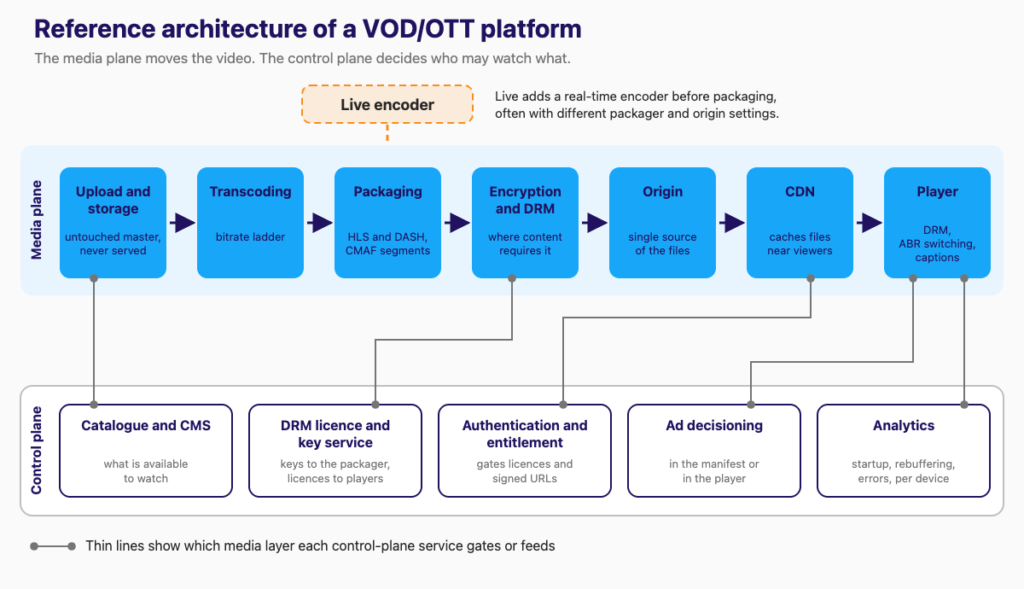
| Layer | Its job | What to decide | Where it breaks first |
|---|---|---|---|
| Upload and storage | Accept uploads; keep the master | Where masters live; who uploads; moderation | No master kept, so re-encodes start from a compressed copy |
| Transcoding and ladder | Master into renditions | Codecs; fixed or content-aware ladder; managed or own encoders | A ladder copied from a table, never tested on your content |
| Packaging | Segments and manifests | Pre-packaged or just-in-time; TS or fMP4 | A segment format one DRM or device cannot use |
| Encryption and DRM | Encrypt; license players | DRM systems, encryption mode, key service | Mode mismatch; FairPlay credentials requested late |
| Origin and CDN | Serve and cache files | One CDN or several; shielding; signed URLs | Origin flooded by duplicate cache misses |
| Player | Pick renditions; fetch licences; report | Web, mobile and TV players | A device without the DRM you chose |
| Entitlement and billing | Who watches, for how long | Subscription, ad, rental rules | Licences that outlive the rental |
| Analytics | Measure playback | Player metrics; per-title, per-device views | No device breakdown, so failures look random |
The business models themselves (subscription, advertising, transactional) are covered in our VOD streaming explainer.
Which decisions come first, before you pick any technology?
Settle four answers before you compare services.
- Does your content require DRM? If you license a catalogue, the protection requirements come from the licence agreement, so ask each licensor for them before you design this layer. For studio content, MovieLabs publishes an Enhanced Content Protection specification, currently version 1.4 (August 2024); announcing an earlier version, it said studios and distributors choose which of its elements apply to each type of distribution. If you own the content (courses, training, creator uploads), signed URLs and segment encryption may cover your risk. The answer decides whether the encryption layer and licence service exist at all.
- Which devices? Web, mobile, smart TVs, streaming boxes. The list decides your DRM set, your encryption modes and most player work. Google’s Widevine overview lists Apple TV (tvOS) and desktop Safari as unsupported, and supports iOS only through “a separate client library”, so Safari and Apple TV viewers need FairPlay.
- Live as well as VOD, now or later? If live is coming, choose a packaging and origin design that can accept a live input, so live does not become a second platform.
- Which monetisation model? Subscription, advertising and rental each add a different control-plane hook, mapped in the monetisation table below.
How do you ingest, store and transcode source video?
How should uploads and source files be stored?
Keep the untouched master in object storage and never serve it to viewers. Every future re-encode starts from that file; encoding from an already-compressed rendition stacks one round of compression loss on another. Managed services are built around this file-first model: AWS describes MediaConvert as “a file-based video processing service”.
If users upload, moderation sits between upload and publish. In our AI content moderation build, the constraint was that “pre-recorded uploads can queue, but live streams must be moderated as they broadcast”.
How do you design the bitrate ladder?
A ladder is the set of renditions a player switches between as bandwidth changes. Apple’s HLS authoring specification makes one mandatory: “You MUST provide multiple bit rates of video (that is, variants).” Six of the nine 16:9 rows in its H.264 example table:
| Resolution | H.264 bit rate (kbit/s) |
|---|---|
| 416 x 234 | 145 |
| 640 x 360 | 365 |
| 960 x 540 | 2000 |
| 1280 x 720 | 3000 |
| 1920 x 1080 | 6000 |
| 1920 x 1080 | 7800 |
Apple’s example ladder (HLS Authoring Specification for Apple Devices, item 1.25), not a Trembit recommendation.
Apple calls it “one possible set of bit rate variants” and adds: “The above bit rates are initial encoding targets for typical content delivered via HLS. Apple recommends that you evaluate them against your specific content and encoding workflow, then adjust accordingly.”
Content-aware ladders shape the ladder per title. AWS MediaConvert’s automated ABR “chooses the right number of renditions and the resolution for each, based on the input video”. AWS’s example: “with a fast-moving, visually complex asset, your ABR stack might include two 720p outputs with different bitrates. If you used that same stack setup with a simple cartoon, those two outputs would likely look the same.”
Two cautions. Automated ABR “requires 2 pass encoding”, which a file workflow can absorb and a live encoder cannot. And its default minimum average bitrate for the lowest rendition is 600 kb/s (configurable), while Apple’s iOS rules say playlists delivered over cellular networks “MUST contain a variant whose peak BANDWIDTH is less than or equal to 192 kbit/s”, so test the generated stack against device rules.
Which codecs, and what do they force?
Apple’s spec allows four: “All video MUST be encoded using H.264/AVC, HEVC/H.265, Dolby Vision, or AV1.” H.264 may use fragmented MP4 (fMP4) or MPEG transport streams; for HEVC and AV1 the container “MUST be fMP4”. H.264 stays the compatibility baseline: Apple says “For backward compatibility, some video content SHOULD be encoded with H.264”.
Each added codec also adds a ladder. Apple says each stream “SHOULD provide all anticipated bandwidths” and “Clients SHOULD NOT be required to switch codecs”, so HEVC alongside H.264 usually means a second full set of renditions to encode, store and cache.
How do you package video for HLS and DASH?
Packaging cuts each rendition into short segments and writes the manifests players read: an HLS playlist and a DASH manifest (MPD). With CMAF segments (a constrained profile of fragmented MP4), one encoded set can sit behind both manifests; AWS MediaConvert, for example, treats “CMAF DASH and CMAF HLS” as one output group type. How HLS, DASH and CMAF compare as delivery protocols is a separate question from packaging. For which protocol carries which leg of a live stream, see WebRTC vs HLS vs SRT vs RTMP.
Pre-packaged or just-in-time. You can write the final formats at transcode time (MediaConvert supports “adaptive bitrate (ABR) packaging output formats”), or store one set of renditions and package on request with a just-in-time packager such as AWS MediaPackage. Its current documentation marks time-shift viewing as live-only, so confirm any packager’s VOD support first. Pre-packaging keeps the origin a plain file store but multiplies stored copies by every format and encryption combination. Just-in-time keeps one copy and moves the work to request time, which makes origin protection matter.
Segment length and keyframes. Apple’s spec says “Target durations SHOULD be 6 seconds”, “Key frames (IDRs) SHOULD be present every two seconds” and “Video segments MUST start with an IDR frame.” Configure the encoder and packager together: with a fixed two-second keyframe interval, aligned across every rendition, each six-second segment starts on one.
How does DRM work, and which DRM systems do you need?
DRM has three parts that are easy to conflate: a browser API, a client decryption module, and the DRM system with its licence server.
What is the difference between EME, a CDM and a DRM system?
Encrypted Media Extensions (EME) is the W3C browser API your web player calls: “This specification does not define a content protection or Digital Rights Management system.” Decryption happens in a Content Decryption Module (CDM), “the client component that provides the functionality, including decryption, for one or more Key Systems.” Only “the Clear Key system is required to be implemented as a common baseline”; which commercial systems are available depends on the browser or OS.
In a web player, DRM configuration maps key-system identifiers such as com.widevine.alpha to licence-server URLs, and Shaka Player’s DRM guide notes that “EME requires a secure URL to use”, so serve the player over HTTPS.
What does each DRM system cover?
| DRM system | What its owner’s documentation says | cbcs on the client (owner’s documentation) | AWS MediaConvert can encrypt CMAF as |
|---|---|---|---|
| Google Widevine | Supported platforms include Android, Chrome, Firefox, Edge, Roku, Fire TV, and Tizen and webOS TVs; not Apple TV (tvOS), desktop Safari, Nintendo Switch or Xbox | Android 7.x and later, Chrome, Firefox, smart TVs; Android 4.4 to 6.x cenc only | cbcs and cenc |
| Apple FairPlay Streaming | Protects playback “on Apple platforms” | Required: Apple’s HLS spec mandates SAMPLE-AES, which is cbcs in fMP4 | cbcs |
| Microsoft PlayReady | Enforces “expiration dates, security levels, and output restrictions” | Optional from client 4.0; clients 1.0 to 3.3 not supported | cbcs and cenc |
Sources: Google Widevine overview (page last updated 9 October 2024; read 17 October 2026), Apple FairPlay Streaming, Microsoft’s PlayReady overview and content encryption modes, AWS MediaConvert SPEKE support (SPEKE v2.0). The last column is what one AWS packaging service can produce, not what a client can decrypt.
Widevine also has security levels: Bitmovin’s developer documentation describes L1 as hardware-backed and L3 as software-only, and says browsers such as Chrome are “Often limited to L3, even on L1-capable systems like Windows or macOS.” If your licence terms tie resolution to hardware-backed protection, one title can play at different qualities on a phone and in a laptop browser.
What does “multi-DRM” mean in practice, and what is cenc vs cbcs?
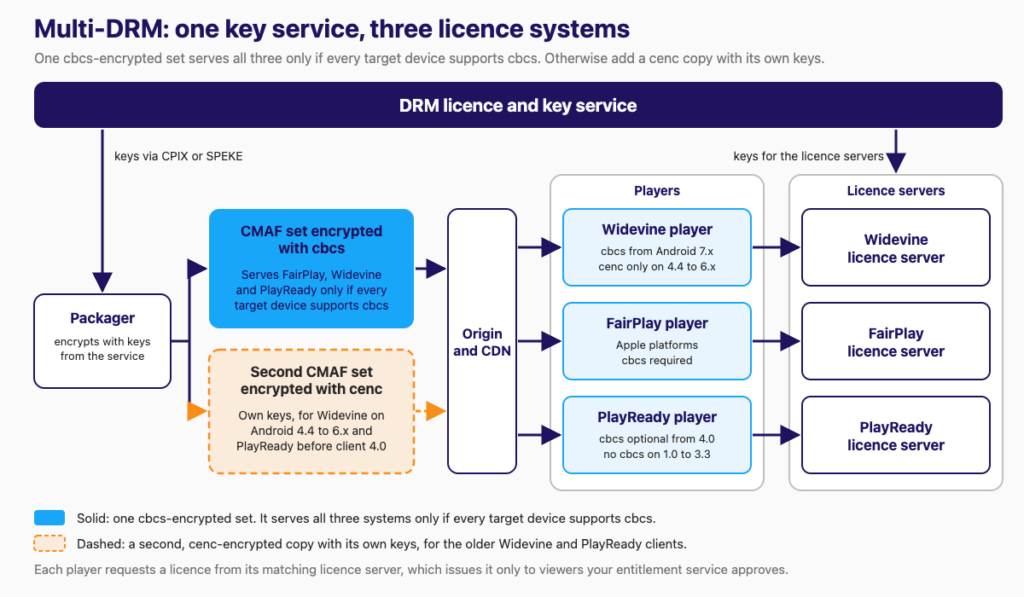
Multi-DRM means using more than one DRM system, usually Widevine, FairPlay and PlayReady, behind one key service. Your packager fetches content keys from that service; each player requests a licence from the matching licence server, which issues it only to viewers your entitlement service approves. The key hand-off has a document format and an API: DASH-IF’s CPIX (“A CPIX document contains keys and DRM information used for encrypting and protecting content”), and SPEKE, an AWS-defined API built on CPIX for communication between “encryptors and packagers of media content and digital rights management (DRM) key providers.” SPEKE v2.0 uses CPIX 2.3; v2.1 uses CPIX 2.4.
Common Encryption has two modes that matter here: cenc uses AES in counter (CTR) mode and cbcs uses AES in cipher block chaining (CBC) mode, as Microsoft’s PlayReady documentation lays out; for video, Apple requires a 1:9 encrypt:skip pattern (10% partial encryption). Apple’s spec says FairPlay content “MUST be SAMPLE-AES” and that “Encryption with SAMPLE-AES-CTR SHALL NOT be used on Apple devices.” The published HLS specification, RFC 8216, says that with SAMPLE-AES “fMP4 Media Segments are encrypted using the ‘cbcs’ scheme of Common Encryption”; the current HLS draft (rfc8216bis) maps SAMPLE-AES-CTR to cenc. So FairPlay in CMAF means cbcs.
Whether one encrypted set can serve all three depends on your oldest devices. Google’s Widevine overview lists cbcs for Android 7.x and later but only cenc for Android 4.4 to 6.x. Microsoft says PlayReady clients from version 4.0 “may support CBC keys” and “Support is optional for clients”, lists clients 1.0 to 3.3 as not supporting cbcs, and places most non-Windows devices, such as smart TVs, released between 2011 and 2017 on 2.x clients. If every device you target supports cbcs, one cbcs-encrypted CMAF set can serve all three systems. If not, you also need a cenc copy for the older Widevine and PlayReady clients, and Microsoft warns that “Services must not encrypt a single piece of content in CTR mode and in CBC mode using the same {KID, Ck}”, so that copy needs its own keys. Either way, test on the oldest devices you support.
Also check what your vendor encrypts: Mux’s DRM guide says “only video tracks are currently DRM protected”.
What are the non-engineering gates?
Apple approves FairPlay production access, and your own team must request it. Apple’s FairPlay page says: “If you’re a content owner or licensee and are ready to deploy your implementation of FairPlay Streaming to a production environment, you’ll need approval in order for your team to create the necessary credentials.” It continues: “Your request will be approved only if your team provides a streaming service to consumers. Please note that requests for third-party accounts acting on behalf of content owners or licensees won’t be approved.” So request the credentials under your own Apple Developer account, not a vendor’s. Apple’s wording names consumer services: if your product is B2B or internal, such as staff training, confirm eligibility with Apple before planning around FairPlay. Mux’s DRM guide says the same from the integrator’s side: “Apple requires you to request your own FairPlay Streaming Deployment package”.
Licence agreements set the protection requirements. Ask each licensor for them during the deal, not after the build. Start both tracks before the player work; they run on someone else’s calendar.
If you are weighing which layers to buy, assemble or build for an on-demand product, our VOD app development team will review that with you.
How do the origin, CDN and player fit together?
Segments and manifests are ordinary files fetched over HTTP. The CDN caches them near viewers; the origin is the single place they come from, and its main risk is a flood of duplicate cache misses. AWS describes CloudFront Origin Shield as “an additional layer in the CloudFront caching infrastructure that helps to minimize your origin’s load”, and on multi-CDN: “Using multiple CDNs can offer certain advantages, but it also means that your origin might receive many duplicate requests for the same content”. AWS is equally clear about limits: Origin Shield “may not be a good fit” for “content with low cacheability, or content that is infrequently requested”, which can describe the long tail of a large catalogue.
Set caching rules for manifests separately from segments.
Signed access. Apple’s spec says “The URLs for Media Segments SHOULD NOT be completely static. URLs should be issued per device or changed over time.” Managed services implement this with signed URLs; Mux says “DRM requires the use of Signed URLs.” The pattern: your entitlement service issues the signed URL or token, and the CDN and licence server enforce it.
The player is where DRM, ABR switching, captions and analytics meet, so it carries most of the per-device work. On the web, an EME-based player such as Shaka Player handles Widevine and PlayReady. Smart TVs and streaming boxes are separate builds, each checked against the DRM table.
Where do monetisation, access control and analytics plug in?
Each business model adds a hook to the control plane:
| Model | Architecture hook | Where it runs |
|---|---|---|
| Subscription (SVOD) | Entitlement check at playback start gates licences and signed URLs | Licence server and CDN token check |
| Advertising (AVOD) | Ad decisioning and insertion in the playback path | Server-side in the manifest, or client-side in the player |
| Transactional (TVOD: rental or purchase) | Purchase records mapped to licence and token lifetimes | Licence expiry and token expiry |
For rentals, licence lifetime is the control. Mux, for example, issues a “default 24-hour streaming license”, and a persistent licence for offline playback when the token’s offline claim is set. Offline access can also rest on tokens: for an artist content marketplace, we built offline access with “pre-validated access tokens that work without connectivity”.
Ad insertion. AWS MediaTailor’s ad insertion “supports Apple HTTP Live Streaming (HLS) and MPEG Dynamic Adaptive Streaming over HTTP (DASH) for video on demand (VOD) and live workflows”.
Analytics. Instrument what tells you a viewer had a bad session: startup time, rebuffering, bitrate switches and playback errors, per title and per device. For CDN-side visibility, CTA-5004 Common Media Client Data (CMCD) “defines data that is collected by the media player” and “is sent as a custom HTTP header or query parameter alongside each object request to a CDN”.
Where does live streaming fit into a VOD/OTT platform?
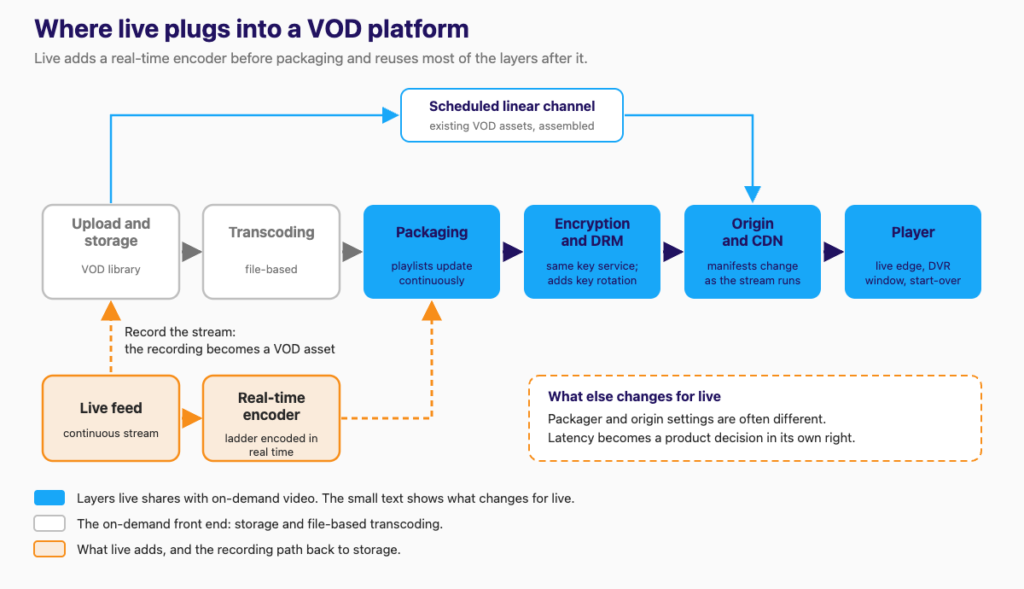
Live adds a second path: a real-time encoder whose output joins the same packaging, DRM, CDN and player layers. What changes is encoding, playlist behaviour, often the packager and origin configuration, the player’s controls and a latency decision VOD does not have.
| Layer | VOD | What live changes |
|---|---|---|
| Source | Uploaded file | Continuous stream from an encoder |
| Transcoding | File-based; multi-pass possible | Ladder encoded in real time, with no second pass over the whole asset |
| Packaging | Playlists written once | Playlists update continuously; AWS MediaPackage lists time-shift viewing as live-only |
| DRM | Same licence systems and key service | Same, plus key rotation over time (SPEKE v2.1 adds time-based key rotation) |
| CDN | Published files are cacheable | Manifests change as the stream runs; just-in-time packaging for live is a named Origin Shield use case |
| Player | Seek anywhere in the asset | Live edge, DVR window, start-over |
| Latency | Not a design input | A product decision in its own right |
Two bridges connect the paths. Live-to-VOD: record the stream and publish the recording as an on-demand asset. We built this pattern into an investor streaming platform (“stream recording for on-demand replay”) and a corporate LMS that attaches session recordings to course modules as on-demand content. VOD-to-linear: assemble existing assets into a scheduled channel. AWS describes MediaTailor channel assembly as “a manifest-only service that allows you to create linear streaming channels using your existing video on demand (VOD) content.”
Live ingest protocols such as RTMP, SRT and WHIP are a separate choice. Which latency tier your product needs is covered in our guide to ultra-low-latency streaming; live-product features, monetisation and post-launch work in our guide to making a live streaming app; and the live build itself is what our live streaming app development team does.
Should you build, buy or assemble each layer?
There are three postures, and most platforms mix them:
- Managed video API. Mux and Cloudflare Stream put storage, encoding and delivery behind one API. Fastest start, within the vendor’s ladder options, DRM terms and pricing. Mux sells DRM as an add-on.
- Cloud media services you assemble. For example, AWS MediaConvert for transcoding and packaging, CloudFront for delivery, and a DRM provider over SPEKE. More control, more integration work.
- Open source you operate. FFmpeg for encoding, Shaka Packager (“a tool and a media packaging SDK for DASH and HLS packaging and encryption”) and an open-source player. The most control; you own uptime and upgrades.
| Layer | Usually bought or assembled | Build it yourself when |
|---|---|---|
| Storage | Cloud object storage | Rarely |
| Transcoding | Managed service or video API | You need ladder or codec control the service does not expose, or encoding becomes your largest bill |
| Packaging and encryption | Packager plus a DRM provider over SPEKE or CPIX | Our view: build the integration, not the licence servers |
| Origin and CDN | Commercial CDN | Multi-CDN routing and shielding policy are yours to design |
| Player | Open-source or vendor player | Custom UX, device-specific fixes, your own analytics |
| Control plane (catalogue, entitlement, billing) | Payment provider for billing | Almost always: this is your product logic |
For how the cost drivers (encoding, storage, CDN egress) add up on a live platform, see our breakdown of what a live-commerce video platform costs.
What has Trembit built around this stack?
The boundary first. Our published case studies cover on-demand and live video: upload, catalogue and CDN delivery for paid media, adaptive-bitrate transcoding, recording live sessions as on-demand content, offline access with pre-validated tokens, and AES-encrypted HLS. We have not published a case study of a studio-grade multi-DRM, smart-TV OTT or server-side ad-insertion launch, so the DRM section of this guide rests on the specifications and vendor documentation cited, not on our own delivery.
What we have built:
- An on-demand media catalogue. For the artist content marketplace mentioned above, we built the admin panel where artists “upload albums, music videos, and audio tracks”, with pricing and “release scheduling”, plus “CDN-backed media delivery”, “adaptive video streaming for music videos” and the offline downloads described in the monetisation section. It is a buy-to-own catalogue, not a subscription service.
- Two delivery paths in one product. For a live horse-auction platform, we built a pipeline on AWS “ingesting camera feeds from auction venues, transcoding for adaptive bitrate, and distributing via CDN”, plus a separate WebRTC path for the primary auction feed.
- Encrypted HLS from one encoder. For a drone video system, one edge encoding pipeline feeds WebRTC and an AES-encrypted HLS fallback for degraded connectivity. That is segment encryption, not studio DRM.
Products in these case studies rarely stayed on one delivery path: the auction and drone builds each added a second path from the same source, and the investor and LMS builds turned live sessions into on-demand content. If you are planning an on-demand platform, that is the work of our VOD platform team.
Frequently asked questions
What are the main components of a video streaming platform? Six media layers (storage, transcoding, packaging, encryption, origin and CDN, player) and a control plane for catalogue, entitlement, licences, ads and analytics. See the layer table.
Do I need DRM to launch a streaming service? It depends on your content. If you license it, the licence agreement sets the protection requirements; for content you own, signed URLs and segment encryption may cover your risk.
Do I need Widevine, FairPlay and PlayReady? Only if your device list needs all three, and whether one encrypted set serves them depends on your oldest devices. See the DRM table.
Should I build or buy transcoding and packaging? Usually buy or assemble them, and build the control plane. See the build-or-buy table.
Can one platform handle live and VOD? Yes. Live adds a real-time encoder, then shares packaging, DRM, CDN and player, often with different packager settings; the live table shows what changes.
Is OTT the same as VOD? No: in this guide OTT means delivery over the open internet and VOD means on-demand viewing, so an OTT service can carry both; our VOD streaming explainer covers the definitions.
Pressure-test your streaming architecture
Book a free 30-minute call with our VOD platform team. Bring your device list, your content-protection requirements and the layer you are weighing: build, buy, or rescue a pipeline that is already struggling. We’ll pressure-test the architecture with you. No deck, no pitch.