Understanding the UX and Infrastructure Collision in Video Dating
Instant video calling sounds like the ultimate feature for dating apps — the promise of immediate, authentic connection at the tap of a button. Product teams envision users swiping, matching, and jumping straight into face-to-face conversations within seconds. The reality? Instant video features consistently show 20-40% lower conversion rates compared to text-based matching, and when implemented poorly, they can crater user retention by up to 60%.
The problem isn’t that users don’t want video — studies show that 65% of dating app users express interest in video features. The issue is that “instant video” creates an impossible collision between user experience expectations and infrastructure reality. When you promise users instant connection but deliver 8-15 seconds of loading states, failed ICE negotiations, and “connection error” messages, you don’t just lose that session — you train users not to try the feature again.
This article explores why instant video matching creates such significant conversion problems, the technical infrastructure challenges that cause these failures, and, most importantly, proven strategies for designing video dating flows that actually work. The key isn’t abandoning video features — it’s understanding that successful video matching requires completely rethinking both the UX and the infrastructure underneath it.
The Instant Video Paradox: Why Speed Promises Backfire
The fundamental problem with instant video in dating apps is the mismatch between what the interface promises and what the infrastructure can deliver. When users see a “Start Video Call” button positioned as a primary action — equivalent to sending a message or liking a profile — they develop specific expectations about how quickly that call will connect.
User Expectations vs. Technical Reality
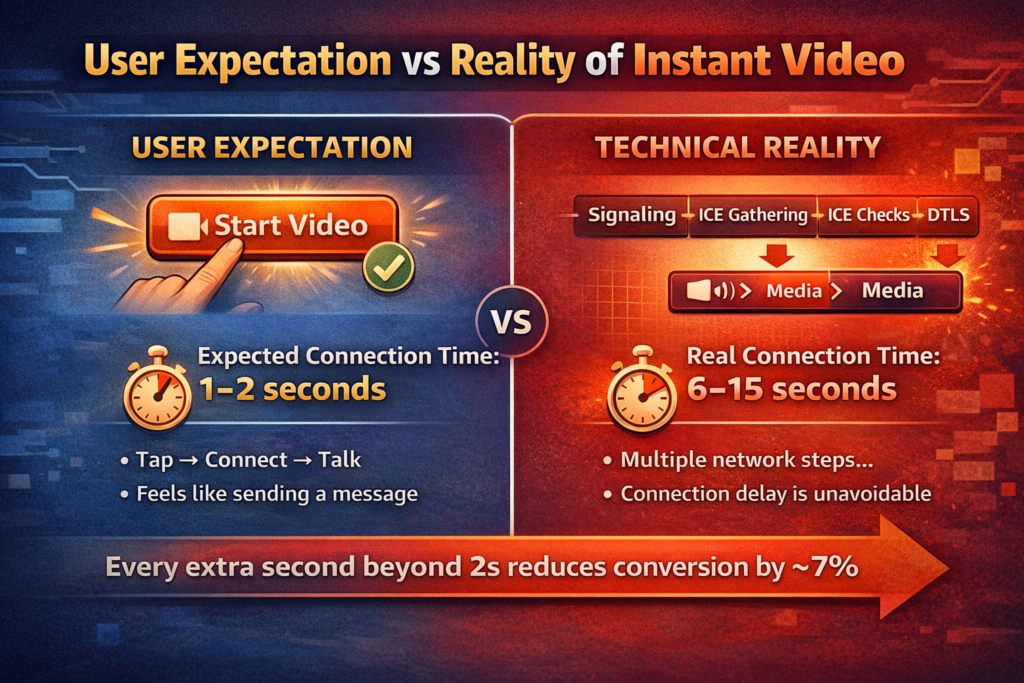
Research on user interface expectations shows that when an action is presented as instantaneous (single-tap, no confirmation screens, prominent placement), users expect feedback within 100-300 milliseconds and completion within 1-2 seconds. Text messaging meets these expectations easily — tap send, see delivery confirmation, done. Even audio calls typically connect within 2-4 seconds on modern mobile networks.
WebRTC video connections, however, require an entirely different timeline. The ICE (Interactive Connectivity Establishment) negotiation process alone takes 2-5 seconds under optimal conditions, and can extend to 8-15 seconds when TURN servers are required, or network conditions are poor. This creates what UX researchers call an “expectation violation”, the interface promised instant, but delivered a delay.
The Conversion Death Spiral
Here’s how instant video promises destroy conversion: User taps “Start Video Call,” expecting an immediate connection. After 3 seconds of loading the spinner, they’re confused — did it work? After 6 seconds, they’re frustrated and considering canceling. After 10 seconds, they’ve lost confidence and probably won’t try again even if the call eventually connects. If it fails completely, which happens 8-15% of the time with naive WebRTC implementations, they’ve learned that the video feature doesn’t work.
The data bears this out. A/B tests consistently show that every additional second of connection latency beyond 2 seconds reduces conversion by approximately 7%. A 10-second connection time (not uncommon with instant video implementations) translates to roughly 50% lower conversion compared to a 2-second baseline. More critically, users who experience a failed connection attempt are 70% less likely to retry the video feature in subsequent sessions.
Understanding this paradox is the first step toward fixing it. The solution isn’t faster infrastructure, though that helps; it’s redesigning the entire flow to align user expectations with technical capabilities. Before we explore those solutions, we need to understand exactly where and why WebRTC connections fail.
Call Setup Latency: The Multi-Stage Connection Problem
WebRTC video connections require a complex multi-stage negotiation process before the first video frame can be displayed. Each stage introduces latency and potential failure points. Understanding this process is essential for designing flows that manage user expectations appropriately.
The WebRTC Connection Timeline
A typical WebRTC connection involves these sequential stages:
- Signaling Exchange (300-800ms): Client A creates an SDP offer, sends it through your signaling server to Client B, who creates an answer and returns it. Network round-trips and server processing add unavoidable latency.
- ICE Candidate Gathering (1-3 seconds): Both clients discover their network topology by querying STUN servers for server-reflexive candidates and TURN servers for relay candidates. This cannot be rushed — it requires actual network probing.
- ICE Candidate Exchange (200-600ms): Candidates are exchanged through the signaling channel. The number of candidates (typically 4-12 per client) affects total exchange time.
- Connectivity Checks (1-4 seconds): ICE performs STUN binding checks on all candidate pairs to find working paths. With 8 candidates per client, that’s potentially 64 pairs to test. Successful pairs are identified, prioritized, and nominated.
- DTLS Handshake (200-500ms): Once a connection path is established, DTLS performs a cryptographic handshake for secure transport before media can flow.
Under optimal conditions — both users on good WiFi, direct peer-to-peer connection possible, responsive STUN servers — this process completes in 2.5-4 seconds. Under realistic conditions with mobile networks, NAT traversal challenges, and TURN relay requirements, it extends to 6-12 seconds. Under poor conditions — restrictive firewalls, packet loss, or overloaded TURN servers — it can take 15+ seconds or fail entirely.
Why You Can’t Just “Make It Faster”
The latency in WebRTC connection establishment is largely unavoidable. ICE candidate gathering requires actual network packets sent to STUN/TURN servers and waiting for responses. Connectivity checks require attempting actual connections and waiting for success or a timeout. You can optimize (better server placement, faster signaling, aggressive timeout tuning), but you cannot eliminate the fundamental physics of packets traveling across networks. The solution must come from UX design, not infrastructure magic.
ICE Failures: When and Why Connections Don’t Establish
Even with perfect implementation, WebRTC connections fail 8-15% of the time in production environments. Understanding failure modes helps design appropriate fallback strategies and set realistic user expectations.
Common ICE Failure Scenarios
The primary causes of ICE connection failures:
- Symmetric NAT Configuration (3-5% of connections): When both users are behind symmetric NAT without TURN servers configured, no connection path exists. Direct connection impossible, relay required but unavailable.
- Restrictive Corporate/School Firewalls (2-4% of connections): Some network administrators block all UDP traffic except DNS, or specifically block known STUN/TURN server IP ranges. WebRTC fundamentally cannot work in these environments without TCP fallback.
- TURN Server Unavailability (1-2% of connections): When TURN servers are overloaded, unreachable, or misconfigured, connections requiring relay fail. This failure mode is entirely under your infrastructure control.
- Mobile Network Issues (2-4% of connections): Carrier-grade NAT, network handoffs during connection establishment, or temporary packet loss can cause ICE to fail even when both networks are theoretically capable.
- Browser/OS Incompatibilities (1-2% of connections): Despite standardization, edge cases exist where specific browser versions, OS configurations, or device types fail ICE negotiation.
These failure rates compound. In a dating app scenario where two users attempt connection, if each has a 10% individual failure rate, the combined success rate is approximately 81% (0.9 × 0.9). This means roughly one in five attempted instant video connections will fail through no fault of either user. This is unacceptable for a feature positioned as reliable and instant.
WebRTC Connection Latency and Failure Patterns
Understanding the relationship between network conditions, connection latency, and failure rates helps design realistic UX flows:
| Network Condition | Typical Latency | Failure Rate | Primary Bottleneck |
| Both WiFi, Optimal | 2.5-4 seconds | 2-3% | ICE candidate gathering |
| Mixed WiFi/4G | 4-7 seconds | 5-8% | Connectivity checks, mobile NAT |
| Both Mobile Networks | 6-12 seconds | 10-15% | TURN required, longer timeouts |
| Corporate/Restricted Network | 10-20 seconds or timeout | 20-35% | Firewall blocking, no TURN |
| Poor Mobile (2-3% loss) | 15-30 seconds or fail | 30-50% | Packet loss disrupts ICE checks |
This data reveals why instant video promises are so problematic: under the conditions where 30-40% of your users operate (mobile networks, corporate WiFi), connection establishment takes 3-5x longer than the 2-second expectation threshold and fails 3-10x more frequently than users tolerate.
Given these inevitable technical constraints, how do we design video matching experiences that actually convert? The answer lies in completely rethinking the flow, implementing intelligent retry logic, and designing robust fallback strategies that preserve user confidence even when connections fail.
Intelligent Retry Logic: Making Failures Invisible
Since connection failures are inevitable, successful video dating features must implement retry logic that attempts recovery without exposing users to the underlying complexity. The key is making multiple connection attempts appear as a single, longer-than-expected connection rather than discrete failures.
Progressive Connection Strategies
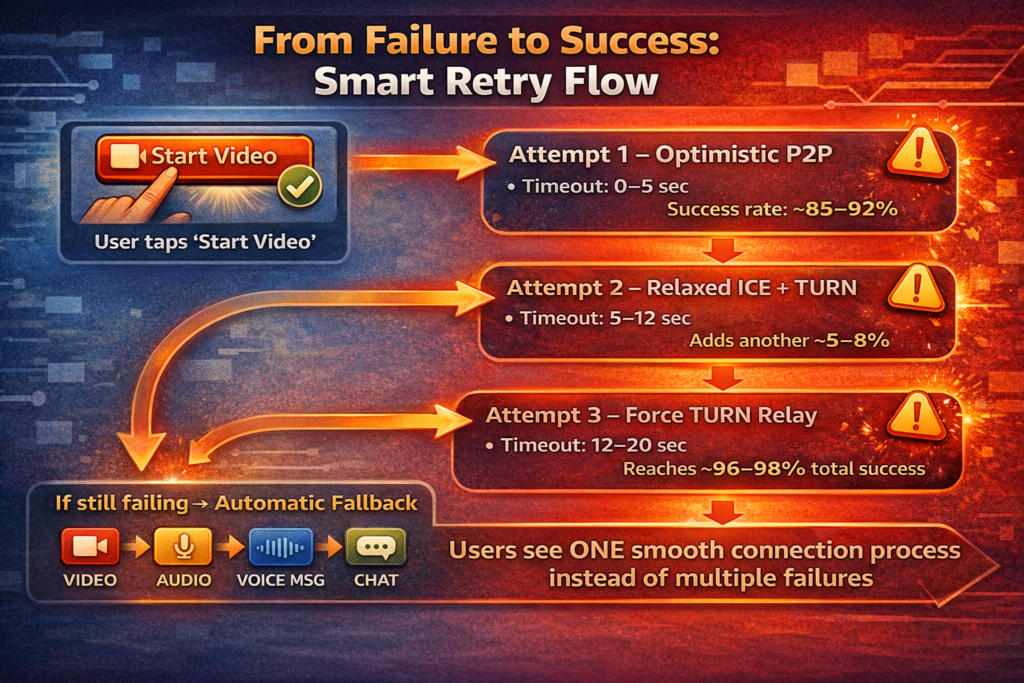
Instead of attempting one connection and either succeeding or showing an error, implement a progressive strategy that tries increasingly robust but slower connection methods. Start with aggressive timeouts optimized for best-case scenarios. If that fails, retry with relaxed timeouts. If that fails, force the TURN relay. This happens automatically in the background while showing users a single, honest “connecting” state.
A robust retry strategy:
- Attempt 1 (0-5 seconds): Optimistic ICE with 3-second candidate gathering timeout, prefer direct peer-to-peer
- Attempt 2 (5-12 seconds): If failed or still connecting, restart with a 5-second gathering timeout, include TURN candidates
- Attempt 3 (12-20 seconds): Force TURN relay only, bypass peer-to-peer entirely for guaranteed connection path
- Attempt 4 (20+ seconds): Fall back to alternative modalities (discussed in next section)
This approach significantly improves success rates. First attempts succeed 85-92% under good conditions. Second attempts catch another 5-8% of failures. Third attempts (TURN-forced) catch most remaining connection-possible scenarios. Total success rate climbs to 96-98%, with only truly impossible connections (hard firewall blocks, no TURN available) resulting in failure.
Connection Pre-Warming
Advanced implementations can pre-warm connections before users explicitly request them. When the matchmaking algorithm identifies a high-probability video match (based on mutual interest signals, time of day patterns, or explicit scheduling), begin ICE candidate gathering in the background. When the user taps “Start Video,” candidates are already gathered, signaling already initiated, and connection establishment proceeds 3-5 seconds faster. Users perceive this as genuinely instant video, even though the infrastructure work started earlier. This technique requires careful resource management to avoid wasteful pre-warming of low-probability connections.
UX Fallback Strategies: Preserving Conversion When Connections Fail
Even with perfect retry logic, 2-4% of connection attempts will fail due to impossible network configurations. The difference between apps with strong video conversion and those where video features die is how gracefully they handle these failures. The goal is never to show users an error screen that suggests the feature doesn’t work.
Automatic Modality Downshift
When video connection fails after multiple retry attempts, automatically downshift to the next-best modality without requiring user action. The progression might be: video call attempt → audio-only call → voice message exchange → rich text chat with photo sharing. Frame this positively: “Video isn’t available right now, but let’s start with voice!” rather than “Connection failed.”
This approach maintains engagement momentum. Users want to connect, they don’t particularly care whether it’s video, audio, or text as long as the interaction feels successful. By automatically providing an alternative, you prevent the dead-end that kills conversion. Studies show that users who experience automatic fallback maintain 65-75% of the engagement compared to successful video calls, versus 10-20% engagement for users who receive error messages.
Scheduled Video as First-Class Alternative
Rather than positioning instant video as the only option, present scheduling as an equally viable choice. During connection attempts, offer users the option to “Schedule Video for Later” when both parties can ensure optimal network conditions. This transforms potential failures into intentional planning, and actually increases video call completion rates because scheduled calls have higher show-up rates than opportunistic attempts.
Progressive Disclosure of Network Requirements
When connection attempts are struggling, progressively disclose information about network conditions: “Your connection seems weak, switching to WiFi might help” or “Your network has restrictions, trying an alternative path.” This educates users about why delays occur without making them feel like the app is broken. It also sets expectations for future attempts — users who understand that video requires good networks will naturally attempt calls when conditions are favorable.
Design Patterns That Work: Redesigning the Video Call Flow
Successfully integrating video into dating apps requires abandoning the “instant video” paradigm entirely and adopting patterns that align user expectations with technical reality. Here are proven approaches that maintain high conversion rates:
Pattern 1: Video Request + Acceptance Flow
Instead of instant calling, implement a request-acceptance model similar to traditional phone calls. User A sends a video chat request. User B receives a notification and can accept when ready. Connection establishment happens asynchronously while both users prepare. By the time they’re both ready and accepted, the connection is already established or well underway. This pattern adds 10-30 seconds to the total flow but reduces perceived latency to near-zero because connection time is hidden behind user decision time.
Pattern 2: Scheduled Video Dates
Position scheduled video dates as a premium, intentional experience rather than spontaneous calling. Users pick a time, both receive reminders, and at the scheduled time, the app proactively establishes the connection before displaying the “Your date is ready” notification. Connection success rate for scheduled calls is 98%+ because both users are present on good networks, and the infrastructure has unlimited time to establish the connection.
Pattern 3: Progressive Engagement Ladder
Design the user journey as a progression: text chat → voice notes → scheduled audio call → scheduled video call. Each step builds trust and investment, and by the time users reach video, they’re willing to tolerate a longer setup because they’re already engaged. This also naturally filters users to video when both are serious about the connection, increasing completion rates.
Pattern 4: Opt-In Video Readiness Status
Let users indicate when they’re available for video calls—”Video Ready” status badge. This signals availability, good network conditions, and emotional readiness. When both users show this status, video calls have 95%+ connection success because both are on suitable networks. It also prevents awkward “caught off guard” moments that reduce engagement.
Video Feature Conversion Rate Comparison
Real-world data comparing different video call implementation approaches shows dramatic differences in conversion and retention:
| Implementation Pattern | First Attempt Conversion | Retry Rate After Failure | 30-Day Feature Retention |
| Instant Video (naive) | 35-45% | 15-25% | 20-30% |
| Instant Video + Retry Logic | 55-65% | 35-45% | 45-55% |
| Request-Accept + Fallback | 70-78% | 60-70% | 65-75% |
| Scheduled Video Dates | 85-92% | 75-85% | 80-88% |
| Progressive Engagement Ladder | 80-88% | 70-80% | 75-85% |
The data is clear: abandoning instant video promises in favor of thoughtfully designed flows can nearly double conversion rates and triple feature retention. The best implementations convert 2-3x better than naive instant video while creating more satisfied users who actually use the feature repeatedly.
Building Reliable Video Dating Experiences with Trembit
Implementing successful video features in dating applications requires expertise spanning multiple disciplines: WebRTC infrastructure engineering, UX design psychology, real-time networking, and data-driven product optimization. The difference between video features that drive engagement and those that destroy conversion often comes down to hundreds of small decisions made throughout development — connection timeout values, retry strategies, UI state management, fallback flows, and user education.
Trembit brings extensive experience building video-enabled consumer applications where reliability and user experience are non-negotiable. Our engineering teams understand the nuances of WebRTC implementation, from optimizing ICE negotiation for diverse network conditions to designing retry logic that gracefully handles failures. More importantly, we approach video features through a product lens — helping clients balance technical capabilities with user expectations to create flows that actually convert.
Whether you’re adding video to an existing dating platform or building a new video-first experience, Trembit provides the technical partnership needed to navigate the complex intersection of UX and infrastructure. We’ve seen what works and what doesn’t across dozens of implementations, and we bring that practical experience to help you avoid the conversion-killing pitfalls that plague most video dating features.
Conclusion: Redesigning for Reality, Not Ideals
The allure of instant video matching is powerful — the promise of an authentic, immediate connection with a single tap. But this promise collides with technical reality in ways that consistently destroy user conversion and retention. WebRTC connections require 3-15 seconds to establish under real-world conditions, fail 8-15% of the time despite perfect implementation, and create user experiences that violate fundamental expectations about instant features.
The solution isn’t better infrastructure — though that helps. It’s completely redesigning video matching flows to align user expectations with what the technology can reliably deliver. Request-acceptance models hide connection latency behind user decision time. Scheduled video dates ensure both users are present on good networks. Progressive engagement ladders build investment before introducing video. Automatic fallbacks maintain engagement when connections fail. Each pattern acknowledges reality while still delivering the authentic video connections that users want.
The data proves the approach works. Thoughtfully designed video flows convert 2-3x better than instant video implementations, maintain 3-4x higher feature retention, and create users who actually trust and repeatedly use video features. The irony is that by abandoning the instant video promise, you create an experience that feels more reliable and immediate because it consistently meets the expectations you’ve set.
Video features are valuable for dating applications — the authenticity and connection they enable are real. But that value only materializes when the implementation respects both the technical constraints of real-time video and the psychological requirements of user experience design. The most successful video dating features aren’t the most technically ambitious — they’re the ones designed for the reality of how video connections actually work.
Key Takeaways
- Instant video promises create expectation violations: users expect a 1-2 second connection but receive 6-15 seconds, destroying conversion
- WebRTC connection establishment requires 2.5-15 seconds, depending on network conditions, with unavoidable latency from ICE negotiation
- Connection failures occur 8-15% in production environments due to NAT, firewalls, and network conditions — rates that users won’t tolerate
- Intelligent retry logic with progressive strategies (optimistic → TURN → fallback) increases success rates from 85% to 96-98%
- Automatic modality downshift (video → audio → voice message → text) maintains 65-75% engagement versus 10-20% with error messages
- Request-acceptance flows, scheduled video dates, and progressive engagement patterns convert 2-3x better than instant video
- Best implementations achieve 80-92% first-attempt conversion and 75-88% 30-day retention by aligning UX with technical reality
The path forward is clear: stop promising instant video that your infrastructure cannot reliably deliver. Instead, design flows that acknowledge connection complexity while still providing the video experiences users want. By managing expectations honestly and designing robust fallbacks, you create video features that users trust and actually use — not ones they try once and abandon forever.