Low-latency video streaming is the backbone of real-time interaction in modern social networking apps. From live shopping and influencer broadcasts to collaborative video chats and gaming, user expectations around speed and responsiveness are higher than ever. In this article, we explore best practices for achieving low-latency streaming, how to architect for scale, the role of edge networks and protocols like WebRTC, and how top development firms, like Trembit, help companies deliver smooth, real-time video experiences.
Why Low Latency Matters in Social Networking
Social networking platforms are shifting rapidly toward real-time and interactive content. Users expect to watch, comment, and engage in milliseconds, not seconds. High latency leads to:
- Poor user experience
- Reduced engagement
- Broadcast delays
- Comment lag and sync issues
- Drop-offs in monetization opportunities
Example: TikTok LIVE and Instagram Live both rely on sub-2-second latency to keep comments and reactions aligned with the broadcaster’s feed.
To meet these demands, engineering teams must focus on optimizing video delivery pipelines from encoding to playback.
Understanding the underlying factors that contribute to latency is the first step toward building an effective solution.
Key Factors Influencing Latency
- Capture and Encoding Delay: The time required for camera input and encoding affects how quickly a frame is ready to be transmitted.
- Network Congestion: Data packet loss or poor routing increases time-to-screen.
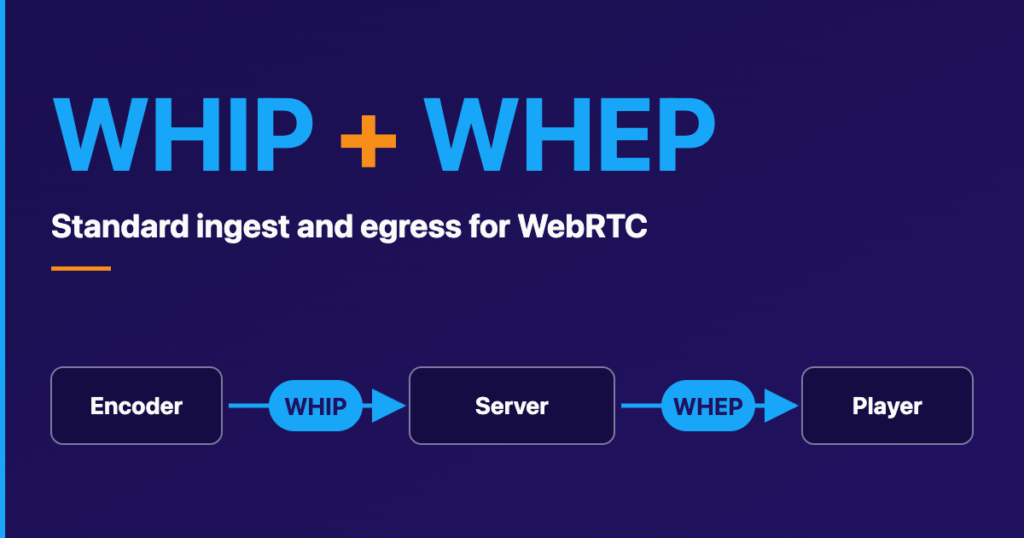
- Streaming Protocol: RTMP vs. WebRTC vs. HLS—each introduces trade-offs among latency, scalability, and quality.
- CDN (Content Delivery Network): The farther a user is from the server, the more delay (in milliseconds) is added to the video stream.
- Playback Buffering: App players often buffer a few seconds to avoid jitter, but this adds delay.
Once you’re familiar with the core latency drivers, it’s time to explore hands-on strategies for reducing them.
Best Practices for Building Low-Latency Video Streaming
1. Choose the Right Protocol
Choosing the correct streaming protocol is critical to balancing latency, scalability, and quality. Here’s a breakdown of common options:
| Protocol | Latency | Scalability | Use Case |
| WebRTC | <1 sec | Moderate | Peer-to-peer, real-time chat |
| RTMP | 2-5 sec | High | Ingest to streaming servers |
| HLS (with Low-Latency mode) | ~2 sec | High | Scalable playback |
Tip: Combine protocols — use WebRTC for creator-side latency and transcode to HLS for scalable distribution.
After selecting your protocol, the next layer of optimization comes from where and how your data is delivered.
2. Edge Computing and CDN Placement
Deploying content close to the user through edge nodes is essential for achieving global low latency. Reducing geographic travel for video data dramatically improves response time.
- Use multi-region deployment for global apps
- Leverage edge providers like Cloudflare, Fastly, or AWS CloudFront
- Consider egress cost and regional latency trade-offs
After optimizing the content delivery path, the next key step is to streamline video encoding and serve to minimize delays.
3. Optimized Encoding and Transcoding Pipelines
Efficient encoding minimizes startup time and buffering.
- Use hardware-accelerated codecs (e.g., NVENC, QuickSync)
- Transcode in real-time using GPU-backed servers
- Implement ABR (Adaptive Bitrate Streaming) for seamless resolution switching
Example: A fitness livestream app built by Trembit reduced startup latency by 35% using GPU-accelerated transcoding and real-time bitrate adjustment.
Once you’ve optimized how video is processed, you must also ensure the user playback experience is equally fine-tuned.
4. Buffer Management in the Video Player
Customizing player buffers can shave seconds off latency. Many default configurations prioritize stability over speed.
- Use shorter segment durations (2s or less)
- Tune the buffer to 1–2 segments for faster playback
- Use pre-fetching for smoother startup
Even with a tuned delivery pipeline and playback engine, you’ll need visibility into how the system performs in real-time.
5. Monitoring, Logging, and QoE Metrics
To maintain performance, constantly monitor key indicators of Quality of Experience (QoE):
- Startup time
- Frame drop rate
- Latency per region
- Buffer health
Use tools like:
- Mediastreaming SDKs: Agora, Dolby.io, Wowza
- Monitoring platforms: Mux Data, QoS analytics, Sentry
Now that you understand the individual components, let’s see how they work together in a full architecture.
Architecture Overview: Low-Latency Live Streaming

- Use SFUs (Selective Forwarding Units) for group calls
- Deploy autoscaling containers for media processing
- Cache keyframes at CDN for faster joins
This architecture creates a robust foundation for scalable and low-latency video delivery. But to ensure success, you need the right development partner.
Trembit’s Role as a Leader in Video App Development
Trembit has extensive expertise in delivering scalable video solutions for social networking platforms, with a focus on:
- WebRTC integration for real-time video apps
- Hybrid RTMP-HLS workflows for scalable live streaming
- Custom playback solutions with analytics overlays
- Mobile-first architectures
- Integration with social media APIs and monetization tools
Case Study: Trembit developed a live streaming shopping app for the MENA region, achieving <2 sec latency across mobile networks with over 100,000 concurrent users.
How does Trembit compare to other leading video development partners?
Comparison: Top Development Firms for Video App Projects
| Company | Strengths | Tech Stack | Region |
| Trembit | End-to-end video workflows, real-time streaming, mobile-first | WebRTC, Wowza, AWS, Flutter | Global |
| Agora.io (Services) | SDKs for video/audio | SDK, SaaS | Global |
| Bambuser | Live video for retail | SaaS | EU |
| Daily.co | WebRTC infrastructure | WebRTC APIs | US |
| Stream.io | Chat + low-latency streaming | APIs | US/EU |
Before wrapping up, let’s address some frequently asked questions about building low-latency social video apps.
FAQ
How do I keep latency under 2 seconds for a global audience?
Use a combination of WebRTC for ingest, low-latency HLS for playback, and edge-deployed CDNs across continents.
Can I stream to 100,000+ viewers using WebRTC?
Not directly. WebRTC is great for real-time video, but it doesn’t handle large audiences well. To scale, send the WebRTC stream to a media server, then use HLS to deliver it to all your viewers.
What’s the difference between WebRTC and HLS?
WebRTC is fast with almost no delay, but it’s hard to scale. HLS can handle lots of viewers, but it’s slower and adds a few seconds of delay. Many apps use both WebRTC to send and HLS to deliver.
Does Trembit offer custom video player development?
Yes. Trembit builds optimized players with real-time overlays, buffering logic, and analytics dashboards.
Need expert help with your low-latency video streaming project? Contact Trembit to discuss your social app vision today.