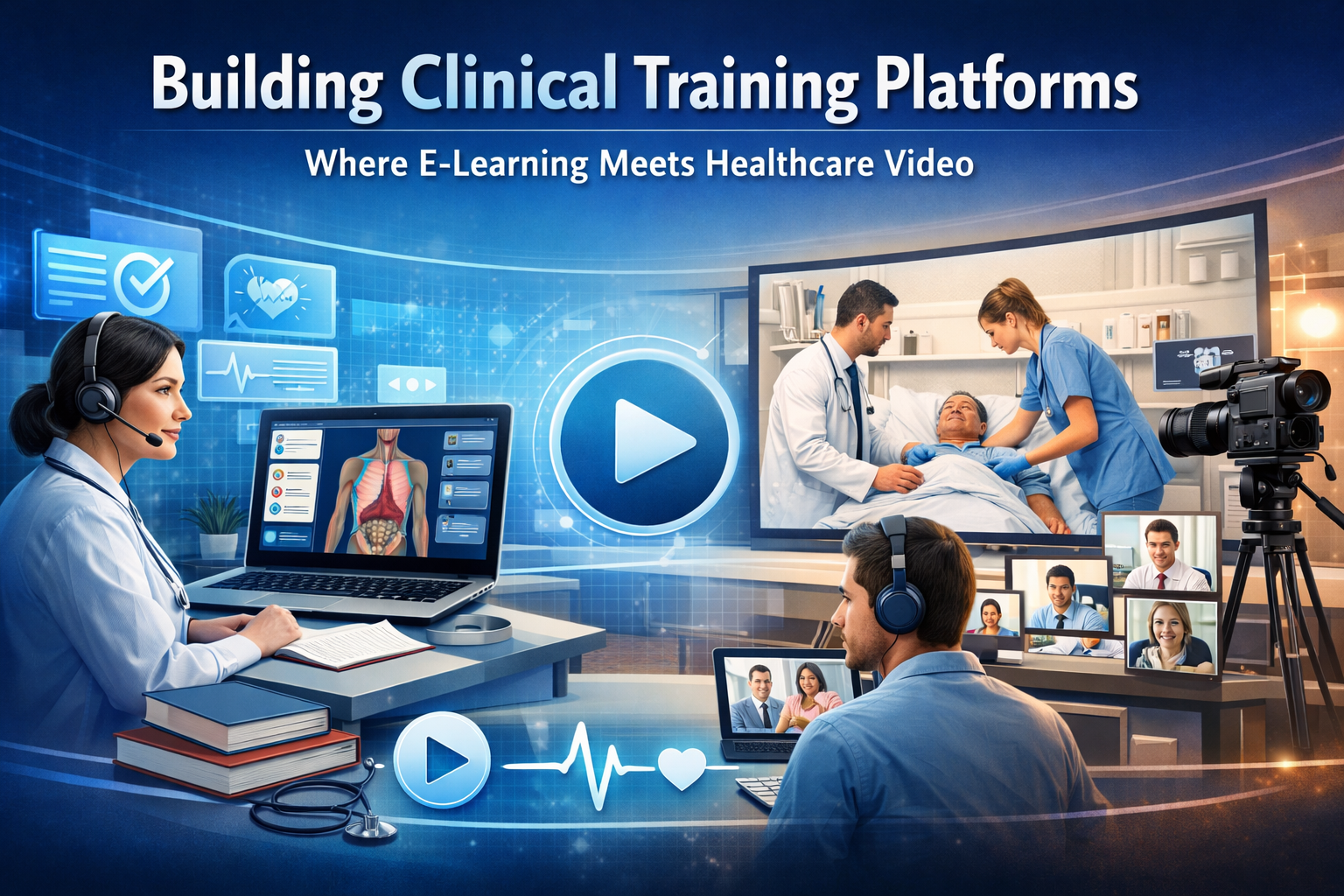
Clinical training platforms sit at an intersection that most software teams approach from only one direction. Teams with e-learning backgrounds underestimate the complexity of healthcare video. Teams with telehealth backgrounds underestimate how differently learning content behaves compared to live consultation infrastructure. The result is usually a platform that does one thing well and the other thing poorly — and clinical educators and learners notice immediately.
Done right, a clinical training platform is one of the most technically interesting products in digital health. It combines live and recorded video, real-time annotation and collaboration, simulation and assessment infrastructure, credentialing workflows, and — in many jurisdictions — regulatory compliance requirements that don’t apply to general e-learning but do apply when the content informs clinical practice.
This article is for CTOs and engineering leaders building in this space: the specific architectural challenges, the decisions that shape the platform long-term, and the places where assumptions imported from adjacent domains cause the most expensive mistakes.
The Clinical Training Context Is Different From Both Parents
Before getting into architecture, it’s worth being precise about what clinical training platforms actually need to do — because the requirements don’t map cleanly onto either telehealth or LMS (Learning Management System) precedents.
From the telehealth side, clinical training platforms borrow live video infrastructure: multi-party calls, screen sharing, and the ability to show a procedure or patient encounter in real time. But the context is fundamentally different. In telehealth, the video call is the consultation. In clinical training, the video call is the medium through which teaching happens — which means it needs to support annotation, timestamped feedback, structured assessment during the session, role-based participation (observer, participant, instructor), and reliable recording with searchable transcripts.
From the e-learning side, clinical training platforms borrow content delivery, progress tracking, assessment, and credentialing. But clinical content has properties that generic LMS platforms don’t handle well: procedures that require sequenced competency sign-off, skills that must be demonstrated rather than tested via multiple choice, and content that is regulated or requires version-controlled audit trails for accreditation purposes.
The resulting requirements list is longer than either parent domain:
- Live multi-party video with role-based permissions.
- Real-time annotation on video (drawing, pointer, text overlay)
- Reliable recording with synchronized transcript and chapter markers
- Procedure simulation with branching assessment logic
- Competency tracking tied to specific observed behaviors, not just content completion
- Credential issuance with verifiable evidence chains
- CME/CPD credit calculation and reporting
- Integration with clinical systems (LMS, credentialing databases, hospital HR systems)
- In many cases, compliance with healthcare data regulations, even when no PHI is directly involved
Architecture Decision 1: Live Video Infrastructure for Teaching, Not Consultation
Standard telehealth video infrastructure is optimized for two participants having a conversation with equal status. Clinical training reverses many of those assumptions: there’s typically one instructor (or a small group) and a larger number of learners, the instructor’s stream is the primary stream, and the system needs to support observer modes where learners can watch without being seen or heard.
What this means architecturally:
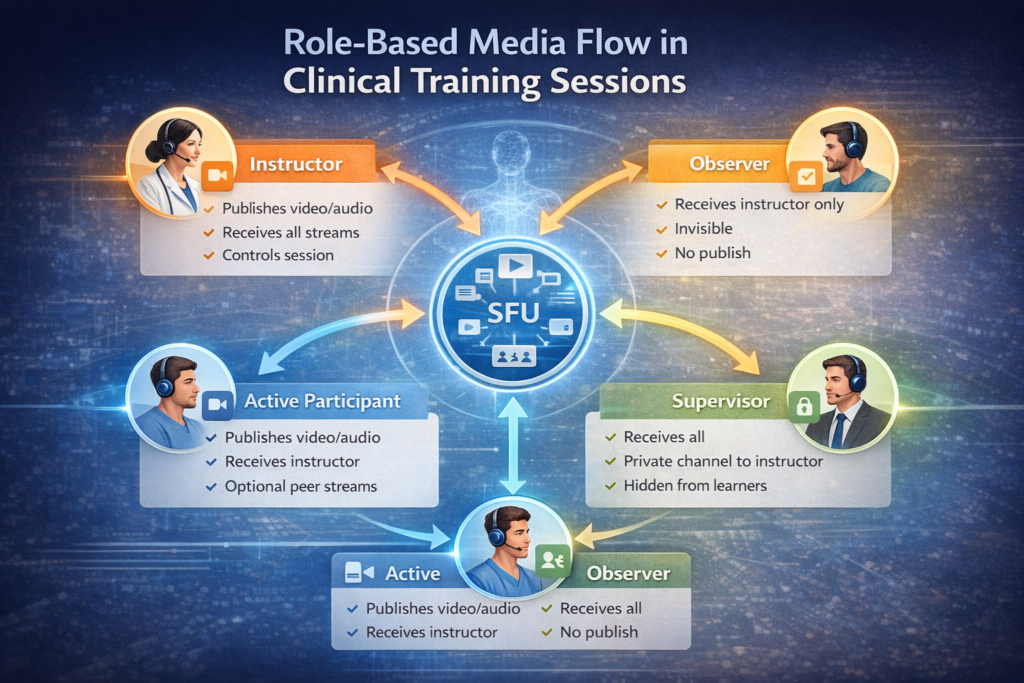
You need SFU infrastructure (P2P cannot support the participant counts or the role-based stream routing required), but you need SFU configuration that supports asymmetric media flows. Most managed SFU providers support this, but require explicit configuration — don’t assume default “room” behavior will handle observer modes correctly.
Role-based media routing requirements for a clinical training session:
- Instructor — publishes video and audio; receives all participant streams; can mute/unmute participants.
- Active participant — publishes video and audio; receives instructor stream; may receive peer streams.
- Observer — receives instructor stream only; does not publish; invisible to other participants unless promoted.
- Supervisor — receives all streams; can interject on a private channel with the instructor; does not appear to learners.
Implementing these roles requires server-side media policy enforcement, not just client-side convention. If observers can technically publish a stream and are just told not to, you will eventually have an incident. The SFU must enforce the policy.
Recording architecture for teaching sessions is more complex than for telehealth recordings. A telehealth recording captures one call. A clinical training recording needs to be:
- Synchronized across multiple camera feeds (instructor, procedure view, room overview)
- Searchable by transcript
- Chaptered at natural teaching moments or procedure phases
- Accessible for asynchronous review with annotation playback
- Retained under an access policy that respects learner privacy while maintaining instructor review rights
This is not a feature you add to an existing video recording pipeline — it needs to be designed into the recording infrastructure from the start.
Architecture Decision 2: Real-Time Annotation and Synchronized Feedback
The feature that most differentiates a clinical training video platform from a general video conferencing tool is the ability for an instructor to annotate what’s happening in real time — drawing on a shared view, pointing to anatomical structures, marking a procedure step — and for learners to see those annotations synchronized with the video stream.
This is harder than it looks for two reasons:
First, annotation data and video frames must be synchronized. An annotation that appears one second after the instructor draws it destroys the pedagogical value. This requires a low-latency annotation transport (WebSocket with sub-100ms delivery target) that is temporally aligned with the video stream. Getting this right requires explicit timestamp synchronization between the annotation channel and the media pipeline — not something most WebRTC or video SDK implementations expose cleanly.
Second, annotations must be persisted and synchronized with recordings. When a learner reviews a recorded session, the annotations need to appear at the correct timestamps in the video. This requires a time-indexed annotation store that the playback UI can query frame-by-frame. Most teams implement this as a separate event stream stored alongside the recording, with the playback player consuming both simultaneously.
Pointer and drawing tools are the baseline. More sophisticated platforms add:
- Timestamped text comments anchored to specific moments in a video.
- Region-of-interest markup that persists across the recording for later assessment
- Structured assessment overlays — checkboxes or rating scales that appear during a procedure and are completed in real time by a supervisor
The annotation layer is effectively a second real-time collaboration system running alongside the video infrastructure. Teams that underestimate it tend to implement it as an afterthought and end up with annotation sync bugs that erode instructor trust in the platform.
Architecture Decision 3: Competency Assessment vs. Content Completion
Generic LMS platforms track content completion: the learner watched the video, passed the quiz, and got the certificate. Clinical training requires something fundamentally different — competency assessment, where a learner must demonstrate a skill to a qualified observer who judges performance against defined criteria.
The data model for competency assessment:
A competency record is not a completion flag. It needs to capture:
- The competency being assessed (referenced to a clinical framework — e.g., CanMEDS, Entrustable Professional Activities)
- The assessment context (simulation, observed clinical practice, video review)
- The assessor’s identity and their qualification to assess this competency
- The evidence attached (video clip, procedure log, case details)
- The rating against each criterion with free-text commentary
- The entrustment decision (supervised, unsupervised, can supervise others)
- The date and expiry, if applicable
This is a significantly richer data model than LMS completion tracking, and it needs to support partial completion (competency in progress), re-assessment (competency lapsed or concerns raised), and aggregation across multiple assessors.
Simulation and branching scenarios add another layer. Procedure simulation — a learner making clinical decisions in a virtual patient encounter — requires branching scenario logic, scoring rubrics tied to decision points, and time-on-task data. This is closer to game engine logic than LMS logic, and it benefits from being architected as a separate service with a defined interface to the main platform rather than built into the LMS layer.
Architecture Decision 4: Credentialing Evidence Chains and Audit Trails
For platforms supporting formal credentialing — CME credits, specialty certification, hospital privilege — the audit trail requirements are more demanding than standard e-learning compliance.
What regulators and accreditation bodies want to see:
- That the learner who completed the activity is the person they claim to be (identity verification at login, not just account creation)
- That completion data hasn’t been modified after the fact (append-only logs or signed completion records)
- That the content version the learner completed is preserved (content versioning with hash verification)
- That the assessor’s qualifications at the time of assessment are documented.
Practical implementation:
Content versioning requires treating clinical training content with the same rigor as software releases — every content update produces a new version, older versions are preserved, and completion records reference the specific version completed. This is not how most CMS platforms work by default.
Signed completion records — where a cryptographic signature ties a completion event to a specific learner, content version, and timestamp — are increasingly expected by accreditation bodies and are straightforward to implement if designed in from the start. They are painful to retrofit.
For platforms dealing with PHI in training scenarios (using real patient cases for education), HIPAA and GDPR de-identification requirements apply to the content pipeline, not just the learner data.
Integration Complexity: The Underestimated Part
Clinical training platforms don’t exist in isolation. They integrate with:
- Hospital LMS systems (most commonly HealthStream, Cornerstone, or custom platforms) via xAPI or SCORM 2004
- Credentialing databases (medical boards, specialty societies, hospital privilege systems)
- HR and workforce management systems for mandatory training tracking
- Clinical simulation lab management systems for scheduling and resource booking
- Video conferencing infrastructure (many institutions have existing Zoom or Teams contracts that learners expect to use)
xAPI (Tin Can) is the current standard for clinical learning data interoperability and is significantly more expressive than SCORM for capturing competency evidence. If your platform will integrate with hospital systems, xAPI support is not optional — and implementing it correctly, with a Learning Record Store (LRS) that handles the data model cleanly, is a week of careful engineering, not an afternoon.
Platform Architecture Summary
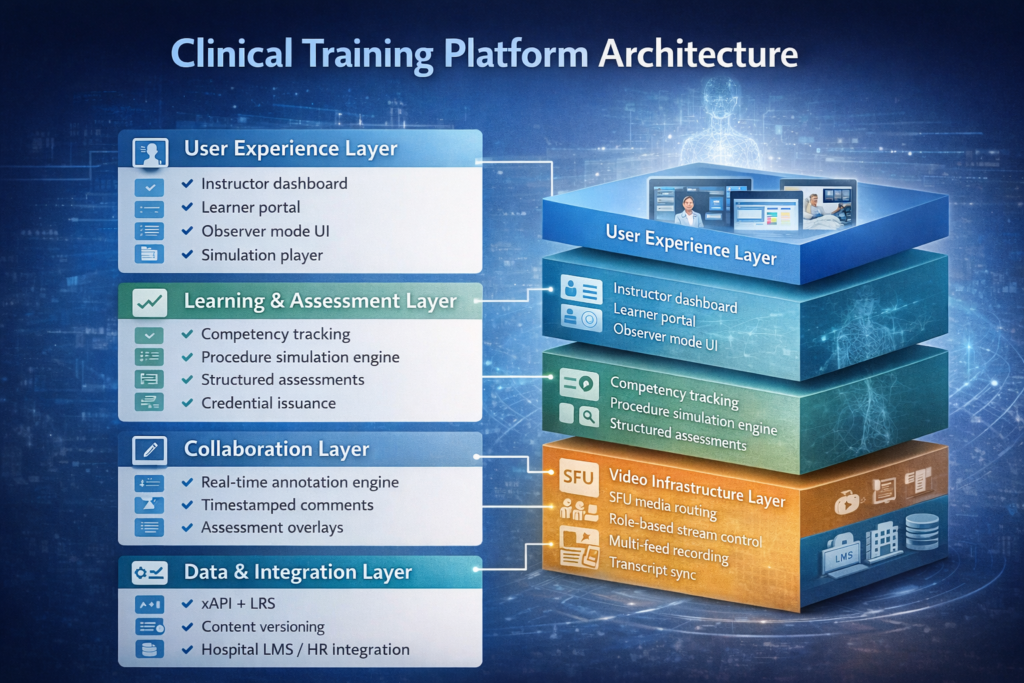
| Layer | Key Requirements | Common Mistakes |
| Live video | Role-based media routing, observer mode, multi-feed recording | Using telehealth SFU config without role enforcement |
| Annotation | Sub-100ms sync, time-indexed persistence, recording alignment | Implementing annotation as afterthought, missing sync |
| Assessment | Competency data model, assessor qualification tracking | Using LMS completion flags instead of competency records |
| Content | Version control, hash verification, PHI de-identification | No versioning; completion records reference mutable content |
| Credentialing | Signed records, append-only audit log, xAPI/LRS | Retrofitting audit trail; SCORM instead of xAPI |
| Integration | xAPI LRS, SCORM fallback, HR system webhooks | Underestimating integration scope and timeline |
Getting the Foundation Right
Clinical training platforms fail most often not because the video doesn’t work or the content doesn’t display — those are solved problems. They fail because the competency data model was too shallow to support real assessment workflows, because the recording infrastructure wasn’t designed for multi-feed synchronized playback, or because the credentialing audit trail couldn’t satisfy accreditation review.
These are foundational decisions. Getting them right requires experience across clinical education workflows, video infrastructure, and regulated system design simultaneously — a combination that’s genuinely rare in a single team.
Trembit has designed and built clinical training and healthcare video platforms for medical education institutions, simulation centers, and digital health companies. From SFU configuration for role-based clinical sessions to xAPI Learning Record Stores and competency assessment data models, we’ve worked across the full stack this domain requires. If you’re in early architecture or hitting the ceiling on an existing platform, contact us.
The intersection of e-learning and healthcare video is narrow enough that experience in both halves independently isn’t sufficient. What matters is having worked specifically where they meet.