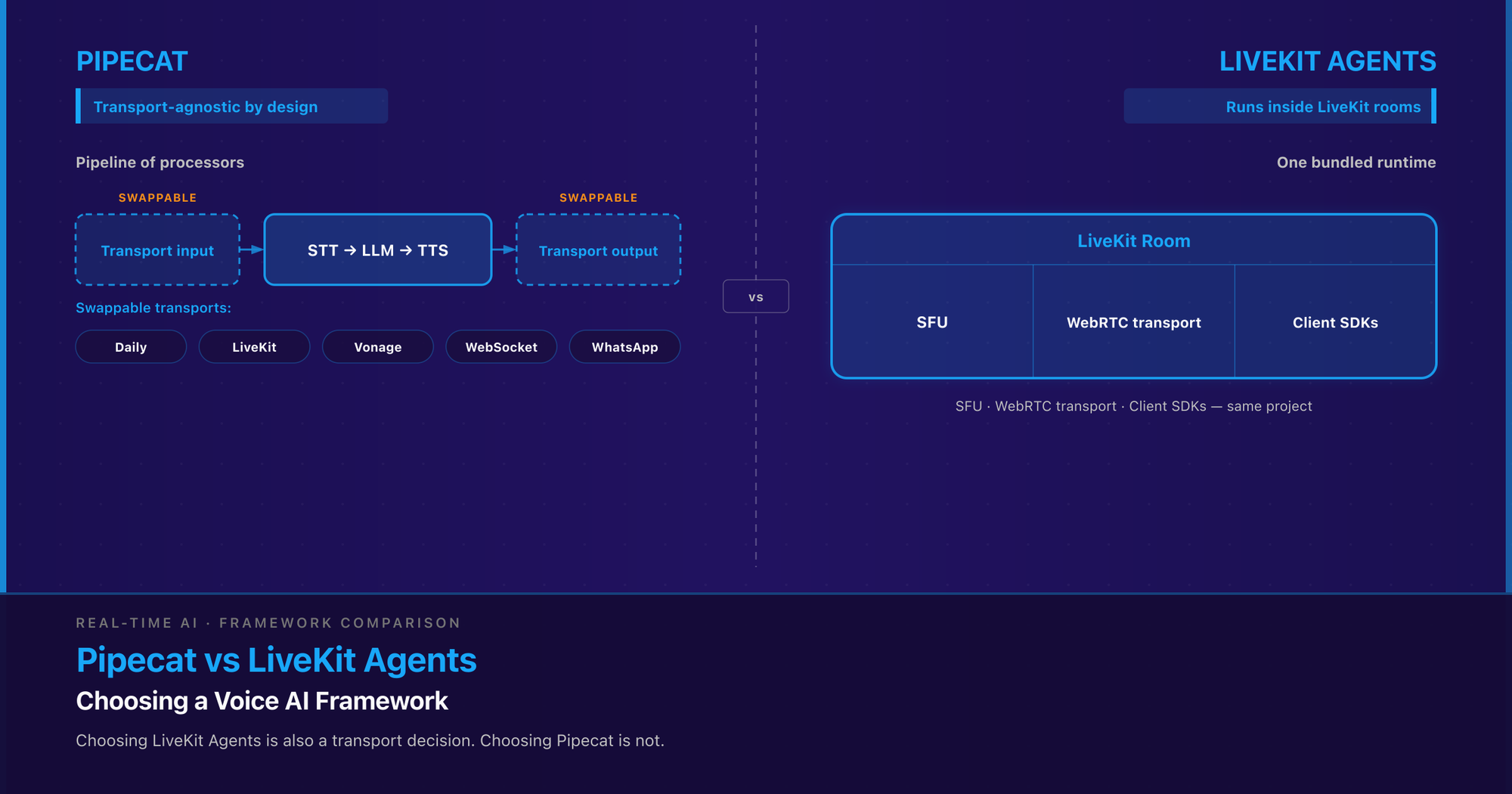
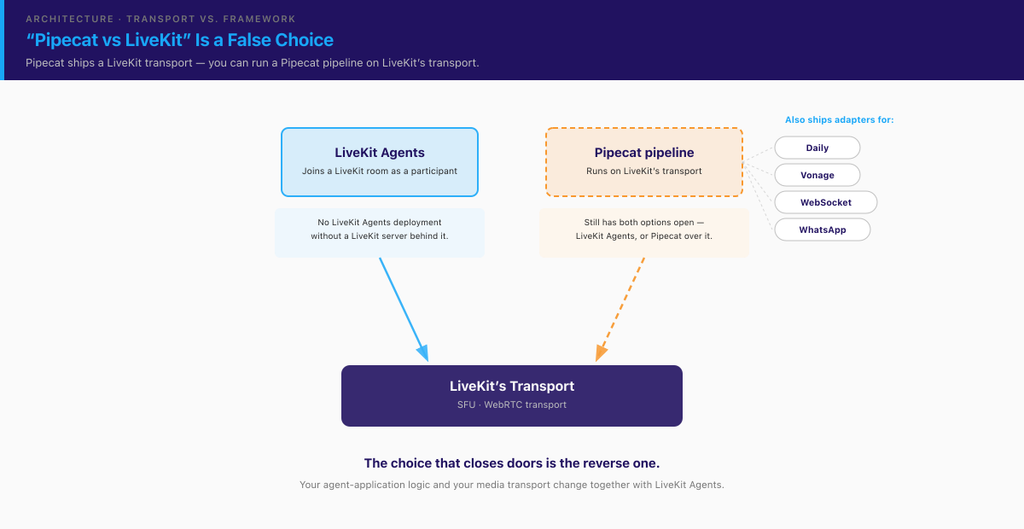
Pipecat and LiveKit Agents are both open-source frameworks for the agent-application layer of a voice AI product — the STT → LLM → TTS (or speech-to-speech) pipeline, turn-taking, interruption handling, and tool calling that sits between your transport and your models. The difference that should drive your choice is not this quarter’s feature list. It’s a structural bet each project made and can’t easily reverse. Pipecat treats the transport as a swappable dependency and ships adapters for Daily, LiveKit, Vonage, WebSocket and WhatsApp (Pipecat README). LiveKit Agents is the agent runtime inside the LiveKit stack: your agent joins a LiveKit room as a participant, and the SFU, the WebRTC transport, and the client SDKs come from the same project (LiveKit Agents docs). Choosing LiveKit Agents is also a transport decision. Choosing Pipecat is not.
Key takeaways
- Both frameworks operate at the agent-application layer, above the SFU and transport. For where that layer sits in the full call path, see our breakdown of voice AI agents on WebRTC — this piece picks up where that one deliberately stopped.
- The structural difference that outlasts any feature list: Pipecat is transport-agnostic by design; LiveKit Agents runs inside LiveKit rooms. Pipecat ships a LiveKit transport, so “Pipecat vs LiveKit” is a false choice — you can run a Pipecat pipeline on LiveKit’s transport (Pipecat README).
- Both projects ship near-weekly, so treat every version number as perishable. Verified on PyPI on 30 September 2026:
livekit-agents1.8.3, released 23 September 2026 (PyPI);pipecat-ai1.12.0, released 26 September 2026 (PyPI). Re-check before you quote either.- Turn detection is where the bundled-vs-modular split becomes concrete. LiveKit’s stronger audio turn detector (
v1) is proprietary and served from LiveKit Inference; itsv1-miniis open-weights under LiveKit’s own model licence (not Apache or BSD) and runs locally on CPU, and both cover 14 languages (LiveKit docs). Pipecat’s Smart Turn v3 is open-weight, runs locally via ONNX on CPU, and covers 23 languages (Pipecat docs).- Both now document first-class MCP tool support — LiveKit via
MCPToolset(LiveKit docs), Pipecat viaMCPClientover stdio, SSE and streamable HTTP (Pipecat docs). This was a live differentiator in the research notes for this article and stopped being one within the same day. Feature-checkbox comparisons on these two projects are not durable.- Licences differ: LiveKit Agents is Apache-2.0, Pipecat is BSD-2-Clause (both per their PyPI package metadata, 30 September 2026).
- Neither framework removes the transport-layer engineering underneath it. Jitter-buffer depth, codec and frame-size choice, and SFU placement stay your team’s problem whichever you pick.
Choosing for a team rather than writing the code yourself? Read the next section — it’s where the lock-in question actually gets decided — then jump to the decision framework and the FAQ. The four sections in between (turn-taking, tool calling, deployment, build-it-yourself) are for whoever will own the pipeline.
What’s the fundamental architectural difference between Pipecat and LiveKit Agents?
Pipecat’s unit of composition is the pipeline. You assemble processors — a transport input, a VAD/turn analyser, an STT service, an LLM context, a TTS service, a transport output — and frames flow through them. The transport is just the first and last processor in that chain, which is why the project can list Daily, LiveKit, Vonage, FastAPI WebSocket, a generic WebSocket server, WhatsApp, a local device transport, and its own SmallWebRTCTransport as interchangeable options (Pipecat README). Swapping transport is, in principle, a change at the edges of the pipeline rather than a rewrite of the agent.
LiveKit Agents inverts that relationship. Its own documentation describes agents as “stateful, realtime bridges” that join LiveKit rooms as full participants, speaking WebRTC to frontends and HTTP/WebSockets to backends, with agent servers that register with LiveKit, receive dispatch requests, and boot job subprocesses per room (LiveKit Agents docs). There is no LiveKit Agents deployment without a LiveKit server behind it. The room is not an integration point you chose — it’s the runtime’s addressing model, its participant model, and its media plane at once.
That buys you real things. Dispatch, participant identity, track subscription, reconnection semantics, and the client SDKs are all one vendor’s problem, designed against each other. When an agent needs to know that the human hung up, or that a second participant joined, the room already models it. Teams that assemble the same behaviour from a media server plus a separate agent process usually end up writing a thinner, buggier version of exactly this.
It also costs you something specific: your agent-application logic and your media transport now change together. If in eighteen months you need the same agent on a SIP-only carrier path, an on-prem media server you don’t control, or a messaging channel, you’re not swapping a component — you’re re-homing the runtime.
The reframe most readers need: “Pipecat vs LiveKit Agents” is not “Pipecat vs LiveKit.” Pipecat ships a LiveKit transport. A team that has already standardised on LiveKit as its SFU still has both options open — LiveKit Agents, or a Pipecat pipeline running over LiveKit’s transport. The choice that closes doors is the reverse one, and it’s worth naming out loud before anyone sketches an architecture diagram.
Two notes on scope. This article sits one layer above our LiveKit vs mediasoup comparison, which answers “which media server should my product run on.” And it does not re-derive the latency budget, barge-in mechanics, or SFU topology covered in voice AI agents on WebRTC — that piece names both frameworks and stops short of choosing, on the grounds that “a framework gives you the agent-application box for free, but it does not absolve you of the transport-layer decisions around it.” Everything below assumes you’ve accepted that.
How do the two frameworks differ on turn-taking and interruption handling?
This is the clearest concrete instance of the bundled-versus-modular split, and it’s worth more attention than any feature table gives it — turn detection is the single component most responsible for whether an agent feels conversational.
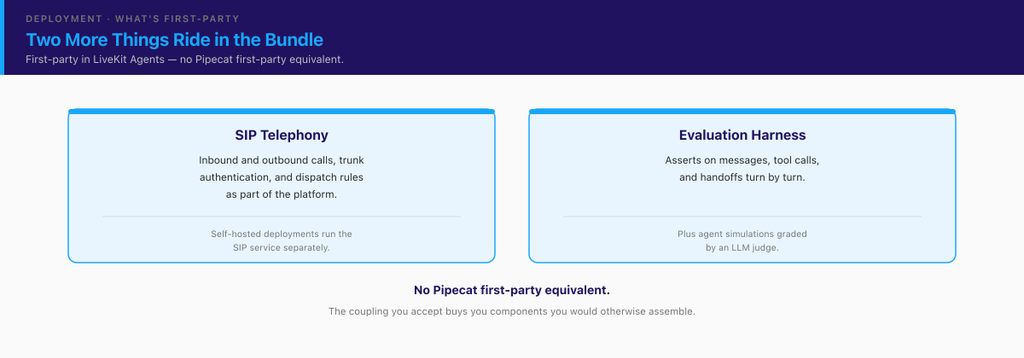
LiveKit ships two audio turn detectors. The v1 model is proprietary and “served on LiveKit Inference in every region”; v1-mini is open-weights under the LiveKit Model License and runs locally on CPU. Both encode user audio directly rather than working from transcripts, combining semantic content with acoustic cues like intonation and rhythm, and both support 14 languages (LiveKit docs).
Pipecat ships Smart Turn v3, an open-source semantic VAD released under BSD-2-Clause. It runs locally through LocalSmartTurnAnalyzerV3 using ONNX, is designed for CPU, and Pipecat’s docs put inference “on low-cost cloud instances in under 100ms,” with optional GPU acceleration via onnxruntime-gpu. It covers 23 languages (Pipecat docs), and the published model card gives an 8M-parameter Whisper-Tiny encoder with a linear head, shipping at 8 MB quantised / 32 MB unquantised (Hugging Face model card).
Read past the numbers to the architectural consequence. LiveKit’s better-performing detector is a hosted inference call inside your turn loop — the tightest, most latency-sensitive path in the system. LiveKit’s own documentation is candid about the resulting failure mode: if the model doesn’t return a prediction within about a second, the agent commits the turn anyway, and a timeout on the full v1 model switches the session to v1-mini for the rest of the call (LiveKit docs). That’s a sensible design, and it also tells you what a degraded network between your agent and LiveKit Inference will feel like to a caller. Pipecat’s equivalent has no network dependency at all; it’s a model file in your process, with whatever CPU cost that implies on every turn.
Neither approach is wrong. They’re different answers to “who owns the risk in the turn loop” — a managed service with a defined timeout fallback, or a local model you host, version, and profile yourself. If you run in a region with thin coverage from your inference provider, or in an air-gapped or on-prem deployment, that distinction decides for you. If it doesn’t, the language coverage (14 vs 23) may matter more than the topology.
What does each framework’s tool-calling story look like?
Both frameworks do standard LLM function calling, and both now document first-class Model Context Protocol support. LiveKit wraps MCP servers in an MCPToolset passed to the agent’s tools parameter, with filtering, authentication, and per-tool customisation (LiveKit docs). Pipecat’s MCPClient “connects Pipecat bots to MCP servers and registers their tools with your LLM,” over stdio, SSE, or streamable HTTP (Pipecat docs).
Here’s why that paragraph is short. The research notes behind this article, written the same week, flagged MCP as a documented LiveKit capability with no confirmed Pipecat equivalent — a clean differentiator. Checking Pipecat’s own docs at drafting time dissolved it. The category simply moves faster than any comparison can be published. Treat every tool-calling checkbox you read about these two projects — including this one — as a snapshot with a date on it, and verify against the project’s own docs before it influences an architecture decision. The transport-coupling question above will still be true next year. This section may not be.
How does deployment and hosting differ?
LiveKit Agents gives you a graded path: LiveKit Cloud as the managed option, or a self-hosted LiveKit server, documented in full including its built-in TURN server with TLS (LiveKit self-hosting docs). Either way you run your agent workers yourself; what varies is who operates the media plane. One caveat carries forward from the previous section: self-hosting the LiveKit server does not automatically make the stack self-contained, because the v1 turn detector is still served from LiveKit Inference. Check each component you rely on, not the deployment label.
Pipecat itself is a library; Daily offers Pipecat Cloud as an optional managed host, and otherwise you bring the infrastructure, and your transport choice decides what “hosting” even means — Daily’s hosted WebRTC, a LiveKit deployment, or a WebSocket endpoint you already run. That’s flexibility, and if you self-host it’s also work: nobody hands you dispatch, autoscaling, or regional placement.
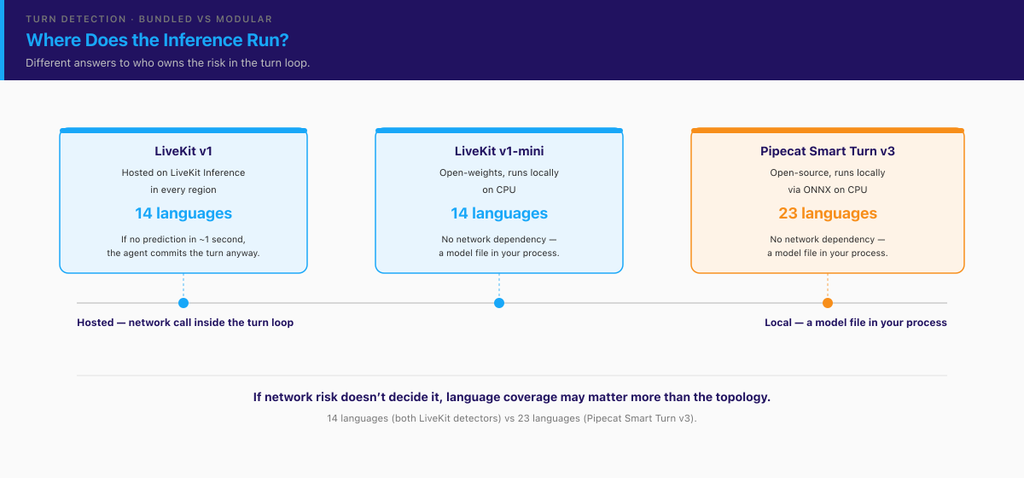
Two more things ride in the bundle. Telephony is first-party on the LiveKit side — LiveKit SIP handles inbound and outbound calls, trunk authentication and dispatch rules as part of the platform (LiveKit telephony docs), though self-hosted deployments run the SIP service separately. So is evaluation: LiveKit Agents ships a testing framework that asserts on messages, tool calls and handoffs turn by turn, plus agent simulations graded by an LLM judge (LiveKit testing docs). Anyone who has tried to regression-test a voice agent knows that is not a small thing to be handed.
Pipecat doesn’t bundle a SIP service or an evaluation harness of its own (phone calls come in through its transport providers), and we found no first-party equivalent of either in its docs as of 30 September 2026, and that is the bundled-versus-agnostic trade in its clearest form: the coupling you accept buys you components you would otherwise assemble.
For what any of this costs to run, we’ve modelled the full stack in the cost of running a voice AI platform; the managed-versus-self-hosted trade-off is covered from the media-server side in the LiveKit vs mediasoup comparison.
What does building this orchestration layer yourself actually take?
Frameworks exist at this layer because it’s genuinely hard, and the difficulty isn’t where teams expect. Picking a good LLM does not get you a good conversation.
Trembit built a production voice agent for HR screening — outbound calls, real-time STT on telephony-grade audio, TTS, response scoring, and ATS integration —. We’re not a Pipecat shop or a LiveKit Agents shop, and this isn’t a claim that we shipped on either. It’s evidence about the problem both projects are productising.
What consumed the engineering time was turn-taking. Transcription accuracy was solved early; the bot still lost calls, because it started speaking before candidates finished a thought or left dead air after they stopped. What fixed it was a multi-signal turn-taking model combining audio energy levels, speech cadence, syntactic completeness of the transcribed text, and prosodic cues such as falling intonation — structurally the same job Smart Turn v3 and LiveKit’s audio turn detector now do as a shipped component. Call completion rates moved as soon as the rhythm felt natural. The second time sink was TTS pacing: slowing delivery on important questions, avoiding monotone intonation, and inserting acknowledgement phrases so the silence between turns read as listening rather than a broken line.
That is what a framework buys you now, and it’s a lot — which is why the honest answer to “should we build this ourselves?” is usually no. Three real exceptions: an existing bespoke pipeline that already works, a transport neither project supports well, or requirements that fight a framework’s abstractions (unusual barge-in policy, hard on-prem constraints, a media path you must own end to end). Make that call knowing what it costs, because the turn-taking work is not the part you can time-box.
If you’re weighing that build-versus-adopt call now, our AI voice assistants development team scopes exactly this decision — details at the end.
When should you choose Pipecat, and when should you choose LiveKit Agents?
Choose LiveKit Agents when:
- You’re already on LiveKit as your SFU, or clearly heading there, and you want the room, dispatch, participant, and reconnection semantics handled by the same project that handles your media.
- You want a managed path available — LiveKit Cloud now, or the option of it later — rather than owning the media plane from day one.
- Your team is small relative to the surface area, and inheriting an opinionated stack beats assembling one. Fewer integration seams is a real engineering budget line.
- Your language coverage needs sit inside the 14 the turn detector supports, and a hosted inference call in the turn loop is acceptable in the regions you serve.
- Phone calls are a first-class channel and you’d rather inherit SIP than build it, or you want a shipped evaluation harness rather than writing your own regression tests for a voice agent.
Choose Pipecat when:
- Your transport is not LiveKit and shouldn’t be — an existing mediasoup deployment, a voice AI agent on FreeSWITCH or another SIP path, or a WebSocket channel you already operate.
- You expect to run the same agent logic across more than one channel (WebRTC plus telephony plus WhatsApp, for example), and you’d rather change the first and last processor than the runtime.
- You need components you can self-host and pin — an open-weight turn detector under BSD-2-Clause with no network dependency, versioned by you.
- You need turn detection beyond LiveKit’s 14 languages, where Smart Turn v3’s 23 is the deciding fact.
- You want the option to run on LiveKit’s transport without adopting LiveKit’s runtime — which, per the architecture section, is a real and underused position.
When it’s genuinely close, weight two things over the feature list. First, which coupling you can live with in eighteen months — a framework migration is a quarter of engineering time you didn’t plan. Second, which project’s failure modes you can debug, because the debugging you’ll actually do at 2 a.m. is transport-layer, not framework-layer. Both projects are actively maintained and shipped releases days apart; neither is a bet against maintenance.
Frequently asked questions about Pipecat and LiveKit Agents
Is Pipecat or LiveKit Agents better for a voice AI agent?
Neither is better in general. LiveKit Agents fits teams already committed to LiveKit’s transport who want the bundled runtime, dispatch, and LiveKit Cloud as a managed path. Pipecat fits teams that need transport flexibility, self-hostable components, or a single agent across multiple channels. If your transport is undecided, that’s the decision to make first — it constrains this one.
Can I use Pipecat with LiveKit’s transport?
Yes. Pipecat’s README lists LiveKit (WebRTC) among its supported transports alongside Daily, Vonage, FastAPI WebSocket, a WebSocket server, WhatsApp, and local (Pipecat README). Standardising on LiveKit as your SFU does not commit you to LiveKit Agents as your orchestration framework.
Do both frameworks support MCP tools?
As of 30 September 2026, yes — LiveKit Agents through MCPToolset (LiveKit docs) and Pipecat through MCPClient over stdio, SSE, or streamable HTTP (Pipecat docs). Both projects release frequently; check the current docs before relying on any specific tooling behaviour.
What licences are Pipecat and LiveKit Agents released under?
Per their PyPI package metadata on 30 September 2026, livekit-agents is Apache-2.0 (PyPI) and pipecat-ai is BSD-2-Clause (PyPI). Pipecat’s Smart Turn v3 model is also BSD-2-Clause (Hugging Face model card). Both are permissive; if licensing gates your decision, read the current LICENSE file in each repository.
Do I still need to worry about latency and barge-in if I use a framework?
Yes. A framework hands you the agent-application box; it does not decide your jitter-buffer depth, your codec and frame-size choice, or where your SFU sits relative to your users. Those terms stay in your latency budget either way — we cover them in voice AI agents on WebRTC, and they’re the layer where most “the model is slow” complaints actually resolve.
Deciding between these two — or working out whether the framework is the problem at all? Trembit has spent 15+ years and 50+ production video and voice builds at the transport layer these frameworks sit on, including WebRTC AI work and voice agents built without either framework. To be direct about what that means for you: we build on whichever of the two you choose, and the engagement usually starts as an architecture review rather than a rewrite. Book a free 30-minute call with an engineer: bring the specific decision — the transport you’re on, the barge-in behaviour you can’t fix, the migration you’re weighing — and we’ll pressure-test it against what we’ve seen break in production. No deck, no pitch, and if the answer is “your current stack is fine, change this one thing,” that’s what you’ll hear. Start with our AI voice assistants development team.