By Stan Reshetnyk, CTO, Trembit — protocol-level WebRTC and telephony engineering across 50+ real-time video and voice builds · Last updated 3 August 2026
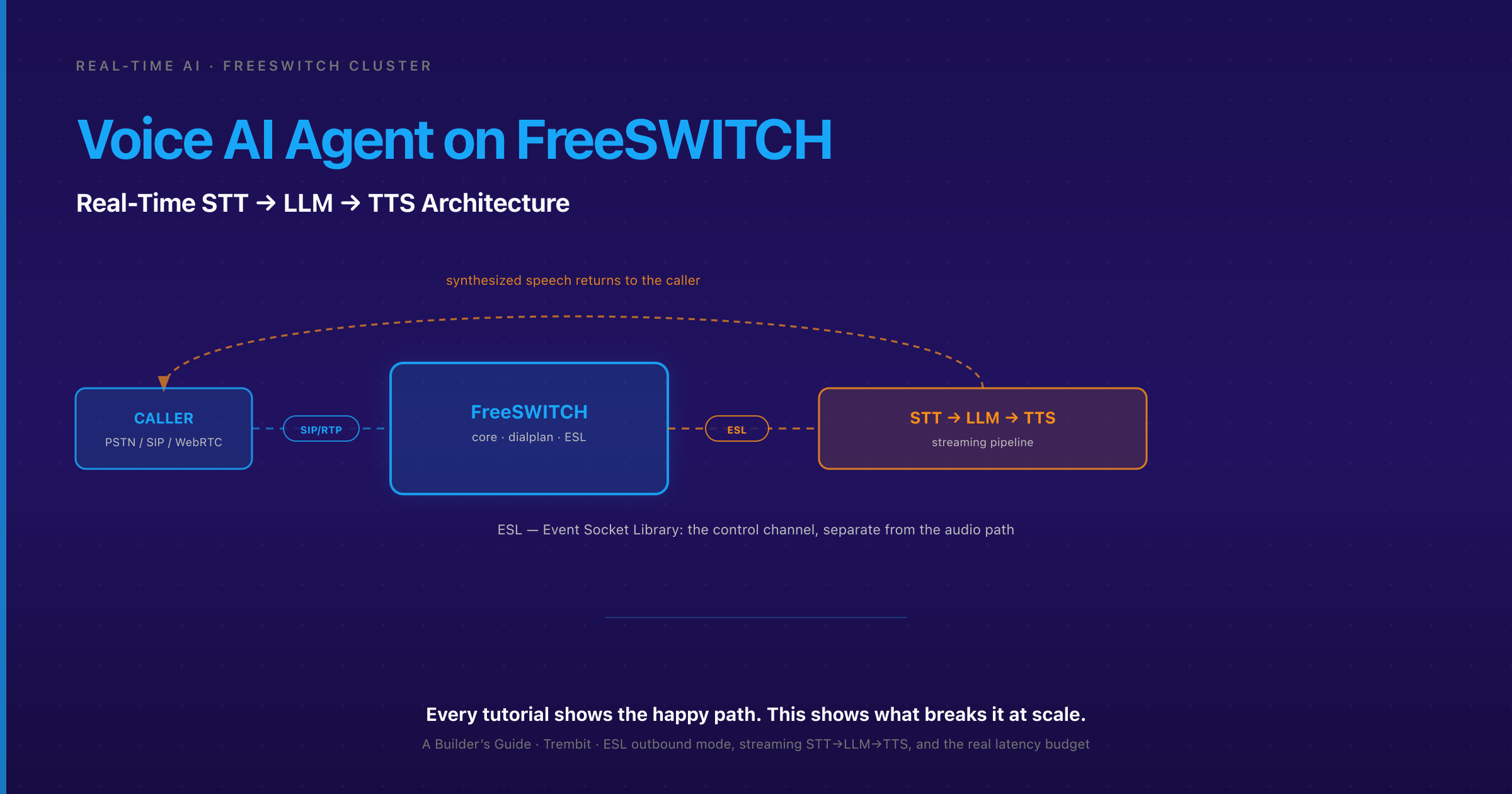
A voice AI agent on FreeSWITCH is a telephony application where FreeSWITCH handles the call’s media layer — SIP, PSTN, or WebRTC — while an external pipeline streams the caller’s audio to a speech-to-text (STT) engine, feeds the transcript to an LLM, and streams synthesized speech back into the live call. The orchestration runs over FreeSWITCH’s Event Socket Library (ESL), not inside the dialplan itself. Every tutorial gets this far, and they all describe the same happy path. What breaks it in production is architectural, not code-level: FreeSWITCH’s media threads blocking while an LLM call is in flight, and a latency budget nobody added up. This guide is about those two problems — the ones the happy-path tutorials skip, whether you call the thing a voice agent or a voice bot.
If you own compliance rather than code, skip to how you keep voice data compliant — it’s self-contained. If you’re evaluating a build partner rather than writing the code yourself, skip to how Trembit approaches this, honestly — it’s the trust-and-proof section. Otherwise, read on for the architecture first.
Key takeaways
- FreeSWITCH connects to an AI pipeline over ESL in one of two modes: inbound (your app connects to FreeSWITCH and controls it server-wide) or outbound (FreeSWITCH connects out to your app for one specific call leg). Outbound mode gives each call its own socket and its own handler — which is what keeps a slow inference call on one session from stalling every other session.
mod_audio_fork— the module older tutorials still reference — appears effectively unmaintained and no longer builds cleanly against current FreeSWITCH. The current pragmatic path ismod_audio_stream(a community module that forwards call audio out to a WebSocket for STT) plus coreuuid_broadcast/ audio injection to play synthesized speech back in.- A cascaded STT→LLM→TTS pipeline sums to a roughly 340 ms–1.75 s end-to-end envelope once you add up every stage honestly — with a representative mid-range around 720 ms–1.4 s when each stage lands near typical. A native speech-to-speech model over a real-time API (e.g., OpenAI Realtime) can land closer to 250–450 ms because it collapses the three text round trips into one audio-in/audio-out call. All are — commonly reported ranges, not a lab-measured Trembit figure.
- Barge-in (stop talking within ~100–200 ms of the caller interrupting) and turn-taking / endpointing (deciding the caller has finished) are two different problems most guides conflate. Both depend on voice-activity detection (VAD) tuned against real, narrowband call audio — not the silence-timeout defaults.
- The single biggest production failure competitor tutorials skip: AI inference blocking FreeSWITCH’s own media/event threads. An LLM call of 400 ms–2 s, run synchronously inside the call’s event path, stalls audio for every session sharing that thread. This is why ESL outbound mode plus an async pipeline is the wedge, not a nice-to-have.
- FreeSWITCH does not natively terminate audio into a cloud AI service — bridging SIP/PSTN calls to a cloud STT/LLM/TTS stack, or bridging browser WebRTC callers into FreeSWITCH, is its own protocol-translation layer. “
- Keeping voice data inside the firewall — running STT/LLM/TTS on-prem or in a VPC instead of shipping raw caller audio to a third-party API — is a 2026 “sovereign AI” pattern gaining ground specifically for regulated voice (health, finance). This piece flags it; the full compliance build-out is its own guide.
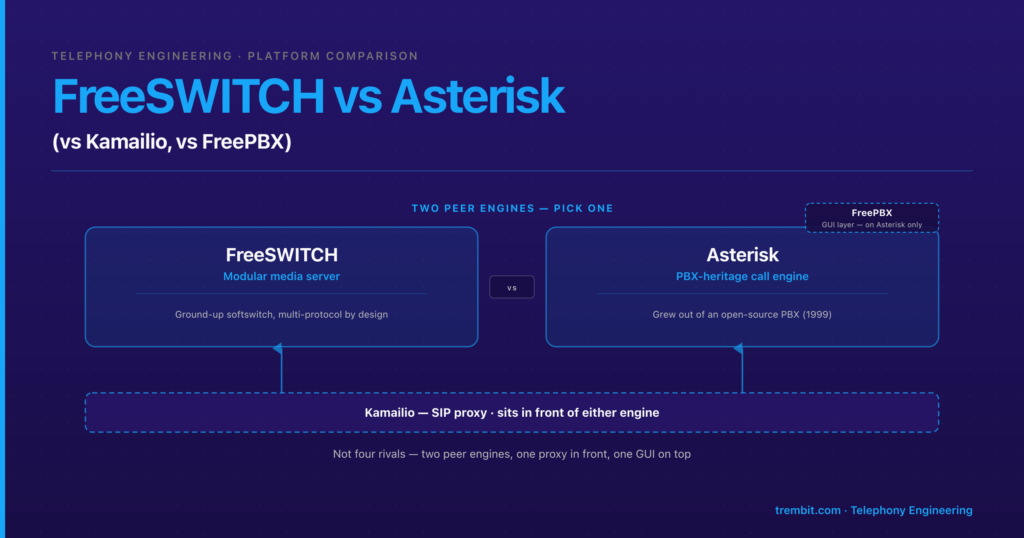
Part of our FreeSWITCH in Production series. Read next: FreeSWITCH vs Asterisk — an honest engineering comparison if you’re still deciding on the platform itself; this guide assumes you’ve chosen FreeSWITCH.
What does a voice AI agent on FreeSWITCH actually look like end to end?
At a high level, one call flows through five stages. This isn’t a FreeSWITCH primer — it’s the map every deep section below hangs off.
- A caller arrives over PSTN, a SIP trunk, or WebRTC.
- FreeSWITCH’s core answers and bridges the leg. The dialplan decides this call talks to the AI agent rather than a human queue or an IVR.
- An ESL connection controls that leg — either your application reaches in (inbound) or FreeSWITCH reaches out to your application (outbound). This is where the agent’s logic lives.
- The external AI pipeline runs the turn: caller audio → STT → LLM → TTS.
- Synthesized speech is injected back into the live call, and the caller hears the response.
Two architectural choices decide whether this survives contact with production, and the rest of this guide resolves them:
- Inbound vs. outbound ESL — how your agent logic attaches to the call, and whether one slow AI call can freeze others.
- How audio actually moves in and out — the streaming path for caller audio going to STT and synthesized audio coming back.
Get these two right and the model layer is swappable. Get them wrong and no amount of model tuning saves you, because the failure is in the transport, not the tokens.
Should you use ESL inbound or outbound mode for an AI voice agent?
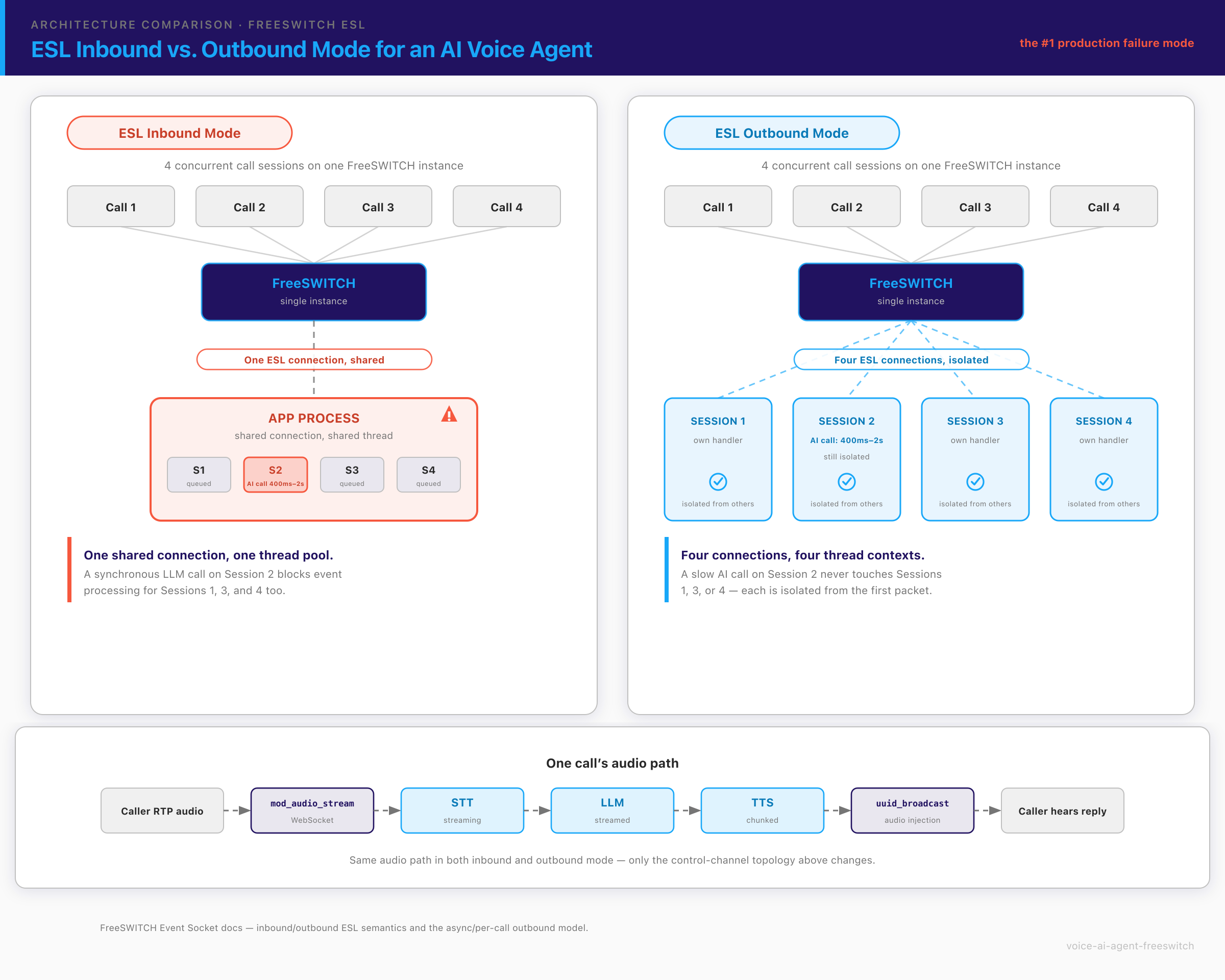
This is the decision that separates a demo that works on your laptop from an agent that survives a hundred concurrent calls. The two ESL modes are not two ways of writing the same thing — they have different threading and blocking behavior, and that difference is invisible at one call and catastrophic at scale.
Inbound mode: your application is the client. Your program opens a persistent TCP connection to FreeSWITCH’s Event Socket listener, authenticates, and then issues commands and consumes events for as long as it likes. “ This is the mode you’d reach for building a dashboard, a click-to-call backend, or a dialer — one long-lived, server-wide controller. It’s simple to reason about for a single test call. The trap: if your agent logic — including any synchronous STT, LLM, or TTS call — runs on the connection and thread that’s also processing call events, a slow inference call blocks event processing for that path. Share a connection pool or a thread pool carelessly across sessions and one 2-second LLM response turns into cascading jitter on every call riding the same resources. The blocking is real; it’s just invisible until there’s contention.
Outbound mode: FreeSWITCH is the client. On a dialplan event — typically the call being answered — FreeSWITCH connects out to your application server, and your app controls that one call leg. The property that matters: outbound is per-call. Each session gets its own outbound socket to its own handler, so inference latency on one call’s pipeline is architecturally isolated from another’s from the first packet. Pair outbound ESL with FreeSWITCH’s `async` flag (which runs the socket session in its own thread and lets the dialplan continue rather than blocking in the socket application), and you have the foundation that scales. One FreeSWITCH-specific footgun comes with async, though: because commands no longer block until the prior one finishes, they can race — a playback and a break, or overlapping uuid_broadcast calls, can arrive out of the order you intended. The fix is FreeSWITCH’s own event-lock flag (and deliberate command ordering) so each queued command completes before the next runs; skip it and your barge-in break can land before the audio it was meant to stop even started. “
Here’s the part the tutorials that mention outbound mode still get wrong: outbound mode is not automatically safe. It removes the forced coupling between AI latency and FreeSWITCH’s event loop — it does not remove your obligation to design the application side well. If your per-call handler makes a blocking, synchronous call to an STT or LLM service and waits, you’ve just recreated the inbound problem one socket at a time. Outbound ESL has to be paired with genuinely non-blocking pipeline calls — async I/O, or a worker/queue model — so a 2-second LLM response never freezes that call’s own audio handling. The mode gives you isolation between calls; async design gives you responsiveness within a call. You need both.
The practical framing: at demo scale — one test call — inbound-mode blocking is invisible. There’s no contention, so nothing stalls, and the demo is flawless. At production concurrency, that same architecture is the number-one reason teams say “it worked perfectly in the demo and fell apart in production.” If you take one thing from this guide, take this: choose outbound ESL, make every AI call async, and load-test under concurrency before you trust it. This is the layer where building AI into the live media path is an architecture discipline, not a library import — the model is the easy part.
How does audio actually move between FreeSWITCH and your AI pipeline?
ESL controls the call and carries events; it does not, by itself, carry the raw media out to your STT engine or the synthesized speech back in. Audio movement is a separate mechanism, and this is exactly where generic tutorials go stale, because the module landscape has moved.
Inbound audio (caller → STT): mod_audio_stream. This community module opens a WebSocket from FreeSWITCH and streams the call’s audio out to your STT service in real time, so transcription can start on partial utterances instead of waiting for the call to end. “ Streaming, not batch, is what makes the whole pipeline feel live.
Retire mod_audio_fork explicitly. Older posts — and a lot of copy-pasted Stack Overflow answers — still point you at mod_audio_fork, the original “fork the audio to a WebSocket” module. It appears effectively unmaintained and no longer builds cleanly against current FreeSWITCH releases due to dependency drift; mod_audio_stream was written as the leaner successor and is the actively maintained path. “ Neither module ships in FreeSWITCH core — both are community modules you compile in, which is itself worth knowing before you plan a build around them.
Outbound audio (TTS → caller): uuid_broadcast / audio injection. Once you have synthesized speech to play, you inject it into the live call. Core FreeSWITCH gives you uuid_broadcast to play a file or stream into a specific call leg by UUID “; that’s the pragmatic primitive for getting the agent’s voice back to the caller.
Stream chunks, don’t wait for the full response. The single biggest perceived-latency win in a cascaded pipeline is refusing to wait. Don’t hold the LLM’s full response and then start TTS — stream the LLM output sentence-by-sentence (or clause-by-clause) into TTS as each chunk completes, and start playing the first synthesized chunk while the model is still generating the rest. This overlaps three stages that would otherwise run in series, and it’s the difference between an agent that “feels” real-time and one with an awkward beat of silence after every turn.
Put together, the data flow for one call is:
caller RTP audio
   → mod_audio_stream (WebSocket)
      → STT (streaming, partial transcripts)
         → LLM (streamed token/sentence output)
            → TTS (chunked synthesis)
               → uuid_broadcast / audio injection
                  → caller hears the response
The LLM and orchestration layer — prompt design, tool calls, retrieval, state — is its own body of work; where the pipeline steps from telephony into that layer, AI development and the transport engineering have to be designed against each other, not in isolation, or you get an agent that’s smart and unusable.
What is the real latency budget for a voice AI agent on FreeSWITCH?
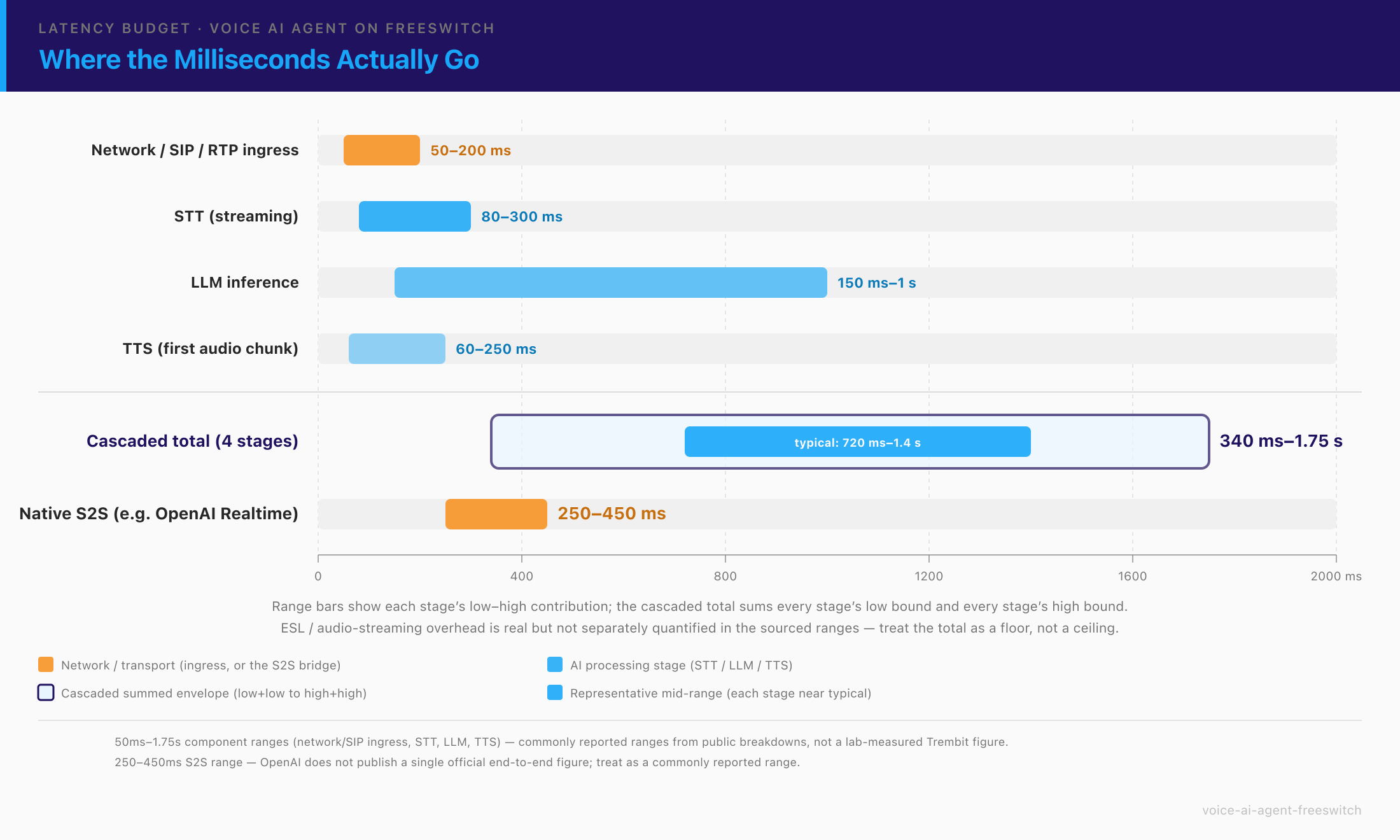
Most competitor posts quote a single latency number with no breakdown. That number is meaningless without two things: which architecture it describes, and what “good enough” actually is. Start with the target. Research on human conversation puts the comfortable gap between one speaker finishing and the next starting at roughly 200 ms, with anything past about half a second starting to feel like a pause. “ That’s the bar the caller’s ear is holding you to.
Now the two architectures.
Cascaded STT → LLM → TTS on FreeSWITCH: the components sum to a roughly 340 ms–1.75 s end-to-end envelope. “ It’s a sum, and adding it up is the honest way to reason about it:
| Stage | Rough contribution | Notes |
|---|---|---|
| Network + SIP/RTP ingress | ~50–200 ms | Signaling and media path in |
| STT (streaming) | ~80–300 ms | Time to a usable partial transcript, not full |
| LLM inference | ~150 ms–1 s | First-token time dominates if you stream output |
| TTS (first audio chunk) | ~60–250 ms | First chunk, not the whole utterance |
| ESL + audio-streaming overhead | non-trivial | The transport layer this whole guide is about |
“
Add those four stages up and the honest envelope is ~340 ms–1.75 s — wide, because every stage has real variance. Within it, a representative mid-range is ~720 ms–1.4 s: what you actually see when STT partial-transcript time, LLM first-token time, and TTS first-chunk time each land near their typical (not best-case, not worst-case) values on a well-tuned pipeline. Quote the full envelope when you plan capacity and worst-case behavior; quote the mid-range when you set an experience target — but never quote either as a single magic number without the component terms sitting behind it, because that’s exactly the number that turns out to be a lie under load.
Native speech-to-speech via a real-time API (e.g., OpenAI Realtime), bridged through FreeSWITCH: roughly 250–450 ms. It’s faster because the model takes audio in and emits audio out, collapsing the three text-serialization round trips into one call. Be honest about the trade-off, though: speech-to-speech is less observable per stage (you can’t inspect the transcript between STT and LLM because there is no separate STT step), harder to swap providers on, and the audio bridge into a real-time API is itself a real integration project — not a drop-in swap. Cascaded pipelines also cost meaningfully less at scale and keep each stage independently debuggable, which is why they still dominate regulated and enterprise deployments.
So the architecture choice is a genuine trade-off — debuggability, provider flexibility, and cost on one side; raw latency on the other — not a strict upgrade path from cascaded to S2S. Pick deliberately.
And the point the whole guide keeps returning to: even the best model-layer latency number is a lie if FreeSWITCH’s own event handling is stalling on synchronous AI calls. The transport/orchestration architecture and the model-layer budget are both real terms in what the caller experiences. A 300 ms model with a blocked ESL thread feels worse than a 1.2 s pipeline that never stalls, because jitter reads as broken in a way steady latency does not.
Does bridging to a real-time S2S API change the ESL architecture?
Yes, in one important way. Instead of streaming audio out to a separate STT service and text back from an LLM, your outbound-ESL application bridges the call’s audio more directly to the real-time API’s audio stream — fewer moving parts on your side of the pipeline. But the wedge principle from the ESL section is unchanged: the real-time API call is still a network round trip, and it must not block FreeSWITCH’s media thread. Outbound ESL plus async handling is exactly as necessary for a speech-to-speech bridge as for a cascaded pipeline; S2S changes what flows over the socket, not whether the socket has to be non-blocking. For the transport-layer mechanics of turn-taking and barge-in on WebRTC specifically, our deep dive on voice AI agents on WebRTC covers the browser side of this same problem.
How do you handle barge-in and turn-taking in a FreeSWITCH voice agent?
These are two different problems, and conflating them is the most common conceptual mistake in voice-agent design. One is about interrupting; the other is about knowing when it’s your turn.
Barge-in: the caller starts talking while the agent is still speaking. The agent has to detect the caller’s speech and stop — and flush — its own outbound audio within roughly 100–200 ms, or it talks over the person. On FreeSWITCH specifically, the mechanics are: VAD runs against the inbound audio stream (the same stream mod_audio_stream is already forwarding to STT), speech onset fires an interrupt, and that interrupt has to reach the outbound-audio path and stop and flush in-flight playback — not merely stop queuing new audio. Miss the flush and the already-buffered speech keeps playing out; the agent “hears” the interrupt but keeps talking anyway. “
Turn-taking / endpointing: deciding the caller has finished, so the agent can respond — even when the agent wasn’t talking. This is a silence-threshold problem, optionally augmented with prosodic or semantic cues, and it’s genuinely hard to tune. Set the threshold too short and the agent interrupts a caller who was just pausing mid-sentence; too long and every turn has a dead beat before the agent responds.
The FreeSWITCH-specific gotcha that ties both together: telephony audio is a hostile VAD environment. Narrowband PSTN audio (typically 8 kHz G.711), codec artifacts, comfort noise, and real network jitter make speech-onset and end-of-turn detection materially harder than the clean 48 kHz audio you get from a browser WebRTC mic on your desk. A common failure mode looks like this: an agent that testers report as “laggy and interrupting people” isn’t actually slow at all — its VAD was tuned against clean local test audio and misfires constantly on the packet loss and background hum of real phone calls. We’ve seen builds fail their first production calls for exactly this reason while every latency metric looked fine. Tune and test against real call recordings, not synthetic test audio, or you’ll ship a barge-in system that works in the office and fails on the network.
How Trembit approaches this — and what we’ll say honestly
Trembit runs FreeSWITCH in production as telephony infrastructure: on a HIPAA/GDPR-compliant healthcare video platform, FreeSWITCH serves as the SIP proxy and PSTN bridge that connects WebRTC and mobile callers through to the phone network and into hospital SIP conferencing. That’s real production telephony — the SIP/PSTN/WebRTC bridging layer this guide’s whole architecture sits on — carrying regulated healthcare traffic. “
Separately, we run production voice AI: we built an autonomous voice-AI phone-screening agent that conducts real candidate calls end to end — streaming speech-to-text and text-to-speech, real-time turn-taking, answer scoring, and ATS integration. To be precise: that agent’s stack is STT/TTS with OpenAI/Gemini and Python — we’re not claiming it runs on FreeSWITCH. So both halves exist in production, separately: production voice AI (that screening agent) and production FreeSWITCH telephony (the SIP proxy/PSTN bridge above). “
Being straight about the seam between them: the real-time voice-AI pipeline running on FreeSWITCH specifically — streaming STT→LLM→TTS with barge-in over ESL — we have prototyped and demoed, not run at production scale. The credibility behind this guide is our 15+ years and 50+ implementations of protocol-level WebRTC and real-time media, plus production FreeSWITCH telephony and production voice AI — not a claim to operate a fleet of production voice agents on FreeSWITCH itself. If a vendor tells you they run thousands of concurrent FreeSWITCH voice agents, ask them the concurrency number and the ESL threading model; the honest ones hesitate, because that’s exactly where the hard part lives. And if you’re already mid-build and stuck — jitter under load you can’t trace, barge-in you can’t get under 200 ms — a stalled real-time project is exactly the kind of work we’re brought in to rescue. If you’re scoping this and want that judgment applied to your architecture — the ESL threading model, the async pipeline, the latency budget — before you commit engineering time, that’s what our real-time voice AI team pressure-tests.
What breaks when you take this from a demo to production?
The demo hides everything that matters. Here’s what to plan for — at the “what to design against” level, not a full runbook (deep scaling operations is its own subject).
Concurrency. Every session needs its own outbound-ESL connection and its own async pipeline handling. The failure mode is specific: the inbound-mode/blocking mistakes that were invisible at one call become visible only under concurrent load, so load-test with realistic simultaneous calls, not one at a time. A demo tested serially tells you almost nothing about production behavior. We won’t quote a concurrent-call ceiling here, because a truthful one depends entirely on your hardware, codecs, model latency, and pipeline design — anyone quoting “handles N thousand concurrent AI calls per node” as a universal figure is selling, not engineering.
Failure recovery. Decide, in advance, what the agent does when the STT service times out mid-call, the LLM call errors, or the ESL connection drops. A production agent needs defined fallback behavior at each stage — a graceful “I’m having trouble hearing you, one moment” beats dead air or a dropped call, and the caller’s tolerance for silence is measured in low single-digit seconds. Dead air is the most common way a technically-working agent still fails its users.
Security hardening. ESL connections and any application endpoints need authentication and network isolation. Outbound ESL specifically means your application server is accepting inbound connections from FreeSWITCH — treat that surface with the same care as any other externally reachable service: bind it tightly, authenticate it, and never expose the raw Event Socket to an untrusted network.
For the full economics of running this once it’s live — per-minute STT/LLM/TTS costs, infrastructure, and where the money actually goes — see our breakdown of the cost of running a voice AI platform; the architecture decisions in this guide are also cost decisions, because cascaded vs. S2S and self-hosted vs. API change your unit economics as much as your latency.
How do you keep voice data compliant when FreeSWITCH is talking to third-party AI APIs?
The moment a cascaded pipeline calls out to a cloud STT, LLM, or TTS API, the caller’s audio and its transcript leave your infrastructure boundary. For HIPAA/GDPR-regulated voice — health, finance, legal — that’s a Business Associate Agreement or data-processing-agreement question for every hop in the chain, not just the model provider. STT, LLM, TTS, transport, storage: a gap anywhere is a gap everywhere. HIPAA requires BAA coverage for every business associate that handles PHI. “
This is why the 2026 “sovereign AI” / on-prem pattern is gaining real ground for regulated voice: run STT, LLM, and TTS inside your own infrastructure or VPC — self-hosted or on-prem models — so raw voice data never crosses a third-party API boundary at all. The trade-off is honest and concrete: self-hosted open models generally cost you some quality and latency headroom versus the best cloud APIs, in exchange for keeping the data inside the firewall. For regulated voice, that’s an increasingly common, deliberate choice — not a hypothetical.
Trembit’s relevant credential here is genuine and specific: HIPAA, GDPR, and KBV compliance experience from telemedicine work — we built a KBV-certified psychotherapy video platform in Germany — which is exactly the discipline of mapping every hop that touches regulated data and keeping it inside a defensible boundary. To be precise about scope: that’s compliance-architecture capability, not a claim that a specific FreeSWITCH voice-agent deployment has been through a HIPAA audit. The full on-prem/sovereign-AI build-out for FreeSWITCH voice is its own guide.
Getting a FreeSWITCH voice agent to survive production
Getting a FreeSWITCH voice agent from demo to production is an architecture discipline as much as a model choice: the ESL threading model, an async pipeline so inference never blocks media, a latency budget you’ve actually added up across every hop, barge-in tuned against real call audio, and a compliance boundary you can defend. Trembit has spent 15+ years at the protocol level of real-time voice and video, across 50+ implementations, and runs FreeSWITCH in production as compliant telephony infrastructure today.
If you’re scoping or debugging a FreeSWITCH voice-AI build, that’s worth a conversation before you commit engineering time to an architecture. Book a free 30-minute call: bring the specific decision you’re stuck on — inbound vs. outbound ESL, the barge-in flush you can’t get under 200 ms, or a latency-budget audit across your pipeline — and we’ll pressure-test it with an engineer. No deck, no pitch. Start at our real-time voice AI page.
Frequently asked questions about building a voice AI agent on FreeSWITCH
What’s the difference between ESL inbound and outbound mode for an AI voice agent?
Inbound mode: your application connects to FreeSWITCH over a persistent, server-wide socket and controls it — good for dashboards and dialers, risky for AI agents because a synchronous inference call on the event thread can stall other sessions. Outbound mode: FreeSWITCH connects out to your application for one specific call leg, so each call gets its own isolated socket and handler. Outbound is the pattern that scales for voice agents, because inference latency on one call can’t block another’s media thread — provided you also make the AI calls async. “
Is mod_audio_fork still the right way to stream audio out of FreeSWITCH?
No. mod_audio_fork appears effectively unmaintained and no longer builds cleanly against current FreeSWITCH. The current pragmatic path is mod_audio_stream (streams call audio out to a WebSocket for STT) plus core uuid_broadcast / audio injection to play synthesized speech back into the call. Both are community modules you compile in — verify their current status against the repos at build time, since this is exactly the detail that ages fastest. “
How much latency does FreeSWITCH itself add to a voice AI pipeline?
Most of the end-to-end latency lives in the AI stages (STT, LLM, TTS), not in FreeSWITCH’s media handling — but FreeSWITCH’s contribution stops being negligible if your ESL architecture is wrong. A synchronous AI call inside an inbound ESL event loop can add hundreds of milliseconds to seconds of jitter under load, which the caller experiences as the agent “breaking.” The transport overhead is small when the architecture is right and dominant when it isn’t. “
Can FreeSWITCH connect directly to OpenAI’s Realtime API?
Not natively — FreeSWITCH doesn’t terminate audio into a cloud AI service on its own. You bridge the call’s audio to the Realtime API from your outbound-ESL application, treating the real-time API as one leg of the pipeline. The same rule applies as for a cascaded stack: the API call is a network round trip and must not block FreeSWITCH’s media thread, so outbound ESL plus async handling is still required. “
How do you prevent an LLM call from freezing a live call on FreeSWITCH?
Two things together. Use ESL outbound mode so each call has its own isolated socket and handler, and make every AI call (STT, LLM, TTS) non-blocking — async I/O or a worker/queue model — so a 2-second LLM response never stalls that call’s own audio handling. Outbound mode gives you isolation between calls; async design gives you responsiveness within a call. Skip either and the demo works but production jitters under concurrency.
Does a voice AI agent on FreeSWITCH need to be HIPAA-compliant?
Only if it handles protected health information — but if it does, the whole pipeline is in scope, not just the model. Every hop that touches the audio or transcript (STT, LLM, TTS, transport, storage) needs BAA coverage, or you keep the data on-prem so it never leaves your boundary. See the compliance section above; the full regulated-voice build-out is covered in the forthcoming compliance guide.