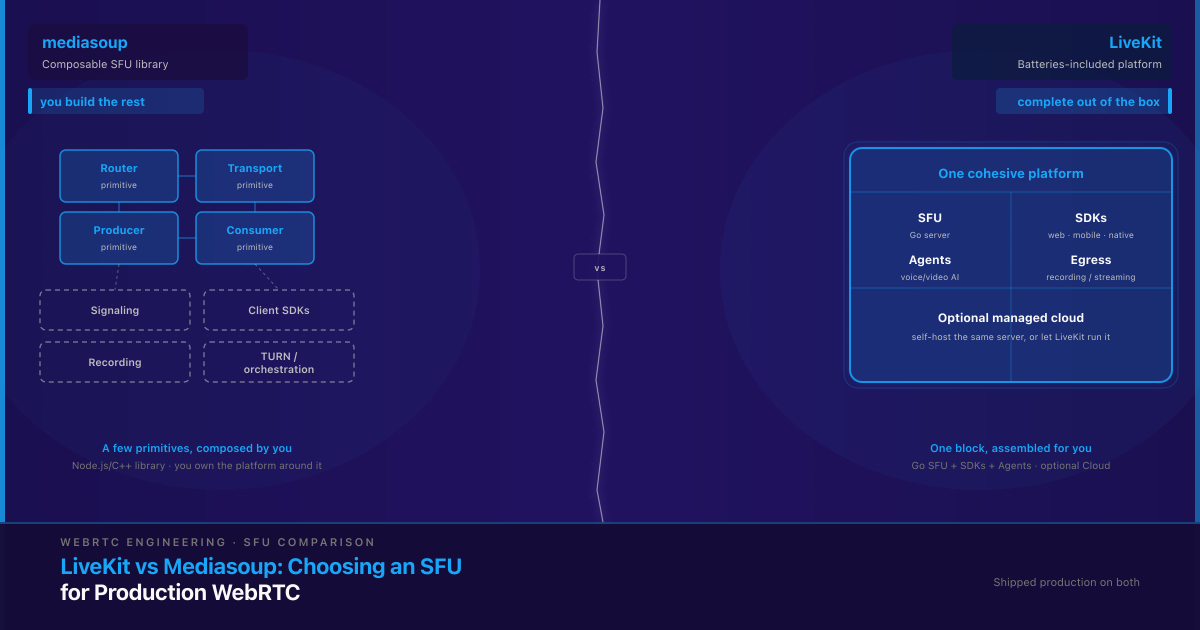
LiveKit and Mediasoup are both open-source Selective Forwarding Units (SFUs) for building real-time WebRTC video and voice, but they sit at different levels of the stack. LiveKit is a batteries-included platform: a Go SFU plus official client SDKs, room and participant management, recording/streaming (egress), an AI-agents framework, and an optional managed cloud. Mediasoup is a lower-level Node.js/C++ SFU library — a media-routing engine you compose into your own platform, bringing your own signaling, SDKs, TURN, and orchestration. The real decision isn’t “which is better.” It’s how much of the surrounding platform you want to own versus have handed to you — and what that trade-off costs you at scale.
What’s the actual difference between LiveKit and Mediasoup?
The difference is architectural scope. Mediasoup is a library you embed inside your own Node.js application, with media routing handled by C++ worker processes. It hands you a small set of primitives — routers, transports, producers, and consumers — and expects you to build everything around them: the signaling layer, room and participant state, recording and composition, TURN infrastructure, and client-side integration on every platform you support. Mediasoup alone is not a deployable product; it’s the media-routing core of one you build.
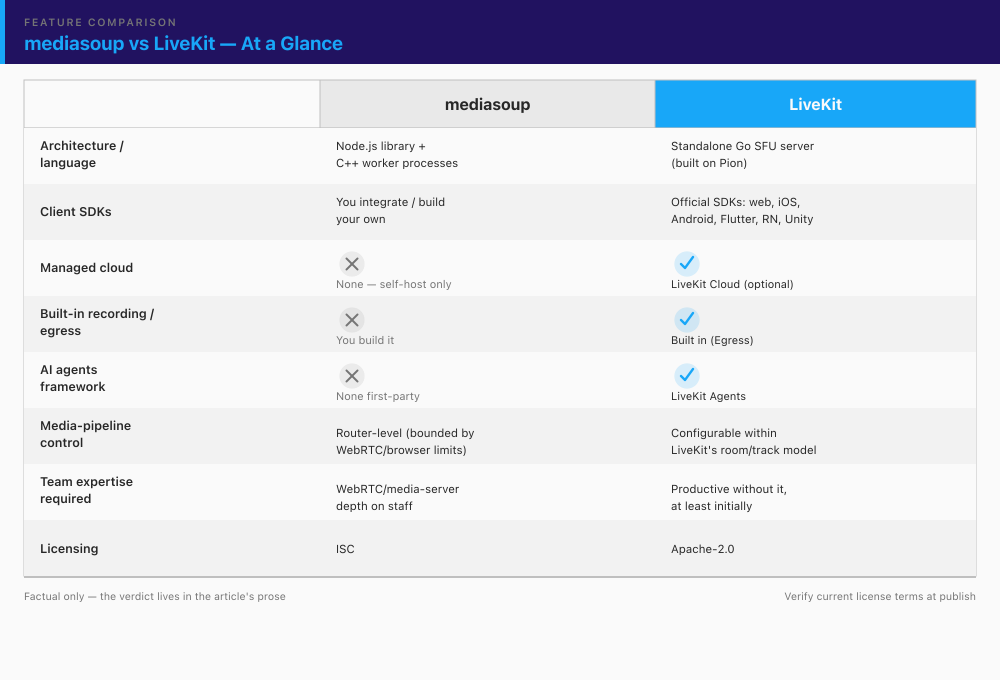
LiveKit is a full platform. Its SFU is a standalone Go server built on Pion, the widely used Go WebRTC implementation — not a fork or wrapper of any other SFU. Around it, LiveKit ships official client SDKs for web, iOS, Android, Flutter, React Native, and Unity, a defined server API, built-in room and participant management, and egress/ingress for recording and streaming. You build on LiveKit — calling its API and dropping in its SDKs — rather than assembling primitives into a platform of your own.
That framing explains almost every downstream trade-off in this comparison. With mediasoup you own more surface area, which means more control and more code. With LiveKit you own less surface area, which means less control and less code. The rest is detail on where each of those cuts.
Is LiveKit built on mediasoup, or are they unrelated?
They’re unrelated implementations. LiveKit’s SFU is written in Go and is its own independent media server; it is not a wrapper around mediasoup, which is a Node.js/C++ library. The confusion is understandable — both are open-source SFUs that gained traction in the same era — but they share no codebase. If a decision hinges on this (say, you assumed one inherits the other’s behavior or tuning), treat them as fully separate engines.
How do LiveKit and mediasoup compare on control and flexibility?
Mediasoup gives you router-level control. Because you write the layer around its primitives, you decide codec policy, simulcast and SVC behavior, how bandwidth estimation is tuned, how STUN/TURN is configured, and exactly how recording and composition work. Nothing about the room, track, or participant model is imposed — you design it. For a team that needs to do something genuinely non-standard at the media layer — custom codec handling, an unusual topology, tight integration with a proprietary media pipeline, or a specific approach to server-side mixing — that low-level access is the whole point.
LiveKit exposes control through its own APIs and configuration. It’s genuinely configurable — simulcast, codecs, egress behavior, and server settings are all tunable — but you operate within LiveKit’s model of how rooms, tracks, and participants relate. That model is well-designed and covers the overwhelming majority of production video products. The constraint only bites when your product needs something the abstraction can’t express, and for most teams that moment never arrives.
Here’s the honest framing engineers should carry away: LiveKit’s opinions are a limitation only if you need to break them. For most products, those opinions are a feature — they’re the parts of a real-time system you’d otherwise have to design, build, and debug yourself. Mediasoup’s flexibility is a real asset for the team that needs it and dead weight for the team that doesn’t. The question isn’t which is more flexible — mediasoup plainly is — it’s whether your product actually needs that flexibility.
How do LiveKit and mediasoup compare on time-to-market and engineering lift?
With mediasoup, the SFU is the part that’s done; the platform is what you build. Before your first production room works, plan for a signaling and room server, client SDK integration on every platform you ship, recording and composition if you need them, and TURN infrastructure for the users who can’t establish a direct connection. None of that is exotic for an experienced real-time team — but all of it is real engineering that has to be designed, built, and integration-tested before you have a product.
With LiveKit, most of that layer already exists. Official SDKs cover the major platforms, the room API is defined, egress handles recording and streaming, and LiveKit Cloud can remove self-hosting entirely if you want it to. “Faster” here has a precise meaning: fewer components to design and integration-test before a first production room works — not necessarily less total engineering over the product’s whole lifetime.
That distinction matters, so hold onto it. LiveKit’s speed advantage compounds as long as the team stays close to LiveKit’s opinionated model. It narrows if the product later needs deep customization that pushes against those opinions — at which point you’re back to writing platform code, just inside LiveKit’s framework instead of your own. The teams that get the most out of LiveKit are the ones whose product fits the standard room/track/participant shape and stays there.
LiveKit Cloud vs self-hosted mediasoup — what does each actually cost?
Both LiveKit and mediasoup are the same open-source servers whether you self-host or not — the cost difference is in the operating model. LiveKit can be self-hosted (the identical OSS server) or consumed as LiveKit Cloud, a managed service with usage-based pricing. If you cite a specific LiveKit Cloud figure, take it from LiveKit’s own current pricing page, not a third-party estimate — the pricing model changes and this space moves fast. Mediasoup has no official managed offering: self-hosting is the only path, whether your own team runs it or a partner runs it for you.
The real comparison isn’t dollars against dollars — it’s dollars against engineering time. Self-hosted mediasoup (and self-hosted LiveKit) shifts cost from a vendor line-item to in-house or partner engineering hours, indefinitely, not just at build time. Someone has to scale it, monitor it, upgrade it, and carry the pager when a region degrades at peak.
State this plainly, because it’s the myth that sinks budgets: “cloud is expensive, self-host is free” is wrong. At meaningful scale, both self-hosted LiveKit and self-hosted mediasoup carry real infrastructure and on-call cost. Self-hosting doesn’t delete the bill — it trades a predictable vendor invoice for headcount and operational risk. That can be the right trade (control, data residency, unit economics at high volume), but it’s a trade, not a free lunch.
When does self-hosting mediasoup (or LiveKit) actually get expensive?
The compute is rarely what hurts. The cost drivers that catch teams out are the ones around it: multi-region deployment to keep latency low for a distributed audience, TURN/relay bandwidth for users behind restrictive NATs, horizontal SFU scaling with the load-balancing logic to route participants sensibly, monitoring and alerting that actually catches media-quality regressions before users do, and the on-call engineering time to keep all of it reliable. In our experience the single line item that most often blindsides teams is TURN/relay bandwidth: once real traffic skews toward mobile and restrictive networks, relayed media can rival or exceed the SFU compute nobody sized for it. This is where “we saved money by self-hosting” quietly fails — teams budget the servers and under-budget the operations layer.
If you’re reading this because your current SFU choice is already buckling in production — costs climbing, calls dropping, a scaling wall you didn’t see coming — that’s a different and more urgent conversation than a greenfield pick. It’s also the one we get called into most: the reconnection, scaling, and NAT-traversal work is exactly the kind of protocol-level failure our WebRTC rescue playbook exists to fix. Budget the ops layer honestly up front and self-hosting is a sound choice; skip that math and it’s a slow-motion cost overrun.
What is LiveKit Agents, and does it matter for your decision?
LiveKit Agents is a first-party framework for building real-time voice and video AI agents on top of LiveKit’s transport layer — the orchestration for a spoken-AI pipeline (speech-to-text → LLM → text-to-speech, or multimodal) running live over WebRTC. If your product roadmap includes or plausibly will include a real-time AI agent — a voice assistant, an AI interviewer, a live-translation participant, an AI tutor — this is a concrete, non-marketing reason to weight toward LiveKit.
Mediasoup has no first-party equivalent. A team building an AI voice/video agent on mediasoup assembles that orchestration layer themselves or brings in a third-party framework — which is entirely doable, but it’s a build, not a download.
Keep the weighting honest in both directions. If real-time AI agents are on the roadmap, LiveKit’s head start is real and worth a lot. If they never will be, this is a moot point — don’t let a feature your product won’t use become a mediasoup “con.” Agents tips the decision only for the products that will actually ship one.
When should you choose mediasoup over LiveKit?
Choose mediasoup when the control is the product requirement, not a nice-to-have. Concretely, it’s the stronger choice when:
- Your team already has (or is deliberately building) deep WebRTC/media-server expertise in-house. Mediasoup rewards a team that can work at the router/transport/producer/consumer level; it assumes that capability rather than compensating for its absence.
- Your product needs media-pipeline behavior that doesn’t fit a room/track/participant model — custom codec handling, an unusual topology, server-side composition done your way, or tight coupling to a proprietary media pipeline.
- You want zero dependency on any third party’s opinions about how signaling, rooms, or recording should work, and you’re willing to own that surface area to get it.
- You’re integrating an SFU as one component inside a larger, already-existing custom real-time architecture rather than starting fresh — mediasoup slots in as a routing engine without imposing a platform shape.
For the right team, this is a defensible, deliberate choice — not a fallback. The cost is real (you own more), and so is the payoff (you control more).
When should you choose LiveKit over mediasoup?
Choose LiveKit when shipping a reliable production feature quickly matters more than owning every layer. Concretely, it’s the stronger choice when:
- You want a production video/voice feature without first building a signaling and SDK layer. LiveKit gives you a working room and maintained clients out of the box, so your engineers spend their time on the product, not the plumbing.
- Your team doesn’t have — and doesn’t want to hire for — deep media-server engineering depth. LiveKit is built to be productive without that specialization, which lowers both hiring risk and bus-factor risk.
- AI voice/video agents are on the roadmap now or plausibly soon — LiveKit Agents removes an entire orchestration build.
- The option to start self-hosted and later move to managed cloud (or the reverse) without a rewrite has real value — for example, when you’re unsure of your scale or want to defer the ops decision.
- Official, maintained SDKs across web/iOS/Android/Flutter/React Native reduce your client-side engineering risk — someone else maintains them against browser and OS changes, which is a recurring cost you’d otherwise carry.
This is equally a real choice for the right team. The cost is some flexibility; the payoff is speed and a smaller platform to maintain.
Decision framework — which SFU should your team actually build on?
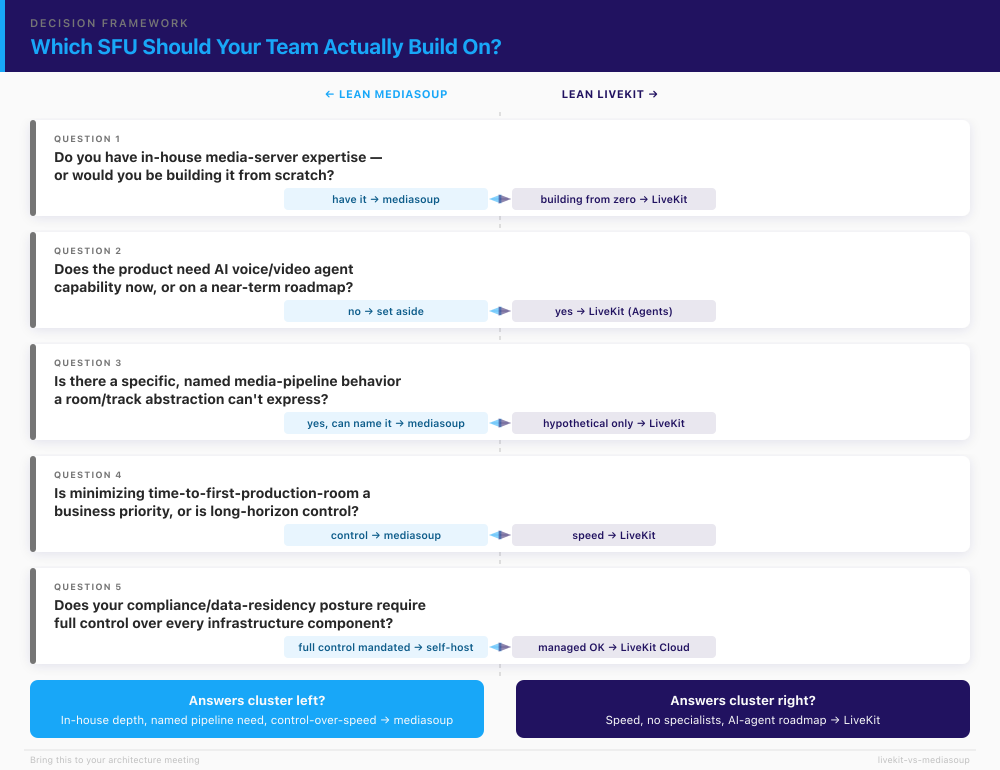
Skip the feature table for this part — the sections above already did that work. The decision is better made by answering five honest questions about your own team and product:
- Do you already have production WebRTC/media-server engineers on staff, or would you be building that expertise from scratch? Have it → mediasoup is in play. Building it from zero → LiveKit lowers the risk.
- Does the product need AI voice/video agent capability now or on a realistic near-term roadmap? Yes → weight toward LiveKit (Agents). No → set this factor aside entirely.
- Is there a specific, named media-pipeline behavior your product needs that a room/track abstraction can’t express? If you can name it → mediasoup earns serious consideration. If you’re reaching for a hypothetical → you probably don’t need that flexibility.
- Is minimizing time-to-first-production-room a business priority (competitive pressure, a fundraising milestone), or is long-horizon architectural control the priority? Speed → LiveKit. Control → mediasoup.
- Does your compliance/data-residency posture require full control over every infrastructure component, or is a managed-cloud option (with the right contractual and compliance terms) acceptable? Full control mandated → self-hosted (either engine). Managed acceptable → LiveKit Cloud is on the table.
If your answers cluster around in-house depth, a named custom pipeline need, and control-over-speed, mediasoup is likely your answer. If they cluster around speed, no media-server specialists, an AI-agent roadmap, and openness to managed hosting, LiveKit is likely your answer. Most teams find their answers point clearly one way once they’re written down honestly. In plain business terms: mediasoup can save you platform and licensing spend but costs you a specialist hire and ongoing operations; LiveKit gets you to a working product faster and lightens your team, at the price of leaning on someone else’s opinions about how real-time video should work.
And if you choose wrong, or outgrow the choice later, it isn’t a rebuild from zero: moving between SFUs is a scoped migration, and rescuing a deployment that’s buckling under load is a specific kind of project — not a catastrophe. We’ll say the quiet part plainly, since it’s why teams call us: Trembit has built and rescued production systems on both LiveKit and mediasoup — and across five major media servers in total (Janus, Jitsi, mediasoup, LiveKit, Kurento). The right answer depends on your team and your roadmap, not on which project has better marketing. If you want a second opinion before you commit engineering time to one, a WebRTC development and architecture review is a 30-minute call where we pressure-test your requirements and tell you which way we’d lean — no deck, no pitch.
For the broader “which media-server topology do I even want” question — SFU versus MCU versus peer-to-peer — that’s a level up from this piece, and one we’ll cover in a dedicated architecture guide soon.