An AI transformation roadmap is a sequenced plan for moving AI from isolated pilots into the systems your business actually runs on. It answers four questions in order: which workflows are ready, which go first, what to do about the legacy systems in the way, and what must be true before the next wave starts. For a CTO, the hard part is sequencing, not choosing a model.
A familiar version of the problem: the pilot demo worked, the board liked it, and months later nothing is in production. The pilot ran on a clean export and a hand-tuned prompt. Production needs live data, permissions, an audit trail and a place in the workflow where someone acts on the result. This guide closes that gap with a plan you can defend to a board, because every step rests on an engineering check.
Key takeaways
- Readiness is per workflow, not per company. One business can be ready for invoice triage and not for contract review.
- Integration and legacy constraints decide the order of work. Model choice rarely does.
- Sequence by exit gates, not by calendar. A wave ends when its gate is met, not when the quarter ends.
- Wrap or strangle legacy systems; a full rebuild is the exception.
- Measure at workflow level (exceptions, overrides, cycle time) before claiming enterprise ROI.
Short on time? Jump to the wave table, or to the worked example to see this applied.
What is an AI transformation roadmap, and how is it different from a digital transformation strategy?
A strategy sets direction. A roadmap is a build sequence: which workflows change, in what order, and the condition that must hold before the next one starts.
The distinction matters because AI sits on top of systems, not on top of a business. A model that classifies contracts is worthless if it cannot read the contract where it is stored or write its answer back where the decision is made. That makes AI transformation mostly an integration problem with a model attached, which is why it belongs inside engineering-led digital transformation rather than beside it.
Why do AI initiatives stall between pilot and production?
Rarely because of the model. A pilot proves a model can produce a good answer. It does not prove the answer can reach the person who needs it, inside the tool they already use, with a record of who accepted it.
On Trembit’s ESKA leasing build, covered below, the lessons pointed the same way. On adoption: “A standalone ML dashboard never gets adopted.” On where the effort went: “We spent more time on reliable contract parsing than on the scoring model itself” (ESKA case study).
DORA’s 2025 research on AI-assisted software delivery describes the same shape inside engineering teams: “AI’s primary role is as an amplifier, magnifying an organization’s existing strengths and weaknesses” (DORA, 2025). A better model does not fix weak plumbing. It exposes it.
So this roadmap is built against three failure modes:
- Pilots chosen for demo appeal instead of integration readiness.
- No owner for the output once it is live.
- No agreed signal for “this worked, start the next one.”
How do you assess AI readiness before choosing a single use case?
Run four engineering checks against each candidate workflow, not against the company.
| Check | What “ready” looks like | What to fix first if not |
|---|---|---|
| Data access | The workflow’s inputs can be reached programmatically, with permissions matching who may see them | A read path: an export, a replica, a document store with access control |
| Integration surface | The system of record exposes APIs, events or webhooks, so results can be written back | An integration layer in front of the system |
| Legacy constraints | The system can be changed, its requests intercepted, or its data read safely | Decide wrap, strangle or rebuild before any model work |
| Controls | Security, data residency and audit trail are defined; evaluation and incidents have owners; HIPAA or GDPR obligations are mapped where they apply | Name the owners and the audit requirement before the first production run |
Readiness is per workflow, not per company. Invoice triage may read from a modern accounting system with a clean API and a clear approval step. Contract review in the same company may depend on scanned PDFs in a shared drive and a sign-off in someone’s inbox. The first is ready. The second needs data and integration work before any model is worth evaluating.
Which AI use cases should go first?
Score each candidate workflow on five criteria:
- Value: hours, error cost or delay removed.
- Input structure: structured forms beat free-text email threads.
- Reversibility: can a wrong output be caught before it causes harm?
- Integration cost: how much of the readiness table still needs fixing.
- Measurability: can you count the outcome today, as a baseline?
Then pick a portfolio of three, not a single bet:
- One visible win: a narrow, reversible, measurable workflow the business will notice, such as triaging inbound documents.
- One enabling investment: the integration or data work that unblocks the next few use cases.
- A deliberate “not yet” list: high-value workflows that fail readiness today, with the reason written down.
The “not yet” list also does political work: “why aren’t we doing X?” becomes “X is waiting on the integration work in wave 0,” an answer a board can accept. To test whether one workflow suits an agent at all, use the five questions to test a workflow from our agents guide. If back-office work tops your list, see what building AI agents that do back-office work involves.
Should you modernise legacy first, wrap it, or build around it?
The short answer: most legacy systems can keep running while AI is added around them, and a full rebuild is usually the wrong first bet. You also only need to decide for the systems your first two waves touch.
Wrap it. Put an API layer in front of the legacy system so the AI component can read inputs and write results without touching the old code. This is the fastest route when the system works and only needs to be reachable.
Strangle it. Replace slices of functionality one at a time behind a façade. Microsoft’s Azure Architecture Center describes the Strangler Fig pattern as a way to “incrementally migrate a legacy system by gradually replacing specific pieces of functionality with new applications and services,” where a façade “intercepts requests that go to the back-end legacy system” and routes them to old or new code. The pattern lets you “perform high-ROI replacements before low-ROI replacements,” which is AI roadmap logic in miniature. Martin Fowler, who wrote up the pattern, says he and his colleagues prefer “a gradual process of modernization,” having seen the replace-everything plan “go down in flames most of the time” (Fowler, Strangler Fig Application).
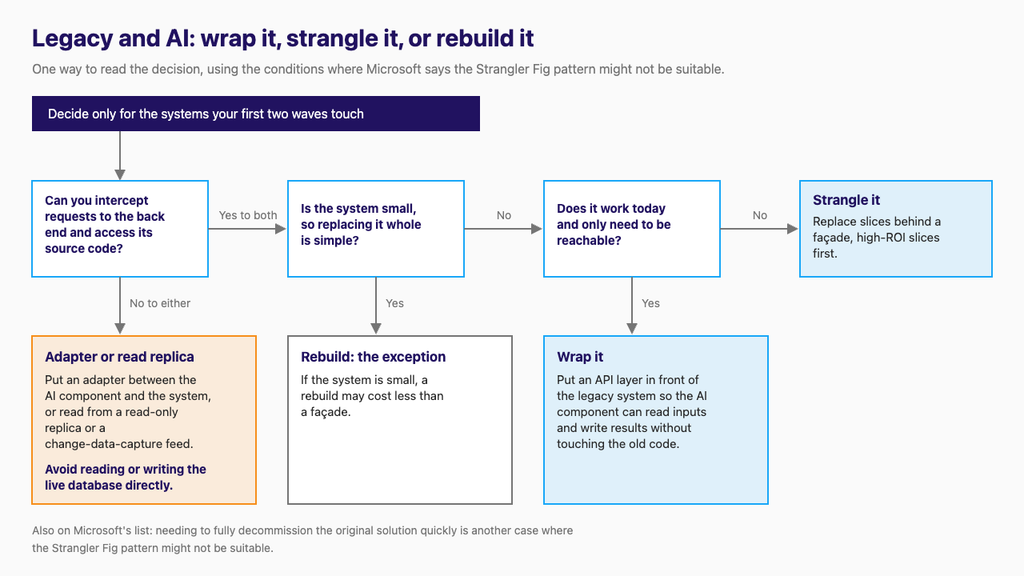
Rebuild it. The exception, when neither of the other two fits.
When a façade is not possible. Microsoft lists when the pattern might not be suitable:
- Requests to the back-end system can’t be intercepted.
- You can’t access the legacy system’s source code.
- You migrate a small system and replacing the whole system is simple.
- You need to fully decommission the original solution quickly.
The first two rule out a façade, not integration. Put an adapter between the AI component and the system, or read from a read-only replica or a change-data-capture feed. Avoid reading or writing the live database directly: it bypasses the system’s business rules and permissions, and it breaks the next time the schema changes.
What does a wave-based AI roadmap look like?
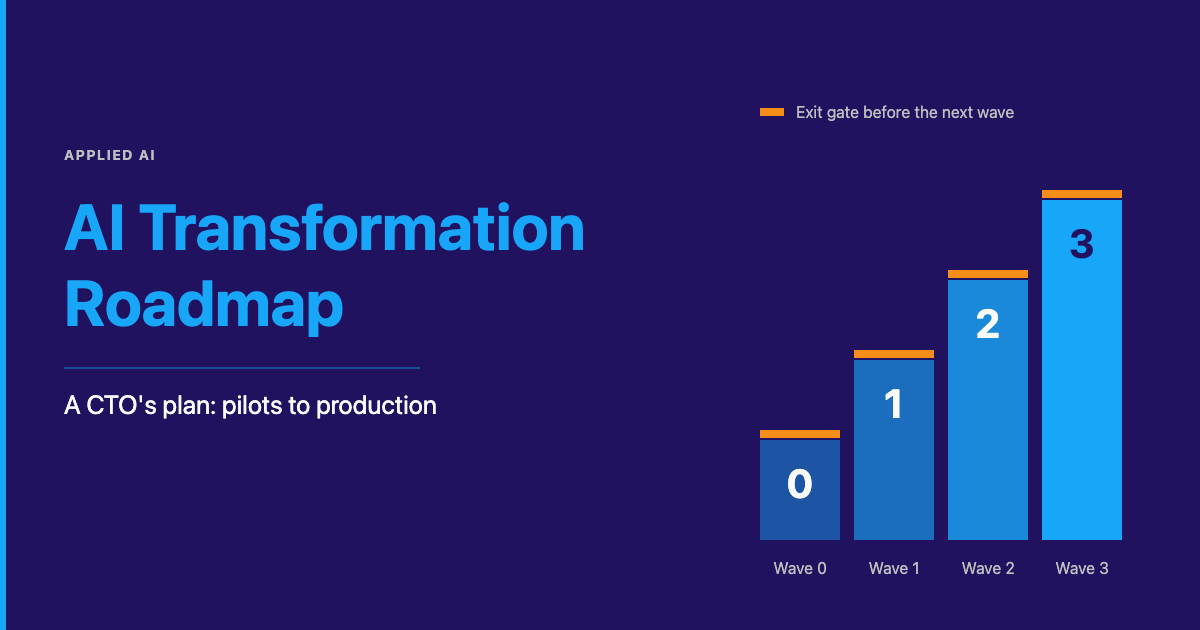
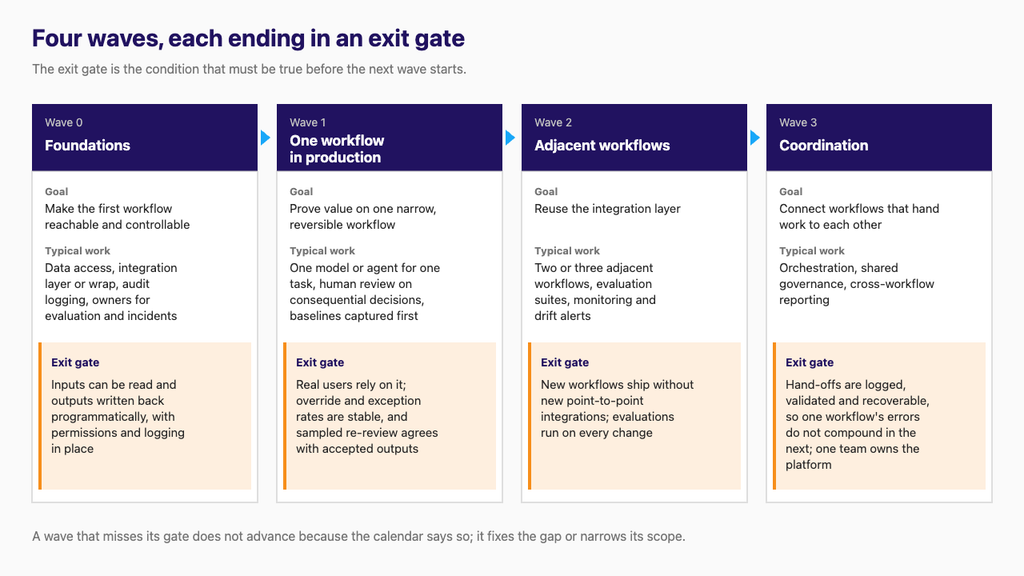
Each wave has a goal, typical work and an exit gate: the condition that must be true before the next wave starts.
| Wave | Goal | Typical work | Exit gate |
|---|---|---|---|
| 0: Foundations | Make the first workflow reachable and controllable | Data access, integration layer or wrap, audit logging, owners for evaluation and incidents | Inputs can be read and outputs written back programmatically, with permissions and logging in place |
| 1: One workflow in production | Prove value on one narrow, reversible workflow | One model or agent for one task, human review on consequential decisions, baselines captured first | Real users rely on it; override and exception rates are stable, and sampled re-review agrees with accepted outputs |
| 2: Adjacent workflows | Reuse the integration layer | Two or three adjacent workflows, evaluation suites, monitoring and drift alerts | New workflows ship without new point-to-point integrations; evaluations run on every change |
| 3: Coordination | Connect workflows that hand work to each other | Orchestration, shared governance, cross-workflow reporting | Hand-offs are logged, validated and recoverable, so one workflow’s errors do not compound in the next; one team owns the platform |
Two rules make the table work. A wave that misses its gate does not advance because the quarter ended; it closes the gap or narrows its scope. And wave 0 is not optional just because the business cannot see it. It is the integration work every later wave reuses.
For the mechanics of the wave-1 pilot, see how to run the first pilot in our admin co-worker guide. Wave 3 raises the orchestration question, covered in our guide on build-versus-buy for orchestration.
Not sure which workflow should be wave 1? A free 30-minute call is the cheapest way to find out. Bring the shortlist.
Build, buy or partner: how do you decide layer by layer?
Decide per layer, not per program.
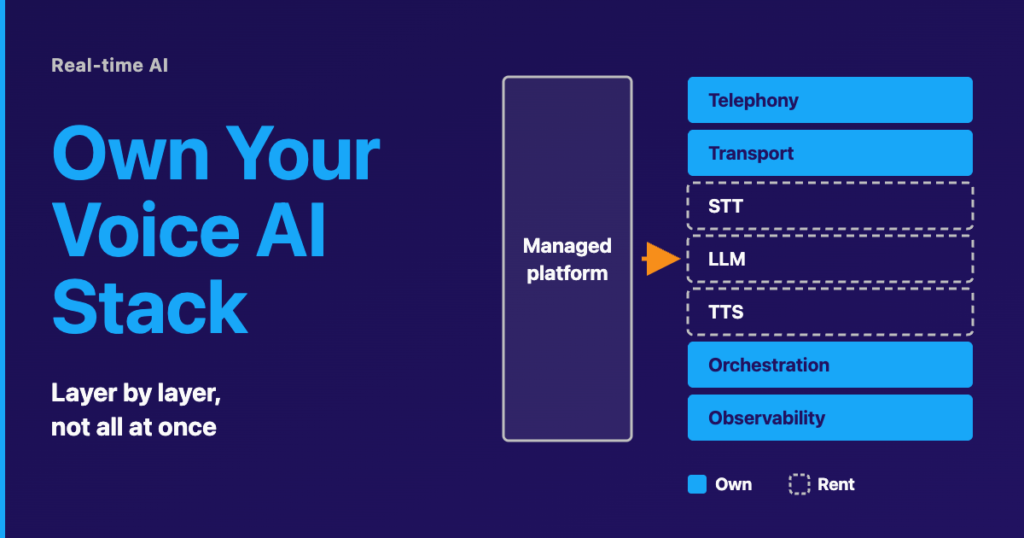
- Buy foundation models and commodity tooling: hosted LLMs, OCR engines, vector stores, observability. Check where the provider processes your data and how it retires model versions, because a retired model means a release on your side.
- Build what encodes your business: the integration glue into your systems of record, the evaluation sets that define “correct” for your workflows, and the decision logic around the model.
- Partner where specialist engineering is the bottleneck: a legacy integration nobody on the team has touched in years, a regulated deployment, a production model that needs monitoring and retraining. A good partner leaves you owning the integration and the evaluations.
Whoever takes on building the AI layer itself should own the integration around it too. The ESKA example below shows why.
How do you govern AI in production without slowing it down?
Four controls per workflow cover most of the risk:
- Human review on consequential actions: approvals, payments, anything sent to a customer.
- An audit trail: what went in, what the system produced, who accepted or overrode it.
- Evaluations with a named owner (see below).
- An incident path: who switches the workflow back to manual, and how.
Evaluation is the AI engineering most roadmaps skip. Three habits cover it:
- Build the evaluation set from the workflow’s own history: real past cases with the decision a qualified person made, including the awkward ones. Add new exceptions and overrides as they arrive so the set does not go stale.
- Treat any model, prompt or provider change as a release, not a configuration tweak. Run the set, compare against the current version, and switch only if results hold. ESKA’s A/B framework, which compares model versions on live scoring traffic before switching over, is this discipline applied to a classical model.
- Measure cost and latency per transaction at realistic volume before wave 2. A workflow that is affordable in a pilot may not be at full volume.
Audit trails, review and evaluation apply to classical ML and LLM-based agents alike. Prompt injection and prompt-change regressions are specific to systems where a language model reads text and follows instructions.
Controls reduce risk; they do not make a system safe. If a workflow reads untrusted content (inbound email, uploaded documents, supplier contracts), text inside it can try to steer the model. That is prompt injection. Validating output against a schema checks its form, not its intent: an injected instruction can still produce a valid action with attacker-chosen values. Scope the system’s credentials to the task, not to whatever service account it runs under, and keep human review on anything that cannot be undone.
NIST’s AI Risk Management Framework is “intended for voluntary use” to help organisations build trustworthiness into AI design, development, use and evaluation. Map HIPAA or GDPR obligations during the readiness check, not after launch.
How do you know the roadmap is working?
Measure the workflow first, the platform second, the finances last.
- Workflow level: cycle time from input to decision, exception rate (cases the system could not handle), human override rate (cases where a person changed the output) and rework (decisions reversed later). Capture baselines before wave 1.
- Platform level: the share of AI workflows on the shared integration layer rather than their own point-to-point connections.
- Financial level: only once the workflow numbers have held long enough to trust.
Read the override rate with care. A falling rate can mean the people closest to the work trust the output. It can also mean review has become a click-through, which is automation bias. Pair it with sampled blind re-review, where a reviewer decides a sample of cases without seeing the system’s answer, and with rework traced back to outcomes. Live workflows also need ongoing maintenance and support as part of the roadmap, not after it.
What does this look like in a real build?
Trembit built the ESKA leasing platform for a leasing company with a manual contract-review bottleneck: analysts spent hours extracting data from unstructured documents, risk scoring was inconsistent across reviewers, and there was no way to predict likely defaults. It is a classical machine-learning build (NLP, OCR and a predictive risk model), not an LLM agent, and it shows what waves 0 and 1 look like for a single workflow.
Inputs first. Before any risk model, the team built NLP and OCR parsing to extract payment terms, guarantors and penalty clauses from contracts in varied layouts and scan qualities, with validation that flagged anomalies for human review. In the case study’s words: “Document parsing is the unglamorous foundation that everything else depends on.”
An explainable score, with review where it changes the outcome. Each score came with a breakdown of contributing factors so analysts could audit it. Contracts below a configurable risk threshold were auto-approved. High-risk contracts went to analysts with the breakdown attached, and borderline cases were flagged with specific concerns. The threshold was tuned for cost asymmetry: approving a contract that later defaults costs far more than flagging a good one. That is human review on consequential decisions, calibrated so people see the cases where their judgement matters.
Integration came third, and that is the one thing this roadmap changes. In the ESKA build, Odoo ERP integration followed the model. Through a Node.js layer, new contracts triggered parsing and scoring automatically, and results flowed back into the existing approval workflow. The case study’s own lesson: “ERP integration is where AI projects succeed or die.” Because scores appeared inside the approval workflow analysts already used, adoption needed no behaviour change. If integration decides whether the system is used at all, it belongs in wave 0, before the model, which is where this roadmap puts it.
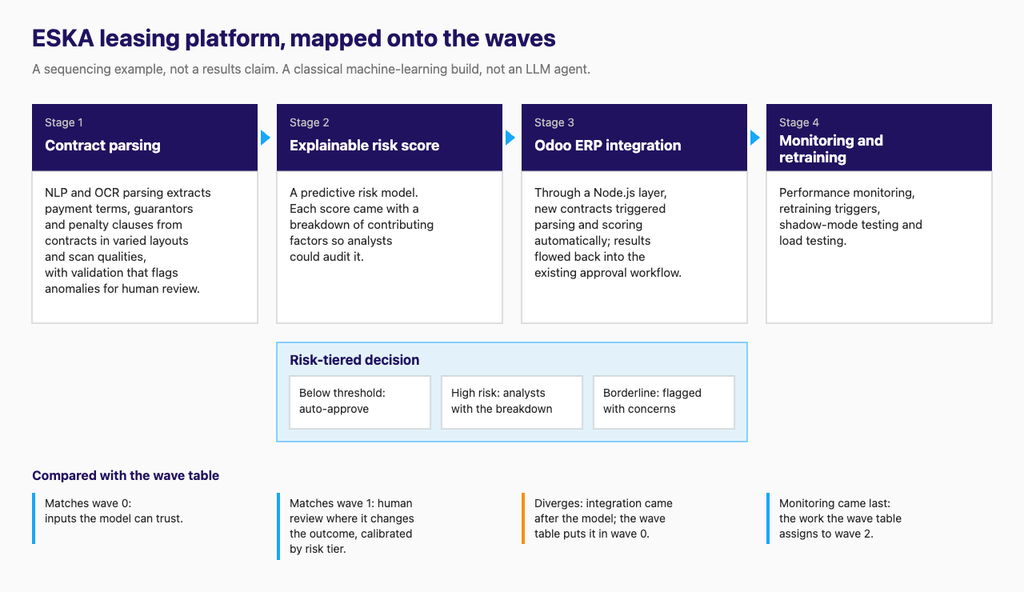
Monitoring before scale. The final phase added model drift detection, a retraining pipeline triggered by drift alerts with human validation, and A/B comparison of model versions on live traffic: the kind of work the wave table puts in wave 2.
What carries over is the dependency chain: trustworthy inputs, an explainable decision, and integration into the workflow where people already work. For the pipeline internals, see how that pipeline was built.
Frequently asked questions
How long does an AI transformation roadmap take?
There is no honest calendar answer, because each wave ends when its exit gate is met, not on a date. What you can plan is the order: foundations for the first workflow, then that one workflow in production, then adjacent workflows that reuse the same integration layer. The integration and data work in wave 0 usually decides how fast everything after it moves.
Do we need to replace legacy systems before adding AI?
Usually not. Most legacy systems can stay in place: wrap them with an API layer, strangle them slice by slice behind a façade, or read from a replica or change-data-capture feed. A full rebuild is the exception, and you only need to decide for the systems your first two waves touch.
What should the first AI use case be?
A narrow, reversible, measurable workflow that passes the four readiness checks: data access, an integration surface, known legacy constraints and defined controls. Pair it with one enabling investment and a written “not yet” list, so the board sees why high-value but unready workflows are waiting.
How do we measure whether AI is working?
Start at workflow level: cycle time, exception rate, human override rate and rework, with baselines captured before wave 1. Read a falling override rate with care and pair it with sampled blind re-review. Claim financial ROI only after the workflow numbers have held long enough to trust.
Where Trembit fits
Trembit is an engineering team that builds the integration, data and AI layers together, so the model ends up inside the workflow people already use. We have built AI systems such as the ESKA risk platform, and we take on legacy integration work that blocks wave 0.
Have a shortlist of candidate workflows? Book a free 30-minute call and we will help you decide which one should be wave 1 and what has to be true before it starts.