Telehealth video calls almost always struggle with quality — freezes, audio delays, dropped sessions, and blurry video frustrate both patients and providers. This is not a UX issue; it is a real-time systems engineering challenge.
Achieving sub‑150 ms latency and carrier‑grade stability in telemedicine requires deep WebRTC expertise, careful network design, and continuous monitoring. This is where Trembit’s video engineering experience makes a measurable difference.
Why Low Latency and Stability Are Mission‑Critical in Telemedicine
In consumer video calls, a small delay is annoying. In telehealth, it is risky.
Common consequences of poor video quality include:
- Miscommunication during diagnosis
- Interrupted mental‑health sessions
- Lost trust in the platform
- Increased churn among clinicians
Low latency enables natural, in‑person‑like interaction, while stability ensures sessions survive real‑world conditions: mobile networks, Wi‑Fi handovers, packet loss, and NAT restrictions.
Engineering benchmark: End‑to‑end latency below 150 ms with <1% packet loss tolerance.
Core WebRTC Techniques for Telehealth Platforms
WebRTC is the foundation of modern telemedicine video — but only when properly engineered.
Codec Selection (Quality vs. Speed)
Choosing the wrong codec can instantly add tens of milliseconds of delay.
- VP8 / VP9 — Best balance of quality, CPU usage, and low latency
- AV1 — Excellent compression, but requires hardware acceleration to avoid CPU spikes
- H.264 — Broad compatibility, but higher bitrate requirements on unstable networks
Best practice: Default to VP8/VP9 with hardware acceleration enabled where possible.
NAT Traversal: STUN & TURN Done Right
Telehealth users frequently connect from:
- Hospital networks
- Corporate VPNs
- Mobile carrier NATs
Without a robust relay infrastructure, calls simply fail.
Engineering recommendations:
- Deploy geographically distributed TURN servers
- Prioritize UDP, with TCP/TLS fallback only when required
- Use Coturn with aggressive health checks and autoscaling
This alone can reduce connection failures by up to 80% in symmetric NAT environments.

Simulcast & Adaptive Streaming
Bandwidth fluctuates constantly — especially for patients on mobile networks.
Simulcast allows the client to send multiple video qualities simultaneously, enabling the SFU to select the optimal stream without renegotiation.
Result:
- No reconnections
- No sudden quality drops
- Smooth adaptation to network changes
Network Optimization Strategies That Reduce Latency
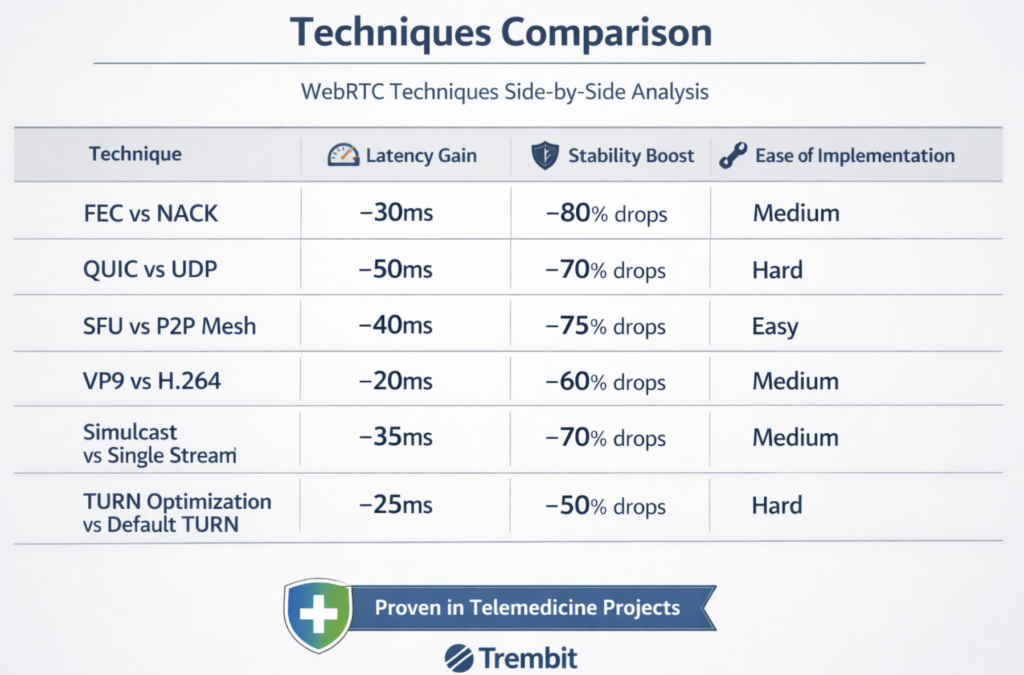
| Technique | Why It Matters | Practical Tip |
| Forward Error Correction (FEC) | Recovers packet loss without retransmission | Tune for <1% loss scenarios |
| Bandwidth Estimation | Prevents congestion before it happens | Use Transport‑CC feedback |
| Selective Forwarding Unit (SFU) | Scales multiparty calls efficiently | Avoid full‑mesh beyond 2 users |
Well‑tuned pipelines typically reduce end‑to‑end latency by 50–100 ms compared to default WebRTC setups.
Stability Enhancers for Production Telemedicine Systems
Congestion Control
Google Congestion Control (GCC) dynamically adapts bitrate during network spikes, protecting audio quality first — a critical requirement for medical conversations.
Server‑Side Recording
For HIPAA‑compliant storage and audits:
- Record streams server‑side
- Offload processing using FFmpeg pipelines
- Avoid client CPU and battery drain
Real‑Time Monitoring
You cannot fix what you cannot see.
Key metrics to monitor continuously:
- Jitter
- Packet loss
- Round‑trip time (RTT)
- Encoder queue delays
Tools like Prometheus + Grafana enable proactive issue detection before users complain.
Codec and Encoding Optimizations
Encoding delays are often underestimated — but they add up quickly.
Engineering optimizations:
- Enable hardware acceleration (VideoToolbox, VAAPI, MediaCodec)
- Use low‑complexity encoder profiles
- Reduce keyframe interval to 1–2 seconds
These steps alone can reduce encoding latency by 20–30%.
Transport‑Level Tweaks
| Optimization | Impact | Configuration Insight |
| Selective TURN routing | −50–100 ms | Geo‑cluster relays |
| Limited NACK / RTX | Faster recovery | Cap retransmissions |
| QUIC (where supported) | −10–20% latency | Avoid TCP head‑of‑line blocking |
Signaling & Session Setup Optimization
Connection setup speed directly affects user perception.
Best practices:
- Use Trickle ICE instead of full ICE gathering
- Minimize SDP payload size
- Ramp bandwidth quickly using REMB / Transport‑CC feedback
- Always route >2 participants through an SFU
This reduces call setup time by 200–500 ms.
Why Trembit?
Trembit designs and operates production‑grade telemedicine platforms, not demo‑level video calls.
Our team:
- Designs scalable SFU architectures
- Fixes real WebRTC bottlenecks
- Handles NAT traversal at a global scale
- Ensures HIPAA‑compliant, low‑latency streaming
If your telehealth platform struggles with call quality, it is not a mystery — it is an engineering problem.
And we know how to solve it.
Final Thoughts
Low latency and high stability in telehealth video calls are not achieved through SDK defaults or UI tweaks. They are the result of intentional real-time engineering decisions across encoding, networking, signaling, and infrastructure.
Teams that invest in these fundamentals deliver better clinical outcomes, higher clinician adoption, and long-term trust in the platform.
Trembit helps healthcare companies move from “video that mostly works” to reliable, scalable, and compliant telemedicine communication.