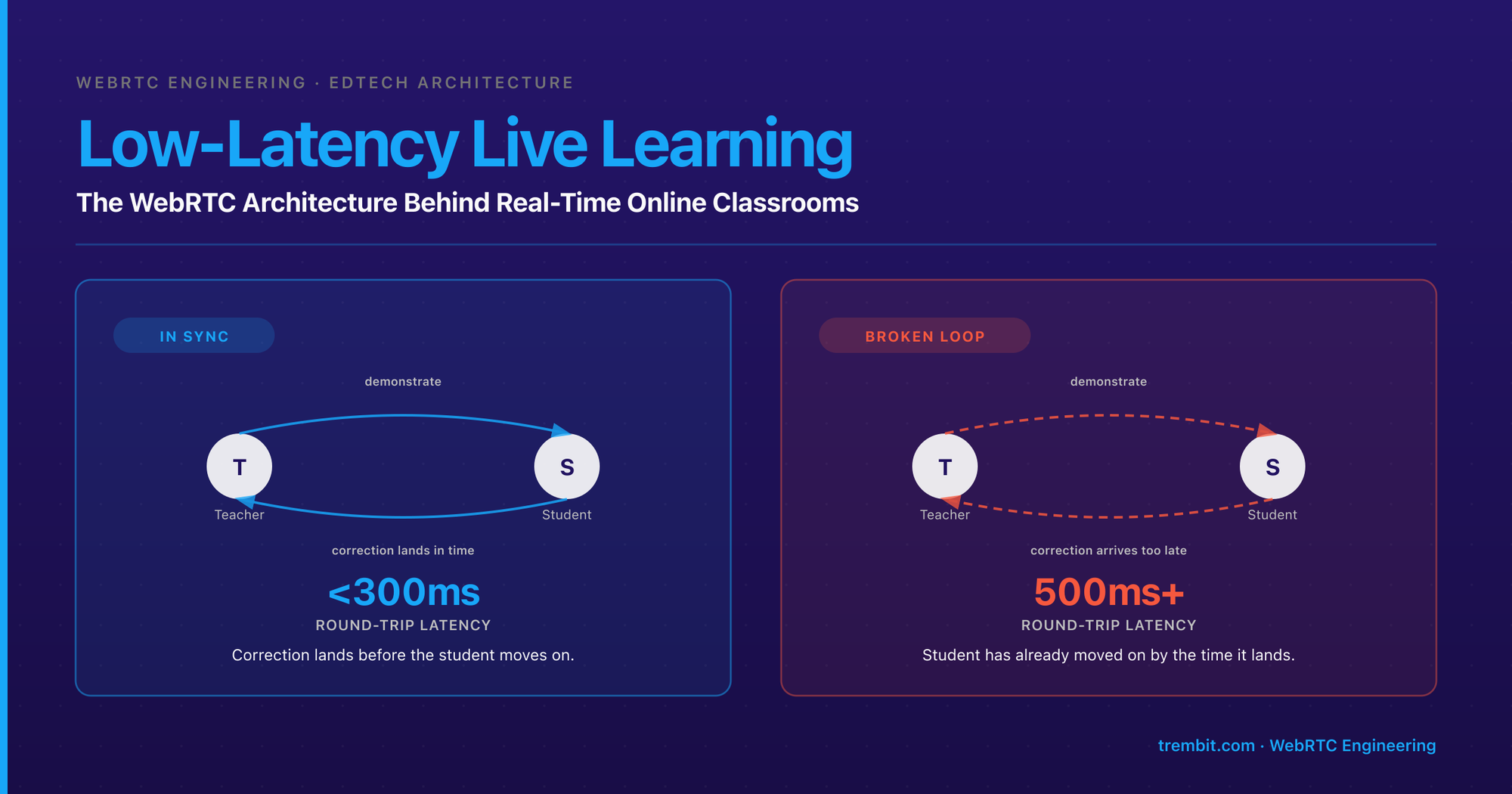
Low-latency live learning is synchronous, two-way instruction over video where the round-trip delay between teacher and student is short enough that the two can react to each other in real time — demonstrate, imitate, and correct without waiting on the network. It is a fundamentally different engineering problem from a course-video library or a recorded lecture. A video library only has to deliver bytes eventually; a live classroom has to deliver them fast enough to keep a human feedback loop intact. And that is the core of it: past a certain round-trip delay, live instruction stops feeling live. That threshold — not “does the product have video” — is what the architecture has to be built around. The whole of a WebRTC virtual classroom architecture is downstream of that one decision: transport, topology, audio codec, scaling path, and compliance all follow from it.
Key takeaways
- Live instruction breaks down somewhere in the 300–500ms round-trip range — the “play that again” moment where a correction arrives after the student has already moved on. The tolerance is tighter for music and pronunciation, looser for a general lecture.
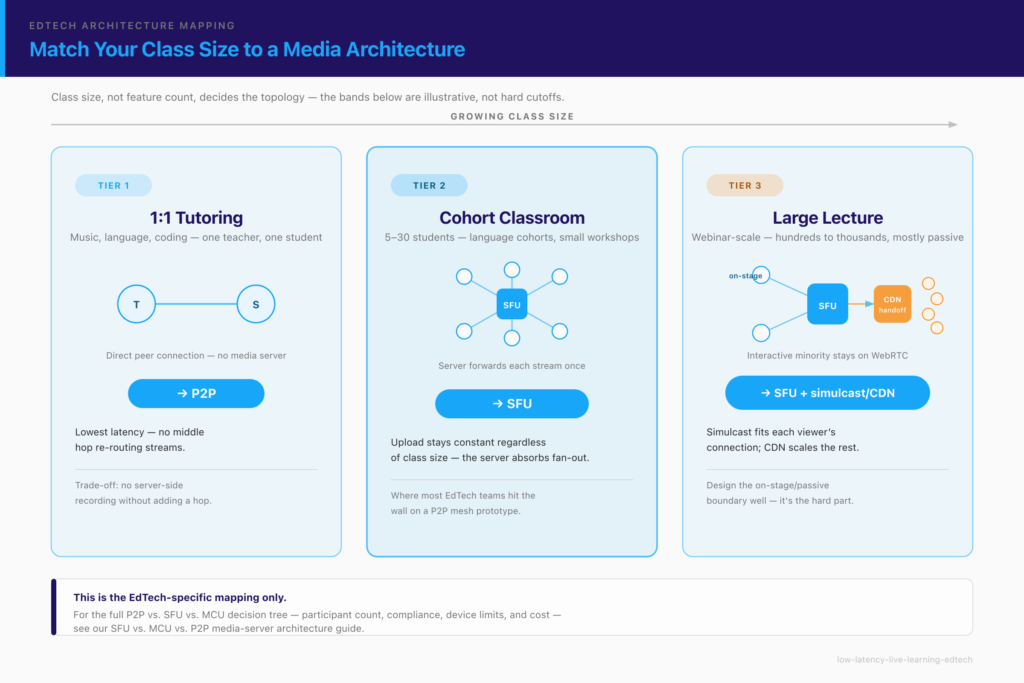
- Class size, not feature count, decides P2P vs SFU. One-to-one tutoring can run peer-to-peer; cohort classrooms almost always need a Selective Forwarding Unit (SFU); large lectures need one-to-many patterns with simulcast or CDN handoff.
- Speech-optimized audio codecs actively destroy music and pronunciation detail. The fix is codec configuration (wideband Opus, higher sampling, disabled aggressive noise suppression), not switching video vendors.
- A webinar or “embed-and-play” video tool does not solve live learning — one-way and buffered streaming trade latency for scale, which is the wrong trade for two-way teaching.
- Compliance is an architecture input, not a launch-week checklist. GDPR data residency, WCAG accessibility, and (for products serving minors) COPPA all shape where media and metadata physically live and how sessions are built — decisions that are expensive to retrofit.
Reading for a build-vs-buy or compliance decision rather than the media stack? Start with Why doesn’t a video-embed or webinar tool solve this? (the “why not just a Zoom widget” question), then What does a production-grade live-learning build actually look like? and What compliance and accessibility requirements apply? — the rest is for the engineer building the real-time layer.
What does “low latency” actually mean for live learning?
Two numbers get confused constantly, so start here. One-way delay is the time for audio or video to travel from the speaker’s microphone to the listener’s ear. Round-trip latency is the full loop — one person speaks, the other hears it, reacts, and their reaction gets back. For live instruction, the round trip is what matters, because teaching is a loop, not a broadcast.
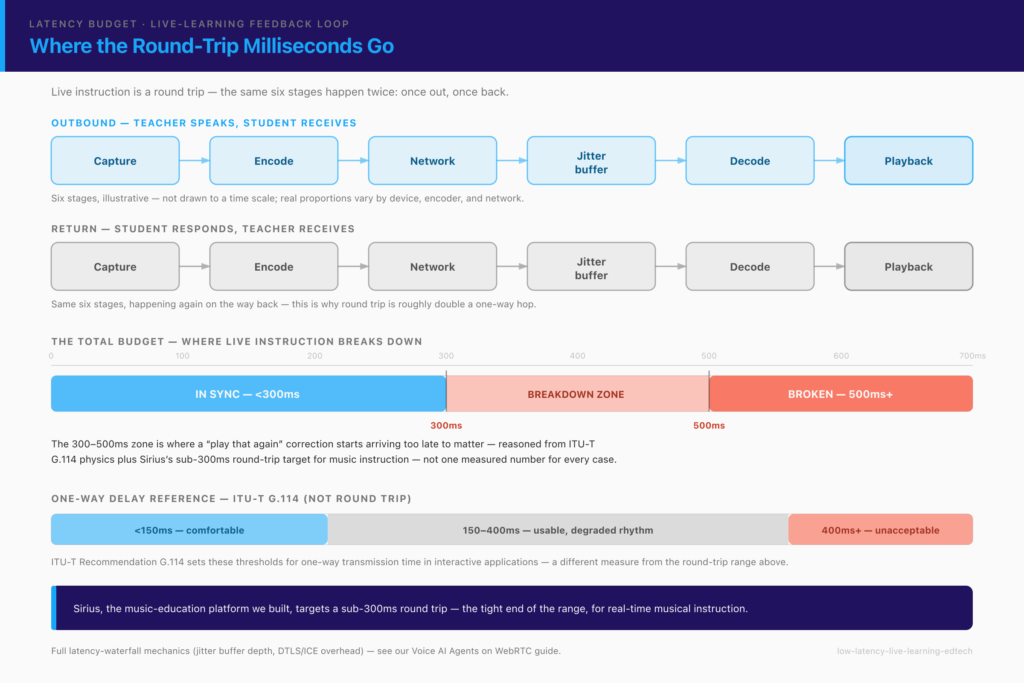
The grounding standard is ITU-T Recommendation G.114, which sets acceptable one-way transmission time for interactive applications. G.114 puts one-way delay under roughly 150ms in the range where most users don’t notice it, treats 150–400ms as usable but degraded (users adapt, but conversation rhythm suffers), and marks delay beyond ~400ms one-way as unacceptable for general interactive use. Those figures were written for telephony, but the perceptual physics carry over: a human conversation has a rhythm, and delay past a threshold breaks it.
Translate that into the classroom. In our experience building live-learning platforms, the point where the instructional feedback loop breaks — not just conversation, but demonstrate-and-correct teaching — sits somewhere in the 300–500ms round-trip range. A teacher says “play that again,” the student replays, the teacher’s correction lands late enough that the student has already moved on, and the lesson degrades into a series of missed cues. This is a reasoned threshold from the G.114 physics plus what we’ve seen building live-learning platforms, not an ITU number — the exact point depends on the subject. Music and pronunciation are tighter; a lecture Q&A is looser.
Why is this worse for teaching than for a normal video call?
A social video call tolerates delay because it’s forgiving: people wait a beat, and nobody’s learning outcome depends on the timing. Live instruction is a tight call-and-response loop — demonstrate, imitate, correct, all in real time. A delayed correction is worse than useless: it either gets ignored or it arrives after the student has committed the wrong movement to muscle memory. The teacher is effectively coaching a version of the student that existed half a second ago.
The delay itself is not one thing — it accumulates across capture, encode, network transit, jitter buffering, decode, and playback, on both the outbound and return paths. Each stage has its own tuning knobs, and a “laggy” classroom is usually one or two of those stages misconfigured rather than raw network distance. We’ve broken down that latency waterfall in detail in our guide to voice AI agents over WebRTC — the mechanics are the same for a live classroom, so we won’t re-derive them here.
Why doesn’t a video-embed or webinar tool solve this?
Because those tools are built for the opposite trade-off. A webinar platform or an HLS/DASH broadcast stream is engineered to deliver one source to a large, passive audience reliably — and it buys that reliability with buffering. A viewer watching a broadcast lecture with five or ten seconds of buffer will never notice, because they aren’t reacting into the stream. That same buffer makes two-way instruction impossible.
The “embed and play” model is a further step removed. A lot of e-learning platforms handle video by embedding a hosted file (YouTube, Vimeo, a CDN-backed player) inside a course page. That is a genuinely good architecture — for asynchronous content a learner watches on their own time. It has nothing to do with live instruction: there is no return path, no real-time interaction, no feedback loop to protect. Confusing the two is the single most common architectural mistake we see in EdTech briefs. “We have video in the product” can mean a play button on a recorded module, or it can mean a teacher and student in a synchronous session — and those are different systems with almost no shared infrastructure.
The dividing line is simple: if a human has to react to what they’re seeing while it’s happening, you need real-time transport (WebRTC), not streaming or embedding. WebRTC exists precisely because the web needed sub-second, two-way media that HTTP streaming could never deliver. Everything else in this article assumes you’ve landed on the live side of that line.
Which media architecture fits your class size — P2P, SFU, or MCU?
Class size, more than any feature, decides the topology. The general trade-offs between peer-to-peer (P2P), a Selective Forwarding Unit (SFU), and a Multipoint Control Unit (MCU) apply to every real-time product, not just education — we cover that full decision tree in our breakdown of SFU vs. MCU vs. P2P media-server architecture. What follows is the EdTech-specific mapping.
1:1 tutoring (music, language, coding) — when P2P is enough
For one teacher and one student, peer-to-peer WebRTC is often the right answer. The two browsers connect directly (through a TURN relay when a firewall blocks the direct path), media never touches your server, and you get the lowest possible latency because there’s no middle hop re-routing streams. For a tutoring marketplace where the atomic unit is a private lesson, P2P keeps both latency and server cost low. The catch is that “media never touches your server” also means you can’t easily record or moderate centrally — if server-side recording or a compliance audit trail is a hard requirement, even a 1:1 product may route through a server anyway.
Cohort classrooms (5–30 students) — where most teams need an SFU
This is where the majority of EdTech teams hit the wall, and usually the reason a product “lags with more students.” P2P uses a mesh: every participant sends their stream to every other participant. Three people is manageable; ten people means each browser is uploading nine copies of its own video and downloading nine others. Consumer upload bandwidth and laptop CPUs collapse under that long before the class is full. An SFU fixes it by having each participant send one stream up to the server, which selectively forwards the streams each person needs. Upload stays constant regardless of class size; the server absorbs the fan-out. If your product is cohort classrooms, small-group language classes, or a live workshop, plan for an SFU from the start — retrofitting one after a mesh prototype stops scaling is a rebuild, not a patch.
Large lectures / webinar-scale — one-to-many patterns
Once you’re broadcasting one or a few presenters to hundreds or thousands of mostly-passive viewers, the pattern shifts again. Here an SFU with simulcast (each sender publishes multiple quality layers, and the server sends each viewer the layer their connection can handle) covers a lot of ground, and at the top of the scale you hand the passive-viewer portion off to a CDN. The nuance for live learning: if even a fraction of that large audience needs to interact — raise a hand, ask a question live, be pulled “on stage” — you need a hybrid where those participants get a real-time WebRTC path while the passive majority get the scaled broadcast. Designing that boundary well is what separates a lecture platform that can run a 500-person class from one that falls over at 50.
This is the tier where we built an EdTech webinar platform — on a Jitsi Meet foundation (NestJS/Node backend on AWS) — that holds hundreds of concurrent viewers per session while keeping screen sharing, chat, Q&A, and polls responsive at that scale. The lesson from that build was that interaction at webinar scale is its own engineering problem: 300 engaged learners generate a message volume that overwhelms both the UI and the backend unless rate limiting, message queuing, and moderation are designed into the engagement layer from day one, separate from the media path.
How do you preserve audio quality for non-speech content (music, pronunciation, accents)?
Here is the trap that catches almost every team building a music, language, or pronunciation product: the default WebRTC audio pipeline is optimized for speech, and those optimizations actively destroy the content you’re trying to teach. WebRTC’s default codec is Opus, defined in IETF RFC 6716. Opus is excellent and highly flexible — it spans narrowband speech all the way to 48kHz fullband audio — but the defaults browsers apply for a video call assume you’re transmitting a talking human: a narrower frequency band, aggressive bitrate compression, and a noise-suppression stage that treats anything unlike speech as noise to be removed.
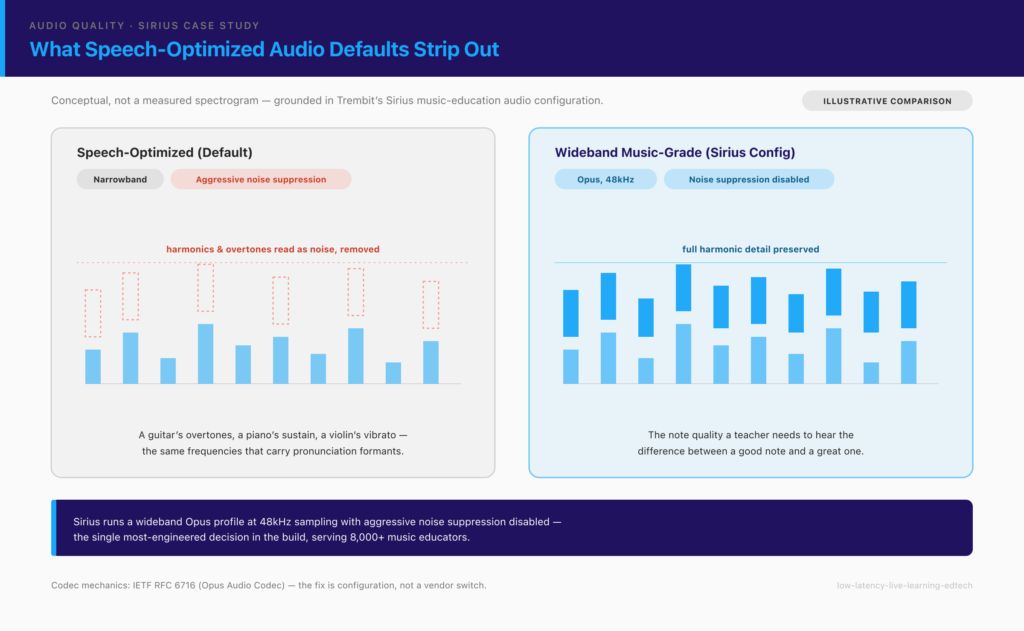
For music instruction, that’s catastrophic. A guitar’s harmonic overtones, a piano’s sustain, a violin’s vibrato — the noise suppressor reads those as artifacts and strips them. The frequency band that carries the difference between a good note and a great one gets compressed away. The teacher literally cannot hear whether the student’s C-sharp is slightly flat, which is the entire point of the lesson. The same failure mode hits language and pronunciation teaching, where the subtle formants that distinguish accents and phonemes live in exactly the frequencies speech-optimized compression discards.
The fix is configuration, not a vendor switch. This is the single most-engineered decision in Sirius, the music-education platform we built — a live WebRTC product (built on EasyRTC, with a Node.js/Fastify backend and Angular frontend) serving over 8,000 educators, with a sub-300ms round-trip latency target for real-time musical instruction. We spent more engineering time on the audio pipeline than on any other single feature. The working configuration used a wideband Opus profile at 48kHz sampling, higher bitrate targets, and — critically — disabled the aggressive noise suppression that was reading instrument harmonics as noise. The result was audio faithful enough that a teacher could hear the difference between a good note and a great one over the network. No amount of switching CPaaS vendors gets you there; it’s a property of how the audio pipeline is tuned, and most platforms bury those knobs precisely because 95% of their customers only ever transmit speech.
“Sirius finally lets us teach music the way it should be taught online — you can actually hear the difference between a good note and a great one. The scheduling and progress tracking make running a teaching practice effortless.” — Music educator on Sirius
If you’re building an audio-sensitive live-learning product — music, language, vocal coaching — this is the decision that will make or break it. It’s worth a short conversation before you commit to a stack; here’s how to reach our WebRTC team.
How do interaction features (screen share, breakout groups, recording) change the architecture?
Once the core media loop works, the features that make a classroom usable — screen share, shared whiteboard, breakout groups, and session recording — each ride on top of the topology you chose, and each has an architectural cost worth planning for.
The key insight is that these are not standalone add-ons; they belong inside the course structure. A recording isn’t just a video file — it’s the recording of a specific session, for a specific cohort, attached to a specific module, and attendance for that session should update automatically from who actually joined. When live video is wired into the learning context this way, an SFU that’s already receiving and forwarding every participant’s stream is the natural place to also capture the recording, because the media is already flowing through it.
This is the shape of an enterprise LMS we built as a four-month MVP for a corporate training client (on Django, Angular, Flutter, and WebRTC). The live conferencing wasn’t a bolt-on video call — instructors launched sessions from inside a course module, screen sharing and instructor controls ran through the session, recordings attached back to the module as on-demand content for anyone who missed the live class, and attendance tracked automatically against the enrollment roster. That integration — session, recording, and attendance as one linked object rather than three disconnected tools — is what turns a video call into a classroom. It also constrains the architecture: because the frontends were a web app and a mobile app sharing one backend, every rule about who’s enrolled, who attended, and what a session recording belongs to had to live server-side, not in either client.
Screen share and breakout groups add their own load. Screen share is a second high-resolution video track per presenter (often at a different frame rate than camera video), and breakouts are effectively spinning up several smaller SFU rooms on demand and tearing them down when the main class resumes — cheap to describe, real work to make reliable under a live class’s timing.
How do you scale a live-learning platform from pilot to thousands of concurrent sessions?
Scaling live learning is less about a single magic capacity number and more about knowing which ceiling you hit first. There is no fixed “max students” — the real limits are bandwidth and device-dependent. A classroom of learners on school Wi-Fi and mid-range Chromebooks has a very different ceiling than the same class on home fibre, and your architecture has to degrade gracefully across that spread rather than target a best case.
Three moves carry most products from pilot to scale. Adaptive bitrate and simulcast let each participant receive a quality layer matched to their connection, so one student on a weak home network doesn’t drag the whole class down. Geo-distribution matters once your users span regions: a single SFU cluster in one data center adds a transatlantic hop for half your users, so you move to multi-region SFUs that keep media close to the participants. And capacity planning per SFU node — how many concurrent streams one server handles before latency climbs — determines when you shard sessions across a cluster rather than stacking them on one box.
For the far end of scale — large, mostly one-to-many lecture delivery to very big audiences — a newer transport is worth watching. Media over QUIC (MoQ) targets exactly the “broadcast to many, with low latency” case that sits awkwardly between interactive WebRTC and buffered streaming. It’s not a replacement for WebRTC’s interactive path today, but it’s a real consideration for the passive-viewer portion of a large-lecture product; we compare the two in our MoQ vs. WebRTC analysis.
What compliance and accessibility requirements apply to a live-learning platform?
Compliance for live learning is an architecture input, because the three regimes that matter most — data residency, accessibility, and minors’ data — each dictate decisions you can’t cheaply retrofit after launch. The rule of thumb is to figure out which ones apply to your users early, because they shape where media lives and how sessions are built.
Data residency (GDPR). If you serve European users or education-sector customers, the GDPR governs how personal data — including video sessions and student records — is stored and transferred, with stricter conditions on transfers outside the EU/EEA. For Sirius, this was concrete: the entire platform runs on GDPR-compliant German infrastructure, giving European educators data-sovereignty guarantees that internationally hosted competitors couldn’t match. That wasn’t a legal checkbox bolted on at the end — it drove where the media servers physically sit, which is an infrastructure decision made at design time. In practice, European education buyers actively chose the product because their students’ data stayed in Germany.
Accessibility (WCAG). Public-sector and education customers increasingly require conformance with WCAG 2.2. For a live classroom that means live captions and transcripts for sessions, keyboard-navigable controls (not mouse-only), and screen-reader-compatible interfaces — all easier to build in from the start than to add to a finished UI. This is architectural, not cosmetic: on the EdTech webinar platform we built, real-time speech-to-text subtitles were a core requirement, not an add-on — and the lesson was that live captioning is a pipeline problem (audio pre-processing, speaker diarization, punctuation restoration, timing alignment with the video), not a single model call. Notably, the majority of attendees turned subtitles on regardless of hearing ability — accessibility built in properly became the platform’s most-used feature, not a niche one. A multilingual classroom raises a related question: real-time translation and captioning is its own architectural sub-problem, with a genuine engineering choice between speech-to-text pipelines and direct speech-to-speech models.
US education records (FERPA) and minors’ data (COPPA). If you sell to US schools or universities, FERPA governs student education records — and an EdTech vendor handling those records typically does so as a “school official,” inheriting obligations on access, disclosure, and retention that shape how you store sessions, recordings, and progress data. Separately, if your product serves children under 13, the FTC’s COPPA Rule (16 CFR Part 312) imposes verifiable-parental-consent requirements that affect account creation, recording, and retention. The point isn’t that any one platform is “FERPA-certified” — it’s to know which regime applies to your users and design consent, access, and retention around it before you launch, not after a regulator (or a school district’s procurement team) asks.
What does a production-grade live-learning build actually look like?
Put the pieces together and a real live-learning platform is less a “video feature” and more a set of decisions that all point back to the feedback loop.
The audio pipeline is a first-class architecture decision, not a setting. For any product where the content of the audio is what’s being taught — music, language, vocal coaching — the codec configuration is the highest-leverage work in the build. In Sirius, it was the single most-engineered component, and it’s what made the product credible to professional educators.
Scheduling is a data-modeling problem, not a UI problem. This is the lesson that surprises most teams. Timezone-aware scheduling across thousands of educators looks like a calendar widget, but storing availability as naive time slots collapses the moment educators teach across timezones and daylight-saving transitions shift boundaries. In Sirius, availability was modeled in UTC with timezone metadata and display times computed client-side — the scheduling engine became one of the most complex backend services, and the complexity was invisible to users, who just saw “book at 3pm” and it worked.
Live video belongs inside the course structure, not beside it. The corporate-LMS build is the template here: sessions launched from within a module, recordings attached back to the module, attendance tracked automatically against the roster — one linked object, enforced server-side so web and mobile clients agree. That integration is what makes it a learning platform rather than a video call with a course catalog next to it.
If you’re architecting or diagnosing the real-time layer of a live-learning product, this is our home ground. Trembit is a WebRTC development team that works at the protocol level — one of a small number of firms globally that build video and voice infrastructure exclusively, with 50+ delivered video/voice projects across education, healthcare, and enterprise. And we tend to stay: our EdTech engagements are typically full-cycle and long-term — we operate and evolve the platforms after launch, not just ship an MVP and leave, because a live-learning product’s hardest problems (scale, audio quality, compliance drift) show up in year two, not week one. The concrete next step: book a free 30-minute architecture call. Bring the specific decision you’re stuck on — the class-size ceiling where your mesh stops scaling, the audio profile for a music or language product, a GDPR data-residency question, or a latency budget you need pressure-tested — and we’ll work through it with you. No deck, no pitch, just engineering clarity.