By Eugenia Nemkova, Marketing Director, Trembit · Published September 2026 · Last updated: 30 September 2026
A virtual classroom software development company builds the real-time system that puts a teacher and learners into one live session and connects that session to the learning platform around it: recordings, captions, attendance, and grades. EdTech companies hire one when the live lesson is the product (a tutoring marketplace, a cohort course, a corporate academy) and a meeting link bolted onto an LMS is no longer good enough. This guide scores eight companies that build custom live virtual classroom software in 2026 on one public rubric, with every fact checked against each company’s own website in September 2026.
Key takeaways
- Live-video builders and LMS shops both sell “virtual classrooms.” Ask for a published case where the vendor built the live session itself, with a named media stack and a scale figure.
- Media-server depth predicts how the product behaves with a full class. Vendors who name the SFU they ran and publish concurrency or latency numbers have met the problems that only appear at 30 students.
- Compliance is an architecture question. FERPA and COPPA are not certificates, and GDPR turns on where recordings live. Separate what a vendor holds (ISO 27001, SOC 2) from what it lists.
- Nobody sweeps every column. The strongest live-video specialists have fewer reviews and less published LMS-standards evidence; the most-reviewed, most-certified vendors have the thinnest live-video proof.
- Trembit wrote this list and is a vendor in it. We scored ourselves with the same rubric: Trembit ties Fora Soft for the top score and loses points on review volume, LMS-standards evidence, and certifications.
Here for the shortlist? Skip to the scores and company profiles. Writing an RFP? The vendor questions are the part to copy.
What Does “Virtual Classroom Software Development” Actually Mean?
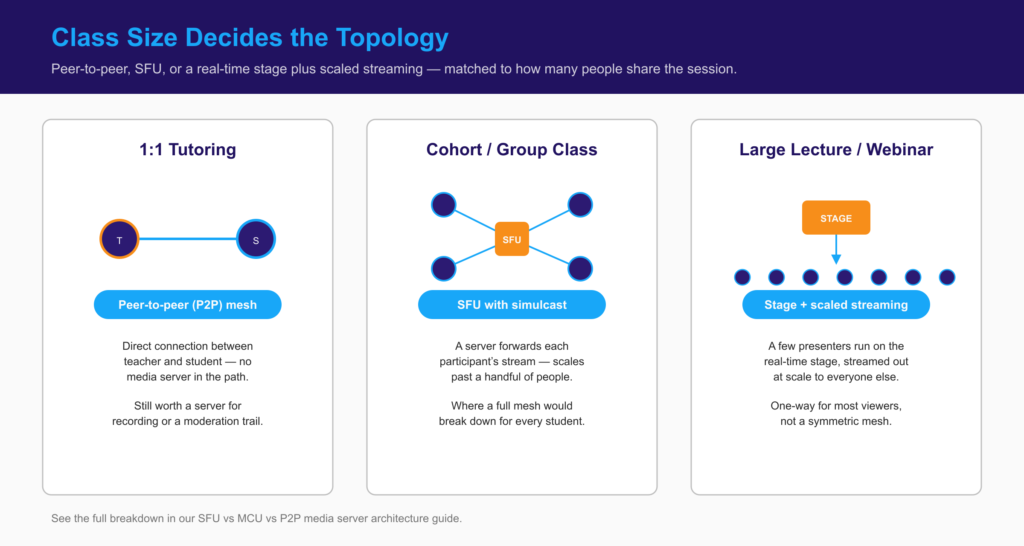
Virtual classroom software development means engineering the live layer of a learning product: the media architecture that carries teacher and student audio and video, and the classroom state that has to stay in sync around it. That covers choosing peer-to-peer, SFU, or hybrid streaming per class size, adapting video to each student’s connection, keeping whiteboards, hand-raises, and polls identical for everyone (late joiners included), and attaching recordings, captions, and attendance to the right course and learner.
Scope. This list covers companies that build custom live classrooms. It leaves out ready-made classroom products such as Class, BigBlueButton, Kaltura, or LearnCube, which you buy and configure (see build versus buy below), and LMS or courseware agencies whose education work is course content or back-office operations with a third-party meeting tool embedded.
For how a low-latency classroom is architected (topology by class size, latency thresholds, recording pipelines), see our engineering guide to building a low-latency virtual classroom with WebRTC. This piece answers who builds one. For a general WebRTC partner rather than an EdTech-specific one, see our WebRTC and video app development company comparison.
How We Scored These Companies
We started from about 20 vendors: the companies AI search engines named when we asked for a “virtual classroom software development company for a live video e-learning platform” in our September 2026 citation test, plus education and video-development categories on Clutch and similar directories. We removed vendors whose published education work had no live-video component, and product companies that sell a platform rather than build one. Eight remained. Each was scored 0–2 on six criteria, using public evidence only; where a vendor’s own page and a directory disagree, we report both.
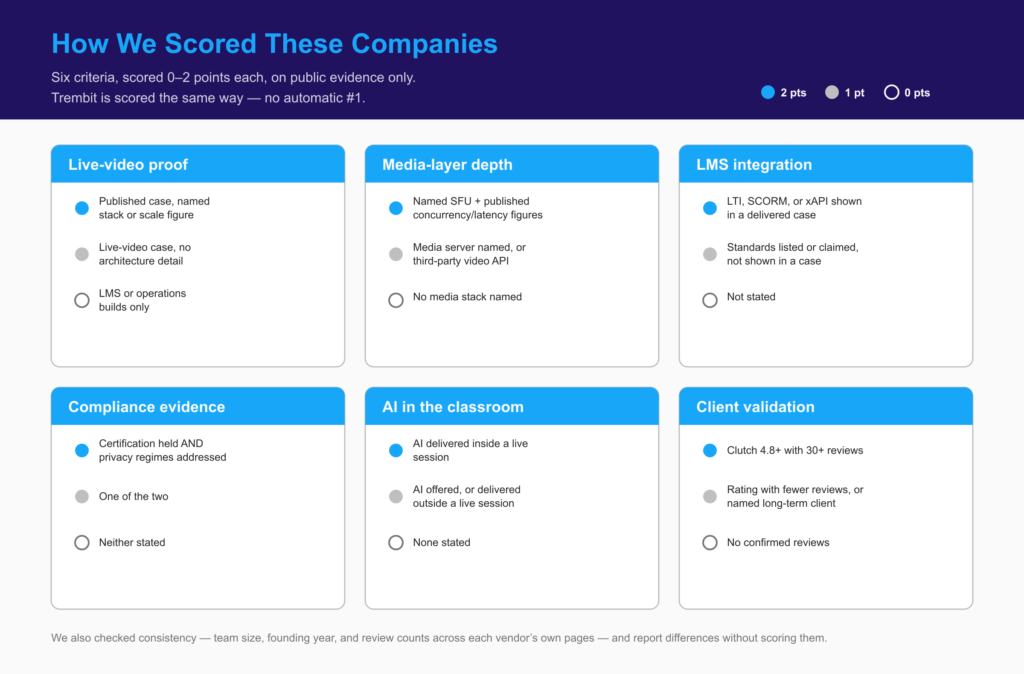
| Criterion | 2 points | 1 point | 0 points |
|---|---|---|---|
| Live-video proof | A published live classroom or live-learning case with a named stack or a scale figure | A live-video education case without architecture detail | Education cases are LMS or operations builds only |
| Media-layer depth | Named media server or SFU in delivered work, plus published concurrency or latency figures | Media servers named, or delivery built on a third-party video API | No media stack named |
| LMS integration | LTI, SCORM, or xAPI shown in a delivered case | Standards or LMS integration listed or claimed, not shown in a case | Not stated |
| Compliance evidence | An audited information-security certification the vendor holds (ISO 27001, SOC 2) and privacy regimes (GDPR, FERPA, COPPA) addressed | One of the two | Neither stated |
| AI in the classroom | AI (captions, translation, proctoring, tutoring) delivered inside a live session | AI offered, or delivered outside a live session | None stated |
| Client validation | Clutch 4.8+ with 30+ reviews | Clutch rating with fewer reviews, or a named long-term education client | No reviews we could confirm |
Notes on the criteria buyers most often get wrong:
- Media-layer depth. Class size, not the feature list, decides the topology: peer-to-peer mesh works for a 1:1 lesson and breaks down around a full cohort, where an SFU takes over. Our SFU vs MCU vs P2P comparison explains why getting it wrong costs a rebuild.
- LMS integration. LTI 1.3 from 1EdTech lets an LMS launch an external tool such as your classroom; xAPI (IEEE 9274.1.1-2023) records learning activity, live sessions included. “Supports LTI” on a services page is not a shipped integration.
- Compliance. Under FERPA, a vendor a school outsources to can act as a “school official” under the school’s direct control. The FTC’s COPPA Rule, amended in April 2025, requires verifiable parental consent before collecting personal information from children under 13. Neither is a certificate a development company can hold, so we score what vendors hold separately from what they list. We score certifications as vendors state them; we did not check certificate registries.
- AI in the classroom counts delivered work only, never a roadmap. Live captions also carry an accessibility requirement: WCAG 2.2 success criterion 1.2.4 requires captions for live audio at Level AA.
We also checked consistency (whether team size, founding year, and review counts agree across a vendor’s own pages and its directory profile) and report differences without scoring them.
Top Virtual Classroom Software Development Companies in 2026
Companies are listed by total score; ties alphabetically. All facts were checked on 23–24 September 2026 against each company’s own site and Clutch profile. Ratings and team sizes drift, so re-check anything that decides your shortlist.
| Company | Live-video proof | Media depth | LMS integration | Compliance | AI in class | Client validation | Total /12 | Best for |
|---|---|---|---|---|---|---|---|---|
| Fora Soft | 2 | 2 | 1 | 1 | 1 | 2 | 9 | Classrooms embedded in an existing LMS, with published scale |
| Trembit | 2 | 2 | 1 | 1 | 2 | 1 | 9 | Live sessions where audio, latency, or data residency is the hard part |
| Oxagile | 2 | 2 | 0 | 1 | 2 | 1 | 8 | Proctored exams and high-concurrency assessment sessions |
| Geniusee | 2 | 1 | 0 | 1 | 1 | 2 | 7 | Broad EdTech products with a live classroom inside |
| WebRTC.ventures | 2 | 1 | 0 | 1 | 2 | 1 | 7 | US tutoring products starting on a managed video API |
| Cleveroad | 0 | 0 | 1 | 2 | 1 | 2 | 6 | LMS and school-operations builds where ISO 27001 is required |
| Softermii | 1 | 2 | 0 | 1 | 0 | 2 | 6 | A ready WebRTC engine under a custom app |
| Enfin Technologies | 1 | 2 | 1 | 0 | 1 | 0 | 5 | Hybrid and studio-based university classrooms |
| Company | HQ (per own site) | Founded | Team size (as claimed) | Clutch (Sept 2026) | Clutch rate band |
|---|---|---|---|---|---|
| Fora Soft | New York, US / UAE (Clutch: Hong Kong) | 2005 | 50 in-house engineers | 5.0 · 31 reviews | $25–$49/hr |
| Trembit | Kyiv, UA (+ Valencia, London) | 2009 (team); UK LLP 2018 | ~30, 20+ engineers | 4.9 · 16 reviews | $50–$99/hr |
| Oxagile | New York, US (Warsaw, Riga, Vilnius) | 2005 | 250–999 (Clutch band) | 4.9 · 15 reviews | Undisclosed |
| Geniusee | Austin, US (Clutch: Middletown, DE) | 2017 | 300+ | 5.0 · 71 reviews (own site: 65+) | $25–$49/hr |
| WebRTC.ventures | Charlottesville, US | 2010 (as AgilityFeat); WebRTC since 2015 | 10–49 (Clutch band) | Not confirmed | $100–$149/hr |
| Cleveroad | Tallinn, EE (Clutch: New York) | 2011 | 250–999 (Clutch band) | 4.9 · 81 reviews (own site: 70) | $25–$49/hr |
| Softermii | Los Angeles, US | 2014 | 50–249 (Clutch band) | 4.9 · 48 reviews | $25–$49/hr |
| Enfin Technologies | Thiruvananthapuram, IN | 2009 | 50–249 (Clutch band) | No reviews yet | $25–$49/hr |
Fora Soft — video and e-learning specialist since 2005
Fora Soft (claims “250+ video projects delivered”) has the most detailed public virtual-classroom page in this group and the strongest published scale: BrainCert at “500M+ live minutes/month” and Scholarly at “2,000+ students per live session.” It names a current media stack (mediasoup 3.16, LiveKit, Janus, plus FFmpeg, Wowza, and LL-HLS packaging) and publishes latency budgets: under 200 ms host to student, under 1.5 s from LMS launch to classroom join, under 800 ms for captions or translation.
- LMS (1): lists SCORM 2004, xAPI, cmi5, LTI 1.3, Moodle, Canvas, Brightspace, Blackboard, and SAML/OAuth/OIDC single sign-on, but doesn’t tie a standard to a named delivery.
- Compliance (1): FERPA, GDPR, and SOC 2 controls described as design features; no certificates listed.
- AI (1): names caption, translation, and voice models (Whisper, Deepgram, SeamlessM4T, DeepL Voice, ElevenLabs) as options, without a named classroom delivery.
- Pricing: one of the few vendors publishing starting prices: pilot “from $8K” (about 4–6 weeks), production “from $16K” (about 8–10 weeks), scale “from $32K.”
Trembit — WebRTC specialist building live learning platforms
Trembit works only on real-time video and voice and is one of roughly 50 companies worldwide focused exclusively on WebRTC. Its live-classroom proof is three published builds:
- Sirius, a live music-education platform for 8,000+ educators, with a sub-300 ms round-trip target and GDPR-compliant hosting in Germany. Default WebRTC settings tune Opus for speech and suppress instrument harmonics as noise, so the team ran wideband Opus at 48 kHz with noise suppression off. Teachers needed to hear whether a student’s C-sharp was slightly flat.
- An accessible EdTech webinar platform carrying hundreds of concurrent learners per session on self-hosted Jitsi Meet on AWS, with real-time speech-to-text subtitles and speaker labels. Most attendees switched subtitles on whether or not they needed them.
- A corporate LMS with built-in live video that reached production in four months, with sessions launched from inside the course module, recordings attached to it automatically, and attendance tracked against the roster.
Where Trembit loses points:
- LMS integration (1): SCORM delivery, SSO, and SCIM provisioning come from a seven-year engineering partnership with Swedish LMS Learnster, which began as a rescue of a stalled project. Trembit took over after the previous team failed to deliver, moved a full team in within a week, grew it from 3 to 11 engineers, and still runs the engineering today. Learnster’s video model is embedded playback, not live classes, so it counts here as continuity and rescue proof, not live-video proof. Trembit’s service page lists LTI 1.3 and xAPI, but no published case shows them.
- Compliance (1): Trembit holds Cyber Essentials, the UK government-backed baseline security certification, and is working toward ISO 27001; it is not ISO 27001-certified and has no SOC 2 report. Its KBV approval for a psychotherapy video platform in Germany is a healthcare scheme and doesn’t transfer to education. Without an ISO certificate, Trembit handles compliance risk in the architecture, not the paperwork: recordings and student data stay in the jurisdiction the client needs, as with Sirius on German servers.
- Client validation (1): 16 Clutch reviews (four from education clients) is a fraction of Geniusee’s or Cleveroad’s count.
- AI tutors: Trembit builds voice pipelines (streaming speech-to-text, a model grounded in course material, streaming text-to-speech, interruption handling) and writes about conversational AI tutors, but has not published a delivered AI-tutor project; the AI score of 2 comes from the live subtitles. If a voice tutor is what you are planning, our voice AI assistant development page covers that real-time stack.
Oxagile — video engineering firm with a proctoring and classroom track record
Oxagile is a broad engineering firm with a long-running video-streaming practice, and its education work is live-first. The clearest proof is a WebRTC proctoring platform for a US proctoring company serving students in 129 countries: it captures test-takers’ camera and desktop streams through Kurento Media Server, supports 1,000+ simultaneous connections and 5,000+ exams a day, and runs customized OpenCV models to flag suspicious activity during the session. Its education video-conferencing platform targets K-12 classrooms, university lectures, and proctored exams, on-premise or in the cloud.
- LMS (0): the education pages we reviewed don’t state LTI, SCORM, or xAPI.
- Compliance (1): Oxagile’s service pages reference ISO 27001; we could not confirm the certificate, since no number or issuing body is published. We found no FERPA or COPPA treatment on the education pages.
- AI (2): machine-learning proctoring inside the live exam is the most concrete in-session AI delivery in this list.
Geniusee — EdTech-heavy product studio with a mediasoup classroom case
Geniusee runs a large EdTech practice. Its live-classroom proof is a K-12 virtual classroom (2024–2025) for a US tutoring and test-prep provider with a nationwide network of learning centers: “a custom media soup SFU,” a Fabric.js whiteboard, and WebSockets for classroom state. The case is candid that “real-time interactivity proved to be a significant challenge,” resolved partly by “integrating robust third-party tools for video and whiteboard features.” It publishes no scale or latency figure, so media depth scores 1.
- Other EdTech cases: MyTutor (4M+ lessons to 250K+ learners) and K’CIDADE Academy, which includes an “AI virtual tutor.”
- LMS (0): no LTI, SCORM, or xAPI on its EdTech pages; the classroom page lists Moodle, BigBlueButton, EdX, and PHP as its stack.
- Compliance (1): “ISO-compliant processes” and GDPR are mentioned; no certificate is named.
WebRTC.ventures — exclusive WebRTC agency with US tutoring work
WebRTC.ventures is one of the few agencies worldwide that works only on WebRTC. Its flagship education case is Mathnasium, a math-tutoring franchise with 1,000+ centers: a remote tutoring platform with whiteboards, screen share, hand-raise, and recording that supports more than 1,300 concurrent daily users and that WebRTC.ventures still maintains. The video layer runs on the Vonage Video API rather than a self-hosted SFU, so media depth scores 1. Its load-testing case for another classroom product simulated 720 sessions of 10 users each (7,200 users), evidence few vendors publish.
- Other education work: Sparkwise (small-group professional development with GDPR-compliant recording) and PlatformQ’s webcasting platform with automated closed captions.
- LMS and certifications: not stated on the pages we reviewed.
Cleveroad — certified custom-software firm with LMS-focused education work
Cleveroad has the page whose H1 matches this search most exactly and the strongest certification evidence in the group: it lists ISO 27001 and ISO 9001. Its compliance list is the broadest (GDPR, FERPA, UK GDPR, LGPD, CCPA/CPRA, PIPEDA), and it lists LTI, SCORM, and xAPI. But the two cases on its virtual-classroom page are a healthcare learning management system and a K-12 educator operations platform, both LMS and operations builds rather than live classrooms, so live-video proof scores 0. Its stack lists WebRTC alongside Zoom, Teams, and Google Meet integrations, with no media server named.
Softermii — full-cycle studio with its own mediasoup-based engine
Softermii owns VidRTC, a WebRTC engine built on mediasoup: peer-to-peer for up to four users, media servers from five, and stated limits of 200 users per room, 25,000+ broadcast viewers, and 1,000+ concurrent calls per media server. It lists “lectures and online collaboration boards” among education uses. Its published education case, Polyfish, is a live video and chat app for language practice delivered in two months, with no architecture described, so live-video proof scores 1.
- Compliance (1): states AICPA SOC alongside GDPR, HIPAA, and HL7; no FERPA or COPPA treatment on the pages we reviewed.
- AI (0): none stated.
Enfin Technologies — WebRTC product shop with a hybrid-classroom build
Enfin builds on its own WebRTC conferencing platform, Twyng. Its education case is an immersive classroom for a business school with five campuses across Asia-Pacific and Europe: a studio with 18 ultra-high-definition screens in an arc, so faculty teach remote students as a room, plus LMS integration. The case doesn’t publish the media architecture; its strongest media evidence is the Tokbird webinar platform, built on WebRTC and Wowza for up to 3,000 attendees. Its ISO 9001:2015 covers quality management, not information security, so compliance scores 0.
Shortlisting now and want a second opinion on topology or audio before you commit? What the free call covers is at the end of this guide.
If You Would Rather Buy Than Build
A ready-made classroom product (Class, BigBlueButton, Kaltura, LearnCube, and similar) is often the right first step. This list doesn’t rank them because they answer a different question: you configure a product; you commission a build.
Buy when you need live classes this term, have no in-house media engineering, and standard teacher controls, recording, and an LMS plug-in cover how your instructors teach.
Build when:
- The live session is what customers pay for.
- Per-minute or per-seat fees become a major line item at hundreds of classes a week.
- Recordings and student data must stay in a specific jurisdiction or on your own infrastructure.
- You need deep LMS integration or behavior a product doesn’t expose, like music-grade audio or in-session AI.
Many teams do both in sequence: launch on a product or video API, then move to a custom classroom once volume, data residency, or product ambition makes it pay. The move is an engineering project, not a configuration change, so plan the data model for it early.
Questions to Ask a Virtual Classroom Vendor Before You Sign
These seven questions separate vendors who have run live classes at scale from vendors who have demoed them.
1. Which topology would you use for each of our class types, and why? A good answer maps class types to architecture: peer-to-peer for 1:1 tutoring, an SFU with simulcast for cohorts, a real-time “stage” plus scaled streaming for very large lectures. It also says when a 1:1 session should still go through a server, for example for server-side recording or a moderation trail. One answer for every class type is a warning sign.
2. What latency do you design for, and how do you measure it on real student networks? Expect a number tied to the use case, tighter for music and language. In our experience, classroom back-and-forth breaks down somewhere around 300–500 ms round trip. The vendor should test on weak home Wi-Fi and mobile networks, not only office fiber.
3. Who owns the recording and caption pipeline, and where do recordings land? A good answer names where audio is transcribed, where recordings are stored, and how both attach to the right course module automatically. Ask whether the vendor has shipped live captions that meet WCAG 2.2’s live-captions criterion, or only post-session transcripts.
4. Which LMS standards have you actually shipped, and for whom? Ask for the case, not the logo list. “We support LTI 1.3” should come with the platform it launched from (Canvas, Moodle, Brightspace) and what data flowed back: attendance, grades, xAPI statements. Vendors who have shipped it will also tell you what broke.
5. Where will our students’ data and recordings live, and who can access them? Expect a named region and hosting provider, a subprocessor list, and retention and deletion workflows. For US schools, ask how the vendor fits FERPA’s “school official” conditions; for under-13 users, how parental consent, recording, and retention work under COPPA.
6. Which certifications does your company hold, and which are properties of the platform you’ll build? A company can hold ISO 27001 or a SOC 2 report. It can’t hold FERPA, GDPR, or COPPA; those are obligations your platform meets. Ask for the certificate or report itself, and treat “FERPA-certified” as a red flag.
7. Who owns the code, and how does handover work? You should own the source code and IP on payment, hold the infrastructure accounts in your name, and get documentation and a handover period. For long-running products, ask how the vendor handles a team transition in either direction.
One more, from experience: ask how they’ll load-test your timetable. A classroom that holds one full class can still fail when 40 classes start at 9:00 on a Monday and every student joins in the same minute.
Key Conclusions
Start from your hardest constraint, and use the Best for column in the score table to find the vendor built for it. No company sweeps every column: the live-video specialists have fewer reviews and less published LMS-standards evidence, and the most-reviewed, most-certified firms show the least live-video engineering. Close that gap in your RFP by asking every vendor the seven questions above and scoring the answers side by side.
Adding an AI tutor? Companies that build real-time AI more broadly are compared in our guide to real-time AI development companies.
Frequently Asked Questions
What does a virtual classroom software development company do? It builds the real-time system that puts teachers and learners in one live session and connects it to the learning platform around it. That includes media architecture sized to each class type (peer-to-peer, SFU, or hybrid streaming), adaptive video for weak connections, synced whiteboards, polls, and hand-raise, recording and live captions, and attendance and progress data for the LMS. It differs from an LMS or courseware agency, which builds course catalogs and content and usually embeds a third-party meeting tool for live sessions.
How much does it cost to build custom virtual classroom software? Few vendors publish prices. Fora Soft is an exception: in September 2026 its virtual-classroom page listed a pilot from $8K, production from $16K, and scale from $32K. Clutch rate bands for the eight companies here run from $25–$49 to $100–$149 an hour. The total depends on the largest live class and number of simultaneous sessions, a video API versus self-hosted media servers, recording and captioning volume, platforms, LMS and SSO integrations, and data residency. Trembit’s e-learning platform development page lists the same drivers, and we give a firm estimate after a scoping call.
Should we build a custom virtual classroom or buy a ready-made one? Buy when you need classes running quickly, have no media engineers, and a standard product covers how your teachers teach. Build when the live session is your product, when per-minute or per-seat fees grow with every cohort, when recordings and student data must stay in a specific jurisdiction, or when you need deep LMS integration or features a product doesn’t expose. Many teams launch on a product or video API and move to a custom build once volume justifies it.
Which LMS standards should a virtual classroom support? For launching the classroom from an LMS, LTI 1.3 (with LTI Advantage for grades and rosters) is the current standard from 1EdTech. For recording learning activity, including live-session attendance and participation, xAPI (IEEE 9274.1.1-2023) is the modern option. SCORM still matters for delivering packaged courses. Ask each vendor which of these it has shipped in a named project, since listing them is not evidence of an integration.
Does a virtual classroom vendor need to be FERPA or COPPA certified? No such certification exists for a development company. FERPA governs how schools and the vendors acting for them handle education records; a vendor can be treated as a “school official” under the school’s direct control. COPPA requires verifiable parental consent before collecting personal information from children under 13, and the FTC’s Safe Harbor programs are memberships for the service operator, not a developer badge. What a vendor can hold is ISO 27001 or a SOC 2 report. For FERPA and COPPA, ask how the architecture handles consent, access, retention, and deletion.
Can a virtual classroom include a live AI tutor? Yes, and the hard part is real-time engineering, not the model. A voice tutor needs streaming speech-to-text, a model grounded in your course material, streaming text-to-speech, and the ability for a student to interrupt mid-sentence, all on a latency budget short enough to feel like a conversation. Of the companies here, Geniusee has published an education platform with an AI virtual tutor, and Oxagile has delivered in-session AI proctoring. Trembit builds the voice pipeline on the same WebRTC stack as its live captions but has not yet published a delivered AI-tutor project; if you are scoping one, start from our voice AI assistant development page.
Need a Second Opinion on Your Classroom Architecture?
If you’re building a live learning product and want a check before you commit (which topology fits your class sizes, whether a video API or self-hosted media servers will be cheaper at your volume, or why a build that worked in the pilot breaks with a full class), book a free 30-minute call with a Trembit engineer. Bring your class types, peak concurrency, and the systems the classroom has to connect to. We’ll tell you where the cost and risk sit. It’s a working session with an engineer, not a sales pitch. Start from our e-learning and virtual classroom engineering page, or see how we approach media-server work on our WebRTC development page.