By Stan Reshetnyk, CTO, Trembit (real-time video and voice: WebRTC, media servers and streaming infrastructure) · Last updated 19 November 2026
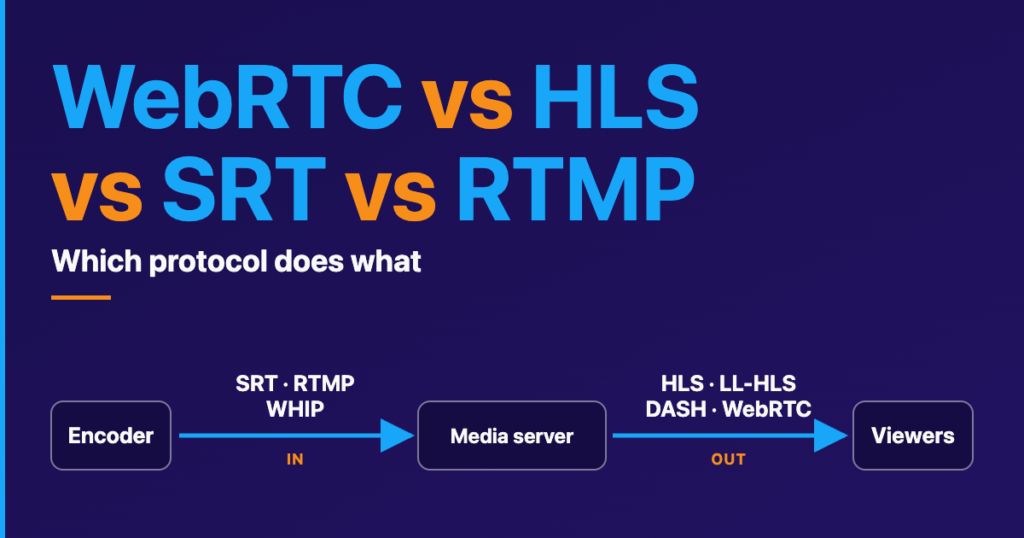
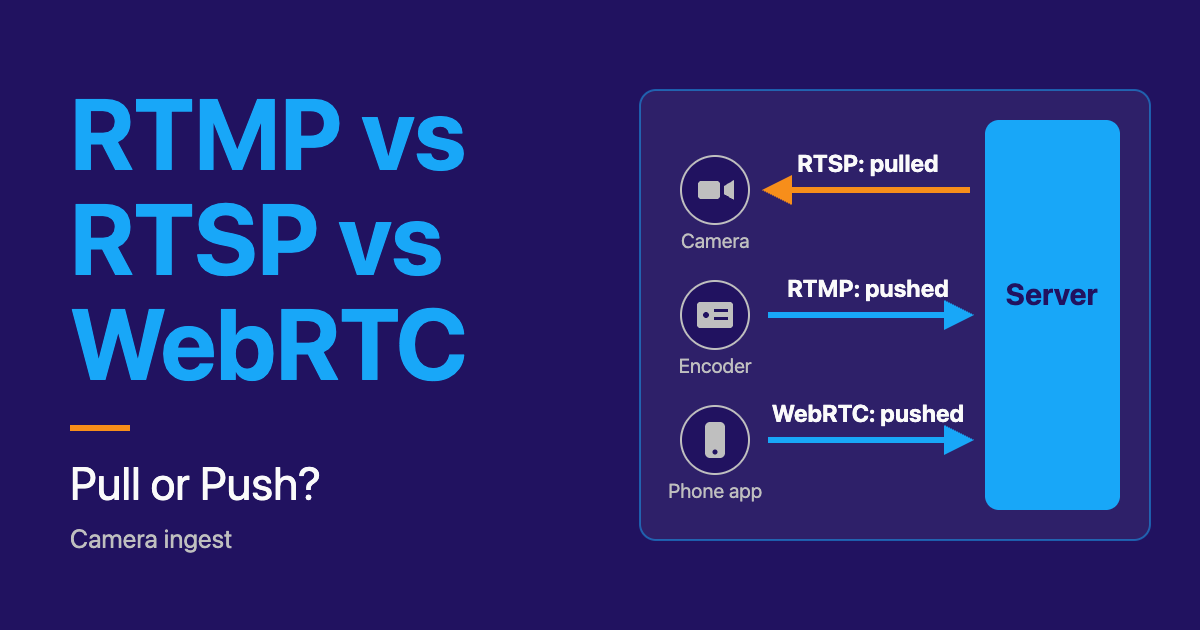
RTSP, RTMP and WebRTC are three ways a camera or other device can send live video out, and for camera ingest the difference that matters most is who opens the connection. With RTSP, the camera runs a server and your side pulls the stream. With RTMP (or RTMPS) and with WebRTC published over WHIP, the device connects out and pushes to your server. So RTMP vs RTSP vs WebRTC comes down to what the device already speaks and whether your servers can reach it. This page covers only that device leg; for the whole pipeline, see our map of WebRTC, HLS, SRT and RTMP.
Key takeaways
- Camera firmware serves RTSP, so you pull. Encoders and some camera firmware push RTMP(S). Ask for WebRTC over WHIP when you control the software on the sender.
- Reachability decides before latency does. Pulling RTSP needs an inbound path to a camera that usually sits behind a customer’s NAT, or a carrier’s NAT on cellular. Pushing needs only an outbound one.
- Audio and H.265 are where feeds stop fitting. WebRTC endpoints must implement Opus and G.711, not AAC, and H.265 is optional in WebRTC.
- Encryption belongs to the variant (RTSPS, RTMPS, DTLS-SRTP), not the protocol name. WebRTC through a media server is encrypted in transit, not end to end.
- At fleet scale, connection direction sets the work: pull means tracking every device’s address and password; push means per-device credentials, an internet-facing endpoint to defend and a plan for mass reconnects.
Not an engineer? Read the key takeaways, the decision table and what Trembit has built.
Which protocol should leave the camera: RTSP, RTMP or WebRTC?
Ask the device to send what it already speaks, and convert on your side. Ask for WebRTC only when you control the device’s firmware or app, because only then can you make it use WebRTC’s codecs and connection logic.
| RTSP | RTMP / RTMPS | WebRTC via WHIP | |
|---|---|---|---|
| Who opens the connection | Your server or gateway, as RTSP client | The device, to your RTMP server | The device, by HTTP POST to your WHIP endpoint |
| What the device runs | An RTSP server | An RTMP client set with your server URL | A WHIP client and a WebRTC stack |
| Typical sender | IP cameras, ONVIF video encoders | Streaming encoders, some camera firmware, some drones | Software you control: your app, an edge computer, FFmpeg, OBS, GStreamer |
| Network direction | Inbound, to the camera | Outbound, from the device | Outbound, from the device |
| Conversion for browser viewers | A gateway on your side | Your media server; no browser plays RTMP | Usually none; a WebRTC media server forwards it |
The RTSP column comes from the camera standard: ONVIF’s Streaming Specification (release 26.06) says “All devices and clients shall support RTSP ([RFC 2326]) for session initiation and playback control”, and its examples have the client send DESCRIBE to the camera. The WHIP column comes from RFC 9725 §3, where “the WHIP client, which represents the encoder or media producer” sends media to the server.
RTSP is not pull-only by design. RTSP 1.0 (RFC 2326) defined ANNOUNCE and RECORD for publishing to a server. RTSP 2.0 (RFC 7826, which obsoletes RFC 2326) removed “the RECORD and ANNOUNCE methods and all related functionality”. Servers such as MediaMTX still accept RTSP publishers like FFmpeg and OBS Studio. ONVIF’s camera model has the client open the session, so plan on a camera serving RTSP, not pushing it.
What does the device actually support?
Read the device’s manual or datasheet, not a protocol comparison. What a device can send depends on its firmware, and on whether that firmware is yours.
- IP and CCTV cameras. An ONVIF-conformant camera serves RTSP. Per ONVIF’s profile pages, Profile S covers “Video streaming and configuration”, PTZ control and audio in; Profile T adds “H.264 / H.265 video compression” and HTTPS streaming. ONVIF tells you what a camera can do, not which codec it is set to.
- Cameras with RTMP push. Some camera firmware has an RTMP setting: you enter a server URL and the camera publishes to it. Which models have it, on which firmware, with which codecs, is a question for the manual of the exact model.
- Streaming encoders. In our engineering view, RTMP(S) and SRT are the usual outputs; check the model. WHIP is arriving: FFmpeg’s
whipmuxer is “an experimental feature”, and OBS Studio 30.0 and GStreamer publish over WHIP. - Drones, body cameras and robots. It depends on the onboard software: our drone examples below use RTMP (2022) and WebRTC from the edge device. For body cameras and robots we know of no common standard; ask the vendor.
If the device is yours to program, the ingest protocol stops being a setting and becomes part of custom WebRTC development.
Pull or push: which survives a camera behind a customer’s NAT or on a cellular link?
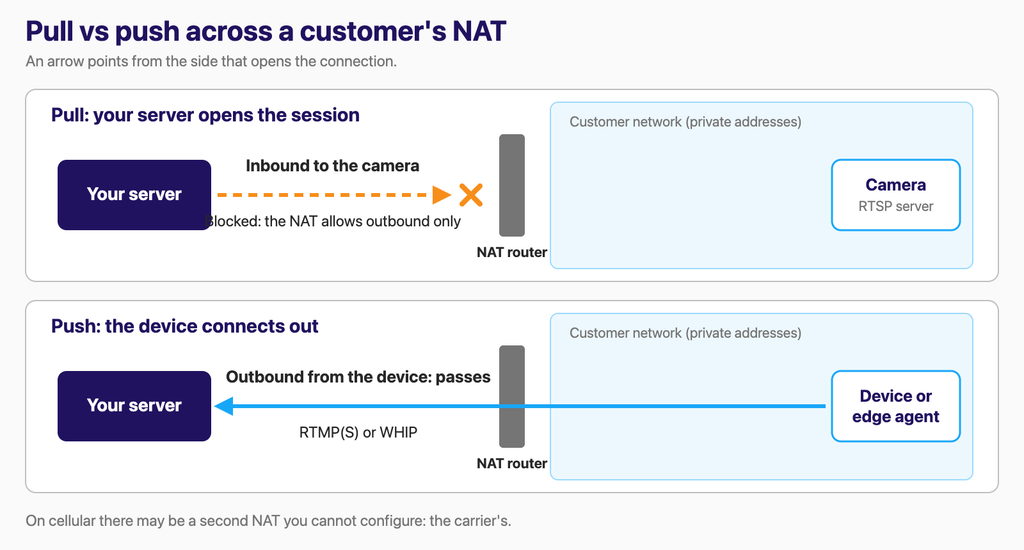
Push. Usually, a camera on a customer’s network has a private address behind a NAT router, and RFC 2663 §4.1 states the rule: “In a traditional NAT, sessions are uni-directional, outbound from the private network.” Your cloud server cannot open an RTSP session to that camera. The camera, or something next to it, can open a connection out to you.
Pulling across that boundary takes a port forward on the customer’s router (which exposes the camera to the internet), a site VPN, or a relay the site connects out to.
On cellular there may be a second NAT you cannot configure: the carrier’s. RFC 6598 reserves 100.64.0.0/10 as Shared Address Space “to accommodate the needs of Carrier-Grade NAT (CGN) devices”, for the links that “connect CGN devices to Customer Premises Equipment (CPE)”. A modem whose WAN address falls in 100.64.0.0/10 cannot be reached from the internet over IPv4, and no port forward on site will change that. An address outside that range proves nothing: RFC 6598 also lets carriers use ordinary private space on that link, and some block inbound traffic. Test an inbound connection from outside before you promise a pull.
RTSP’s transport options don’t change the direction. RTSP 1.0 can interleave media on its TCP connection (RFC 2326 §10.12 cites “Certain firewall designs and other circumstances”), and ONVIF requires RTSP over HTTP “in order to traverse a firewall”. In our reading, these get a client through a strict firewall; none lets your server reach a camera it cannot address.
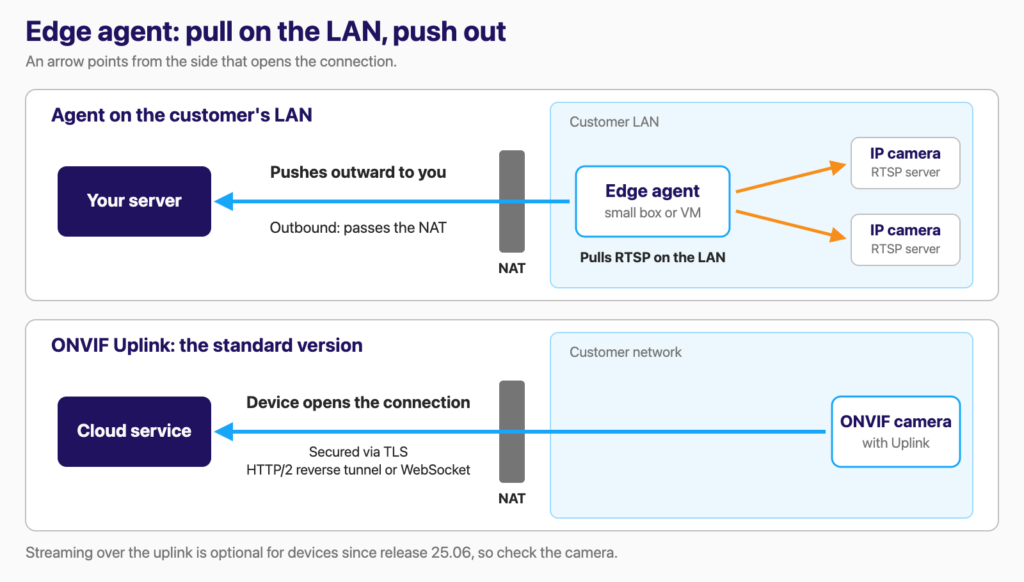
The common fix is an edge agent: a small box or VM on the customer’s LAN that pulls RTSP from the cameras and pushes outward to you. ONVIF’s Uplink Specification (release 26.06) standardises the same idea: “The device initiates the connection to the cloud service” over an HTTP/2 reverse tunnel or a WebSocket, and “The uplink shall be secured via TLS.” Streaming over the uplink is optional for devices since release 25.06, so check the camera.
WebRTC brings its own machinery: ICE finds a path, and RFC 8835 §3.4 requires implementations to support TURN over TLS “to deal with firewalls that block all UDP traffic”.
If your cameras sit in your customers’ networks, this is the decision that shapes the build. Our live streaming team works through it with product teams.
How do codecs and audio differ across the three?
H.264 is common to all three, but its profile and B-frames decide whether a camera’s H.264 plays in WebRTC unchanged. H.265 and audio are the other places a feed stops fitting.
- RTSP carries what the camera encodes, H.265 included where the camera supports it.
- Classic RTMP has no standard H.265. The Enhanced RTMP v1 specification says “RTMP/FLV does not have support for popular video codecs like VP9, HEVC, AV1” and adds them with FourCC codes; v1 adds no audio codecs. Some senders use an older, non-standard H.265 signal instead: in a MediaMTX bug report (October 2025), the server closed such a stream with “unsupported video codec: 12”. Check which one your device and your server implement.
- WebRTC sets a floor. RFC 7742 requires browsers to implement VP8 and H.264 Constrained Baseline. For H.265, the IETF draft (revision 10, in working-group last call) says “Support for the H.265 video codec is OPTIONAL for WebRTC browsers and non-browsers.”
- Audio is the quiet divider. RFC 7874 says “WebRTC endpoints are REQUIRED to implement” Opus and G.711 (PCMA and PCMU); it does not mention AAC. Cameras and RTMP senders can carry AAC (MediaMTX lists it for both), and an AAC track needs an audio transcode before WebRTC viewers hear anything.
- WHIP senders must use WebRTC codecs. FFmpeg’s
whipmuxer documentation: “Ensure that you use H.264 without B frames and Opus for the audio codec.”
How do security and authentication differ?
Encryption is a property of the variant you configure, not of the protocol name.
- RTSP and RTSPS. RFC 7826 §4.2 defines
rtspsas RTSP over TLS, with “the TCP port 322” as its default, against 554 forrtsp. ONVIF says “the RTSPS communication shall use TLS encryption” and added SRTP to its Streaming Specification in release 26.06. - RTMP and RTMPS. Wowza’s RTMP vs SRT comparison (4 May 2026): “RTMP transmits unencrypted by default. RTMPS adds TLS encryption when both encoder and server support it.”
- WebRTC. Not optional. RFC 8827 §6.5: “Media traffic MUST NOT be sent over plain (unencrypted) RTP or RTCP”, and “DTLS-SRTP MUST be offered for every media channel.”
Encrypted in transit is not end to end. In our reading, DTLS-SRTP protects each hop, and a media server or gateway that forwards, records or transcodes the stream terminates its hop and sees the media.
Credentials follow the direction. When you pull, your servers hold every camera’s password, often inside the RTSP URL (MediaMTX documents rtsp://user:pass@host:port/path). When devices push, each holds a credential for your service: an RTMP publish URL, or a WHIP bearer token, which RFC 9725 §4.7 says “MUST be supported by all WHIP entities”. In our view, push is easier to govern at scale: you issue and revoke one credential per device on your side, and rotation needs only a channel that updates the device. The cost is an ingest endpoint on the public internet: authenticate before accepting media, rate-limit it, and assume a key stored on a device in someone else’s building will leak. Pull keeps that edge closed but puts every camera password on your side.
Does the protocol change camera-to-server latency?
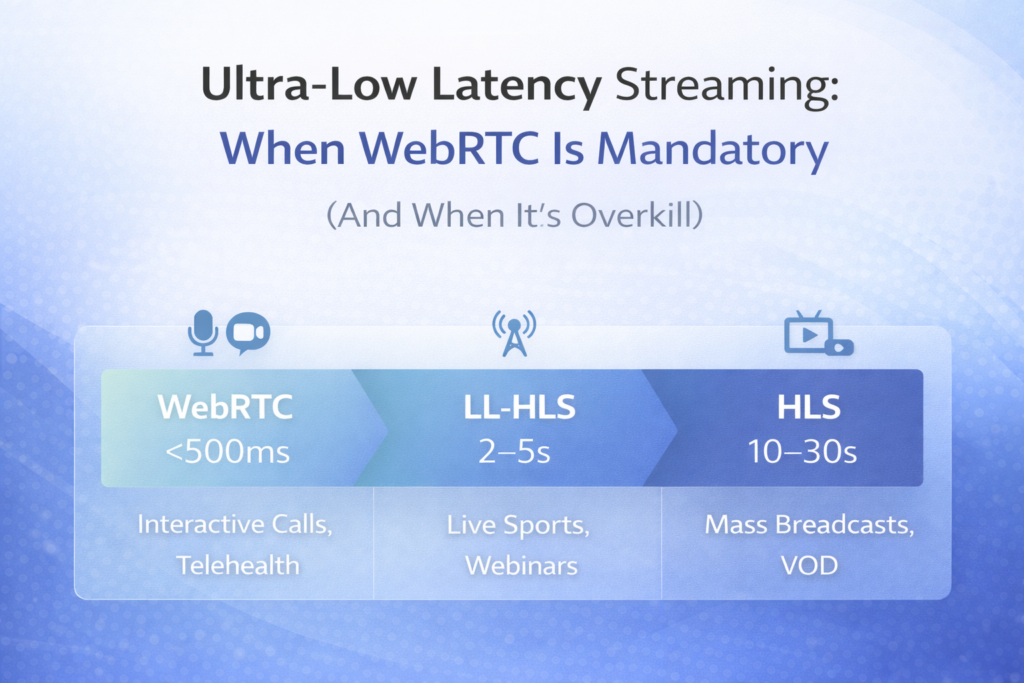
Less than the encoder and the receiving buffer do, in our engineering view: keyframe interval, B-frames and buffering weigh more on the device leg than the protocol name. Published latency figures also measure different spans; our protocol map explains them, and our guide to when WebRTC is mandatory and when it’s overkill covers whether sub-second pays off.
What changes when you go from 5 cameras to 5,000?
Who opens the connection decides your failure modes. What follows is our engineering view except where a source is named.
Pull at scale. Your servers hold one session per camera. You keep every camera’s current address and credentials, and each restart of a camera, site router or VPN is yours to detect and retry. In return, you decide when to connect, so load stays under your control.
Push at scale. Devices come to you, so the work moves to your front door:
- Per-device authentication, with revocation that doesn’t touch other devices.
- A reconnect-storm plan. After an ingest outage, every device retries at once. Where you control the firmware, add backoff with jitter; on the server, admit connections at a rate you can absorb.
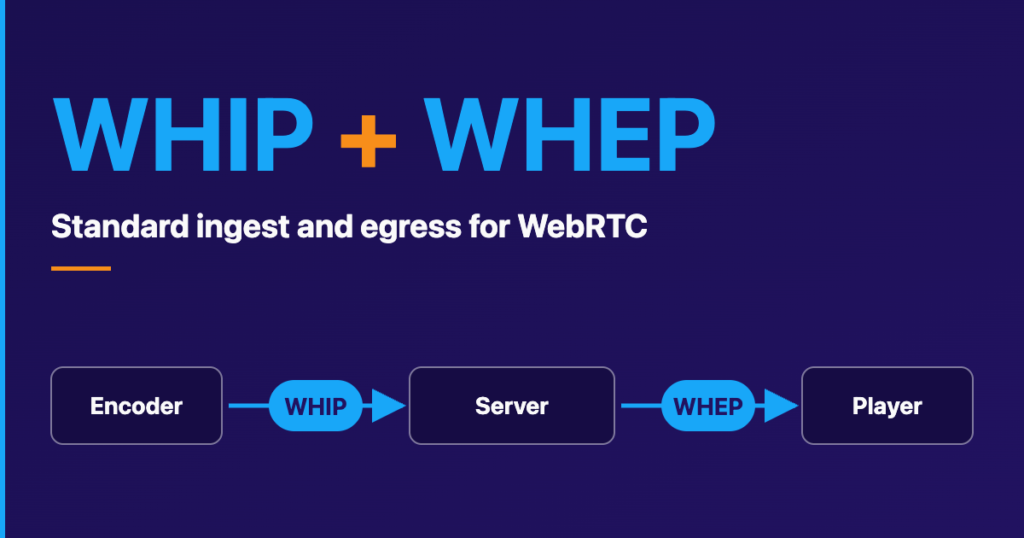
- Load balancing. WHIP builds some in. RFC 9725 §4.5 makes “307 Temporary Redirect” the preferred way to move a client to another server and lets a busy endpoint return “503 Service Unavailable” with Retry-After. For classic RTMP, that logic lives in your DNS and load balancers. The rest of the handshake is in our WHIP and WHEP explainer.
When is SRT the honest fourth answer?
When the uplink is lossy or long-haul, the device or encoder sends SRT, and the path passes UDP. Status, encryption defaults and what “SRT latency” means are in our protocol map.
Which protocol for which device? A decision table
Our engineering judgment, by device class, is in the table below; five questions after it settle most cases.
| Device | Ask it to send | Where conversion happens | Verify first |
|---|---|---|---|
| IP or PTZ camera on a customer’s LAN | RTSP, pulled by an edge agent on that LAN | Agent pushes out; your gateway converts for browsers | Codecs and audio; that the site allows outbound connections |
| IP camera you can reach (same network or VPN) | RTSP, pulled by your gateway | Your gateway | Credentials; UDP or interleaved TCP |
| Camera with RTMP push, behind NAT or on cellular | RTMPS; plain RTMP only inside a VPN, since it sends video and stream key in the clear | Your media server | Firmware version, H.265 or AAC, encryption |
| Streaming encoder | RTMPS or SRT; WHIP if supported and you want WebRTC throughout | Your media server, or none with WHIP | For WHIP: H.264 without B-frames, Opus |
| Drone, body camera or robot | What its onboard software can send; WebRTC if you write that software | Depends on the sender | Who controls the software on board |
| Your own app on a phone | WebRTC, through your SDK or WHIP | None for WebRTC viewers | Reconnects on mobile networks |
Five questions settle most cases:
- Do you control the firmware or app? If yes, WebRTC is on the table. If no, take what the device sends.
- Can your servers reach the device inbound? If no, push, or put an agent on site.
- Does it send H.265 or AAC? Budget for a transcode, or for H.265 signalling both ends agree on.
- How many devices, and who restarts them? Pushers need per-device credentials and a reconnect plan; pulls need an address book and retries.
- Does the viewer need a browser? Then something must convert RTSP and RTMP. WebRTC arrives ready.
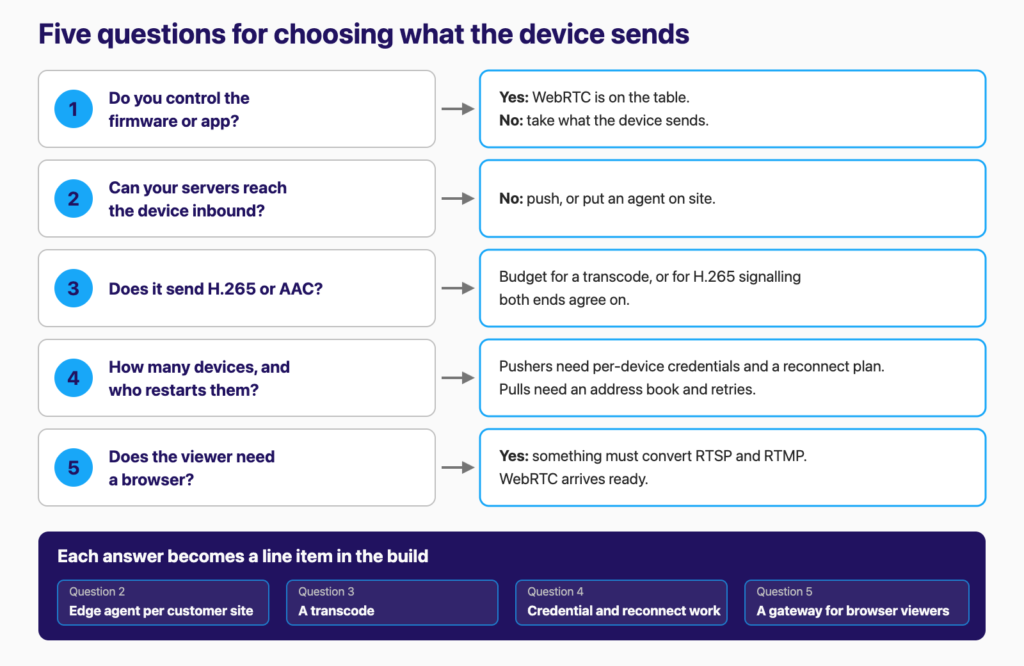
In our engineering view, each answer maps to a line item in the build: an edge agent per customer site (question 2), a transcode (3), credential and reconnect work (4), and a gateway for browser viewers (5). The fewer you need, the shorter the schedule.
What has Trembit built across these ingest paths?
Two of these ingest paths are ones we have built for clients:
- The pull leg. For a US government agency, we built the RTSP-to-WebRTC bridge on Janus that embeds live IP-camera feeds in conference sessions for real-time surveillance monitoring.
- WebRTC leaving the device. For a defense client streaming from drones, we built a GStreamer capture pipeline on Raspberry Pi hardware that serves WebRTC, at sub-second glass-to-glass latency, and HLS from one encoder, encrypted in transit (DTLS/SRTP for WebRTC, AES for HLS). We wrote the software on the device.
We have no published client project with RTMPS, RTSPS, SRT, WHIP or ONVIF ingest, and none for body cameras, PTZ or robots; the sections on those rest on the specifications and vendor documentation cited.
- RTMP from a drone, 2022. We wrote up converting an RTMP drone feed to WebRTC with a Janus-based converter: a dated example, not current guidance.
Choosing ingest paths like these is the work of our live streaming team.
FAQ
Can an IP camera push its stream instead of waiting to be pulled? Some can. Certain firmware has an RTMP push setting, and ONVIF’s Uplink Specification lets a device open a TLS connection out to a cloud service. Otherwise, an edge agent on the camera’s network pulls RTSP locally and pushes it to you.
Is WebRTC better than RTSP for cameras? They usually sit on different legs. RTSP is how a camera exposes video; WebRTC is how a browser watches it, or how a device you program publishes over WHIP.
Why does my RTSP camera work on the LAN but not from the cloud? Your cloud server has no inbound path to it: the customer’s NAT, a carrier’s NAT on cellular, or a firewall stops the session. Use a VPN, a relay, or an edge agent that pushes outward.
Do I need ONVIF? For IP cameras it helps: a conformant device must support RTSP, Profile S covers streaming and PTZ, and Profile T adds H.265. For phones and apps you write, it does not apply.
Choosing what your cameras, drones or encoders should send? Book a free 30-minute call with a Trembit engineer. Bring your device list (models, firmware, where they sit, how many), where viewers watch, and any setup that works on site but not from the cloud, and we’ll pressure-test the ingest choice with you. No deck, no pitch.