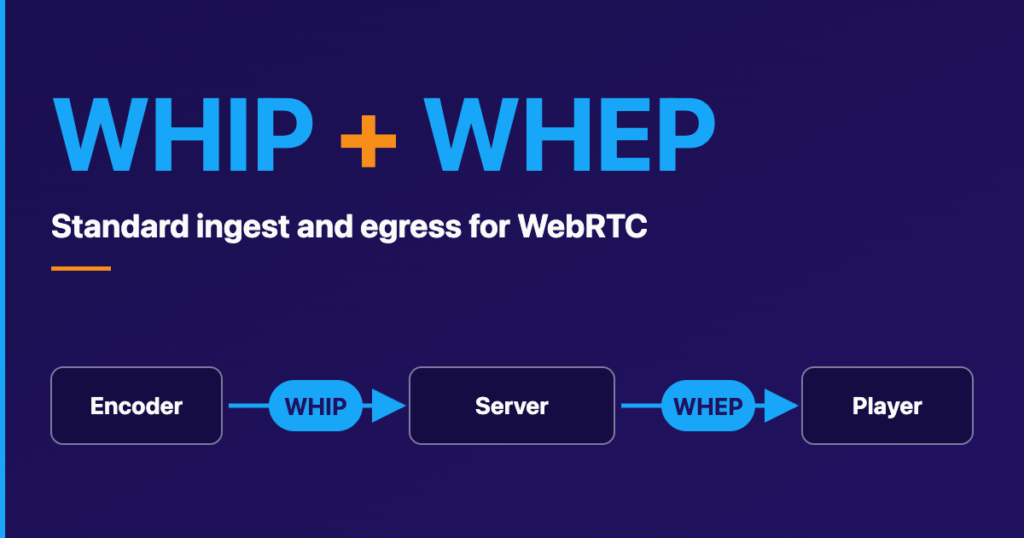
As a video streaming development company, we love WebRTC. It empowers us to create extraordinary products. It enables a seamless video conferencing experience, allowing us to simplify matters and focus on what truly matters: communication and collaboration among individuals.
For communication purposes, the primary features of WebRTC are utilized, including:
- Accessing and recording audio, video, and text data.
- Initiating, monitoring, and terminating peer-to-peer connections between devices through web browsers.
- Facilitating bidirectional data transfer across multiple data channels.
To enhance collaboration, additional opportunities are provided through the WebRTC API. Some of the suggested options include:
- Screen sharing.
- Document co-editing.
- Co-browsing the web or utilizing a whiteboard solution, among others.
Nonetheless, it is essential to prioritize usability over flashy new features that may distract end users.
Video streaming app effortless experience
So, how do we make collaboration the main attraction of the video conferencing application? Right, by creating seamless interactions that allow users to engage without any distractions. Consider the below possibilities.
Controls:
To achieve this, we can create intuitive controls that seamlessly blend into the background until they are needed. For instance, we can offer controls for common actions like muting, video sharing, screen sharing, raising hand, and chat. These controls should align with user expectations and be user-friendly. Our objective is to make these actions so effortless that users don’t need to consciously think about them.
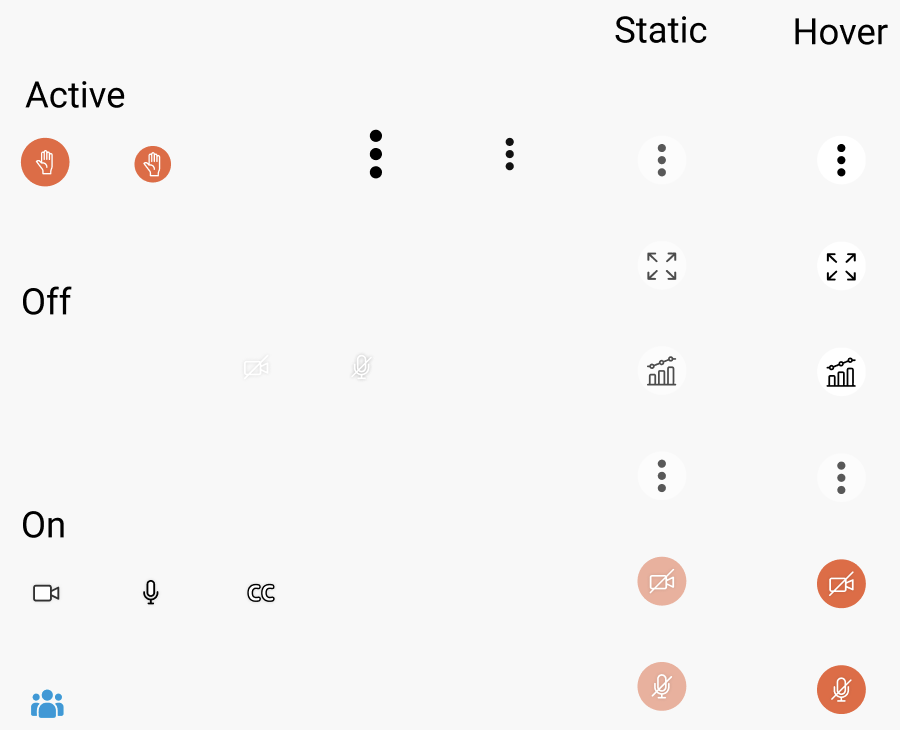
Icons states
Icons:
Selecting the appropriate icons for the controls is equally vital. They should be clear and unambiguous, allowing users to easily grasp their functions and determine their enabled or disabled status. Consider the ‘hover’ states of the icons as well.
Connectivity Health Checks:
Prior to establishing a conference, it is crucial to assess network speed and ensure suitable audio and video quality for the video call. These checks are relevant. We typically recommend incorporating these checks within the pre-room settings, enabling users to identify any potential issues or deviations.
Inapp prompt and unambiguous response
The WebRTC-based app should undoubtedly deliver clear and timely feedback messages. These messages may encompass the following:
Lost connection: It is vital to accurately identify network issues for uninterrupted online calls. Thoroughly check for all potential errors and promptly inform the user.

Media server issue
Waiting for the Host/Teacher, etc.: Anticipate possible disruptions and provide users with clear updates on the ongoing situation.
Are you talking right now? Implement a user-friendly prompt to activate the microphone while the system distinguishes speech.
Naturally, this list of features is not exhaustive and can be expanded to align with the product’s requirements.
Adaptation for variations
Being a user-oriented application based on WebRTC, it requires feedback on possible issues and, obviously, good solutions. The following list includes potential problems:
- Issues with joining a call: Ensure permissions are granted at the device and browser levels. Prompt users to provide necessary permissions.
- Reconnecting after failure: Request feedback and utilize robust technology to handle reconnection scenarios effectively.
- Signal disruptions: Welcome feedback and implement graceful degradation strategies to address signal disruptions.
- Gaps in video/audio: Employ reliable sampling technology and leverage user feedback to resolve any issues.
- Incoming phone calls: Applications may encounter interruptions due to incoming phone calls on the device. Gather feedback and implement a seamless reconnection experience.
- No audio shared: This common problem can be resolved by actively seeking feedback from users.
- Poor audio quality: Once again, solicit feedback and consider implementing graceful degradation techniques to address audio quality issues.
Confidentiality persuasion
When discussing video and audio applications, ensuring privacy is crucial. We can safeguard a user’s privacy by implementing the following measures:
- Minimizing audio noise to prevent unintended capturing of surrounding conversations or sounds.
- Employing background blurring techniques to obscure the details of the user’s surroundings.
- Verifying device connections to ensure the correct camera (front camera) is utilized and prevent unauthorized access.
- Using waiting rooms, which allow for pre-call checks, granting control over who joins a call, obtaining consent for recording, and enabling other necessary preparations.
Conclusion
With the increasing adoption of live video applications, users have become more tolerant of the occasional glitches and issues that may arise. However, it doesn’t diminish the importance of aiming for an exceptional experience. While WebRTC technology may be impressive, users are primarily concerned about the quality of their experience. Drawing upon our extensive experience in developing video applications, we can assist you in crafting the optimal experience for your WebRTC application. Contact us today for actionable recommendations and estimations for the work.
As a video streaming development company, we love WebRTC. It empowers us to create extraordinary products. It enables a seamless video conferencing experience, allowing us to simplify matters and focus on what truly matters: communication and collaboration among individuals.
For communication purposes, the primary features of WebRTC are utilized, including:
- Accessing and recording audio, video, and text data.
- Initiating, monitoring, and terminating peer-to-peer connections between devices through web browsers.
- Facilitating bidirectional data transfer across multiple data channels.
To enhance collaboration, additional opportunities are provided through the WebRTC API. Some of the suggested options include:
- Screen sharing.
- Document co-editing.
- Co-browsing the web or utilizing a whiteboard solution, among others.
Nonetheless, it is essential to prioritize usability over flashy new features that may distract end users.
Video streaming app effortless experience
So, how do we make collaboration the main attraction of the video conferencing application? Right, by creating seamless interactions that allow users to engage without any distractions. Consider the below possibilities.
Controls:
To achieve this, we can create intuitive controls that seamlessly blend into the background until they are needed. For instance, we can offer controls for common actions like muting, video sharing, screen sharing, raising hand, and chat. These controls should align with user expectations and be user-friendly. Our objective is to make these actions so effortless that users don’t need to consciously think about them.
Icons states
Icons:
Selecting the appropriate icons for the controls is equally vital. They should be clear and unambiguous, allowing users to easily grasp their functions and determine their enabled or disabled status. Consider the ‘hover’ states of the icons as well.
Connectivity Health Checks:
Prior to establishing a conference, it is crucial to assess network speed and ensure suitable audio and video quality for the video call. These checks are relevant. We typically recommend incorporating these checks within the pre-room settings, enabling users to identify any potential issues or deviations.
Inapp prompt and unambiguous response
The WebRTC-based app should undoubtedly deliver clear and timely feedback messages. These messages may encompass the following:
Lost connection: It is vital to accurately identify network issues for uninterrupted online calls. Thoroughly check for all potential errors and promptly inform the user.
Media server issue
Waiting for the Host/Teacher, etc.: Anticipate possible disruptions and provide users with clear updates on the ongoing situation.
Are you talking right now? Implement a user-friendly prompt to activate the microphone while the system distinguishes speech.
Naturally, this list of features is not exhaustive and can be expanded to align with the product’s requirements.
Adaptation for variations
Being a user-oriented application based on WebRTC, it requires feedback on possible issues and, obviously, good solutions. The following list includes potential problems:
- Issues with joining a call: Ensure permissions are granted at the device and browser levels. Prompt users to provide necessary permissions.
- Reconnecting after failure: Request feedback and utilize robust technology to handle reconnection scenarios effectively.
- Signal disruptions: Welcome feedback and implement graceful degradation strategies to address signal disruptions.
- Gaps in video/audio: Employ reliable sampling technology and leverage user feedback to resolve any issues.
- Incoming phone calls: Applications may encounter interruptions due to incoming phone calls on the device. Gather feedback and implement a seamless reconnection experience.
- No audio shared: This common problem can be resolved by actively seeking feedback from users.
- Poor audio quality: Once again, solicit feedback and consider implementing graceful degradation techniques to address audio quality issues.
Confidentiality persuasion
When discussing video and audio applications, ensuring privacy is crucial. We can safeguard a user’s privacy by implementing the following measures:
- Minimizing audio noise to prevent unintended capturing of surrounding conversations or sounds.
- Employing background blurring techniques to obscure the details of the user’s surroundings.
- Verifying device connections to ensure the correct camera (front camera) is utilized and prevent unauthorized access.
- Using waiting rooms, which allow for pre-call checks, granting control over who joins a call, obtaining consent for recording, and enabling other necessary preparations.
Conclusion
With the increasing adoption of live video applications, users have become more tolerant of the occasional glitches and issues that may arise. However, it doesn’t diminish the importance of aiming for an exceptional experience. While WebRTC technology may be impressive, users are primarily concerned about the quality of their experience. Drawing upon our extensive experience in developing video applications, we can assist you in crafting the optimal experience for your WebRTC application. Contact us today for actionable recommendations and estimations for the work.