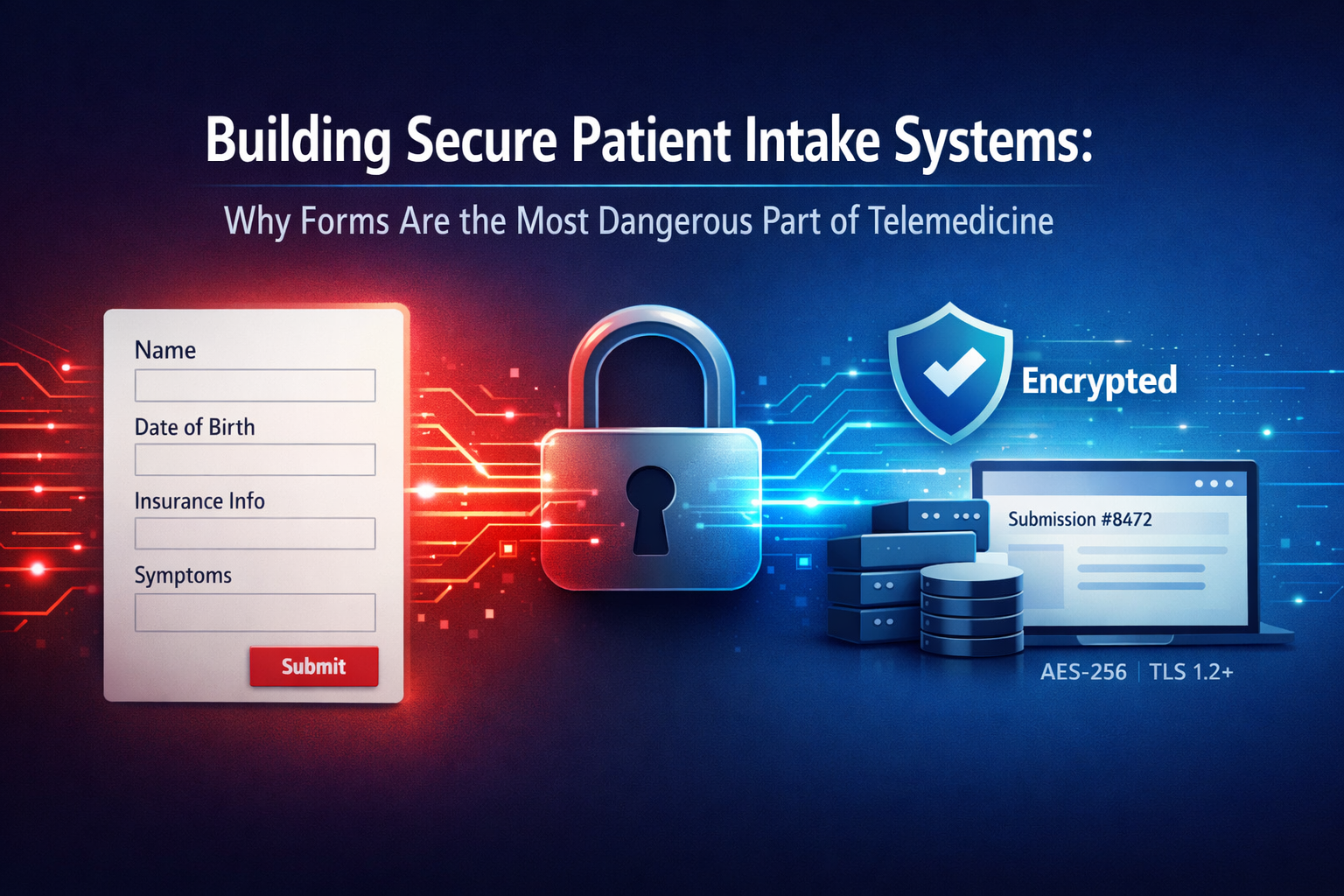
Patient intake forms seem mundane. They’re the unglamorous paperwork of healthcare — medical histories, insurance information, symptom descriptions. Yet telehealth patient intake security represents one of the highest-risk challenges in any modern healthcare platform — far more consequential than its paperwork appearance suggests.
Consider what happens during typical patient intake: individuals provide comprehensive personal information, including social security numbers, insurance details, complete medical histories, current medications, and detailed symptom descriptions. This data flows through form submissions, email notifications, temporary storage, and integration with Electronic Health Records. Each step creates opportunities for exposure, misconfiguration, or outright compliance violations.
The stakes are existential. A misconfigured intake form that emails patient data in plaintext can trigger HIPAA violations carrying large fines. An intake system storing data in unsecured cloud storage creates liability that persists for years. And unlike sophisticated cyberattacks, these failures happen through mundane configuration mistakes or well-intentioned but misguided implementation choices.
For CTOs building or evaluating telehealth platforms, understanding intake system security isn’t optional technical depth — it’s fundamental to viable operations.
The Email Trap: Why PHI via Email Is a Compliance Failure
The most common intake system failure occurs when well-meaning developers implement the obvious solution: the patient submits a form, and the system sends an email to clinic staff. This pattern works perfectly for contact forms and customer support. In healthcare, it’s a critical compliance failure.
Why Email Fails HIPAA Requirements
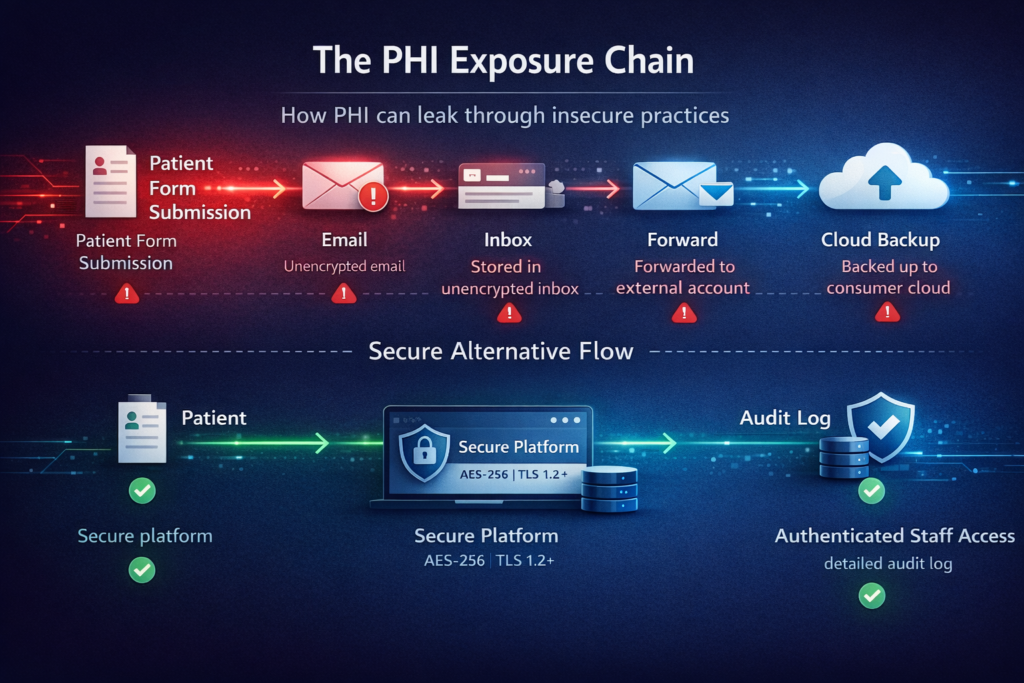
HIPAA requires that Protected Health Information (PHI) transmitted electronically be encrypted. Standard email doesn’t meet this requirement. Even if your email provider uses TLS for transmission, messages typically sit unencrypted in recipients’ inboxes. They’re stored on email servers you don’t control. They get forwarded, copied to personal devices, and backed up to consumer cloud services.
When an intake form sends patient information to drjones@clinic.com, that email likely travels through Gmail, Outlook, or another consumer email service. Google’s servers now contain PHI. If Dr. Jones forwards it to a colleague for consultation, it spreads further. If Dr. Jones checks email on a personal phone that later gets stolen, that PHI is now exposed.
The violation isn’t theoretical. The Office for Civil Rights has levied substantial fines against healthcare organizations for PHI exposure via unencrypted email. Even organizations with otherwise robust security programs have failed audits specifically because of intake form email notifications.
The Insidious Scope of Email PHI
PHI in email isn’t limited to obvious medical information. HIPAA defines 18 specific identifiers that constitute PHI when associated with health information. An intake notification reading “New patient form submitted by Sarah Martinez, DOB 03/15/1987, regarding persistent headaches” contains multiple PHI elements even without a detailed medical history.
Clinic staff often don’t realize the scope. They forward emails to billing departments, copy administrators on responses, or CC external consultants. Each action multiplies PHI exposure across systems and individuals not originally intended to have access.
The Right Architecture: Notifications Without PHI
Compliant intake systems separate notification from data access. When a patient submits an intake form, staff receive a notification that contains zero PHI. Instead, the notification includes:
- A generic identifier: “New intake form #8472 submitted.”
- The submission timestamp
- A secure link to your telehealth platform
Staff click the link, authenticate into your HIPAA-compliant platform, and view the complete intake form within your controlled environment. The email itself contains no patient information. The PHI never leaves your secure infrastructure.
This pattern extends to all intake-related communications. Appointment reminders reference only the appointment ID and date. Follow-up requests link to secure portals. No PHI in email, ever.
Conditional Logic Risks: When Smart Forms Become Security Vulnerabilities
Modern intake forms use conditional logic — questions appear based on previous answers. If a patient indicates pregnancy, additional prenatal questions appear. If they select “chest pain,” cardiac symptom questions display. This improves user experience but creates subtle security risks.
Client-Side Logic Exposure
Many form builders implement conditional logic client-side in JavaScript. The complete form structure — including all questions that might appear based on any answer path — exists in the browser. A patient submitting a basic intake form has access to the JavaScript code revealing questions for specialized conditions.
This seems innocuous, but it can leak sensitive information. If your intake form has a conditional section that appears only when patients indicate HIV positive status, the existence of that section in your JavaScript reveals that your clinic treats HIV. Patients might infer information about other patients or the clinic’s specialization from the conditional logic they can inspect.
More seriously, client-side validation and conditional logic can be bypassed. A malicious user could submit data for fields that shouldn’t be visible based on their answers, potentially injecting unexpected data into your system or triggering backend errors that expose system architecture.
Backend Validation and Authorization
Secure intake systems validate all data server-side, regardless of client-side logic. When processing a form submission, the backend recalculates which fields should be present based on submitted answers and rejects submissions containing unexpected fields.
This server-side logic must also implement authorization checks. Some intake forms include fields that should only be completed by verified providers (internal notes, risk assessments, billing codes). The backend must verify that the submitter has appropriate credentials before accepting data in privileged fields.
State Management Complexity
Conditional forms create complex state management. A patient might begin intake, answer questions triggering conditional sections, then return later and change earlier answers that make those sections no longer relevant. Your system must handle partial submissions, state transitions, and data consistency.
The security risk emerges when incomplete or inconsistent data enters your system. If a patient’s initial answers indicated diabetes, but they later change their medical history, do diabetes-specific fields remain in their submission? Are they visible to clinicians reviewing the intake? Could inconsistent data indicate tampering?
Secure implementations maintain audit trails of intake form state changes, validate data consistency before accepting submissions, and clearly indicate to clinicians which sections were completed when.
Secure Storage Models: Architecture for Intake Data
Once intake data is submitted, where does it go? This architectural decision has lasting security and compliance implications.
Dedicated Intake Data Storage
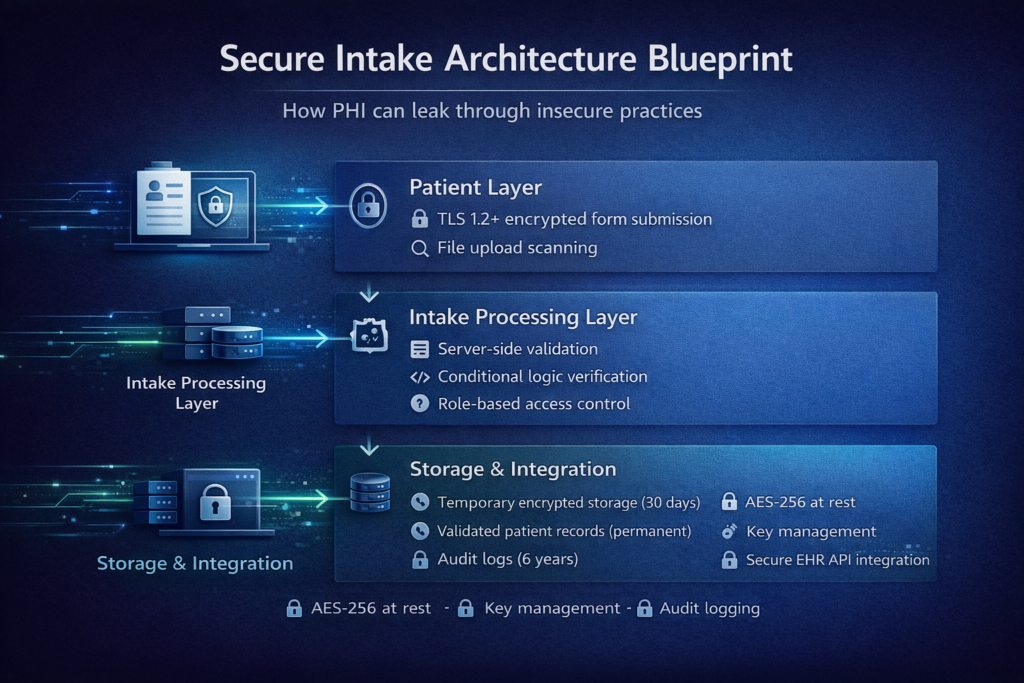
The most secure approach treats intake data as a distinct category requiring special handling. Intake submissions don’t immediately merge into your primary patient database. Instead, they land in a dedicated intake storage system with restricted access.
This separation provides several benefits. Access controls can be more restrictive — only intake coordinators and assigned providers see new submissions. Retention policies can differ from the main medical records. And if intake storage is ever compromised, it’s isolated from your complete patient database.
The workflow typically involves intake coordinators reviewing submissions, validating data quality, potentially contacting patients for clarification, and then explicitly promoting validated data to the patient’s official record. This human-in-the-loop review catches data entry errors, identifies suspicious submissions, and ensures data quality before it enters permanent records.
Encryption at Rest and In Transit
All intake data must be encrypted at rest using industry-standard encryption (AES-256). This means data sitting in databases or file storage is encrypted at the storage layer. If an attacker gains access to raw database files or backup volumes, they see only encrypted data without access to encryption keys.
Encryption in transit requires that all communication between patient devices and your servers uses TLS 1.2 or higher with strong cipher suites. This includes form submission traffic, attachments being uploaded, and any API calls retrieving intake data.
The architectural complexity involves key management. Encryption keys must be stored separately from encrypted data, preferably in Hardware Security Modules (HSMs) or cloud key management services. Keys must be rotated periodically, and old keys must be retained to decrypt historical data.
Temporary vs. Permanent Storage
Some intake data is inherently temporary. A patient uploads a photo of an insurance card during intake. You need it to verify coverage and extract information, but once processed, the raw image shouldn’t persist indefinitely.
Sophisticated intake systems implement tiered storage with automatic lifecycle policies. Raw submissions land in temporary storage with 30-day retention. Validated data promoted to permanent records moves to long-term storage with appropriate backup and disaster recovery. Temporary artifacts like uploaded images are automatically purged after processing.
This reduces your data footprint — minimizing the volume of PHI you store reduces attack surface and compliance burden.
| Storage Type | Purpose | Retention Period | Access Level | Encryption Requirements |
| Temporary Intake Storage | Raw form submissions | 30 days | Intake coordinators, assigned providers | AES-256 at rest, TLS 1.2+ in transit |
| Validated Patient Records | Reviewed and approved data | Permanent (per regulatory requirements) | Role-based per patient assignment | AES-256 at rest, TLS 1.2+ in transit |
| Uploaded Documents | Insurance cards, IDs, lab results | Until processed, then 90 days | Intake coordinators, billing staff | AES-256 at rest, virus scanning required |
| Audit Logs | Access records, state changes | 6 years (HIPAA requirement) | Security team, compliance officers | Tamper-evident storage, append-only |
Intake Dashboards: Visibility Without Compromise
Clinic staff need visibility into incoming intake forms — who’s submitted forms, which forms are complete, and which require follow-up. But dashboards displaying this information can become PHI exposure points if poorly designed.
Dashboard Data Minimization
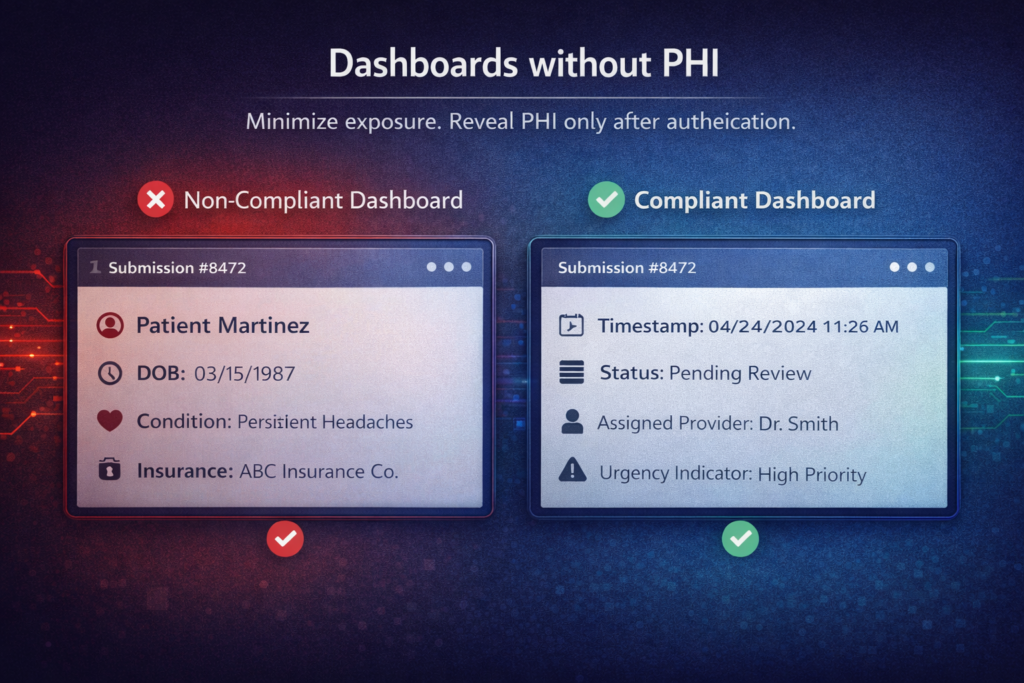
Compliant intake dashboards show only the minimum information needed for triage and assignment. Rather than displaying patient names and medical conditions, show:
- Form submission timestamp
- Submission ID or reference number
- Status (incomplete, pending review, approved)
- Assigned staff member
- Urgency indicator (if applicable)
Staff clicks into individual submissions to see complete details within your secure application. The dashboard itself contains minimal PHI, reducing exposure if someone views it over a staff member’s shoulder or a screen is left unlocked.
Role-Based Dashboard Access
Different roles need different dashboard views. Intake coordinators see all pending submissions. Physicians see only submissions assigned to them. Billing staff sees forms requiring insurance verification. Administrative staff sees volume metrics without patient details.
This requires granular role-based access control (RBAC) at the dashboard level. Your application must verify user roles before rendering dashboard views and filter displayed data based on those roles. A nurse shouldn’t see intake forms for patients they’re not treating. An administrator shouldn’t see medical details, only operational metrics.
Audit Trails for Dashboard Access
Every time someone views the intake dashboard or opens a specific intake form, that access is logged. Audit trails record who accessed what data when, creating accountability and enabling investigation if unauthorized access occurs.
These audit logs must themselves be protected — stored in tamper-evident systems where entries cannot be altered or deleted without detection. They’re critical for compliance audits and breach investigations.
Notification Without PHI Leakage: Communication Patterns
Beyond email notifications, intake systems need various communications — assigning forms to providers, requesting additional information from patients, and notifying when forms are overdue. Each creates PHI exposure risk.
In-App Notifications
The most secure notifications happen entirely within your telehealth platform. When a new intake form requires review, a notification appears in the assigned provider’s dashboard when they next log in. No external communication. No email. No PHI leaving your infrastructure.
This requires users regularly log into your platform. For practices with consistent daily platform usage, in-app notifications work well. For practices where providers check the platform infrequently, you need supplementary notification mechanisms.
SMS Without PHI
Text message notifications can reach providers quickly, but must contain zero PHI. A compliant SMS reads: “New task requires attention in the telehealth portal. Log in to view details.” It includes a link to your login page, but no patient information, no form details, and no indication of what the task involves.
This requires patient tolerance for vague notifications. Providers receive texts saying “new item requires review” without context until they log in. Most clinics accept this trade-off for HIPAA compliance.
Secure Messaging Systems
For practices requiring richer notifications, integrate secure messaging platforms designed for healthcare. These systems — like TigerConnect or Halo Health — provide HIPAA-compliant messaging where notifications can include patient details because the entire platform is designed for PHI.
Integration requires sending notifications to the secure messaging platform’s API rather than standard email or SMS. The secure platform handles delivery to providers’ devices with appropriate encryption and access controls.
Real-World Implementation: Patterns and Pitfalls
Understanding principles is valuable. Seeing how they apply to actual implementation scenarios makes them actionable.
Multi-Step Intake with Save-and-Resume
Many patients can’t complete lengthy intake forms in one session. They start on a phone, get interrupted, and want to resume later on a computer. Implementing secure save-and-resume requires careful handling.
Issue a unique, unguessable token when patients start intake. Store their partial submission encrypted in your temporary storage, indexed by this token. When they return with the token, retrieve and decrypt their partial submission. Tokens should expire after a reasonable period (24-48 hours) to limit the exposure window.
Never send resume links via email containing patient information. The email should say “Continue your intake form” with a link containing only the token, no context about which patient or clinic.
File Upload Security
Intake forms often collect document uploads — insurance cards, photo IDs, and previous lab results. Each upload is a potential malware vector and compliance risk.
Secure implementations scan uploads for malware before storage, validate file types against allowed lists (preventing executable uploads), enforce size limits preventing storage exhaustion, and store uploads in dedicated object storage separate from application servers.
Display uploaded files to authorized users through your application with appropriate access controls — never as direct links to cloud storage that could be accessed without authentication.
Integration with EHR Systems
Validated intake data must eventually reach your Electronic Health Record system. This integration point requires careful security design.
Use authenticated API connections to EHR systems; never file exports to shared folders or email. Transmit only validated, reviewed data — not raw patient submissions. Maintain audit logs of every integration transaction. And implement retry logic with alerting for failed integrations so data doesn’t silently fail to sync.
Building with Compliance from Day One
The common pattern is building intake forms that work, then retrofitting security and compliance. This creates technical debt and often misses subtle vulnerabilities. The right approach integrates compliance from the initial architecture.
At Trembit, we’ve built secure intake systems for telehealth platforms across various specialties and regulatory environments. We understand that intake isn’t just a form — it’s a complete workflow spanning patient interaction, staff coordination, data validation, storage, and integration with broader healthcare systems.
Our approach starts with understanding your specific intake requirements. What information do you collect? Who needs access? How does data flow into your EHR? What conditional logic do you need? From these requirements, we design intake architectures that are secure by default, not as an afterthought.
We implement the patterns discussed here — notification systems that never expose PHI, secure storage with appropriate encryption and access controls, dashboards providing visibility without compromise, and integration patterns ensuring data reaches destination systems securely.
Beyond initial implementation, we provide ongoing support for evolving compliance requirements, security updates as threats emerge, and architectural refinement as your platform scales.
The Bottom Line
Patient intake forms are deceptively dangerous. They seem like simple web forms, but handle some of the most sensitive data in your entire platform. They’re often implemented by junior developers because they’re “just forms,” yet they create the highest compliance risk.
Organizations that treat intake security seriously from the beginning avoid expensive remediation, compliance violations, and patient trust breaches. They build systems where PHI never appears in email, where conditional logic is validated server-side, where storage is encrypted and access-controlled, where dashboards show only necessary information, and where notifications never leak patient data.
The platforms succeeding in competitive telehealth markets understand that security isn’t about expensive enterprise security products — it’s about making correct architectural choices in seemingly simple components. Your intake forms might be your biggest vulnerability or your strongest security foundation. The difference is implementation discipline and expertise.