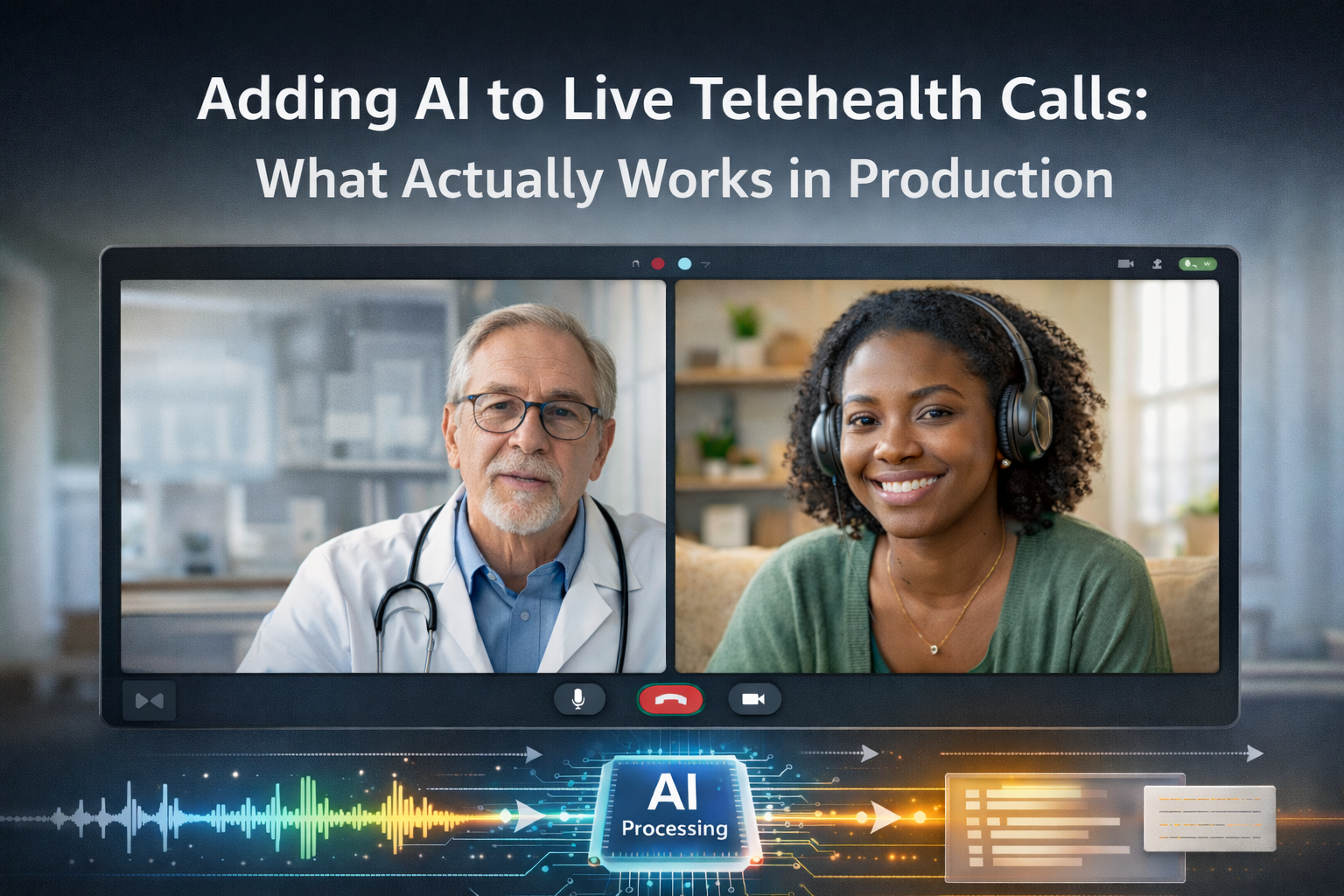
The pitch for AI in telehealth is compelling: real-time transcription that auto-populates clinical notes, live translation that eliminates language barriers between patients and practitioners, and ambient AI that detects medication names and flags potential interactions mid-call. Investors love it. Product roadmaps are full of it.
The production reality is more complicated.
Teams that have shipped AI features on live telehealth calls — not demos, not controlled pilots, but real production systems with real patients — have learned a set of hard lessons about latency, media access architecture, regulatory surface area, and the gap between what AI models can do in a lab and what they do reliably under degraded network conditions at 2pm on a Tuesday.
This article is a practitioner’s account of what actually works. We’ll cover the five AI feature categories most commonly built on telehealth platforms, what production deployment looks like for each, and the architectural decisions that determine whether they ship cleanly or become permanent technical debt.
Why Live AI on Video Calls Is Harder Than It Looks
Before exploring specific features, it’s worth understanding why this problem space is challenging, even for teams with strong AI and WebRTC expertise.
Media access is architecturally constrained. Browser-based WebRTC doesn’t give you a raw audio stream you can pipe to an AI model. You need either server-side media access (which has compliance implications) or client-side capture (which has quality and reliability implications). Neither is trivial.
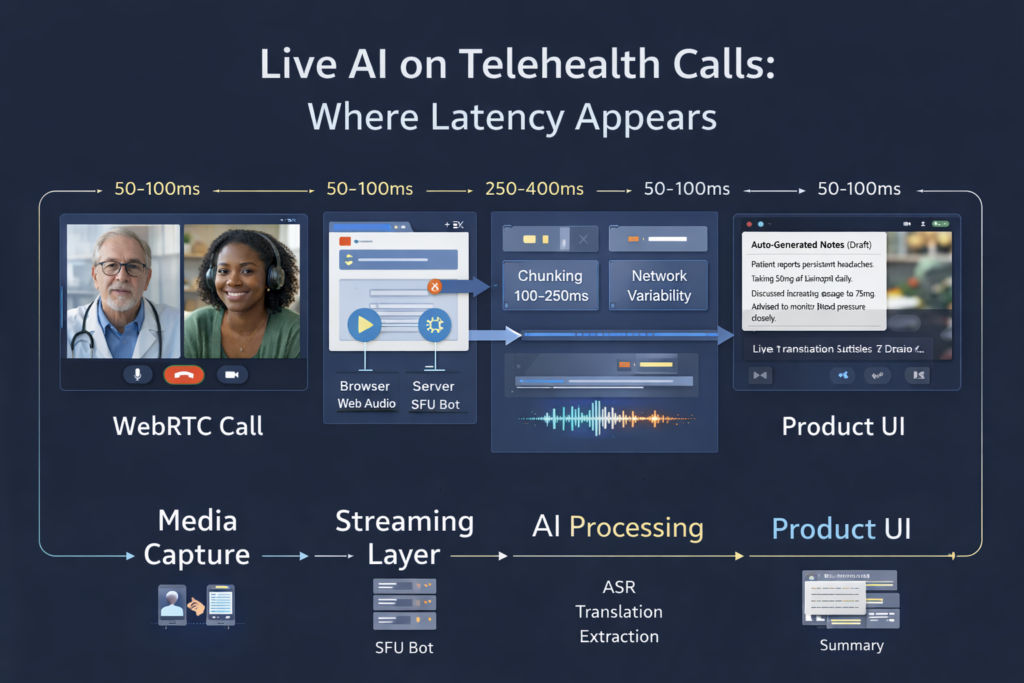
Latency compounds. A live AI feature has to capture media, transmit it to an AI inference endpoint, receive a response, and surface it to the user — all while the conversation continues. Each step adds latency. Features that feel instant in a demo feel laggy when the network isn’t ideal, and the AI model is under load.
Clinical context raises the error cost. Wrong autocomplete in a consumer app is annoying. A transcription error that misrenders a medication name in a clinical note is a patient safety issue. The tolerance for AI errors in telehealth is lower than in most other domains, which means you need confidence thresholds, human review workflows, and explicit “AI-assisted, not AI-generated” labeling built into the UX.
Compliance surface expands with every AI vendor. Every third-party AI provider you integrate becomes a subprocessor under HIPAA and GDPR. Each requires a BAA or DPA, raises questions about where data is processed, and adds surface area to your compliance posture. The more AI features you add, the more complex your compliance documentation becomes.
With that grounding, here’s what works.
Feature 1: Real-Time Transcription and Clinical Note Assistance
What it is: Live speech-to-text during the consultation, used to auto-populate structured clinical notes (SOAP format, ICD codes, prescriptions) rather than requiring practitioners to document after the call.
Why practitioners want it: Documentation is one of the most time-consuming parts of clinical practice. The average physician spends nearly two hours on documentation for every hour of patient care. Reducing that burden directly increases practitioner capacity and reduces burnout.
What works in production:
Real-time transcription at low latency (under 500ms end-to-end) is achievable with Whisper-based models or purpose-built medical ASR providers like Deepgram’s medical model or AWS HealthScribe. The key is streaming audio in chunks — typically 100–250ms frames — rather than waiting for utterance boundaries.
Post-call note generation from full transcripts is more reliable than live note generation and is often the right first step. The practitioner sees a draft note appear within 20–30 seconds of the call ending, reviews it, edits where needed, and signs off. This captures most of the productivity benefit with lower risk than real-time generation.
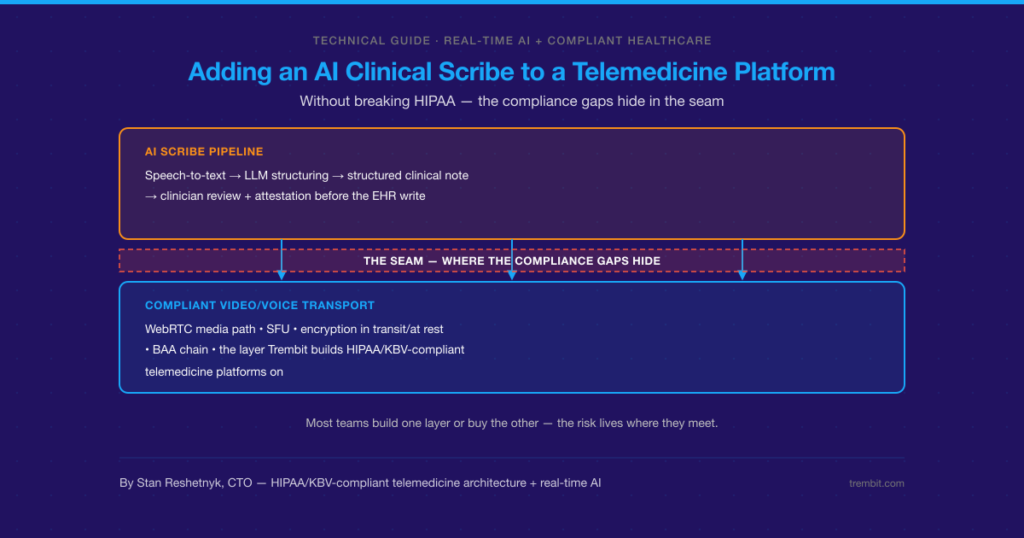
Architecture note: You need server-side audio access or client-side capture. For browser clients, the Web Audio API can capture the local microphone stream before it enters the WebRTC pipeline. Capturing the remote participant’s audio on the client is harder and quality-dependent. Server-side capture via a recording bot joining the SFU is more reliable but requires SFU architecture (not P2P) and careful DPA documentation for all audio processing.
What breaks:
- Medical terminology accuracy varies significantly between models; generic ASR models struggle with drug names, dosage instructions, and clinical shorthand.
- Speaker diarization (knowing who said what) is unreliable when audio quality degrades or when participants talk over each other.
- Real-time note generation with hallucinated clinical details is worse than no notes at all — always surface AI output as a draft requiring review, never as authoritative.
Feature 2: Live Language Interpretation
What it is: Real-time translation of spoken audio, either displayed as subtitles or rendered as synthesized speech in the target language.
Why it matters: Language barriers in healthcare are a documented patient safety risk. In markets with significant linguistic diversity — the US, Germany, the UK — live interpretation dramatically expands the practitioner’s effective patient population without requiring human interpreters for every session.
What works in production:
Subtitle-based translation (speech-to-text → translate → display) is more reliable and lower-latency than voice-based interpretation (speech-to-text → translate → TTS). A latency of 1–2 seconds for subtitle display is clinically acceptable. Voice-based interpretation adds TTS latency and audio mixing complexity, and the synthesized voice can be disorienting for patients.
For common language pairs (Spanish/English, German/Turkish, French/Arabic), current translation models are accurate enough for clinical communication in most contexts. For rare languages and highly specialized clinical terminology, accuracy drops, and human oversight becomes more important.
What breaks:
- Latency spikes under high API load make subtitles arrive out of sync with speech, which is more disorienting than no subtitles.
- Clinical terminology in translation often requires post-editing; “Schwindel” in German covers both dizziness and vertigo, which have different clinical significance in English.
- Patients may not notice or may distrust AI-generated subtitles; explicit UI labeling (“AI interpretation — may not be exact”) manages expectations.
Feature 3: Ambient Clinical Documentation (Structured Data Extraction)
What it is: AI that listens to the consultation and extracts structured clinical data — chief complaint, medication mentions, symptom duration, family history — directly into the EHR, without requiring the practitioner to manually enter fields.
Why it matters: This goes further than transcription — it maps free-form conversation to structured clinical ontologies. Done well, it can reduce documentation time by 50–70% and improve data completeness for downstream analytics.
What works in production:
Ambient documentation works best as a post-call pipeline rather than a live feature. The full transcript is processed by a fine-tuned extraction model (GPT-4-class or domain-specific), and structured output is mapped to EHR fields with confidence scores. Fields above a confidence threshold are auto-populated; fields below the threshold are flagged for practitioner review.
Integration with EHR APIs (FHIR R4 is the current standard) is the hardest part of this feature — not the AI, but the integration surface. Every EHR has a different API, different field schemas, and different behavior around partially-populated records.
What breaks:
- Models that haven’t been fine-tuned on clinical conversations confuse patient-reported symptoms with practitioner assessments
- Without confidence thresholds and review workflows, auto-populated EHR fields erode practitioner trust quickly — one wrong entry that makes it to a permanent record is remembered longer than a hundred correct ones
- HIPAA audit requirements for AI-assisted documentation are not well-standardized; document your data flows and retention policies explicitly
Feature 4: Real-Time Sentiment and Engagement Monitoring
What it is: AI analysis of audio (and optionally video) to detect patient engagement, distress signals, or disengagement during the consultation — surfaced to the practitioner as a real-time indicator.
What works in production:
This is the most experimental category on this list. Acoustic sentiment analysis (detecting distress, frustration, or disengagement from voice characteristics) has demonstrated accuracy in research settings but shows significant performance degradation with audio quality variation, speaker diversity, and cultural differences in emotional expression.
The feature that performs most reliably in production is simpler: engagement detection based on silence periods, one-word responses, and speaking-time ratio — behavioral signals rather than acoustic analysis. These are interpretable, less error-prone, and don’t require sensitive biometric processing.
What breaks:
- Video-based emotion detection from facial expressions is not production-ready for telehealth contexts; accuracy is too low and the ethical, and regulatory risks are significant.
- Any biometric-adjacent processing raises GDPR special category data questions that require legal review before deployment.
- Practitioners don’t want to be distracted by AI indicators during a consultation; UI placement and interrupt behavior matter more than model accuracy for adoption.
Feature 5: Post-Call Summarization and Follow-Up Generation
What it is: After the call ends, AI generates a patient-facing summary, follow-up instructions, and flagged action items (prescriptions to fill, tests to schedule, referrals to make).
What works in production:
This is the most mature and reliable AI feature category for telehealth. It operates on a complete transcript with no latency pressure; the output is always reviewed before sending, and the failure mode (a draft that needs editing) is benign.
LLM-based summarization with structured prompts and clinical context produces summaries that practitioners edit rather than rewrite — the target output for AI-assisted workflows. Patient-facing summaries in plain language (reading level calibrated to health literacy norms) have shown measurable improvement in medication adherence and follow-up attendance in published studies.
Production Readiness by Feature
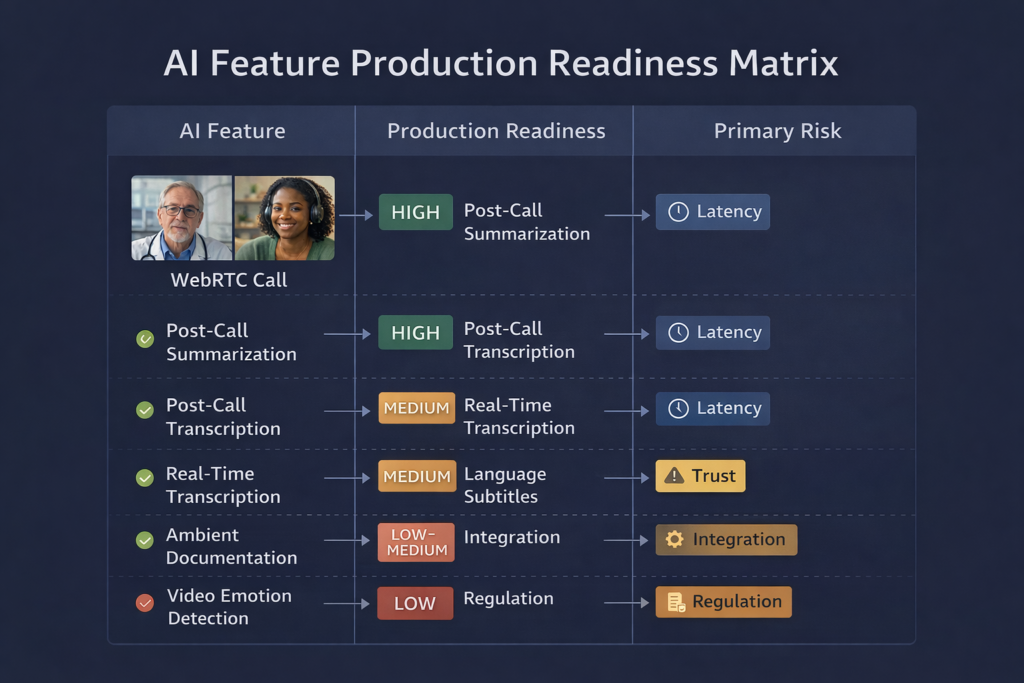
| Feature | Production Maturity | Primary Risk | Recommended Approach |
| Post-call transcription | High | Terminology accuracy | Medical ASR + practitioner review |
| Real-time transcription | Medium | Latency, accuracy | Stream audio in chunks, show as draft |
| Post-call summarization | High | Hallucination | Structured prompts, mandatory review |
| Language interpretation (subtitles) | Medium | Latency spikes, rare languages | Common language pairs only, label as AI |
| Ambient documentation | Medium | EHR integration, trust erosion | Confidence thresholds, staged rollout |
| Engagement monitoring | Low–Medium | Biometric risk, accuracy | Behavioral signals only, not acoustic |
| Video emotion detection | Low | Accuracy, regulatory risk | Not recommended for production |
The Architecture Decisions That Underpin All of This
Every AI feature on this list depends on one foundational decision: how does audio and video get from the call to the AI model?
The options are:
- Client-side capture via Web Audio API or native SDK hooks, streaming directly to AI endpoints. Lower compliance surface, higher implementation complexity, quality dependent on client device.
- Server-side capture via SFU recording bot or media tap. More reliable, centrally managed, but requires SFU architecture, documented DPA chain for all processors, and compliant data residency for the audio stream.
- Post-call processing from stored recordings. Simplest architecture, no latency pressure, but no live features possible.
Most production telemedicine platforms use a combination: post-call processing for summarization and documentation (high reliability, lower complexity), and client-side capture for real-time features where latency is critical.
Building AI Telehealth Features That Hold Up in Production
The teams that ship these features reliably share a few habits: they instrument everything (AI output confidence scores, latency per pipeline stage, user edit rates on AI-generated content), they stage rollouts with explicit practitioner feedback loops, and they treat every AI vendor as a subprocessor from day one rather than figuring out the DPA chain after the feature ships.
At Trembit, we’ve designed and built AI-augmented video consultation systems across HIPAA and GDPR-regulated environments — from the WebRTC media pipeline through to EHR integration and compliance documentation. If you’re planning AI features on a live video platform and want to pressure-test your architecture before you build, we’re worth talking to.
The implementation details are where these features succeed or fail. Getting them right early is substantially cheaper than fixing them in production.