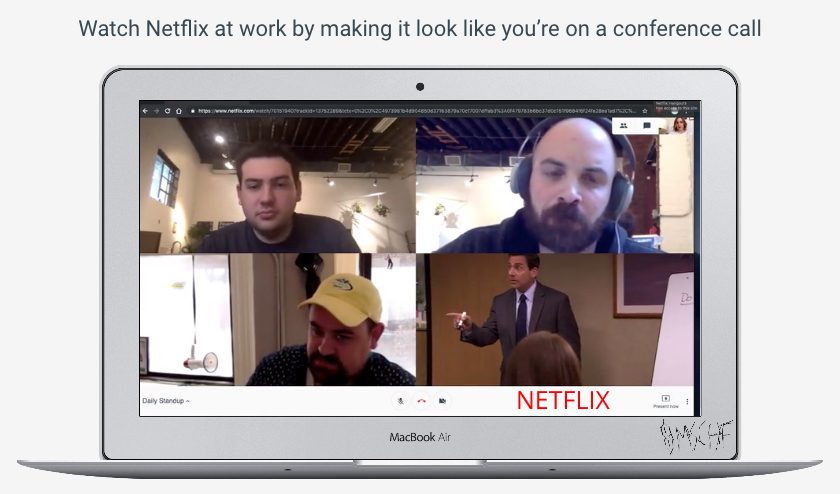
Back in 2019, a Chrome extension made the rounds for one cheeky reason: it let you watch Netflix at work while pretending to be stuck in a video call. It was called Netflix Hangouts, built by the internet-mischief studio MSCHF, and it did exactly what it promised — one click turned your show into the bottom-right tile of a fake four-person conference call, complete with three “colleagues” nodding along. Social media loved it. Thousands of people installed it within a week.
It’s a great gag. It’s also a perfect teaching example for something far less funny: how much trust you hand over every time you install a browser extension — and how easily that trust could be abused.
The harmless-looking install that asks for a lot
Here’s the part most people clicked straight past. To work, Netflix Hangouts asked permission to “Read and change your data on all netflix.com sites.” For this particular extension, that’s a reasonable request — it has to manipulate the Netflix page to pull off the disguise. MSCHF is a known creative studio, not a criminal operation, and there’s no evidence the extension did anything malicious.
But sit with that permission for a second. Read and change your data. On the site holding your account, your viewing history, and your billing relationship. You granted that to a novelty tool you installed because it was funny on Twitter. Now imagine the same gag, the same install flow, the same delighted social-media buzz — built by someone whose intentions weren’t kind.
How the same idea becomes a shakedown
Picture a malicious clone. It works perfectly as advertised, so you never suspect a thing. Quietly, in the background, it collects what it can reach: your Netflix account details, the times of day you fire it up, the specific shows you watch, and — through other permissions you waved through — your approximate location.
That data alone is enough to build a profile. Cross-reference an email or name against LinkedIn and the picture sharpens fast: where you work, who your manager is, who sits next to you. Now the pieces are in place for a clean little extortion play: transfer $500 to this Bitcoin wallet, or we tell your boss and your team exactly how you spent Tuesday afternoon — with timestamps. And if the extension also requested camera access, the threat can come with a still frame from your own webcam during one of those “meetings.”
Would people pay? Plenty would, just to make it disappear. That’s the entire business model of extortion — it doesn’t need to be true to everyone, only frightening enough to enough people.
Why this is more than a 2019 curiosity
The specific extension is a relic now — Google’s consumer Hangouts product was retired, and Chrome’s extension rules have since tightened. But the underlying risk hasn’t aged a day; if anything, it’s worse, because we install more extensions than ever and read the permission prompts less. The mechanics are unchanged:
- An extension’s permissions are the whole ballgame. “Read and change your data on a site” means it can see and alter everything you do there. Treat that prompt as the actual decision point, not a speed bump.
- Popularity is not safety. A clever, viral extension earns trust it hasn’t necessarily proven. Malicious actors specifically clone or buy popular extensions because the install momentum is already there.
- Legitimate extensions get hijacked, too. A trusted extension can be sold to a new owner or compromised, then pushed a malicious update straight to everyone who already installed it — no new click required.
- The data is more linkable than you think. It rarely takes much — an email, a name, a location pattern — to tie an anonymous-feeling activity log back to the real, employed, blackmailable you.
How to actually protect yourself
A few habits that cost nothing and close most of the risk:
- Read the permissions before you click Add. If a simple tool wants access far beyond its obvious job, that’s your signal to stop.
- Audit what you’ve already installed. Open your browser’s extensions page and remove anything you don’t recognize or no longer use. Each one is standing access you’re still granting.
- Prefer extensions with a real publisher, real reviews, and a privacy policy — and be extra wary of clones with names a hair off the original.
- On managed work devices, leave extension policy to IT. That webcam-and-account exposure isn’t only your problem; it’s your employer’s.
And yes — maybe don’t install a tool whose core purpose is deceiving your employer and routing your account through an unknown third party. The joke’s funny. The permission grant isn’t.
Stay safe out there.