Build vs buy for real-time video is the choice between renting the media layer from a managed video API (a CPaaS), running it yourself on open-source media servers, or having a specialist team build infrastructure you own. Trembit is a WebRTC engineering company that builds on managed video APIs and on owned infrastructure, so this comparison doesn’t push one path: it compares 8 managed video APIs and 5 open-source media servers against compliance rules and cost shape, using vendor and project documentation checked in September 2026.
Key takeaways
- Buying is usually right when video is a feature, calls are standard, and a third party may handle your media.
- Owning the media layer pays off when compliance, SDK limits, or a growing per-minute bill become the constraint.
- Vendor capabilities differ more than their marketing suggests. Of the 8 video APIs we checked, one documents end-to-end encryption with no SDK or mode restriction, and one documents a self-host option. Two vendors’ own pages contradict each other on facts that affect the decision.
- Open source lowers lock-in, not work. You still run TURN, signalling (for some servers), recording, scaling and on-call.
- Most teams can buy now and keep the exit open by putting their own interface between the product and the vendor SDK.
If you’re scoping this as a business or procurement decision rather than an engineering one, skip to When Is Buying the Right Call? and How Trembit Helps at This Decision Point — the vendor and open-source tables are for your engineers.
What Is Build vs Buy for Real-Time Video?
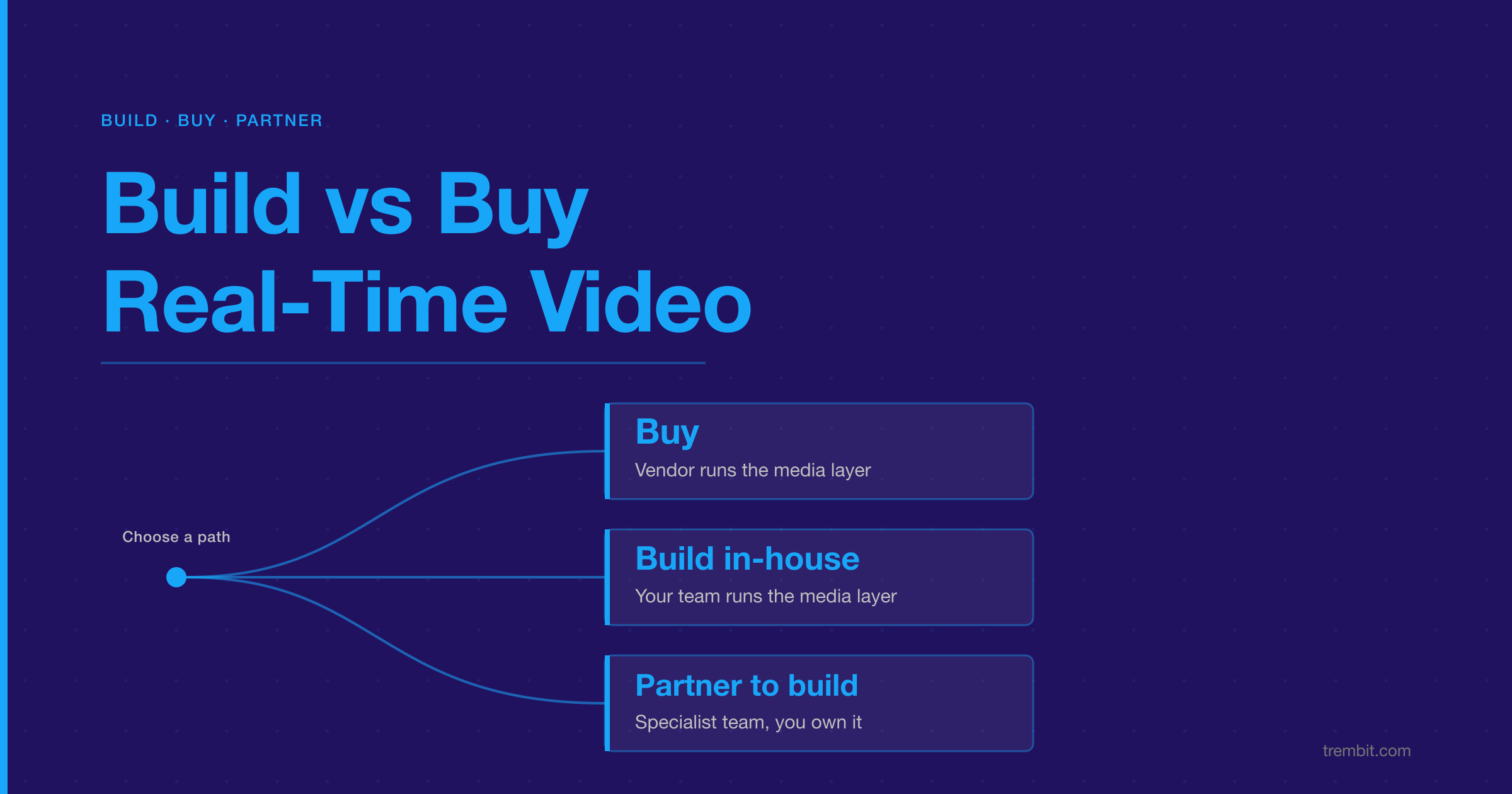
Buying real-time video means a managed video API runs signalling, media servers, TURN and scaling; you integrate its SDK and pay per usage. Building means your engineers run that media layer themselves, usually on an open-source media server such as LiveKit, mediasoup, Janus or Jitsi. Partnering means a specialist team builds media infrastructure that you own and can run after handover.
The reason this decision so often turns on compliance rather than cost is encryption. Every WebRTC path encrypts media in transit — RFC 8827 makes DTLS-SRTP mandatory and states that “media traffic MUST NOT be sent over plain (unencrypted) RTP.” But transport encryption terminates at the media server. Once a server sits in the path, true end-to-end encryption needs a second layer, such as SFrame: RFC 9605 states that “two layers of encryption and authentication are required” so the server can forward media without access to it. In practice, a standard SFU that isn’t built that way decrypts your media. If your contracts, regulator or certification say a third party must not be able to see call content, that single fact can decide build vs buy before a spreadsheet does.
| Buy (managed video API) | Build in-house (open source) | Partner to build | |
|---|---|---|---|
| Speed to a first working call | Fastest | Slowest | In between |
| Control over media behaviour | What the SDK exposes | Full | Full |
| Where media is processed | Vendor’s network (region control varies by vendor and plan) | Where you host it | Where you host it |
| End-to-end encryption | Depends on vendor, SDK and mode (see the vendor table below) | Available on several open-source servers; you configure it | You specify it |
| Cost of leaving later | A migration project | Low: you own the code and hosting | Low: you own the code and hosting — if IP transfer and documentation are contracted, not assumed |
| Usually best for | Standard calls, early products, video as a feature | Video as the core product, experienced team | Video as the core product, without that team yet |
How Do the Three Paths Compare?
Compare the paths on what you give up, not only on what you pay. The same product often sits on different paths at different stages.
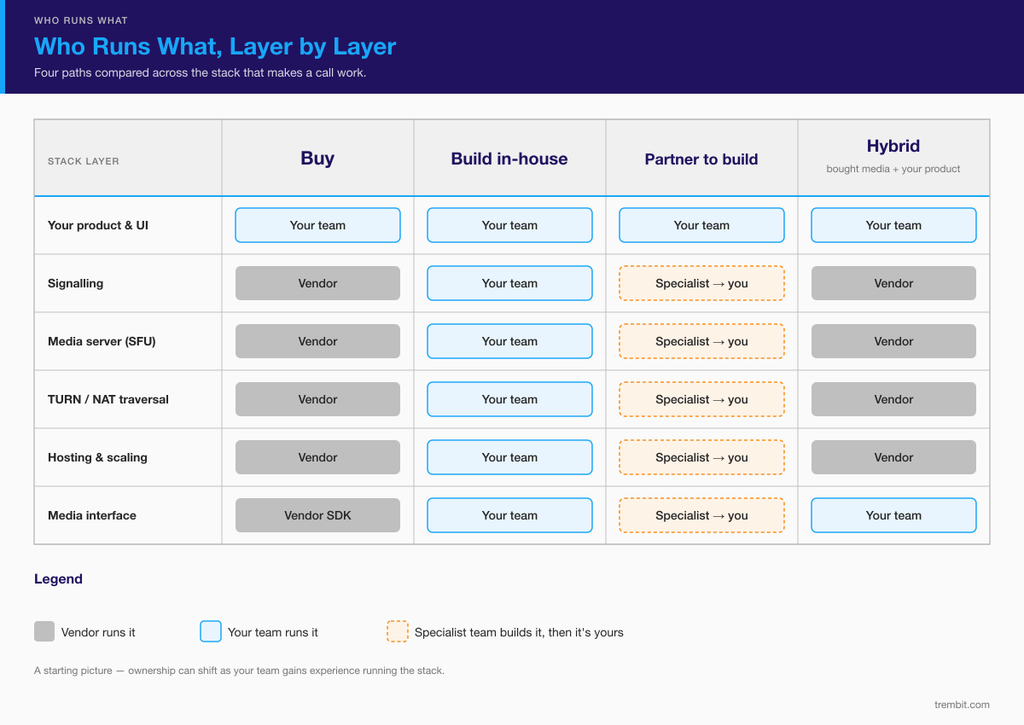
Buy. You integrate an SDK, and the vendor runs signalling, media servers, TURN and scaling. You ship quickly and pay for as long as calls run. You get what the SDK exposes, and your media is processed on the vendor’s network.
Build in-house. Your team runs the media layer, usually on an open-source media server. You control behaviour, hosting and cost at scale — and you own every failure, upgrade and browser change.
Partner to build. A team that has already run real-time media in production builds infrastructure you own, then hands it over or keeps working with you. You get the control of building without learning it on live users — provided the partner documents and transfers knowledge as they go. “You own the code” is only real when IP transfer, documentation and handover are contract terms rather than verbal promises, so make them terms.
What Do Managed Video APIs Actually Give You?
“Buy” isn’t one option. We checked eight managed video APIs against their own documentation on 15 September 2026. The differences that decide build vs buy are encryption, compliance paperwork, region control and session size — not the feature list on the homepage.
| Vendor | Billing unit | HIPAA BAA | End-to-end encryption | Media region control | Documented session size | Self-host option |
|---|---|---|---|---|---|---|
| Twilio Video | Per participant-minute | Security or Enterprise Edition ¹ | Transport encryption to the media server (DTLS/SRTP) ¹ | Yes, per room | Up to 50 participants | Not documented |
| Vonage Video API | Per participant-minute | Enterprise accounts ¹ | Yes for routed sessions (no archiving or SIP while on; not Firefox) | Yes, add-on | Up to 55 publishers | Not documented |
| Agora | Per 1,000 minutes, tiered by resolution ¹ | Agora states it acts as a Business Associate; plan not stated | Native SDKs only, not the Web SDK | Yes (geofencing) | Not documented | Not documented (on-prem recording exists) |
| Daily | Per participant-minute ¹ | Yes, healthcare offering ¹ ² | Peer-to-peer mode only; the SFU re-encrypts media | Yes, per room | Up to 100,000 active participants | Not documented |
| LiveKit Cloud | Participant-minutes plus data transfer, by plan | Scale plan and above | Yes, built in | Yes, region pinning on Scale plan and above | No per-room limit; project-wide concurrency capped at 100 / 1,000 / 5,000 by plan | Yes: the server is open source (Apache-2.0) |
| Amazon Chime SDK | Per attendee-minute | HIPAA-eligible under the AWS BAA | Transport encryption; the media service decrypts audio for mixing | Yes, per meeting | 250 attendees (10,000 with media replication) | Not documented |
| Zoom Video SDK | Per minute, after free minutes ¹ | Available with a BAA; plan not stated ¹ | Not supported in browsers | Yes, data-centre opt-in/out ¹ | 1,000 or 5,000 (Zoom’s own pages differ) ¹ | Not documented |
| Stream Video | Participant-minutes, tiered by quality | Enterprise add-on | SFrame end-to-end encryption in the React SDK; other SDKs “to follow” (Aug 2026) | Dedicated region stack, Enterprise add-on | “Unlimited” on the pricing page; the product page cites a 1M+ concurrent benchmark ³ | Not documented |
¹ Source undated or older than six months. Confirm with the vendor before relying on it. ² Daily’s pricing and HIPAA pages differ on whether the healthcare offering costs extra. ³ Stream’s pricing page says “Unlimited Participants” while its product page cites a benchmark of 1M+ concurrent participants (both checked 26 September 2026). We treat those as a marketing claim and a benchmark figure rather than a documented per-session ceiling.
“Not documented” means we didn’t find it in the vendor’s own documentation, not that it doesn’t exist. We don’t publish vendor prices here, because they change often — check each vendor’s current pricing page.
Encryption is the biggest hidden difference. Every vendor in that table encrypts media in transit. Only some keep media unreadable to their own servers, and often only in specific SDKs or modes: native SDKs but not web, peer-to-peer but not routed, one framework’s SDK with the others “to follow.” If your product needs media the vendor can’t access, check the exact SDK and mode you will ship on.
Compliance paperwork is plan-dependent. Most of these vendors will sign a HIPAA Business Associate Agreement, but usually on a specific plan, edition or add-on. Budget for that plan, not the entry tier.
Session size and region control shape architecture. A documented 50-participant ceiling and a 100,000-participant ceiling suit very different products. The same goes for region pinning, which is sometimes included, sometimes an add-on, and sometimes limited to higher plans.
The vendor’s own pages are not always consistent. Two of the eight contradicted themselves on decision-relevant facts on the day we checked: Daily’s pricing and HIPAA pages differ on whether the healthcare offering costs extra, and Zoom’s documentation and fact sheet give different maximum session sizes (5,000 and 1,000). A third, Stream, states “unlimited” participants on its pricing page and a 1M+ concurrent benchmark on its product page — two different kinds of claim rather than a contradiction, which is why we report both instead of picking one. That isn’t a reason to avoid any of these vendors. It is a reason to get the number that matters to you confirmed in writing before you sign.
Is Twilio Video Shutting Down?
No. Twilio announced it would retire Twilio Video, then reversed that decision on 21 October 2024, and it still sells the product — its pricing page was live and carried no retirement wording when we re-checked on 26 September 2026. Teams do still move off it for cost, scale or control reasons; if that’s your situation, our playbook for migrating off Twilio Video covers when a move makes sense and how to do it without breaking production.
What Does Building on Open Source Really Involve?
Open-source media servers remove licence fees and lower vendor lock-in. They don’t remove operations. All five below had shipped a release within six months of our check on 15 September 2026 (Janus’s most recent was a git tag, v1.4.1, from April 2026) — but they are very different things to build on.
| Project | What it is | Licence | Signalling | Recording | Scaling across servers | End-to-end encryption | Official managed version |
|---|---|---|---|---|---|---|---|
| LiveKit | Standalone SFU server (Go) | Apache-2.0 | Built in | Separate Egress service | Yes (distributed mode with Redis) | Built in | LiveKit Cloud |
| mediasoup | Library you embed (C++ worker, Node.js or Rust API) | ISC | Not provided: you build it | Build it yourself (e.g. RTP to FFmpeg or GStreamer) | Your application spreads rooms across hosts | Not documented | Not found |
| Janus | General-purpose, plugin-based WebRTC server (C) | GPL-3.0 | Built-in JSON API (HTTP, WebSocket and others) | Built in, where plugins use it | No official recipe | VideoRoom option (Insertable Streams) | Not found |
| Jitsi (Videobridge + Meet) | SFU plus a full meeting app (Kotlin, TypeScript) | Apache-2.0 | Built in (XMPP) | Separate Jibri service on its own machine | Yes, add videobridges | Audio, video and screen share | 8×8 Jitsi as a Service |
| Pion | Go WebRTC library to build your own server | MIT | Not documented | Build it yourself (official example) | Not documented | Official example | Not found |
“Not found” means no official hosted service appeared in the project’s own pages, not a confirmed “no”.
What you operate on top of any of them:
- TURN servers for users behind restrictive networks. LiveKit embeds one; Jitsi’s documentation tells you to run your own, for example coturn (a free open-source TURN/STUN server, BSD-style licence, release 4.18.0 in September 2026). Check each server’s docs for its TURN story.
- Signalling, where the server doesn’t provide it — mediasoup’s own FAQ states it “does not provide any network signaling protocol.”
- Recording pipelines, often a separate service on separate machines.
- Scaling and failover across servers and regions.
- Monitoring and on-call for call quality, not only for server uptime. This is the line item teams underestimate most: uptime dashboards stay green while one-way audio and mid-call quality collapse go unreported.
Licences matter to your deployment. Apache-2.0, ISC and MIT are permissive. Janus is GPL-3.0, which carries obligations if you modify it and distribute the result. How that applies to your deployment is a question for your counsel, not for a comparison table.
Library or server? mediasoup and Pion are building blocks — more control, more code. LiveKit, Janus and Jitsi run as servers with more included. That narrower choice is its own decision, covered in LiveKit vs mediasoup and SFU vs MCU vs P2P.
When Is Buying the Right Call?
Buy when most of these are true — and for a product where video is genuinely a feature, most teams should.
- Video is a feature, not your product. A consult button in a scheduling app; a support call inside a SaaS tool. If users would still buy your product without video, the media layer probably isn’t where your engineering effort belongs.
- Standard calls meet the need. Scheduled one-to-one or small-group calls, default quality, default recording. That is exactly what video APIs are built for.
- The vendor’s encryption, paperwork and regions fit your rules. There’s a plan and an SDK in the vendor table that meets your requirements. Confirm that before signing, not after.
- You’re still finding product-market fit. Speed to learning matters more than cost at a scale you haven’t reached. Just keep the exit open.
If you’re weighing a specialist development team against a CPaaS platform rather than weighing the paths themselves, that comparison lives in our guide to WebRTC video app development companies.
When Does Owning the Media Layer Pay Off?
Buying stops being the cheap option when the platform becomes the constraint. These are the five signs we see most often in the projects that come to us.
1. Compliance requires media your vendor can’t access. German KBV rules for video consultations require certified video providers, end-to-end encryption, and a provider that cannot view or store call content. We built a KBV-certified psychotherapy video platform in Germany on peer-to-peer WebRTC, with a strict split between a server-managed control plane and a media plane that never touches a server — running on infrastructure the client controls.
2. The product isn’t a meeting link. In a video interpretation platform we built, now used by 4,000+ US healthcare facilities, a patient’s language had to be matched to an available qualified interpreter and connected in under 20 seconds, launched from inside Epic and other EHR workflows. General-purpose video tools connect known participants in scheduled calls; they don’t maintain an on-demand interpreter pool or route by language.
3. You need media behaviour the SDK won’t expose. On that same platform, sign-language interpretation needed sustained resolution and frame rate that standard WebRTC compression actively degrades — codec settings tuned for a talking-head call break the fingerspelling visibility a certified ASL interpreter depends on. Fixing that meant changing how the media behaves, not how the app looks. That is a media-layer job on any path.
4. The per-minute bill grows faster than your users. Every API in the vendor table bills by usage. That’s fair at low volume and can become a large line item as usage grows, because you keep paying for as long as calls run. Where break-even against owned infrastructure sits depends entirely on your concurrent-session curve, so we model it on your numbers rather than quote a general figure.
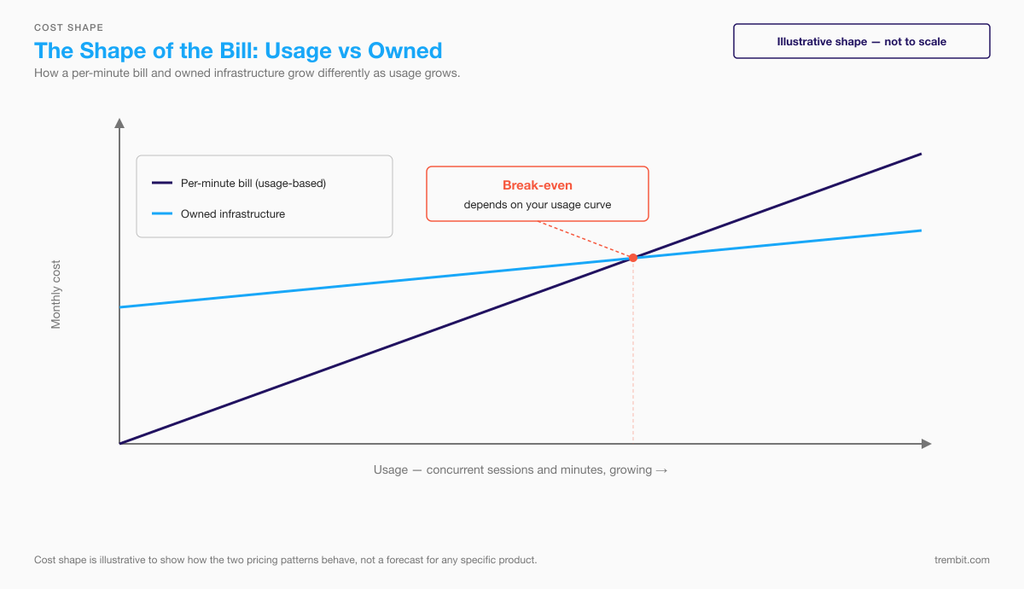
Illustrative shape, not to scale. Owned infrastructure costs more to start and grows more slowly; where the lines cross depends on your usage.
What drives the gap is that usage pricing scales with every participant-minute you serve, and it carries the vendor’s margin on the relay, transcoding and storage you’d otherwise run yourself. Owned infrastructure front-loads engineering and moves the recurring cost to servers, bandwidth and on-call — which grow in steps as you add capacity, not with every minute. That’s the shape; where the lines actually cross is a modelling exercise on your own concurrency curve.
5. Failures happen below the SDK. Dropped calls, one-way audio, quality that collapses as people join. When the cause is ICE, TURN, codec negotiation or media-server configuration, you need people who can read the protocol — whoever runs the servers. Buying moves that work to a vendor’s ticket queue; it doesn’t remove it.
If you recognise your product in two or more of those five, the useful next step is an architecture review rather than a vendor shortlist — that’s what our WebRTC consulting engagements start with.
How Does Compliance Change the Build vs Buy Answer?
Compliance often decides the path before cost does. Below is what the primary sources say, checked in September 2026. This isn’t legal advice — confirm how each rule applies to your product with your own counsel.
| Rule | What it requires of the video layer | What it means for build vs buy | Source |
|---|---|---|---|
| WebRTC security baseline (IETF) | Media must be encrypted in transit with DTLS-SRTP. With a media server in the path, true end-to-end encryption needs a second layer such as SFrame. | Transport encryption is everywhere. Keeping media unreadable to the media server is a separate requirement: check the vendor’s SDK and mode, or design for it if you build. | RFC 8827 (2021); RFC 9605 SFrame (2024) |
| HIPAA (US) | A vendor that maintains protected health information for you is a business associate, even if it never views it. The “conduit” exception is narrow and covers only pure transmission. | A vendor that records or stores sessions maintains PHI in our reading — HHS has issued no guidance specific to video — so it typically needs a Business Associate Agreement, usually offered on a specific plan (see the vendor table). If you build, the same test applies to your hosting, storage and recording providers. | HIPAA Omnibus Final Rule, 78 FR 5566 (2013) |
| GDPR, EU→US transfers | The EU adequacy decision for the US covers only organisations certified under the EU-US Data Privacy Framework. The EU General Court upheld it in September 2025; an appeal (C-703/25 P) was lodged in October 2025 and was still pending when we re-checked in September 2026. | With a US-headquartered video API, check its framework certification and whether media can be pinned to EU regions. Owning EU-hosted infrastructure narrows the question to your own hosting providers. | European Commission adequacy decisions; General Court, Latombe T-553/23 (3 Sep 2025) |
| KBV video consultations (Germany) | Certified video providers only; end-to-end encryption; the provider must be unable to view or store content; peer-to-peer preferred, with server routing allowed only with adequate protection; processing in the EU or a country with an adequacy decision. | A standard media server that decrypts media doesn’t meet the “cannot view” requirement. Either buy from a certified provider, or build a video service that meets the requirements and is certified itself. | Anlage 31b BMV-Ä, version of 5 Aug 2026 |
One dated detail that still catches teams out: HIPAA’s COVID-era telehealth enforcement discretion ended on 9 August 2023, per the Federal Register notice of 13 April 2023. Pandemic-era workarounds — consumer video tools without a BAA — no longer have cover.
Can You Buy Now and Own Later?
Build vs buy isn’t all-or-nothing. Often the right answer is a bought media layer under a custom product, with a planned route out.
A custom product on a bought media layer. For a travel-tech startup’s live virtual-tour platform, we used Agora as the streaming backbone with a WebRTC layer for guide–viewer interaction, and built everything around it: GPS tracking synced with the stream, real-time chat and in-stream shopping. No off-the-shelf product covered that combination — but the streaming infrastructure didn’t need to be owned to get there.
Same approach, a different vendor. For a geosocial video-dating app, we integrated TokBox (now Vonage) as the media layer for private video rooms and built session creation, room provisioning and teardown on top of it.
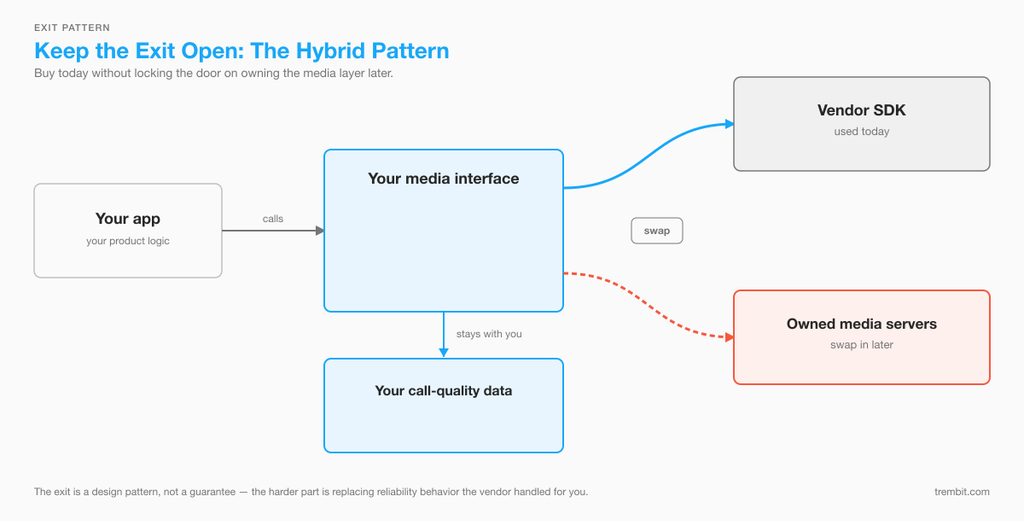
Keep the exit open. Put your own media interface between your product and the vendor SDK, and keep your own call-quality data rather than relying on the vendor’s dashboard. A later move then becomes a migration instead of a rewrite. The hard part of moving isn’t the API surface — it’s replacing the reliability behaviour the vendor handled invisibly, which our Twilio Video migration playbook walks through step by step.
Which Path Fits Your Product? Five Questions
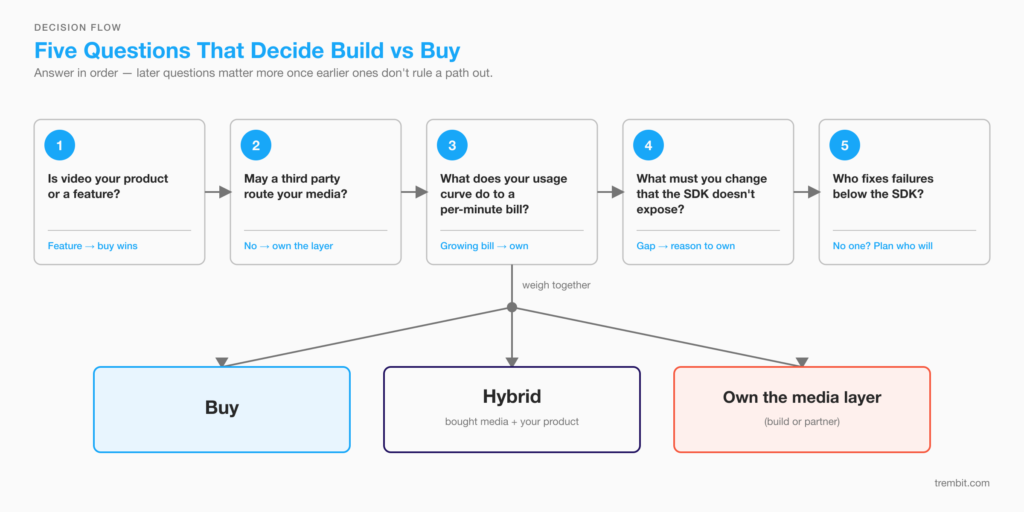
- Is video your product, or a feature of it? If video is the product, its quality is your reputation, and owning the media layer deserves serious consideration. If it’s a feature, buying usually wins — and it wins faster: integrating an API is the quickest route to a first working call, while a production product still takes months on any path (a typical MVP we build runs 2–4 months, and a telemedicine or video-chat MVP 3–4 months, because the workflows, integrations and compliance around the video don’t disappear when you buy).
- May a third party process your media, and can it see it? List your contracts, regulators and certifications first, then check whether any vendor’s plan and SDK meet them. If none do, your real choice is between building and partnering.
- What does your usage curve do to a per-minute bill? Model concurrent sessions, minutes and growth over two to three years, not this quarter. Break-even between usage pricing and owned infrastructure moves with that curve.
- What will you need to change that the SDK doesn’t expose? Codec and quality behaviour, recording pipelines, routing logic, where media is processed. Each item on that list is a reason to own the layer.
- Who fixes a failure below the SDK? Protocol-level problems don’t wait for a ticket queue. If nobody on your team can debug ICE, TURN or codec negotiation, plan for who will — on any path.
If your product is telemedicine specifically, the vertical version of this decision — with the clinical workflow and audit constraints layered in — is in our guide to choosing telemedicine video infrastructure.
How Trembit Helps at This Decision Point
Trembit has built video and voice infrastructure since 2009, across 50+ implementations in healthcare, education, enterprise communication and consumer products — on managed APIs and on infrastructure our clients own.
If you haven’t committed yet. A 30-minute technical scoping call with an engineer, and, if you need more than that, a fixed-scope architecture review that compares the paths against your scale, compliance rules and roadmap. We say “buy” when buying fits.
If buying the media layer is right. We build the product around the video API and keep the exit open — the Agora-backed virtual-tour platform and the TokBox video-dating app above are both that shape. For conferencing-shaped products, our white-label video conferencing work starts from a platform we already maintain rather than from an empty repository; for regulated healthcare products, the same is true of our white-label telemedicine platform.
If you need control of the media layer. Media servers, TURN, scaling, recording and monitoring, built and documented so your team can run them — with code, documentation and IP transferring to you, and knowledge transfer built into the engagement. The KBV-certified psychotherapy platform and the interpretation platform serving 4,000+ US facilities are both examples of that path; WebRTC development is where that work lives.
If your first choice no longer fits. Migrating off a video API you’ve outgrown, stabilising an in-house build that isn’t holding up, or picking up a partner project that stalled or was never handed over cleanly, is WebRTC rescue work. It usually starts with the same question this article does — which layer should you actually own?
Still deciding? Book a 30-minute call with one of our engineers. Bring the specifics — what you’re building, which compliance rules apply, and roughly what usage you expect over the next two years — and you’ll leave with a view on which path fits, including when that view is “buy this vendor, on this plan.” No deck, no pitch; if you want it in writing afterwards, the next step is a fixed-scope architecture review, not a proposal.
How Did We Check These Facts?
Every cell in the vendor, open-source and compliance tables comes from the vendor’s, project’s or regulator’s own documentation, checked on 15 September 2026 and re-verified on 26 September 2026. For the managed APIs, that meant the pricing, security, HIPAA, region and SDK pages of Twilio, Vonage, Agora, Daily, LiveKit, AWS, Zoom and Stream. For open source, each project’s GitHub repository, release history, licence file and official documentation. For compliance, IETF RFC 8827 and RFC 9605, the HIPAA Omnibus Final Rule, the 2023 Federal Register notice ending telehealth enforcement discretion, the European Commission’s adequacy decisions page with the General Court’s Latombe ruling, and KBV Anlage 31b BMV-Ä. We don’t use third-party comparison articles. Where a vendor’s own pages disagree, the table says so; where a source was undated or older than six months, it carries a footnote. “Not documented” means not found in official documentation, not a confirmed absence — and plans change, so confirm current terms with the vendor before you sign.
FAQ
Is it cheaper to build or buy real-time video? Buying is cheaper to start, because you pay for usage instead of engineering. Owning becomes cheaper only past a break-even point set by your concurrent sessions, minutes and growth — and it adds hosting, bandwidth, TURN relay traffic and on-call people to the bill. That break-even is different for every product, which is why we model it against a real usage curve rather than publish a general figure.
Which video APIs support end-to-end encryption? It depends on the SDK and the mode. Of the eight APIs we checked in September 2026, LiveKit Cloud documents built-in end-to-end encryption with no mode restriction. Vonage supports it for routed sessions (not in Firefox, and not with archiving or SIP). Agora supports it in native SDKs but not the Web SDK. Stream offers it in its React SDK, with other SDKs “to follow” as of August 2026. Daily supports it only in peer-to-peer mode. Twilio and Amazon Chime SDK document transport encryption to their media servers, and Zoom Video SDK doesn’t support it in browsers.
Does using a video API make our platform HIPAA- or GDPR-compliant? No vendor makes your product compliant on its own. A vendor that signs a Business Associate Agreement covers its part of the path protected health information travels; your application, storage, access control and every other vendor in that path still have to meet the requirements themselves. For EU data, check how the vendor transfers data outside the EU and whether media can be pinned to EU regions.
Does KBV certification rule out using a video API in Germany? Not automatically. KBV’s rules require a certified video provider, end-to-end encryption, and a provider that cannot view or store call content, with peer-to-peer transmission preferred and server routing allowed only with adequate safeguards. A video service built on an API can qualify if it meets those requirements and is itself certified as a video service provider. What it does rule out is a standard media server that decrypts media, because such a server can’t meet the “cannot view” test.
Is building on LiveKit, mediasoup, or Janus “build” or “buy”? Running an open-source media server yourself is building: the code is free, but you operate it, scale it, patch it and debug it. A managed version of an open-source server — LiveKit Cloud, or 8×8’s Jitsi as a Service — is buying. What open source mainly buys you is lower lock-in, because you can change hosting without rewriting your media layer.
What if we actually need a voice AI agent, not video? This piece is scoped to real-time video infrastructure. If what you’re building is a voice AI agent, the build-vs-buy trade-offs are different — the vendors are different, and so is the cost model — so start with our voice AI platform cost breakdown and our guide to real-time AI development companies instead.
Won’t a development company always tell us to build? We’ll tell a team to buy when buying fits — the vendor table above is there to help you pick one, not to talk you out of it. If buying is right, our advice is to buy and keep a way out. How we engage once you’ve decided is a separate question from which path you should take.
Still deciding? Book a 30-minute call with one of our engineers. Bring the specifics — what you’re building, which compliance rules apply, and roughly what usage you expect over the next two years — and you’ll leave with a view on which path fits, including when that view is “buy this vendor, on this plan.” No deck, no pitch; if you want it in writing afterwards, the next step is a fixed-scope architecture review, not a proposal.