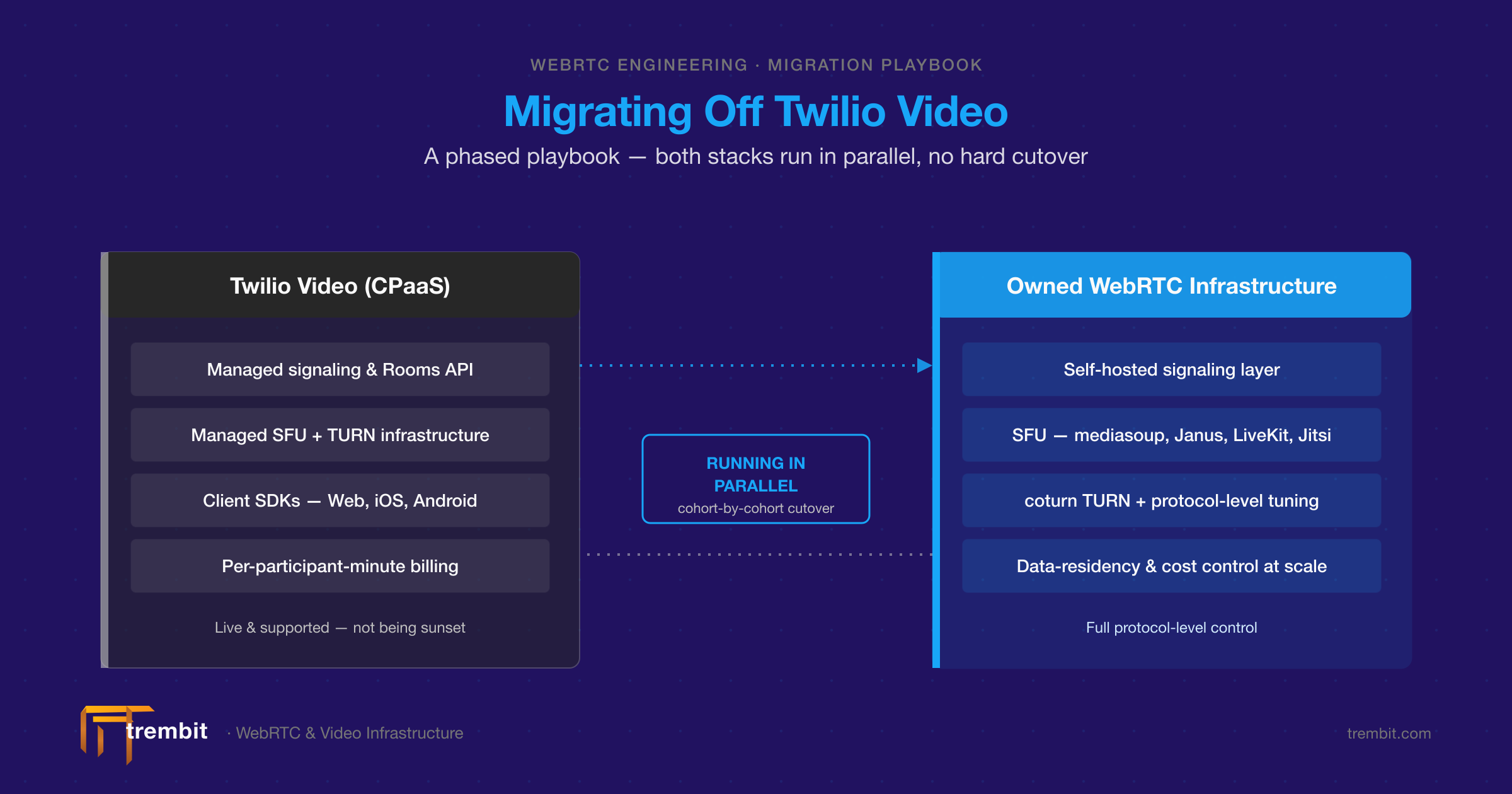
Is Twilio Programmable Video shutting down? No. Twilio first announced an end of life for Video in late 2023, set the date at December 5, 2026 in March 2024, and then reversed the decision on October 21, 2024: Video “will remain a standalone product.” It is still sold with a free trial, and Twilio shipped new iOS and Android SDK releases as recently as April 2026. So no deadline forces you off it. Teams that migrate from Twilio Video anyway do it for three reasons: cost at scale, protocol-level control, and vendor risk after one reversed EOL call. This playbook shows how to move your signaling, media routing and client SDKs to another managed API or your own WebRTC stack without breaking production, with a phased method that never needs a big-bang cutover.
Is Twilio Video actually shutting down in 2026?
No. Here is the record, dated and sourced, because getting this wrong would undermine every decision that follows. Twilio first announced Programmable Video’s end of life in late 2023. In March 2024 it set the date at December 5, 2026. On October 21, 2024, Twilio reversed that decision. Its own changelog states plainly: “we’ve reversed our earlier decision to retire Twilio Video,” that “Twilio Video will remain a standalone product,” and that “current Twilio Video customers can continue to use Video as they always have; there’s no action or change needed.” As of September 2026, Programmable Video is active, supported, and still accepting new accounts — the pricing page carries a live “Start for free” trial, and Twilio released new iOS and Android SDK versions on April 20, 2026. So there is no deadline forcing anyone off the platform. The interesting question is why teams still leave.
Is Twilio Programmable Video built on WebRTC?
Yes. Twilio’s own documentation says participants “can communicate audio, video, and other data using WebRTC,” and in Video Rooms each participant publishes media to a Twilio SFU (Selective Forwarding Unit), which routes the tracks to everyone else. That matters for migration: the browser side is standard WebRTC, so moving off Twilio mostly means replacing the SDK, the signaling and the SFU, not rebuilding how your clients capture and play media. If you want the architecture background first, see SFU vs MCU vs P2P.
Why do teams migrate off Twilio Video if it isn’t being discontinued?
Three drivers show up repeatedly, and all three are defensible reasons a CTO can put in a board deck without overstating anything.
Cost at scale. Twilio Video is priced per participant, per minute. Twilio’s public pricing page lists $0.004 per participant per minute for Group Rooms video, with participant recordings at the same rate, compositions at $0.01 per composed minute, and transcription at $0.027 per room per minute. Those are small numbers until you multiply them. As illustrative arithmetic on Twilio’s own published rate: 5 million participant-minutes a month — say 5,000 daily active users in roughly 33-minute group sessions — costs about $20,000/month in video alone (5M × $0.004), before recording or composition. Turn on participant recording for the same traffic and that line item roughly doubles. Teams that once welcomed pay-as-you-go start wanting a cost structure that flattens as they scale — which per-minute pricing structurally cannot do, because the bill grows in lockstep with the product’s own success.
Protocol-level control. A managed CPaaS abstracts away exactly the layer some products need to touch: SFU forwarding behavior, codec policy, simulcast and bandwidth-estimation tuning, and TURN/STUN routing. If your roadmap needs custom media handling, region-pinned routing for data residency, or performance tuning at real-network scale, a managed API is a ceiling you eventually hit. You can file a feature request; you can’t change the media server.
Vendor-risk and roadmap trust. This one is softer but legitimate. A company that announced, then reversed, a major product’s EOL has given its customers a governance data point. Some CTOs read that reversal as reassurance; others read it as a reason to reduce single-vendor dependency on infrastructure their product bets on. Neither reading is wrong. Both are honest inputs to a build-versus-buy decision — and the 2024 scare itself left a cohort of teams migration-minded even after the reversal removed the deadline.
What are the real alternatives to Twilio Video? (Managed vs. owned)
There are two migration paths, and the honest framing is a trade-off, not a winner.
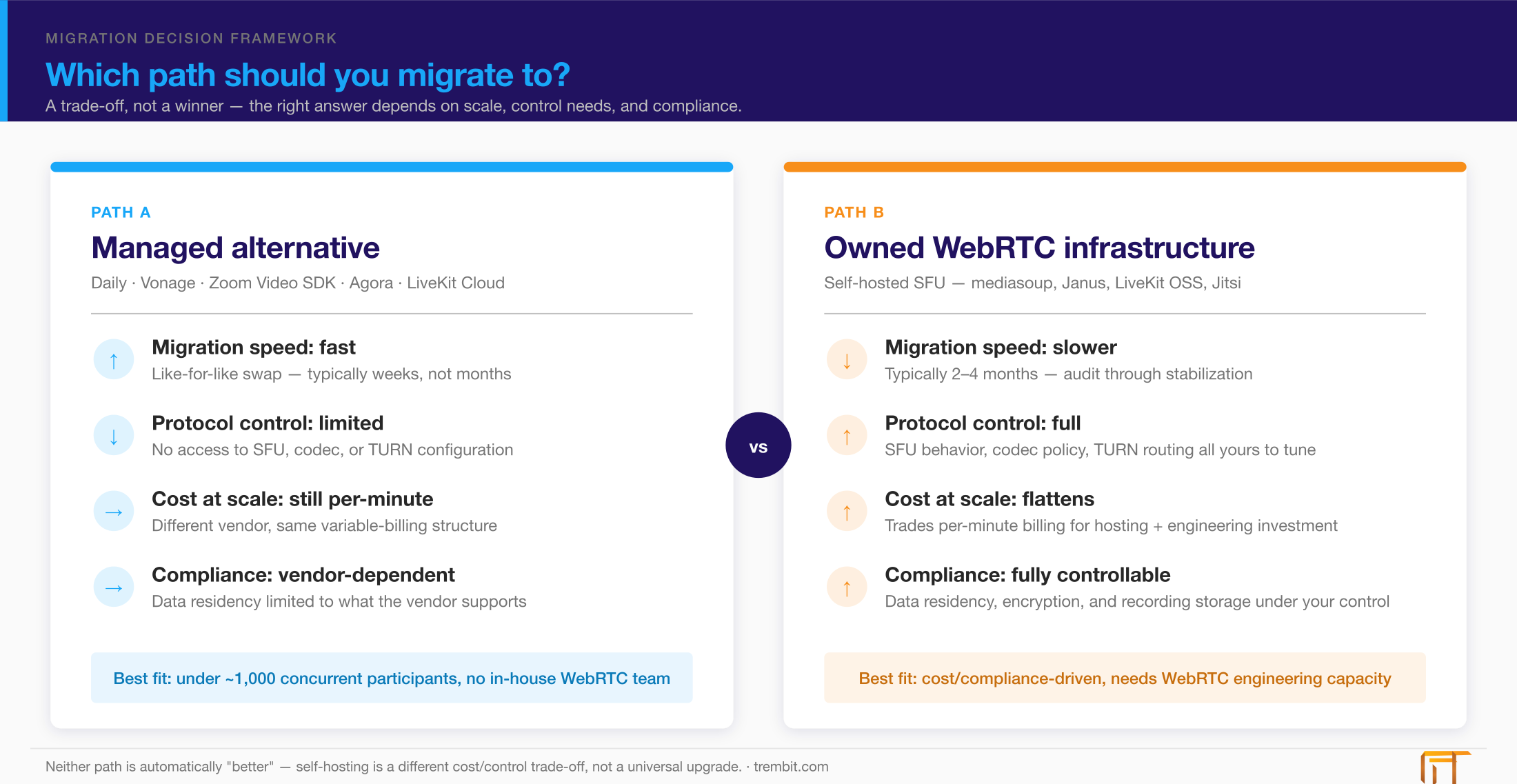
Path A — a managed alternative (faster, less engineering lift). Daily, Vonage Video API, Zoom Video SDK, Agora, and LiveKit Cloud all offer a broadly like-for-like managed video API. This is the pragmatic choice when you want to change vendors without owning infrastructure — the migration is measured in weeks, and someone else keeps the media servers running. The trade-off is that you’re still paying per-minute or per-subscription, still limited in protocol-level control, and still carrying a single-vendor dependency — just a different one. (Twilio’s own developer blog publishes step-by-step tutorials for migrating from Twilio Video to Zoom Video SDK — a useful signal of one well-trodden path, though it’s Twilio’s dev content, not a formal recommendation you should treat as neutral advice.)
Path B — owned WebRTC infrastructure (more control, more investment). Here you run a self-hosted SFU — mediasoup, Janus, LiveKit OSS, or Jitsi — on your own cloud or data-residency-specific hosting. This is the right call when cost at scale, compliance-driven data residency, or long-term protocol control matters more than time-to-migrate. The trade-off is real: it requires WebRTC-specific engineering the team may not have in-house. That is our territory, and we’ll say plainly when it isn’t yours.
One honest caveat: for teams under roughly a thousand concurrent participants, or without WebRTC engineering capacity, a managed alternative is often the pragmatic choice. Self-hosting isn’t automatically “better” — it’s a different point on the cost-versus-control curve. Don’t take on a media server you’re not staffed to operate just to win a pricing argument.
Which media server should you migrate to if you go the owned-infrastructure route?
The short version: mediasoup and LiveKit OSS suit teams that want a modern, well-instrumented SFU with strong scaling stories; Janus is a mature, modular workhorse; Jitsi is proven for conferencing-style topologies; and Kurento remains an option where server-side media processing or an MCU-style topology is needed. The right pick depends on your concurrency curve, codec needs, and compliance constraints — and it’s a genuine engineering decision, not a default. If you are weighing the two most common self-hosted options, our LiveKit vs mediasoup comparison covers the general production decision. Rather than rebuild that comparison here, read our deep dive on choosing between Janus, mediasoup, and LiveKit for telemedicine platforms, which walks through the trade-offs at the protocol level. We’ve deployed all five of these media servers — Janus, Jitsi, mediasoup, LiveKit, and Kurento — in production across 50+ video and voice projects, so the recommendation we give is grounded in having operated each of them, not in a spec sheet.
How do you actually migrate off Twilio Video without breaking production? (Step-by-step methodology)
The core of this playbook. A Twilio Video migration is not a single cutover — it’s a phased program where the old and new stacks run side by side until the new one has earned the traffic. This is the same approach we describe on our WebRTC development and rescue services page, applied step by step. Each step below is self-contained; skip none of them.
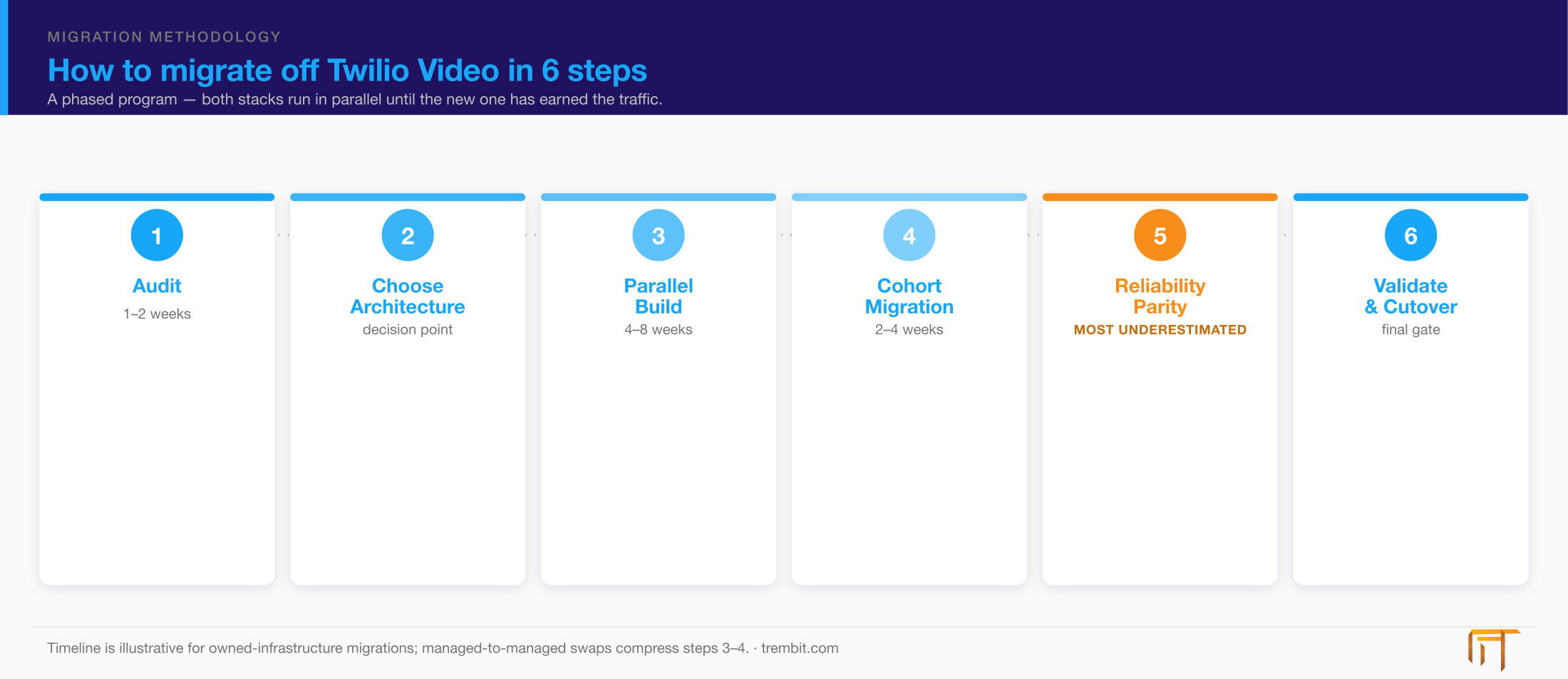
Step 1 — Audit current Twilio usage and map what you actually depend on
Before you choose a target, inventory what you’re actually using. That means every Twilio Video surface in production: the Rooms API and room type (Group vs. Peer-to-peer vs. Go), Recordings, Compositions, the Network Quality API, and every client SDK — web, iOS, Android, and any React Native wrapper. The audit’s real purpose is to surface the invisible dependencies. Most teams underestimate how much Twilio handles for them: automatic reconnection on network drop, network-quality adaptation, TURN infrastructure for NAT traversal, and cross-region media routing — that is, cascading or relaying media between regional SFUs so a participant in Frankfurt connects to a nearby edge instead of a single distant origin SFU in, say, Virginia. If a feature isn’t written down anywhere but breaks when it’s gone, this is the step where you find it. The output is a dependency map that tells you exactly what your new stack has to reproduce — not just the API calls you can see in your code, but the behavior you never had to think about.
Step 2 — Choose the target architecture and validate it against compliance and scale
With the dependency map in hand, choose your path (managed swap versus owned SFU) using the decision framework above. Validate the choice against two constraints that outrank cost: your concurrency curve and your compliance posture. For healthcare or otherwise regulated products, data residency, media-path encryption, and where recordings physically live should drive the architecture as hard as the price per minute. If your migration is partly about compliance — moving media into a specific jurisdiction, or off shared infrastructure — that requirement narrows the field before cost does. (For regulated builds, our security and compliance work covers how the architecture is designed to survive HIPAA, GDPR, and KBV review rather than retrofitted afterward.)
Step 3 — Build the new stack in parallel — don’t touch production yet
Stand up the new signaling layer, media server, and client SDK integration as a complete parallel system, entirely separate from live traffic. Nothing about production changes in this phase. Test the new stack against synthetic load and against realistic traffic patterns — the room sizes, join/leave churn, and network conditions your real users actually produce — before a single real user is routed to it. The goal of this step is to make all your discovery failures happen in an environment where they cost nothing. If the new SFU chokes at your 95th-percentile room size, you want to learn that here, not during cutover.
Step 4 — Migrate by cohort, not by date
The safest cutover pattern is feature-flagged and cohort-based, not calendar-based. Route new users to the new stack first, then a small percentage of existing traffic, then progressively larger cohorts, with your legacy or highest-risk users last. Both stacks run simultaneously throughout the transition window, and the feature flag is your instant rollback if a cohort’s metrics degrade. This is standard CPaaS-migration practice, not a Trembit-specific invention — the point is that a “we switch everyone on Tuesday” migration concentrates all your risk into a single moment with no graceful way back. Cohort migration spreads that risk across weeks and lets real production data, not a launch date, decide when each group moves.
Step 5 — Replace the invisible reliability behavior Twilio handled for you
This is the step teams underestimate, and the business consequence is specific: after cutover, call quality quietly degrades for real users on bad networks. The platform still “works” in a demo on office Wi-Fi, then falls apart for the patient joining from a train or the clinician on a hospital’s congested network. That gap exists because Twilio Video handles a whole reliability layer largely out of sight: reconnection logic when the network drops, ICE/STUN/TURN infrastructure for NAT traversal, adaptive bitrate under poor network conditions, and cross-region media routing.
A self-hosted migration has to rebuild or configure each of these — but they are not equal effort. Standing up coturn for TURN relay and wiring client-side reconnection handling are largely solved configuration tasks with well-worn patterns. Bandwidth-estimation and simulcast tuning is different: it’s ongoing engineering work, tuned against your real traffic and re-tuned as usage patterns change, and it’s the piece most likely to be under-scoped. This is the same protocol-level layer where most failing WebRTC platforms actually break, and diagnosing it is the subject of our protocol-level diagnosis playbook — the failure modes are identical whether you inherited a broken build or created one by under-scoping a migration. It’s also why teams re-platforming a real-time codebase call us in the first place:
“They know the inner workings of the tech and were able to inherit our semi-functional code and get it to work where multiple prior teams couldn’t.” — Whitney Kramer, Founder, Meetaway
Step 6 — Validate call-quality parity before full cutover
Don’t move the last cohort until the new stack has proven it matches the old one. Instrument the metrics that matter — connection-success rate, mid-call drop rate, and objective audio/video quality — on the new stack, and hold it to the same bar as your Twilio baseline. The target isn’t an abstract number; it’s the same or better than the drop rate you have today. If Twilio was delivering, say, a sub-1% drop rate for your traffic, the new stack has to demonstrate parity on real cohorts before it inherits the rest of production. Parity, measured on your own traffic, is the gate that turns a migration from a hope into a decision.
What does a Twilio Video migration cost and how long does it take?
There’s no single dollar figure, and any source that gives you one without knowing your scope is guessing. Cost and timeline are driven by three variables: which path you take (a managed-to-managed swap is far lighter than building owned infrastructure), how many Twilio features are in play (Recordings and Compositions each add scope), and your compliance requirements (data-residency and audit constraints add architecture work). For timeline, a realistic phase breakdown looks like this:
- Audit and dependency mapping: 1–2 weeks.
- Parallel build: roughly 4–8 weeks for owned WebRTC infrastructure; materially less for a managed like-for-like swap.
- Phased cohort cutover: 2–4 weeks, depending on how many cohorts and how conservative your rollout.
- Stabilization and monitoring: ongoing after cutover, not a fixed window.
End to end, a managed swap can land in weeks; a migration to owned infrastructure typically runs 2–4 months. On the cost side, the honest framing is a comparison, not a quote: you’re trading a variable per-minute bill (Twilio’s $0.004 per participant-minute plus recording, composition, and storage line items) for engineering investment plus your own hosting. Whether that math favors migration depends entirely on your volume — which is exactly why the audit comes first.
When should you bring in a WebRTC specialist instead of migrating in-house?
Migrate in-house when the stakes are contained and your team has the right muscle. Bring in a specialist when any of these three signals is present. First, no prior protocol-level WebRTC experience on the team. Strong React and Node.js engineers don’t automatically debug SDP offer/answer exchanges, ICE candidate gathering, or DTLS-SRTP handshakes — that’s a different specialization, and a migration is a poor place to learn it under production pressure. Second, compliance requirements — HIPAA, GDPR, or KBV-adjacent constraints that make the architecture decision high-stakes and expensive to get wrong. Third, no tolerance for user-visible downtime on a live product with real usage, where a botched cutover is a customer-facing incident. If you recognize your situation here, our WebRTC consulting and rescue services exist for exactly this — we’ve run these migrations, off Twilio and other CPaaS providers, running old and new stacks in parallel until the new one has earned the traffic.
If you’d rather pressure-test your plan before committing engineering months to it, book a free 30-minute architecture review: we look at your current Twilio setup and give you an honest, no-obligation read on managed-versus-owned for your scale and compliance profile. No pitch deck — just a diagnosis.